使用 Visual Studio 2022 调试Dapr 应用程序
文章转自:(18条消息) 使用 Visual Studio 2022 调试Dapr 应用程序_寒冰屋的博客-CSDN博客
使用Dapr 编写的是一个多进程的程序, 两个进程之间依赖于启动顺序来组成父子进程,使用Visual Studio 调试起来可能会比较困难,因为 Visual Studio 默认只会把你当前设置的启动项目的启动调试。好在有Visual Studio 扩展(Microsoft Child Process Debugging Power Tool 插件)可以支持。这个思路来自 https://github.com/dapr/dotnet-sdk/issues/401#issuecomment-747563695

1、需要安装 PowerShell 7 / Core (可使用命令行:dotnet tool install --global PowerShell)
2、需要安装 Visual Studio 扩展 Microsoft Child Process Debugging Power Tool 2022
安装插件后启动 Visual Studio,可以在 Debug -> Other Debugging Targets 中找到 Child Process Debugging Settings。

然后你可以按照下图的设置开启此项目的子进程调试:
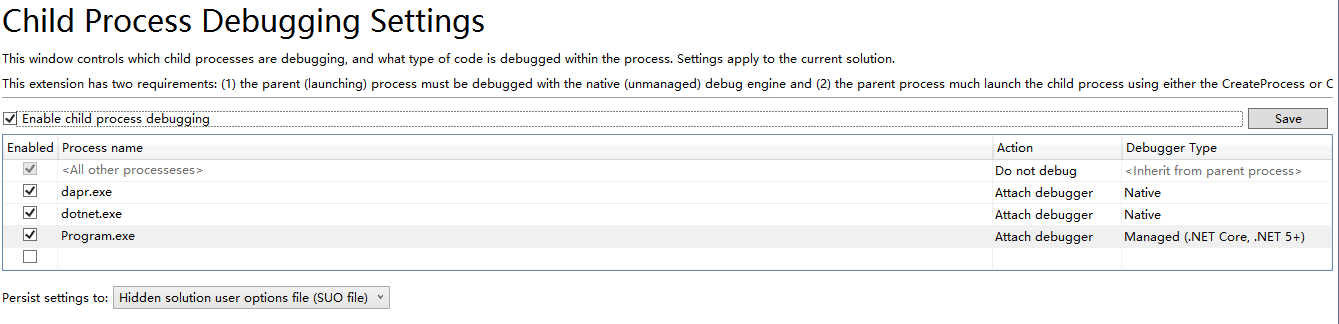
看不清楚,请看这里:https://www.cnblogs.com/bhfdz/p/16649283.html,注意:此处第三行ProcessName一定要与你Build出来的exe文件名称相一致,例如:sample.microservice.webapi.exe,之前就是因为这个被误导使用了Program.exe,所以一直无法命中断点。
我这里用的一个示例程序是 https://github.com/geffzhang/lab-dapr-with-famous-actors ,结合Dapr 和 Orleans 7.0 的一个Demo程序。
3、项目调试属性设置

保存后会自动生成文件 launchSettings.json

launchSettings.json 内容也可以通过文件直接修改,效果等同,文件如下:
"Dapr-PWSH": {
   "commandName": "Executable",
   "executablePath": "pwsh",
   "commandLineArgs": "-Command \"dapr run --app-id modDaprWithFamousActors --app-port 5000 --app-protocol grpc --log-level debug -- dotnet run --no-build\"",
   "workingDirectory": ".",
   "environmentVariables": {
     "ASPNETCORE_ENVIRONMENT": "Development"
   },
   "nativeDebugging": true,
   "dotnetRunMessages": "true",
   "applicationUrl": "http://localhost:5000;https://localhost:5001"
}
上面的配置运行不起来,经实践,改成如下可以运行:
    "Dapr-PWSH": {
      "commandName": "Executable",
      "executablePath": "pwsh",
      "commandLineArgs": "-Command \"dapr run --app-id hello-world --app-port 5000 --dapr-http-port 5010 dotnet run\"",
      "workingDirectory": ".",
      "environmentVariables": {
        "ASPNETCORE_ENVIRONMENT": "Development"
      },
      "nativeDebugging": true,
      "dotnetRunMessages": true,
      "applicationUrl": "http://localhost:5000;https://localhost:5001"
    }
【注意】--app-id 不能包含小数点.,如需要,请使用减号-代替。
查看Dapr服务,可以使用Powershell运行dapr dashboard
验证服务是否正常执行:http://localhost:5010/v1.0/invoke/hello-world/method/hello
现在,你只需要开始调试你的程序,那么你程序中启动的新的子进程都将可以自动加入调试。
效果如下:

值得注意的是,只要启动了本机代码调试,就不能在程序暂停之后修改代码了(像平时调试纯托管代码那样),还有一个方案是sidekick

 浙公网安备 33010602011771号