在ASP.NET CORE IDENTITYSERVER4中使用自定义USERREPOSITORY实现账号密码验证
本文介绍如何在IdentityServer4中使用自定义用户存储或存储库。可以将其用于不使用身份或不从自定义源请求用户数据的现有用户管理系统。使用刷新令牌的资源所有者流用于访问资源服务器上的受保护数据。客户端是使用IdentityModel实现的。
代码: https : //github.com/damienbod/AspNetCoreIdentityServer4ResourceOwnerPassword
历史
2019-09-14更新至.NET Core 3.0
2019-03-29更新到.NET Core 2.2
2018-09-23更新至.NET Core 2.1
在IdentityServer4中设置自定义用户存储库
要创建定制用户存储,需要创建一个扩展方法,可以将其添加到AddIdentityServer()构建器中。.AddCustomUserStore()添加自定义用户管理所需的所有内容。
|
1个
2
3
4
5
6
7
|
services.AddIdentityServer() .AddSigningCredential(cert) .AddInMemoryIdentityResources(Config.GetIdentityResources()) .AddInMemoryApiResources(Config.GetApiResources()) .AddInMemoryClients(Config.GetClients()) .AddCustomUserStore();} |
扩展方法将所需的类添加到ASP.NET Core依赖项注入服务中。用户存储库用于访问用户数据,添加了自定义配置文件服务以将所需的声明添加到令牌,还添加了验证器以验证用户凭据。
|
1个
2
3
4
5
6
7
8
9
10
11
12
13
14
15
16
|
using CustomIdentityServer4.UserServices;namespace Microsoft.Extensions.DependencyInjection{ public static class CustomIdentityServerBuilderExtensions { public static IIdentityServerBuilder AddCustomUserStore(this IIdentityServerBuilder builder) { builder.Services.AddSingleton<IUserRepository, UserRepository>(); builder.AddProfileService<CustomProfileService>(); builder.AddResourceOwnerValidator<CustomResourceOwnerPasswordValidator>(); return builder; } }} |
IUserRepository接口添加了应用程序在整个IdentityServer4应用程序中使用自定义用户存储所需的所有内容。不同的视图,控制器根据需要使用此接口。然后可以根据需要进行更改。
|
1个
2
3
4
5
6
7
8
9
10
11
|
namespace CustomIdentityServer4.UserServices{ public interface IUserRepository { bool ValidateCredentials(string username, string password); CustomUser FindBySubjectId(string subjectId); CustomUser FindByUsername(string username); }} |
CustomUser类是用户类。可以更改此类以映射在持久性介质中定义的用户数据。
|
1个
2
3
4
5
6
7
8
9
10
|
namespace CustomIdentityServer4.UserServices{ public class CustomUser { public string SubjectId { get; set; } public string Email { get; set; } public string UserName { get; set; } public string Password { get; set; } }} |
UserRepository实现IUserRepository接口。在此示例中添加了虚拟用户进行测试。如果使用自定义数据库,dapper或其他工具,则可以在此类中实现数据访问逻辑。
|
1个
2
3
4
5
6
7
8
9
10
11
12
13
14
15
16
17
18岁
19
20
21
22
23
24
25
26
27
28
29
30
31
32
33
34
35
36
37
38
39
40
41
42
43
44
45
46
47
|
using System.Collections.Generic;using System.Linq;using System;namespace CustomIdentityServer4.UserServices{ public class UserRepository : IUserRepository { // some dummy data. Replce this with your user persistence. private readonly List<CustomUser> _users = new List<CustomUser> { new CustomUser{ SubjectId = "123", UserName = "damienbod", Password = "damienbod", Email = "damienbod@email.ch" }, new CustomUser{ SubjectId = "124", UserName = "raphael", Password = "raphael", Email = "raphael@email.ch" }, }; public bool ValidateCredentials(string username, string password) { var user = FindByUsername(username); if (user != null) { return user.Password.Equals(password); } return false; } public CustomUser FindBySubjectId(string subjectId) { return _users.FirstOrDefault(x => x.SubjectId == subjectId); } public CustomUser FindByUsername(string username) { return _users.FirstOrDefault(x => x.UserName.Equals(username, StringComparison.OrdinalIgnoreCase)); } }} |
CustomProfileService使用IUserRepository获取用户数据,并将用户的声明添加到令牌中,如果验证了用户/应用程序,则将令牌返回给客户端。
|
1个
2
3
4
5
6
7
8
9
10
11
12
13
14
15
16
17
18岁
19
20
21
22
23
24
25
26
27
28
29
30
31
32
33
34
35
36
37
38
39
40
41
42
43
44
45
46
47
48
49
50
51
52
53
54
55
|
using System.Security.Claims;using System.Threading.Tasks;using IdentityServer4.Extensions;using IdentityServer4.Models;using IdentityServer4.Services;using Microsoft.Extensions.Logging;using System.Collections.Generic;namespace CustomIdentityServer4.UserServices{ public class CustomProfileService : IProfileService { protected readonly ILogger Logger; protected readonly IUserRepository _userRepository; public CustomProfileService(IUserRepository userRepository, ILogger<CustomProfileService> logger) { _userRepository = userRepository; Logger = logger; } public async Task GetProfileDataAsync(ProfileDataRequestContext context) { var sub = context.Subject.GetSubjectId(); Logger.LogDebug("Get profile called for subject {subject} from client {client} with claim types {claimTypes} via {caller}", context.Subject.GetSubjectId(), context.Client.ClientName ?? context.Client.ClientId, context.RequestedClaimTypes, context.Caller); var user = _userRepository.FindBySubjectId(context.Subject.GetSubjectId()); var claims = new List<Claim> { new Claim("role", "dataEventRecords.admin"), new Claim("role", "dataEventRecords.user"), new Claim("username", user.UserName), new Claim("email", user.Email) }; context.IssuedClaims = claims; } public async Task IsActiveAsync(IsActiveContext context) { var sub = context.Subject.GetSubjectId(); var user = _userRepository.FindBySubjectId(context.Subject.GetSubjectId()); context.IsActive = user != null; } }} |
CustomResourceOwnerPasswordValidator实现验证。
|
1个
2
3
4
5
6
7
8
9
10
11
12
13
14
15
16
17
18岁
19
20
21
22
23
24
25
26
27
|
using IdentityServer4.Validation;using IdentityModel;using System.Threading.Tasks;namespace CustomIdentityServer4.UserServices{ public class CustomResourceOwnerPasswordValidator : IResourceOwnerPasswordValidator { private readonly IUserRepository _userRepository; public CustomResourceOwnerPasswordValidator(IUserRepository userRepository) { _userRepository = userRepository; } public Task ValidateAsync(ResourceOwnerPasswordValidationContext context) { if (_userRepository.ValidateCredentials(context.UserName, context.Password)) { var user = _userRepository.FindByUsername(context.UserName); context.Result = new GrantValidationResult(user.SubjectId, OidcConstants.AuthenticationMethods.Password); } return Task.FromResult(0); } }} |
AccountController配置为使用IUserRepository接口。
|
1个
2
3
4
5
6
7
8
9
10
11
12
13
14
15
16
17
18岁
19
20
21
22
23
|
[SecurityHeaders]public class AccountController : Controller{ private readonly IIdentityServerInteractionService _interaction; private readonly AccountService _account; private readonly IUserRepository _userRepository; public AccountController( IIdentityServerInteractionService interaction, IClientStore clientStore, IHttpContextAccessor httpContextAccessor, IAuthenticationSchemeProvider schemeProvider, IUserRepository userRepository) { _interaction = interaction; _account = new AccountService(interaction, httpContextAccessor, schemeProvider, clientStore); _userRepository = userRepository; } /// <summary> /// Show login page /// </summary> [HttpGet] |
设置授予类型ResourceOwnerPasswordAndClientCredentials以使用刷新令牌
授予类型ResourceOwnerPasswordAndClientCredentials在IdentityServer4应用程序的GetClients方法中配置。要使用刷新令牌,必须将IdentityServerConstants.StandardScopes.OfflineAccess添加到允许的范围。然后可以根据需要设置其他刷新令牌设置。
|
1个
2
3
4
5
6
7
8
9
10
11
12
13
14
15
16
17
18岁
19
20
21
22
23
24
25
26
27
28
29
30
|
public static IEnumerable<Client> GetClients(){ return new List<Client> { new Client { ClientId = "resourceownerclient", AllowedGrantTypes = GrantTypes.ResourceOwnerPasswordAndClientCredentials, AccessTokenType = AccessTokenType.Jwt, AccessTokenLifetime = 120, //86400, IdentityTokenLifetime = 120, //86400, UpdateAccessTokenClaimsOnRefresh = true, SlidingRefreshTokenLifetime = 30, AllowOfflineAccess = true, RefreshTokenExpiration = TokenExpiration.Absolute, RefreshTokenUsage = TokenUsage.OneTimeOnly, AlwaysSendClientClaims = true, Enabled = true, ClientSecrets= new List<Secret> { new Secret("dataEventRecordsSecret".Sha256()) }, AllowedScopes = { IdentityServerConstants.StandardScopes.OpenId, IdentityServerConstants.StandardScopes.Profile, IdentityServerConstants.StandardScopes.Email, IdentityServerConstants.StandardScopes.OfflineAccess, "dataEventRecords" } } };} |
当令牌客户端请求令牌时,必须在HTTP请求中发送offline_access才能接收刷新令牌。
|
1个
2
3
4
5
6
7
8
9
10
11
12
13
14
15
16
17
|
private static async Task<TokenResponse> RequestTokenAsync(string user, string password){ Log.Logger.Verbose("begin RequestTokenAsync"); var response = await _httpClient.RequestPasswordTokenAsync(new PasswordTokenRequest { Address = _disco.TokenEndpoint, ClientId = "resourceownerclient", ClientSecret = "dataEventRecordsSecret", Scope = "email openid dataEventRecords offline_access", UserName = user, Password = password }); return response;} |
运行应用程序
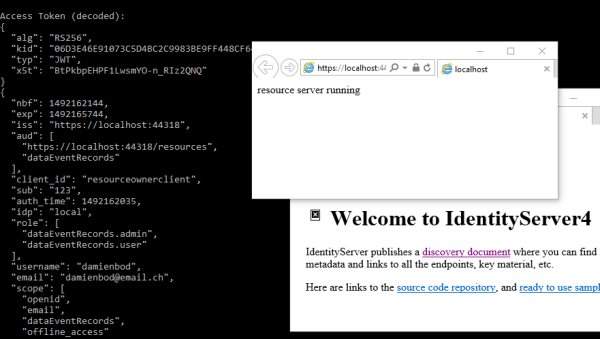
当所有三个应用程序都启动时,控制台应用程序从IdentityServer4应用程序获取令牌,并且所需的声明将以令牌形式返回到控制台应用程序。并非所有声明都需要添加到access_token中,仅需要将资源服务器上需要的那些声明添加到access_token中。如果UI中需要用户信息,则可以对此信息进行单独的请求。
这是令牌中从服务器返回到客户端的令牌有效负载。您可以看到配置文件服务中添加的其他数据,例如角色数组。
|
1个
2
3
4
5
6
7
8
9
10
11
12
13
14
15
16
17
18岁
19
20
21
22
23
24
25
26
27
28
|
{ "nbf": 1492161131, "exp": 1492161251, "aud": [ "dataEventRecords" ], "client_id": "resourceownerclient", "sub": "123", "auth_time": 1492161130, "idp": "local", "role": [ "dataEventRecords.admin", "dataEventRecords.user" ], "username": "damienbod", "email": "damienbod@email.ch", "scope": [ "email", "openid", "dataEventRecords", "offline_access" ], "amr": [ "pwd" ]} |
令牌用于从资源服务器获取数据。客户端使用access_token并将其添加到HTTP请求的标头中。
|
1个
2
3
4
5
6
7
8
9
10
11
12
13
|
HttpClient httpClient = new HttpClient();httpClient.SetBearerToken(access_token);var payloadFromResourceServer = await httpClient.GetAsync("https://localhost:44365/api/DataEventRecords");if (!payloadFromResourceServer.IsSuccessStatusCode){ Console.WriteLine(payloadFromResourceServer.StatusCode);}else{ var content = await payloadFromResourceServer.Content.ReadAsStringAsync(); Console.WriteLine(JArray.Parse(content));} |
资源服务器使用UseIdentityServerAuthentication中间件扩展方法来验证每个请求。
|
1个
2
3
4
5
6
7
8
9
10
11
12
13
14
15
|
JwtSecurityTokenHandler.DefaultInboundClaimTypeMap.Clear();IdentityServerAuthenticationOptions identityServerValidationOptions = new IdentityServerAuthenticationOptions{ AllowedScopes = new List<string> { "dataEventRecords" }, ApiSecret = "dataEventRecordsSecret", ApiName = "dataEventRecords", AutomaticAuthenticate = true, SupportedTokens = SupportedTokens.Both, // TokenRetriever = _tokenRetriever, // required if you want to return a 403 and not a 401 for forbidden responses AutomaticChallenge = true,};app.UseIdentityServerAuthentication(identityServerValidationOptions); |
如果需要,可以使用带有策略的Authorize属性来保护每个API。如果需要,可以使用HttpContext来获取与令牌一起发送的声明。用户名与标头中的access_token一起发送。
|
1个
2
3
4
5
6
7
|
[Authorize("dataEventRecordsUser")][HttpGet]public IActionResult Get(){ var userName = HttpContext.User.FindFirst("username")?.Value; return Ok(_dataEventRecordRepository.GetAll());} |
客户端获取刷新令牌并在客户端中定期更新。您可以使用后台任务在桌面或移动应用程序中实现此任务。
|
1个
2
3
4
5
6
7
8
9
10
11
12
13
14
15
16
17
18岁
19
20
|
public static async Task RunRefreshAsync(TokenResponse response, int milliseconds){ var refresh_token = response.RefreshToken; while (true) { response = await RefreshTokenAsync(refresh_token); // Get the resource data using the new tokens... await ResourceDataClient.GetDataAndDisplayInConsoleAsync(response.AccessToken); if (response.RefreshToken != refresh_token) { ShowResponse(response); refresh_token = response.RefreshToken; } Task.Delay(milliseconds).Wait(); }} |
然后,应用程序将永远循环。
链接:
https://github.com/damienbod/AspNet5IdentityServerAngularImplicitFlow
https://github.com/IdentityModel/IdentityModel2
https://github.com/IdentityServer/IdentityServer4
https://github.com/IdentityServer/IdentityServer4.Samples

 浙公网安备 33010602011771号