结对编程4——黄金点小游戏实现局域网联机
一、项目成员
| 2018141461085 | 龚泽楠 |
| 2018141461012 | 蔡铧荣 |
二、项目名称
黄金点小游戏
三、项目简介
游戏规则: N个同学( N通常大于 10 ),每人写一个 0~100 之间的有理数 (不包括 0或100) ,交给裁判算出所有数字的平均值然后乘以 0.618 (所谓黄金分割常数),得到 G值。提交的数字最靠近 G(取绝对值)的同 学得到 N分,离 G最远的同学得到- 2分,其他同学得 0分。
黄金点游戏其实是一个博弈论G值(博弈值,在黄金点游戏中为黄金点;在市场竞标中为标线;在拍卖中为成交额)的数据收集实验,因此该项目为社会公益项目,普遍情况黄金点游戏项目都会将最后数据或实时数据上传至网络公开使用。
这个游戏规定第一名得到全部的分数, 第二名(不管多接近)到倒数第二名都是 0 分,最后一名还要倒扣分。
四、汇报概要
本次主要实现功能
1、提供了查看历史记录的功能(显示历史对局的黄金点以及每人提交点数的信息)以便玩家分析
2、实现了局域网对局,玩家在局域网下可以联机对战
本次主要完善功能
1、完善了客户端程序,将计算黄金点,排名等功能移植到服务器端,减轻了客户端负担。
2、完善了交互过程,增加了准备阶段,全部玩家准备后才开始游戏。
五、功能实现
1、查看历史记录
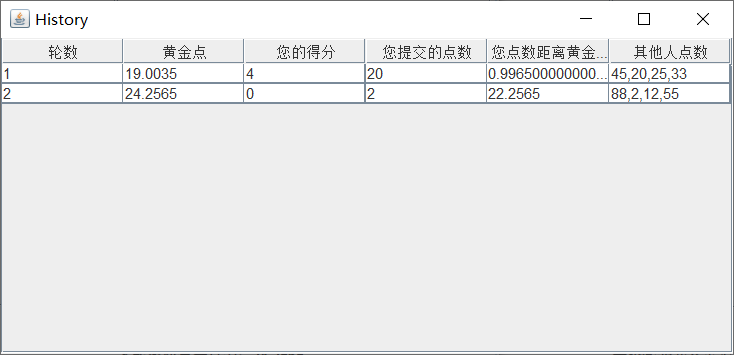
实现方法:
在每一轮游戏后将数据保存到History类中,然后需要显示时调用相关函数显示窗口。
实现代码如下:
History类:
package gp.Client;

public class History {
    String point;//每个人提交的点数
    String GoldenPoint;//黄金点
    String score;//本人的得分
    String MyPoint;//本人提交的点数
    String distance;//本人距离黄金点的距离

    public History(String point, String GoldenPoint, String score, String MyPoint, String distance){
        this.point = point;
        this.GoldenPoint = GoldenPoint;
        this.score = score;
        this.MyPoint = MyPoint;
        this.distance = distance;
    }

    public void setDistance(String distance) {
        this.distance = distance;
    }

    public void setScore(String score) {
        this.score = score;
    }

    public void setPoint(String point) {
        this.point = point;
    }

    public void setGoldenPoint(String goldenPoint) {
        GoldenPoint = goldenPoint;
    }

    public void setMyPoint(String myPoint) {
        MyPoint = myPoint;
    }

    public String getPoint() {
        return point;
    }

    public String getDistance() {
        return distance;
    }

    public String getGoldenPoint() {
        return GoldenPoint;
    }

    public String getMyPoint() {
        return MyPoint;
    }

    public String getScore() {
        return score;
    }
}
添加历史记录函数:
//添加历史记录
    public static void addHistory(Vector<History> histories, Player[] players, int num, String gp){
        String point = players[0].point;
        String GoldenPoint = gp;
        String score = "0";
        String MyPoint = players[num].point;
        String distance = String.valueOf(players[num].distance);
        if(players[num].rank==1){
            score = String.valueOf(players.length);
        }else if(players[num].rank == players.length){
            score = String.valueOf(-2);
        }
        for (int i = 1; i < players.length; i++){
            point = point + "," + players[i].point;
        }
        histories.add(new History(point, GoldenPoint, score, MyPoint, distance));
    }
面板显示:
//查看历史记录点击事件(显示历史记录界面)
        history_Button.addMouseListener(new MouseAdapter() {
            @Override
            public void mouseClicked(MouseEvent e) {
                super.mouseClicked(e);
                JFrame HistoryUI = new JFrame();
                String[] columnName= {"轮数", "黄金点", "您的得分", "您提交的点数", "您点数距离黄金点的距离", "其他人点数"};
                String[][] data = new String[histories.size()][6];
                for(int i = 0; i < histories.size(); i++) {
                    for(int j = 0; j < 6; j++) {
                        if(j == 0) {
                            data[i][j] = String.valueOf(i + 1);
                        }
                        if (j == 1) {
                            data[i][j] = histories.get(i).getGoldenPoint();
                        }
                        if (j == 2) {
                            data[i][j] = histories.get(i).score;
                        }
                        if (j == 3) {
                            data[i][j] = histories.get(i).MyPoint;
                        }
                        if (j == 4) {
                            data[i][j] = histories.get(i).distance;
                        }
                        if (j == 5) {
                            data[i][j] = histories.get(i).point;
                        }
                    }
                }
                JTable table = new JTable(data, columnName);
                table.setEnabled(false);
                JScrollPane jsp = new JScrollPane(table);
                HistoryUI.add(jsp);
                HistoryUI.setTitle("History");
                HistoryUI.setPreferredSize(new Dimension(600, 800));
                HistoryUI.pack();
                HistoryUI.setVisible(true);
            }
        });
2、实现局域网对局
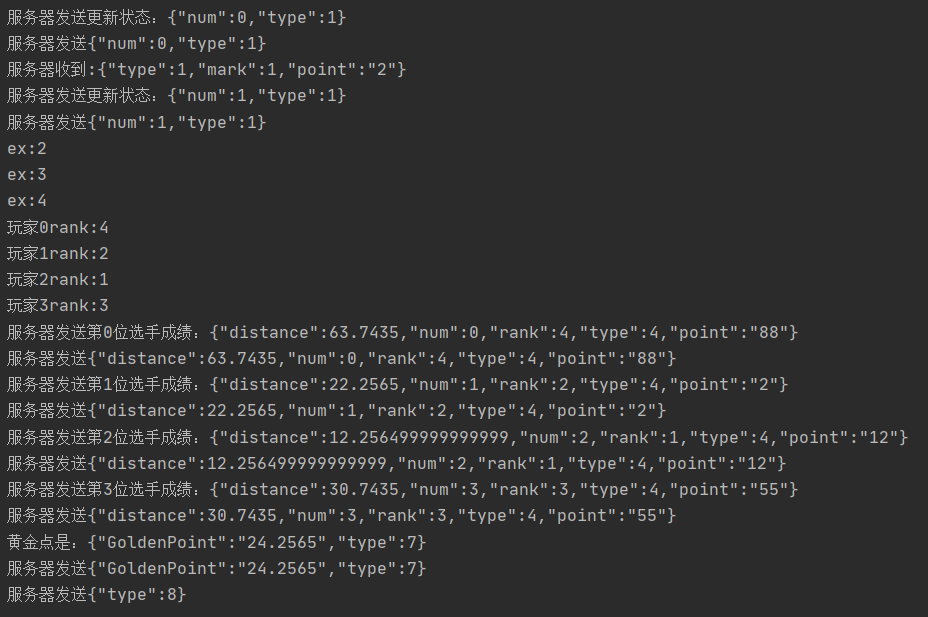
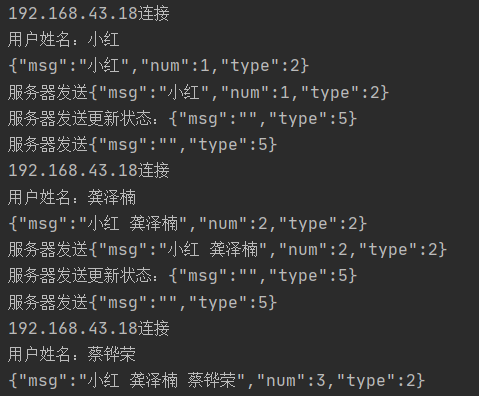
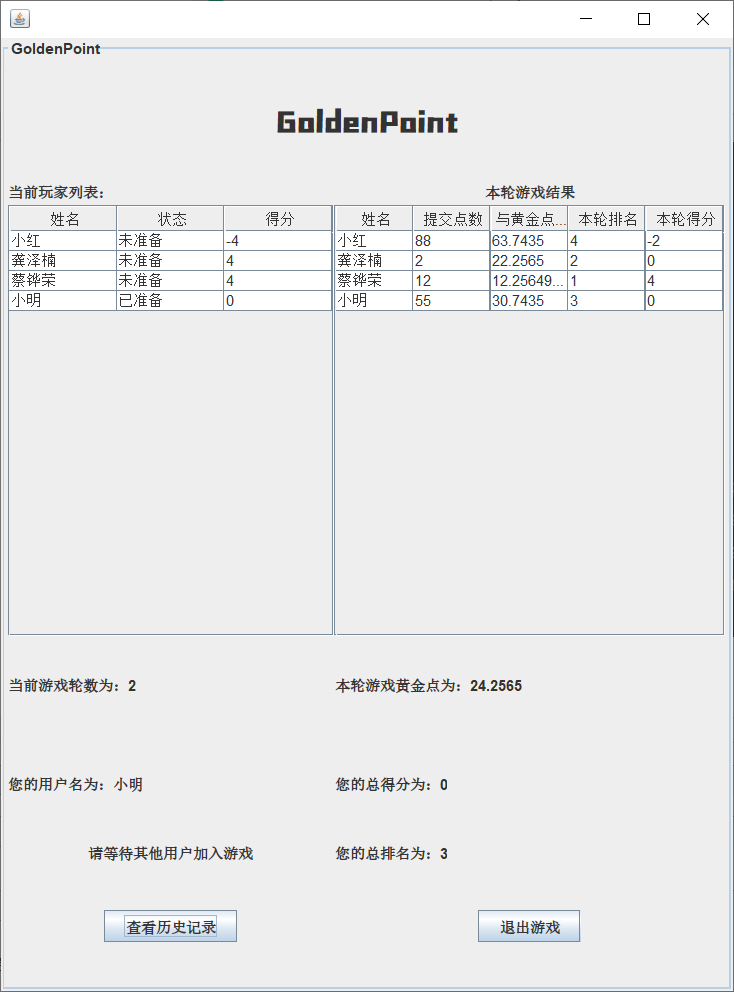
使用Java Socket实现局域网对战
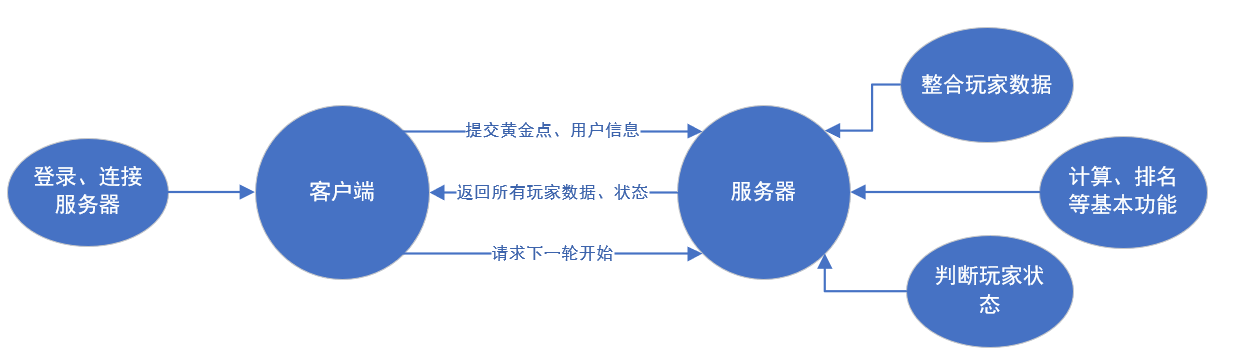
实现代码如下:
客户端接收服务器消息线程:
//获取服务器发来消息线程
    @Override
    public void run() {

        try {

            DataInputStream dis = new DataInputStream(socket.getInputStream());
            DataOutputStream dos = new DataOutputStream(socket.getOutputStream());

            dos.write(player_name.getBytes());

            while (true) {
                //repaint();
                byte[] b = new byte[3000];
                dis.read(b);
                String msg = new String(b).trim();
                System.out.println("服务端发来:" + msg);
                JSONObject json = new JSONObject(msg);
                int commandType = json.getInt("type");
                switch (commandType){
                    case 1: //收到确认玩家提交数据,更新其他人状态 (如果是本机提交则提示玩家等待其他人提交)
                        int num = json.getInt("num");
                        upDatePlayer_table_isSubmitted(num);
                        if(num == LocalNumber){
                            submit_textField.setText("");
                            cardLayout.show(card_panel, "Card2");
                            submit_Button.setVisible(false);
                        }
                        break;
                    case 2: //准备阶段接受和更新玩家信息
                        playerlist = new Player[json.getInt("num")];
                        PlayerCtrl.getLocalPlayer(json, playerlist);//从json中解析玩家列表
                        getLocalNumber(playerlist);//获取本机玩家序号
                        UpDateReady(playerlist);
                        break;
                    case 3: //收到全部准备,更新状态轮数等信息
                        setPlayer_table(playerlist);
                        round = json.getInt("round");
                        round_label.setText("当前游戏轮数为:" + round);
                        cardLayout.show(card_panel, "Card1");
                        submit_Button.setVisible(true);
                        break;
                    case 4: //收到游戏结果
                        PlayerCtrl.getResult(json, playerlist);
                        if(json.getInt("num") == playerlist.length - 1){
                            upDateResult_Table(playerlist);
                        }
                        upDatePlayer_table_score(playerlist);
                        point_label.setText("您的总得分为:" + playerlist[LocalNumber].score);
                        rank_label.setText("您的总排名为:" + PlayerCtrl.getRank(playerlist, LocalNumber));
                        break;
                    case 5://初始化玩家准备状态
                        String playerReady = json.getString("msg");
                        String[] s = playerReady.split(" ");//从json中解析玩家准备状态
                        if(s.length>1){
                            UpDateReady(s);
                        }else if(s.length == 1 && !s[0].isEmpty()){
                            UpDateReady(s);
                        }
                        break;
                    case 6://更新玩家准备信息
                        int num2 = json.getInt("msg");
                        UpDateReady(num2);
                        if(num2 == LocalNumber){
                            ready_button.setVisible(false);
                        }
                        break;
                    case 7://接受黄金点信息,并记录历史
                        String GoldenPoint = json.getString("GoldenPoint");
                        gp_label.setText("本轮游戏黄金点为:" + GoldenPoint);
                        PlayerCtrl.addHistory(histories, playerlist, LocalNumber, GoldenPoint);
                        break;
                    case 8://重置 开始下一轮准备
                        cardLayout.show(card_panel, "Card3");
                        submit_Button.setVisible(false);
                        ready_button.setVisible(true);
                        UpDateReady(playerlist);
                        break;
                    default:
                        System.out.println("json数据不合法");
                        break;
                }
            }
        } catch (IOException e) {
            e.printStackTrace();
        }   catch (JSONException e) {
            e.printStackTrace();
        }
    }
客户端发送消息程序代码:
//提交按钮点击事件(向服务器发送type1)
        submit_Button.addMouseListener(new MouseAdapter() {
            @Override
            public void mouseClicked(MouseEvent e) {
                super.mouseClicked(e);
                String point = submit_textField.getText();
                if (point.isEmpty()) {
                    JOptionPane.showMessageDialog(null, "输入数字为空,请重新输入");
                }else if(!isString(point)) {
                    JOptionPane.showMessageDialog(null, "请输入0-100有理数,不能为其他字符");
                    submit_textField.setText("");
                }
                else {
                    try {
                        JSONObject json = new JSONObject();
                        json.put("type", 1);
                        json.put("mark", LocalNumber);
                        json.put("point", point);
                        ToServer.sendMsg(json.toString(), new DataOutputStream(socket.getOutputStream()));
                    } catch (JSONException e1) {
                        e1.printStackTrace();
                    } catch (IOException ioException) {
                        ioException.printStackTrace();
                    }
                    /*submit_textField.setText("");
                    cardLayout.show(card_panel, "Card2");
                    submit_Button.setVisible(false);*/
                }
            }
        });

        //准备按钮点击事件(向服务器发送type2)
        ready_button.addMouseListener(new MouseAdapter() {
            @Override
            public void mouseClicked(MouseEvent e) {
                super.mouseClicked(e);

                try{
                    JSONObject json = new JSONObject();
                    json.put("type", 2);
                    json.put("mark", LocalNumber);
                    ToServer.sendMsg(json.toString(), new DataOutputStream(socket.getOutputStream()));
                } catch (JSONException e1) {
                    e1.printStackTrace();
                } catch (IOException ioException) {
                    ioException.printStackTrace();
                }
            }
        });
服务器接受客户端消息代码:
@Override
    public void run() {
        try {
            while (true) {
                byte [] b = new byte[10240];
                this.dis.read(b);
                String clientMsg = new String(b).trim();// 来自客户端的命令
                JSONObject json = new JSONObject(clientMsg);// 转化为json数据格式
                System.out.println("服务器收到:"+clientMsg);
                switch (json.getInt("type")) {
                    case 1://接收提交黄金点信息
                        receivePoint(json);
                        break;
                    case 2://接受准备信息
                        receiveReady(json);
                        break;
                    default:
                        System.out.println("json数据不合法");
                        break;
                }
            }
        } catch (Exception e) {
            // TODO: handle exception
        }
    }
    //接收提交黄金点信息处理程序
    private void receivePoint(JSONObject json) throws JSONException, IOException {
        int num = json.getInt("mark");
        String point = json.getString("point");
        sc.player.get(num).point = point;
        sc.player.get(num).setSubmitted(true);
        sc.UpDateSubmit(num);
        sc.CheckSubmit();
        if(sc.getAllSubmitted()){
            sc.sendResult();
        }
    }
    //接收准备信息处理程序
    private void receiveReady(JSONObject json) throws JSONException, IOException{
        int num = json.getInt("mark");
        sc.player.get(num).setReady(true);
        sc.CheckReady();
        sc.upDateReady(num);
        if (sc.player.size() > 3 && sc.getReady()) {
            String player_name = "";
            for(int i = 0; i < sc.player.size(); i++){
                player_name = player_name + " " + sc.player.get(i).name;
            }
            sc.setPlayer(player_name);
        }
    }
服务器发送消息程序代码:
 json.put("round", round);
        System.out.println(json.toString());
        sendMsg(json);
    }

    //发送更新新加入玩家的信息
    public void upDatePlayer(String playername) throws JSONException, IOException {
        JSONObject json = new JSONObject();
        json.put("type", 2);
        json.put("msg", playername.trim());
        json.put("num", player.size());
        System.out.println(json.toString());
        sendMsg(json);
    }

    //发送玩家提交点数消息
    public void UpDateSubmit(int num) throws JSONException, IOException {
        JSONObject json = new JSONObject();
        json.put("type", 1);
        json.put("num", num);
        player.get(num).setSubmitted(true);
        System.out.println("服务器发送更新状态:" + json.toString());
        sendMsg(json);
    }

    //发送最终结果消息(排名、点数、分数等)
    public void sendResult() throws JSONException, IOException {
        para para = new para();
        String[] PointList = new String[player.size()];
        for(int i = 0; i < player.size(); i++){
            PointList[i] = player.get(i).point;
        }
        para.Operate(para, PointList, player.size());
        for(int i = 0; i < player.size(); i++){
            JSONObject json = new JSONObject();
            json.put("type", 4);
            json.put("num", i);
            json.put("rank", para.getRank()[i]);
            json.put("distance", para.getDistance()[i]);
            json.put("point", player.get(i).point);
            System.out.println("服务器发送第" + i + "位选手成绩:" + json.toString());
            sendMsg(json);
            //防止数据堆叠 客户端无法识别 一条一条发送
            try {
                Thread.currentThread().sleep(1000);
            } catch (InterruptedException e) {
                e.printStackTrace();
            }
        }
        //发送黄金点信息
        sendGoldenPoint(String.valueOf(para.getMsum()));
        //等待时间
        try {
            Thread.currentThread().sleep(5000);
        } catch (InterruptedException e) {
            e.printStackTrace();
        }
        //发送开始下一轮消息
        JSONObject json = new JSONObject();
        json.put("type", 8);
        sendMsg(json);
        Reset();
    }

    //发送玩家准备消息
    public void upDateReady(String playerReady) throws JSONException, IOException{
        JSONObject json = new JSONObject();
        json.put("type", 5);
        json.put("msg", playerReady.trim());
        System.out.println("服务器发送更新状态:" + json.toString());
        sendMsg(json);
    }

    //发送玩家准备消息
    public void upDateReady(int num) throws JSONException, IOException{
        JSONObject json = new JSONObject();
        json.put("type", 6);
        json.put("msg", num);
        System.out.println(json.toString());
        sendMsg(json);
    }

    //发送黄金点结果
    public void sendGoldenPoint(String GoldenPoint) throws JSONException, IOException{
        JSONObject json = new JSONObject();
        json.put("type", 7);
        json.put("GoldenPoint", GoldenPoint);
        System.out.println("黄金点是:" + json.toString());
        sendMsg(json);
    }

    private void sendMsg(JSONObject json) throws IOException {
        for (int i = 0; i < player.size(); i++) {
            dos.get(i).write(json.toString().getBytes());
        }
        System.out.println("服务器发送" + json.toString());
    }
六、功能完善
1、服务器端计算程序
public para Operate(para para,String list[],int n)
    {
        for(int i = 0;i < n;i++)
        {//检测数据是否异常,并复制到另一个double数组
            list2[i] = Double.parseDouble(list[i]);
        }

        //计算黄金点
        for(int i = 0;i < n;i++)
        {
            sum += list2[i];
        }
        Msum = (sum / n) * 0.618;

        //每位选手离黄金点的距离
        for(int i = 0;i < n;i++)
        {
            Distance[i] = abs(list2[i] - Msum);
            list3[i] = Distance[i];
        }

        //排名
        //Arrays.sort(list3);           //距离的升序排序
        for(int i = 0; i < n - 1;i++)
        {
            for(int j = 0; j < n - 1;j++)
            {
                if(list3[j] > list3[j + 1])
                {
                    double temp = list3[j];
                    list3[j] = list3[j+1];
                    list3[j+1] = temp;
                }
            }
        }
        ExRank[0] = 1;
        for(int i = 1;i < n;i++)
        {
            NumberFormat nf = NumberFormat.getInstance();
            nf.setGroupingUsed(false);
            String DATA1 = nf.format(list3[i]);
            String DATA2 = nf.format(list3[i-1]);
            if(DATA1.equals(DATA2))

            {
                ExRank[i] = number;
                number++;
            }
            else{
                ExRank[i] = ++number;
            }
            System.out.println("ex:" + ExRank[i]);
        }

        //索引回原先数字

        for(int i = 0;i < n;i++)
        {
            for(int j = 0;j < n;j++)
            {
                NumberFormat nf = NumberFormat.getInstance();
                nf.setGroupingUsed(false);
                String DATA1 = nf.format(list3[j]);
                String DATA2 = nf.format(Distance[i]);
                if(DATA1.equals(DATA2))
                {
                    Rank[i] = ExRank[j];
                    System.out.println("玩家" + i +"rank:" + Rank[i]);
                    break;
                }
            }
        }
        return para;
    }
2、完善交互准备功能
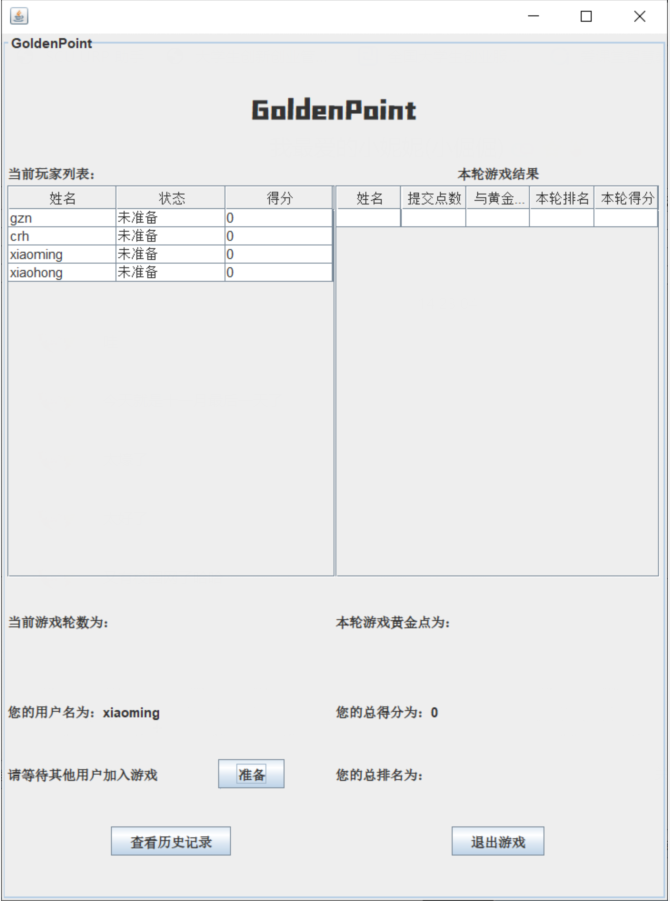
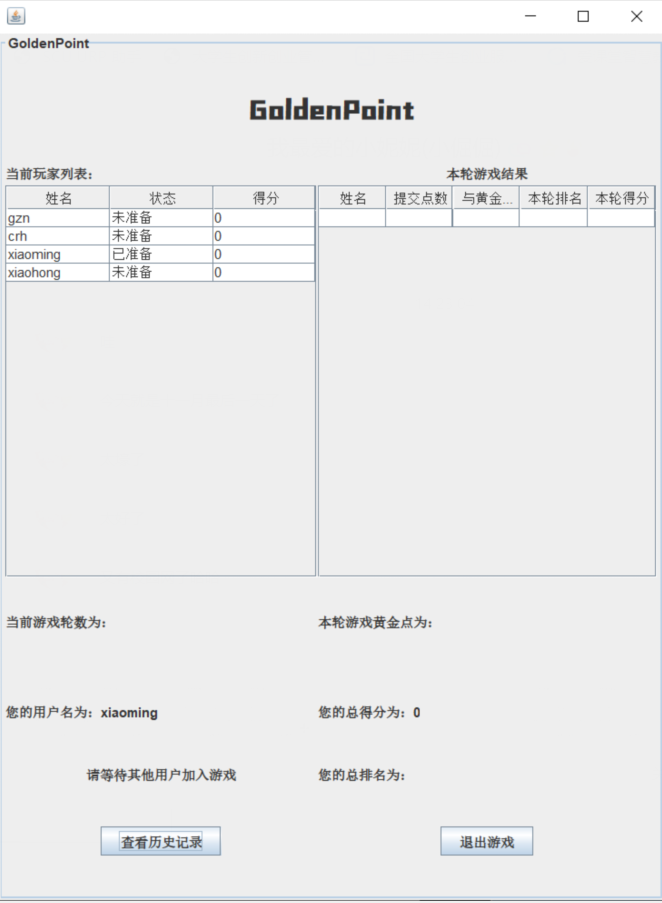
实现代码如下:
//准备按钮点击事件(向服务器发送type2)
        ready_button.addMouseListener(new MouseAdapter() {
            @Override
            public void mouseClicked(MouseEvent e) {
                super.mouseClicked(e);

                try{
                    JSONObject json = new JSONObject();
                    json.put("type", 2);
                    json.put("mark", LocalNumber);
                    ToServer.sendMsg(json.toString(), new DataOutputStream(socket.getOutputStream()));
                } catch (JSONException e1) {
                    e1.printStackTrace();
                } catch (IOException ioException) {
                    ioException.printStackTrace();
                }
                }
        });

//检测玩家是否全部都准备
    public void CheckReady(){
        for(int i = 0;i<player.size();i++){
            if(player.get(i).isReady() && i < player.size() - 1)
                continue;
            else if(!player.get(i).isReady()){
                isAllReady = false;
                break;
            }
            else if(player.get(i).isReady() && i == player.size() - 1)
                isAllReady = true;
        }
    }
//发送玩家准备消息
    public void upDateReady(String playerReady) throws JSONException, IOException{
        JSONObject json = new JSONObject();
        json.put("type", 5);
        json.put("msg", playerReady.trim());
        System.out.println("服务器发送更新状态:" + json.toString());
        sendMsg(json);
    }

    //发送玩家准备消息
    public void upDateReady(int num) throws JSONException, IOException{
        JSONObject json = new JSONObject();
        json.put("type", 6);
        json.put("msg", num);
        System.out.println(json.toString());
        sendMsg(json);
    }
七、阶段总结
本周基本完成了整个程序的设计,实现了预期功能,后期需要对程序进行测试调试,查看有无bug,并对程序进一步完善(如优化Ui等等),如有需求还可添加其他功能。

 浙公网安备 33010602011771号