
vue3+ts封装一行文字组件
说明
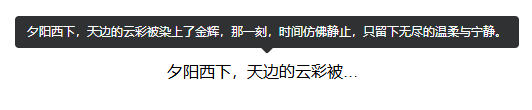
项目开发中,需要限制文字在一行内展示,超出部分则显示省略号,并增加el-tooltip效果
实现要点
- css样式限制文字一行显示
- 计算包裹文字的元素的scrollWidth和clientWidth,如果scrollWidth大,说明文字超出了一行
代码
<template>
  <el-tooltip :content="text" :disabled="!isEllipsisActive" placement="top">
    <div ref="textContainer" class="ellipsis-text" @mouseenter="checkEllipsis">
      <slot></slot>
    </div>
  </el-tooltip>
</template>
<script setup lang="ts" name="LineOneText">
const props = defineProps({
  text: {
    type: String,
    default: "",
  },
});

const textContainer = ref<HTMLElement | null>(null);
const isEllipsisActive = ref(false);

const checkEllipsis = () => {
  if (textContainer.value) {
    isEllipsisActive.value =
      textContainer.value.scrollWidth > textContainer.value.clientWidth;
  }
};
</script>
<style lang="scss" scoped>
.ellipsis-text {
  overflow: hidden;
  text-overflow: ellipsis;
  white-space: nowrap;
}
</style>
调用
<erp-line-one-text
        text="夕阳西下,天边的云彩被染上了金辉,那一刻,时间仿佛静止,只留下无尽的温柔与宁静。"
      >
        夕阳西下,天边的云彩被染上了金辉,那一刻,时间仿佛静止,只留下无尽的温柔与宁静。
</erp-line-one-text>
效果

 浙公网安备 33010602011771号