
Java笔试--编程题
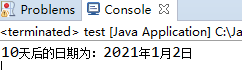
1、编程计算距当前时间10天后的日期和时间,并用“xxxx年xx月xx日”的格式输出新的日期和时间。
import java.util.Calendar;

public class Test_1 {
  public static void main(String[] args) {
    Calendar cal = Calendar.getInstance(); // 获取当前日期实例
    cal.add(Calendar.DAY_OF_YEAR,10); // 当前日期的天数加10天
    String strDate = cal.get(Calendar.YEAR)+"年"
              +cal.get(Calendar.MONTH+1)+"月"
              +cal.get((Calendar.DATE))+"日";
    System.out.println("10天后的日期为:"+strDate);
  }
}
public class Test_2{
    public static void main(String[] args) throws Exception{
        String str="mldnqa@163.net";
        String regex="[a-zA-Z_][a-zA-Z_0-9\\.]*@[a-zA-Z_0-9\\.]+\\.(com|cn|net)";
        if(str.matches(regex)){//符合于验证要求
            System.out.println("TRUE,EMAIL输入合法。");
        }else{
            System.out.println("FLASE,EMAIL输入非法!");
        }
    }
}
import java.text.SimpleDateFormat;
import java.util.Date;

public class Test_3 {
    public static void main(String[] args) throws java.text.ParseException {
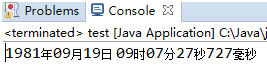
        String str = "1981-09-19 09:07:27.727";
        SimpleDateFormat dateFormat = new SimpleDateFormat("yyyy-MM-dd HH:mm:ss.SSS");
        Date date = null;
        date = dateFormat.parse(str);
        String now = new SimpleDateFormat("yyyy年MM月dd日 HH时mm分ss秒SSS毫秒").format(date);
        System.out.println(now);
    }
}
4、编程计算2/1+3/2+5/3+8/5……数列的前20项之和。
public class Text_4 {

      public static void main(String[] args) {
          /*
           * 计算2/1,3/2,5/3,8/5,13/8,21/13....前20项之和
           */
           double sum=0;
           double first=2,second=1,t;
           for(int x=0;x<20;x++) {
                sum=sum+first/second;
                t=second;
                second=first;
                first=t+second;
             }
            System.out.println("2/1+3/2+5/3+...前20项之和是:"+sum);

       }
 }
5、编写一个程序:将a.txt文件中的单词与b.txt文件中的单词交替合并到c.txt文件中,a.txt文件中的单词用回车符分隔,b.txt文件中用回车或空格进行分隔。
import java.io.File;
import java.io.FileReader;
import java.io.FileWriter;

public class Test_5{
    public static void main(String[] args) throws Exception{
        FileManager a = new FileManager("D:\\a.txt",new char[]{'\n'});
        FileManager b = new FileManager("D:\\b.txt",new char[]{'\n',' '});
        FileWriter c = new FileWriter("D:\\c.txt");
        String aWord = null;
        String bWord = null;
        while((aWord = a.nextWord()) !=null ){
            c.write(aWord + "\n");
            bWord = b.nextWord();
            if(bWord != null)
                c.write(bWord + "\n");
        }

        while((bWord = b.nextWord()) != null){
            c.write(bWord + "\n");
        }
        c.close();
    }

}


class FileManager{

    String[] words = null;
    int pos = 0;
    public FileManager(String filename,char[] seperators) throws Exception{
        File f = new File(filename);
        FileReader reader = new FileReader(f);
        char[] buf = new char[(int)f.length()];
        int len = reader.read(buf);
        String results = new String(buf,0,len);
        String regex = null;
        if(seperators.length >1 ){
            regex = "" + seperators[0] + "|" + seperators[1];
        }else{
            regex = "" + seperators[0];
        }
        words = results.split(regex);
    }

    public String nextWord(){
        if(pos == words.length)
            return null;
        return words[pos++];
    }

}
6、复制D:/aa目录下的所有.java文件到D:/bb中。
import java.io.*;

public class CopyFiles {
    public static void main(String[] args) throws IOException {
        String pathIn = "D://aa";  // 从哪里复制
        String pathOut = "D://bb"; // 复制到哪里去

        //获取目录下的所有文件存入到数组中
        File[] files = new File(pathIn).listFiles();

        for (int i = 0; i < files.length; i++) {
            // 获取所有文件的名字
            String fileName = files[i].getName();

            // 判断文件的后缀
            if (fileName.endsWith(".java")) {
                // 读取文件内容
                BufferedReader br = new BufferedReader(new FileReader(files[i]));
                // 创建一个String流,并将读取的的数据存入到里面
                StringBuffer sb = new StringBuffer();
                String line = "";
                while (br.readLine() != null) {
                    sb.append(line);
                }
                br.close();

                // 创建写入流
                BufferedWriter bw = new BufferedWriter(
                        new FileWriter(pathOut + "//" + fileName));
                bw.write(sb.toString());  // 写入数据
                bw.flush(); // 刷新写入流
                bw.close();
            }
        }
    }
}

 浙公网安备 33010602011771号