
Vue动态更新数据内容,百度下拉框提示
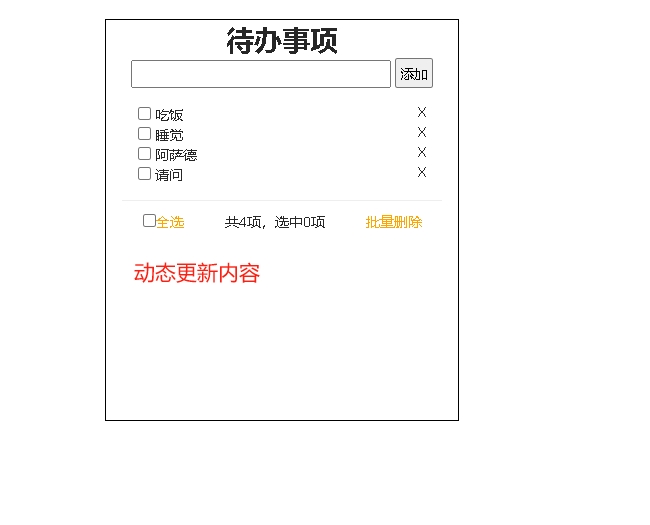
<!DOCTYPE html>
<html>
	<head>
		<meta charset="utf-8" />
		<meta name="viewport" content="width=device-width, initial-scale=1">
		<script src="js/vue.js"></script>
		<link rel="stylesheet" type="text/css" href="https://www.layuicdn.com/layui-v2.8.0/css/layui.css" />
		<title></title>
		<style>
			img {
				width: 20rem;
			}

			#app {
				padding: 0 1rem;
				text-align: center;
				width: 20rem;
				height: 400px;
				border: 1px solid #000;
				margin: 2rem auto;
			}

			.kuang {
				height: 1.52rem;
				width: 16rem;
			}

			button {
				display: inline-block;
				padding: .2rem;
			}

			ul {
				text-align: left;
				margin: 1rem;
			}

			.right {
				float: right;
			}

			.all {
				display: flex;
				justify-content: center;
				justify-content: space-around;

			}

			.orange {
				color: orange;
			}
		</style>
	</head>
	<body>
		<div id="app" @click="alls()">
			<h1>待办事项</h1>
			<input type="text" class="kuang" v-model="plusone" @keydown.enter="plus">
			<button @click="plus">添加</button>
			<ul>
				<li v-for="(item,index) in sports" :key="item.name">


					<input type="checkbox" :value="item.name" v-model="plusdai" class="left">
					<span @click.stop="chang(index)" v-show="!item.zhuangtai">{{item.name}}</span>
					<input type="text" v-model="item.name" v-show="item.zhuangtai
						" @click.stop>
					<span class="right" @click="del(index)">X</span>
				</li>

			</ul>
			<hr>
			<div class="all">
				<span class="orange">
					<input type="checkbox" class="left" :checked="plusdai.length==sports.length && sports.length"
						@click="selall($event)">全选</span>
				<span>共{{sports.length}}项,选中{{plusdai.length}}项</span>
				<span class="orange" @click="delallp">批量删除</span>
			</div>
		</div>

		<script>
			vm = new Vue({
				el: "#app",
				data: {
					plusone: "",
					sports: [{
						name: "吃饭",
						zhuangtai: false
					}, {
						name: "睡觉",
						zhuangtai: false
					}, {
						name: "睡觉s",
						zhuangtai: false
					}],
					plusdai: []

				},
				methods: {
					// 添加内容函数
					plus() {
						if (!this.plusone.length) {
							alert("没内容")
							return;
						}
						this.sports.push({
							name: this.plusone,
							zhuangtai: false
						});
						this.plusone = '';
					},
					// 修改编辑状态
					chang(i) {
						console.log(this.sports[i].zhuangtai = !this.sports[i].zhuangtai)
					},
					 // 鼠标在外部点击事件
					alls() {
						this.sports.forEach(item => {
							item.zhuangtai = false
						})
					},
					// 批量删除选中的数据
					del(i) {
						if (this.plusdai.includes(this.sports[i].name)) {
							this.plusdai.splice(i, 1);
						}
						this.sports.splice(i, 1);
					},
					// 全选或者非全选
					selall(i) {
						const sall = [];
						this.sports.forEach(item => {
							sall.push(item.name)
						})
						this.plusdai = i.target.checked ? sall : [];
						console.log()
					},
					// 删除选中的数据
					delallp() {
						// 删除掉对象中选中的数据
						this.sports = this.sports.filter(obj => {
							for (let key in obj) {
								if (typeof obj[key] === 'string') {
									if (this.plusdai.includes(obj[key])) {
										return false;
									}
								}
							}
							return true;
						});
						this.plusdai = []
						console.log(this.sports);
					}

				},
				computed: {
					all() {

					}

				},
				watch: {

				}
			})
			vm.change = "王二麻";
		</script>
	</body>
</html>
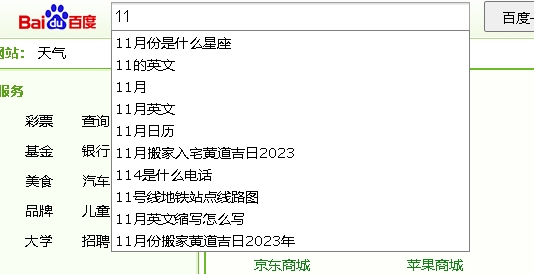
<!DOCTYPE html>
<html>
	<head>
		<meta charset="utf-8" />
		<meta name="viewport" content="width=device-width, initial-scale=1">
		<script src="https://code.jquery.com/jquery-3.1.1.min.js"></script>
		<script src="js/vue.js"></script>
		<title></title>
		<style>
			* {
			padding:0;margin:0 padding:0.5rem
			}
			button{
				background:blue;color:white;padding: 0.5 0.9rem;display:inline-block;
			}
			ul{border:1px solid blue;width:11rem;margin-top:0rem;border-top:none;
			border-bottom-left-radius:.5rem;border-bottom-right-radius:.5rem;
			}
		</style>
	</head>
	<body>
		<div id="app">
			<input type="" name="" id="" v-model="inputValue" @blur="ons=false" @focus="ons=result.length"  />
			<button type="button">baidu</button>
		  <ul v-show="ons">
		  	<li v-for="(item,index) in result">{{item.q}}</li>

		  </ul>
		</div >

		<script>
		vm=	new Vue({
			     el:"#app",
				data: {
					inputValue:'',
			     result:[],
				 ons:false
				},
				methods: {

				},
				computed:{

				},
				watch:{
					inputValue(){
					$.ajax({
						url: "http://www.baidu.com/sugrec", //请求的url地址
						dataType: "JSONP", //返回格式为json
						async: false, //请求是否异步,默认为异步,这也是ajax重要特性
						data: {
					    prod:"pc",
						wd  :vm.inputValue
						}, //参数值


						success: function(msg) {
							console.log(msg.g)
							vm.result=msg.g||[]
							vm.ons=vm.result.length

						},
					});
					}
				}
		})
		// vm.change="王二麻";
		</script>
	</body>
</html>

 浙公网安备 33010602011771号