
SpringBoot:CloudConfig+Rsa+SecurityCrypto搭配加密yml配置文件属性
前言
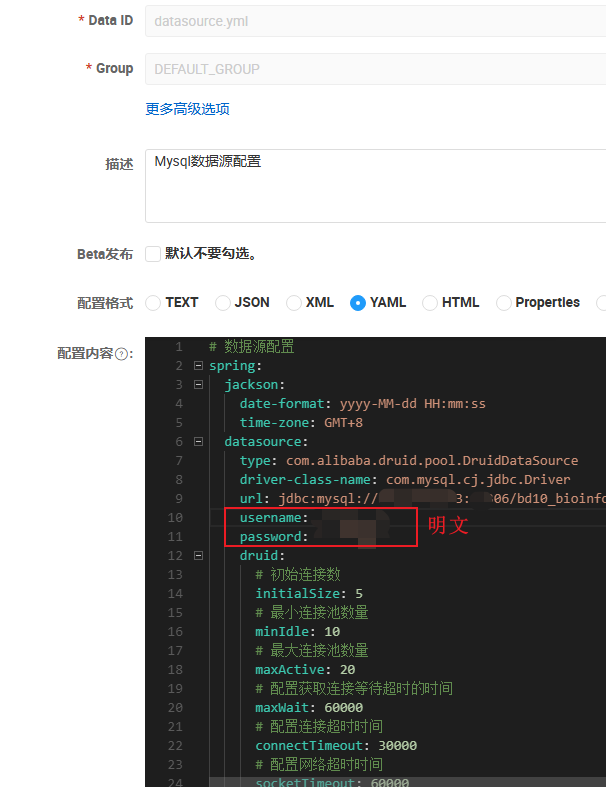
数据安全问题频出,公司开始对数据安全进行严加管控,其中代码开发配置文件中的敏感信息不能明文存放必须密文处理,博主在尝试Jasypt加解密方式时发现Jasypt与(Gateway+SaToken)发生冲突,因为博主框架使用SaToken做鉴权,Gateway内就需要引用SaToken做鉴权过滤,但SaToken需要连接redis,而redis密码使用Jasypt作加密需要解密,最后Gateway(WebFlux)与Jasypt(Servlet)响应式环境冲突,导致启动失败。所以这里使用CloudConfig+Rsa+SecurityCrypto搭配加密方式实现yml配置文件属性加解密功能。
框架环境
博主自己框架的版本信息
<!--   SpringBoot版本   -->
<spring-boot.version>3.2.8</spring-boot.version>
<!--   SpringCloud版本   -->
<spring-cloud.version>2023.0.3</spring-cloud.version>
<!--   SpringCloud-Alibaba版本   -->
<spring-cloud-alibaba.version>2023.0.1.0</spring-cloud-alibaba.version>
<!--   Spring Ai 人工智能框架版本   -->
<spring-ai.version>1.0.0</spring-ai.version>
<!--   bootstrap.yml加载版本   -->
<bootstrap.version>3.1.0</bootstrap.version>
加解密用到的依赖
<!--    配置文件加密依赖包    -->
<!-- SpringCloudConfig客户端 -->
<dependency>
    <groupId>org.springframework.cloud</groupId>
    <artifactId>spring-cloud-starter-config</artifactId>
</dependency>
<!-- 添加Bouncy Castle核心依赖 -->
<dependency>
    <groupId>org.bouncycastle</groupId>
    <artifactId>bcprov-jdk15on</artifactId>
    <version>1.70</version>
</dependency>
<dependency>
    <groupId>org.bouncycastle</groupId>
    <artifactId>bcpkix-jdk15on</artifactId>
    <version>1.70</version>
</dependency>
<!-- RSA 非对称加密支持 -->
<dependency>
    <groupId>org.springframework.security</groupId>
    <artifactId>spring-security-rsa</artifactId>
    <version>1.0.10.RELEASE</version>
    <exclusions>
        <!-- 排除可能存在的旧版本 -->
        <exclusion>
            <groupId>org.bouncycastle</groupId>
            <artifactId>*</artifactId>
        </exclusion>
    </exclusions>
</dependency>
<!-- Spring Security Crypto -->
<dependency>
    <groupId>org.springframework.security</groupId>
    <artifactId>spring-security-crypto</artifactId>
</dependency>
配置类初始化
网上使用yml配置文件加密后通过java -jar命令传递密码的方式较多,博主这里使用的是配置类加载加解密实体,后续使用jar加密后就看不到了,如果使用命令行传递(java -Dcipher.encryptor.password=xxxxxx -jar xxx.jar )并用docker部署的话还是会将密码暴露出来。这里只是多一层考虑,大家根据自己实际情况来评估怎么使用。
import com.higentec.common.utils.sign.EncryptUtils;
import org.springframework.context.annotation.Bean;
import org.springframework.context.annotation.Configuration;
import org.springframework.core.io.ClassPathResource;
import org.springframework.core.io.Resource;
import org.springframework.security.crypto.encrypt.Encryptors;
import org.springframework.security.crypto.encrypt.TextEncryptor;
import org.springframework.security.rsa.crypto.KeyStoreKeyFactory;
import org.springframework.security.rsa.crypto.RsaSecretEncryptor;

import java.security.KeyPair;

@Configuration
public class EncryptConfig {

    /**
     * RSA 非对称加密器
     */
    @Bean
    public TextEncryptor textEncryptor() {
        // 这是两种加密方式,RSA加密方式比较特殊需要先生成一个密钥库文件,然后使用密钥库加密;而ASE就相对简单一些
        // 对应yml配置文件内属性加密,推荐用ASE对称加密,毕竟杀鸡焉用牛刀嘛。
        // RSA 非对称加密
//        return rsaTextEncryptor();
        // ASE 对称加密
        return aesTextEncryptor();
    }

    /**
     * RSA 加密器
     */
    private TextEncryptor rsaTextEncryptor() {
        // 配置文件加密的密码,写死;后续使用jar加密就可以了
        //String keystorePassword = EncryptUtils.keystorePassword;
        // 也可以使用命令行传递密码, java -Dcipher.encryptor.password=mypassword -jar xxxxx.jar
        String keystorePassword = System.getProperty("cipher.encryptor.password");
        Resource jksFile = new ClassPathResource(EncryptUtils.keystorePath);
        if(jksFile.exists()) {
            KeyStoreKeyFactory factory = new KeyStoreKeyFactory(
                    jksFile,
                    keystorePassword.toCharArray()
            );
            KeyPair keyPair = factory.getKeyPair(
                    EncryptUtils.keyAlias,
                    EncryptUtils.keyPassword.toCharArray()
            );
            // 默认前缀识别
            return new RsaSecretEncryptor(keyPair);
        }
        return null;
    }

    /**
     * AES 加密器
     */
    public TextEncryptor aesTextEncryptor() {
        // 配置文件加密的密码,写死;后续使用jar加密就可以了
        //String keystorePassword = EncryptUtils.password;
        // 也可以使用命令行传递密码, java -Dcipher.encryptor.password=mypassword -jar xxxxx.jar
        String keystorePassword = System.getProperty("cipher.encryptor.password");
        TextEncryptor delegate = Encryptors.text(keystorePassword, EncryptUtils.salt);
        // 默认前缀识别
        return delegate;
    }

}
加解密工具类
import jakarta.annotation.PostConstruct;
import org.bouncycastle.asn1.x500.X500Name;
import org.bouncycastle.asn1.x509.BasicConstraints;
import org.bouncycastle.asn1.x509.Extension;
import org.bouncycastle.asn1.x509.KeyUsage;
import org.bouncycastle.cert.X509CertificateHolder;
import org.bouncycastle.cert.X509v3CertificateBuilder;
import org.bouncycastle.cert.jcajce.JcaX509CertificateConverter;
import org.bouncycastle.cert.jcajce.JcaX509v3CertificateBuilder;
import org.bouncycastle.jce.provider.BouncyCastleProvider;
import org.bouncycastle.operator.ContentSigner;
import org.bouncycastle.operator.jcajce.JcaContentSignerBuilder;
import org.springframework.core.io.ClassPathResource;
import org.springframework.core.io.Resource;
import org.springframework.security.crypto.encrypt.Encryptors;
import org.springframework.security.crypto.encrypt.TextEncryptor;
import org.springframework.security.rsa.crypto.KeyStoreKeyFactory;
import org.springframework.security.rsa.crypto.RsaSecretEncryptor;
import org.springframework.stereotype.Component;
import java.util.Base64;
import java.io.FileOutputStream;
import java.math.BigInteger;
import java.security.*;
import java.security.cert.Certificate;
import java.security.cert.X509Certificate;
import java.util.Calendar;
import java.util.Date;

/**
 * 启动项目生成密钥对文件
 */
@Component
public class EncryptUtils {

    // 默认密文前缀,这个必须要用这个前缀否则识别不到!!!
    private static final String cipherTextPrefix = "{cipher}";


    // RSA 非对称加密配置
    // 密钥库文件地址,默认生成在当前项目的顶层根目录下,
    // 在使用RSA功能前需要通过下面的创建函数生成一个密钥库文件,然后将文件放置到 resources 目录才能使用
    public static final String keystorePath = "my_rsa.jks";
    // 密钥库访问密码
    public static final String keystorePassword = "uwj48kw8ayer";
    // 密钥库中密钥对的标识符。一个密钥库可以包含多个密钥对,通过别名区分。
    public static final String keyAlias = "configkey";
    // 解密密钥对中私钥的密码,私钥是加密过的,需要用密码解密才能使用私钥
    public static final String keyPassword = "iw93rxV5";

    // AES 对称加密配置
    // 自定义加密密码
    public static final String password = "ks84j6d7";
    // 盐值,增加密码复杂性和防止彩虹表攻击的随机数据
    public static final String salt = "deadbeef";


    static {
        // 注册 BouncyCastle 提供者
        Security.addProvider(new BouncyCastleProvider());
    }

    // rsa配置信息
    private KeyPair keyPair;
    // Rsa加解密类
    private RsaSecretEncryptor encryptor;
    // 新增 AES 加密器
    private TextEncryptor aesTextEncryptor;

    /**
     * 初始化RSA加密器
     */
    @PostConstruct
    public void init() throws Exception {
        // 初始化 RSA
        this.keyPair = loadKeyPair();
        if (this.keyPair != null) this.encryptor = new RsaSecretEncryptor(keyPair);

        // 初始化 AES
        this.aesTextEncryptor = Encryptors.text(password, salt);

        System.out.println("加密器初始化成功");
    }


    /**
     * 生成RSA密钥库文件
     */
    public void generateKeyStore() throws Exception {
        // 1. 生成 RSA 密钥对
        KeyPair keyPair = generateRsaKeyPair();
        // 2. 创建自签名证书
        X509Certificate cert = generateSelfSignedCertificate(keyPair, "CN=HigenTec, OU=Development, O=HigenTec, L=Hangzhou, ST=Zhejiang, C=CN");
        // 3. 创建密钥库并存储
        createKeyStore(keystorePath, keystorePassword, keyAlias, keyPassword, keyPair, cert);
        System.out.println("密钥库生成成功: " + keystorePath);
        printKeyStoreInfo(keystorePath, keystorePassword);
    }

    /**
     * 获取RSA密钥库的公钥(Base64编码)
     */
    public String getRsaPublicKeyBase64() {
        PublicKey publicKey = keyPair.getPublic();
        return Base64.getEncoder().encodeToString(publicKey.getEncoded());
    }

    /**
     * 获取RSA密钥库的私钥(Base64编码)
     */
    public String getRsaPrivateKeyBase64() {
        PrivateKey privateKey = keyPair.getPrivate();
        return Base64.getEncoder().encodeToString(privateKey.getEncoded());
    }


    /**
     * RSA加密字符串(返回Base64)
     */
    public String RsaEncrypt(String plainText) {
        try {
            byte[] encrypted = encryptor.encrypt(plainText.getBytes());
            return Base64.getEncoder().encodeToString(encrypted);
        } catch (Exception e) {
            throw new RuntimeException("加密失败: " + e.getMessage(), e);
        }
    }

    /**
     * RSA加密字符串(返回{cipher}格式)
     */
    public String RsaEncryptCipher(String plainText) {
        return cipherTextPrefix + RsaEncrypt(plainText);
    }

    /**
     * RSA解密字符串(Base64输入)
     */
    public String RsaDecrypt(String encryptedBase64) {
        try {
            byte[] encryptedData = Base64.getDecoder().decode(encryptedBase64);
            byte[] decrypted = encryptor.decrypt(encryptedData);
            return new String(decrypted);
        } catch (Exception e) {
            throw new RuntimeException("解密失败: " + e.getMessage(), e);
        }
    }

    /**
     * RSA解密字符串(支持{cipher}前缀)
     */
    public String RsaDecryptCipher(String encryptedText) {
        if (encryptedText.startsWith(cipherTextPrefix)) {
            encryptedText = encryptedText.substring(cipherTextPrefix.length());
        }
        return RsaDecrypt(encryptedText);
    }


    /**
     * AES加密字符串(返回Base64)
     * 完全使用 Spring Security 的 Encryptors.text()
     */
    public String AesEncrypt(String plainText) {
        try {
            return aesTextEncryptor.encrypt(plainText);
        } catch (Exception e) {
            throw new RuntimeException("AES加密失败: " + e.getMessage(), e);
        }
    }

    /**
     * AES加密字符串(返回{cipher}格式)
     */
    public String AesEncryptCipher(String plainText) {
        return cipherTextPrefix + AesEncrypt(plainText);
    }

    /**
     * AES解密字符串(Base64输入)
     */
    public String AesDecrypt(String encryptedText) {
        try {
            return aesTextEncryptor.decrypt(encryptedText);
        } catch (Exception e) {
            throw new RuntimeException("AES解密失败: " + e.getMessage(), e);
        }
    }

    /**
     * AES解密字符串(支持{cipher}前缀)
     */
    public String AesDecryptCipher(String encryptedText) {
        if (encryptedText.startsWith(cipherTextPrefix)) {
            encryptedText = encryptedText.substring(cipherTextPrefix.length());
        }
        return AesDecrypt(encryptedText);
    }


    /**
     * 从JKS密钥库文件中加载RSA密钥对
     */
    private KeyPair loadKeyPair() {
        Resource jksFile = new ClassPathResource(keystorePath.replace("classpath:", ""));
        if (jksFile.exists()) {
            KeyStoreKeyFactory keyStoreKeyFactory = new KeyStoreKeyFactory(
                    jksFile,
                    keystorePassword.toCharArray()
            );
            return keyStoreKeyFactory.getKeyPair(
                    keyAlias,
                    keyPassword.toCharArray()
            );
        }
        return null;
    }

    /**
     * 生成 RSA 密钥对
     */
    private KeyPair generateRsaKeyPair() throws Exception {
        KeyPairGenerator keyGen = KeyPairGenerator.getInstance("RSA", "BC");
        keyGen.initialize(2048, new SecureRandom());
        return keyGen.generateKeyPair();
    }

    /**
     * 生成自签名证书
     */
    private X509Certificate generateSelfSignedCertificate(KeyPair keyPair, String dn) throws Exception {
        // 证书有效期(10年)
        Calendar calendar = Calendar.getInstance();
        Date startDate = calendar.getTime();
        // 设置到 9999年12月31日
        calendar.set(9999, Calendar.DECEMBER, 31, 23, 59, 59);
        Date endDate = calendar.getTime();
        // 创建证书构建器
        X500Name issuerName = new X500Name(dn);
        X500Name subjectName = new X500Name(dn);
        BigInteger serialNumber = BigInteger.valueOf(System.currentTimeMillis());
        X509v3CertificateBuilder certBuilder = new JcaX509v3CertificateBuilder(
                issuerName,
                serialNumber,
                startDate,
                endDate,
                subjectName,
                keyPair.getPublic()
        );
        // 添加扩展
        certBuilder.addExtension(
                Extension.basicConstraints,
                true,
                new BasicConstraints(true)
        );
        certBuilder.addExtension(
                Extension.keyUsage,
                true,
                new KeyUsage(KeyUsage.keyCertSign | KeyUsage.digitalSignature)
        );
        // 创建签名器
        ContentSigner signer = new JcaContentSignerBuilder("SHA256WithRSAEncryption")
                .setProvider("BC")
                .build(keyPair.getPrivate());
        // 构建证书
        X509CertificateHolder certHolder = certBuilder.build(signer);
        // 转换为 X509Certificate
        return new JcaX509CertificateConverter()
                .setProvider("BC")
                .getCertificate(certHolder);
    }

    /**
     * 创建密钥库并存储
     */
    private void createKeyStore(String keystorePath, String storePassword,
                                String keyAlias, String keyPassword,
                                KeyPair keyPair, X509Certificate cert) throws Exception {
        // 创建密钥库
        KeyStore keyStore = KeyStore.getInstance("JKS");
        keyStore.load(null, null);
        // 创建证书链
        Certificate[] certChain = new Certificate[]{cert};
        // 将私钥和证书存入密钥库
        keyStore.setKeyEntry(
                keyAlias,
                keyPair.getPrivate(),
                keyPassword.toCharArray(),
                certChain
        );
        // 保存到文件
        try (FileOutputStream fos = new FileOutputStream(keystorePath)) {
            keyStore.store(fos, storePassword.toCharArray());
        }
    }

    /**
     * 打印密钥库信息
     */
    private void printKeyStoreInfo(String keystorePath, String password) throws Exception {
        KeyStore ks = KeyStore.getInstance("JKS");
        try (java.io.FileInputStream fis = new java.io.FileInputStream(keystorePath)) {
            ks.load(fis, password.toCharArray());
        }
        System.out.println("密钥库类型: " + ks.getType());
        System.out.println("别名列表: " + java.util.Collections.list(ks.aliases()));
        if (ks.containsAlias("configkey")) {
            Certificate cert = ks.getCertificate("configkey");
            System.out.println("证书类型: " + cert.getType());
            System.out.println("证书公钥算法: " + cert.getPublicKey().getAlgorithm());
            if (cert instanceof X509Certificate) {
                X509Certificate x509Cert = (X509Certificate) cert;
                System.out.println("有效期从: " + x509Cert.getNotBefore());
                System.out.println("有效期至: " + x509Cert.getNotAfter());
                System.out.println("颁发给: " + x509Cert.getSubjectDN());
                System.out.println("颁发者: " + x509Cert.getIssuerDN());
            }
        }
    }

}
yml配置文件
# Spring
spring:
  application:
    # 应用名称
    name: base-system
  profiles:
    #环境配置
    active: @profiles.active@
  # 手动优先加载 Encrypt 配置文件解密Bean实体
  cloud:
    bootstrap:
      # 多个可以使用,号分隔
      sources: com.higentec.common.config.EncryptConfig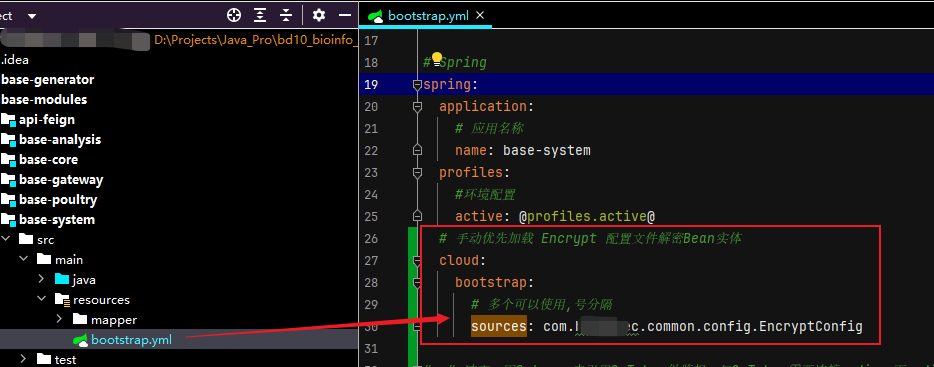
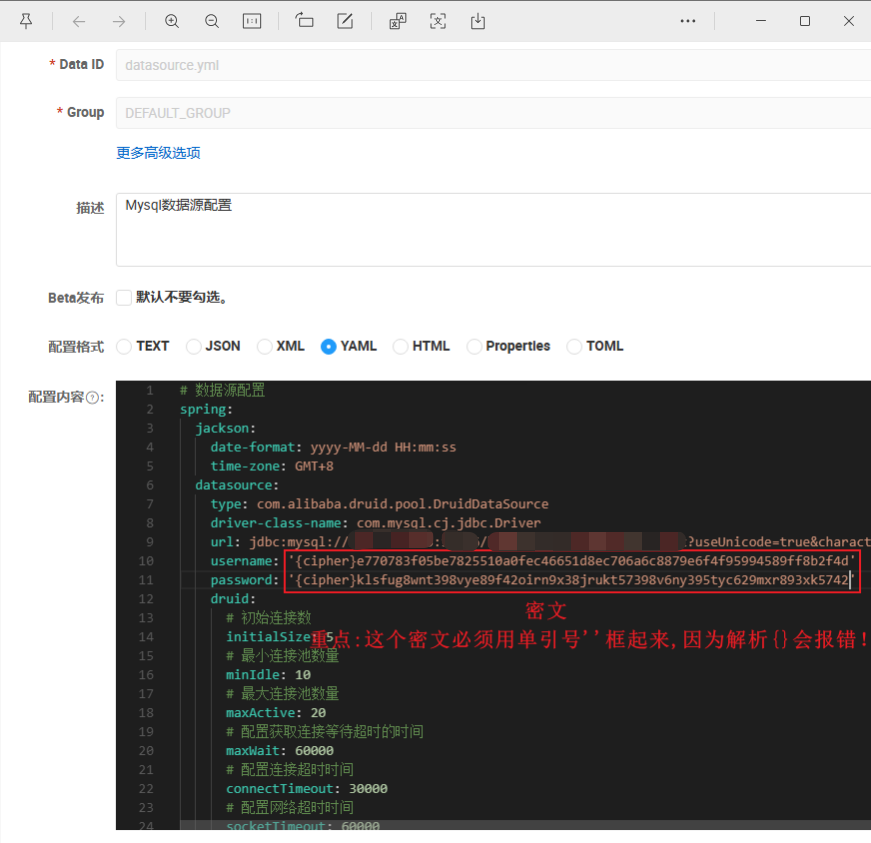
重点: 使用加密后的密文必须用 '{cipher}密文' 做前缀的格式并使用单引号''包裹起来,如此才能识别哪些需要解密。
-----------------------------------
作者:怒吼的萝卜
链接:http://www.cnblogs.com/nhdlb/
-----------------------------------

 浙公网安备 33010602011771号