

python 基础1
linux下解决命令多版本共存:
alternatives --config python3
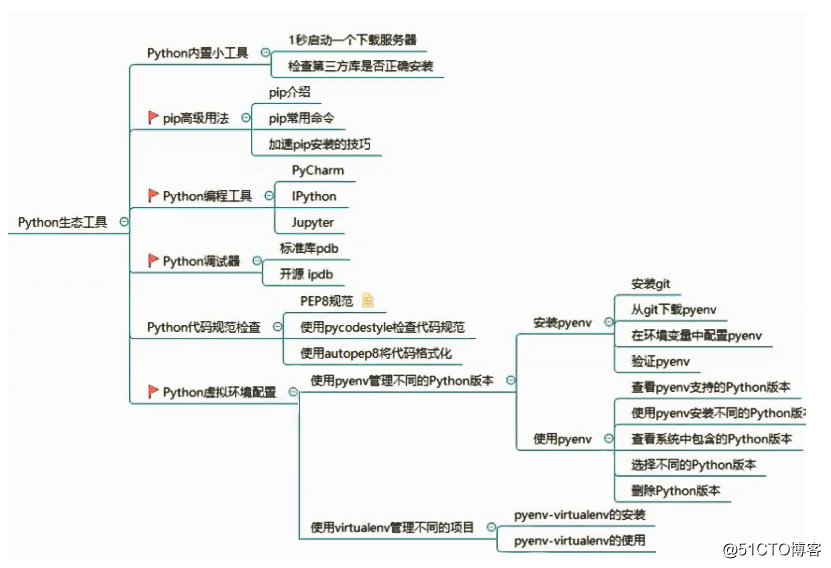
可以用虚拟环境解决python多版本开发问题。
更改pip默认的源
pip config set global.index-url https://pypi.tuna.tsinghua.edu.cn/simple
pip install -i http://mirrors.aliyun.com/pypi/simple/ --trusted-host mirrors.aliyun.com
pip通用配置
windows配置文件: ~/pip/pip.ini 。windows家目录,在“运行”中键入 .
Linux配置文件: ~/.pip/pip.conf
最新linux配置: ~/.config/pip/pip.conf
内容,可参照 http://mirrors.aliyun.com的pypi帮助
[global]
index-url = https://mirrors.aliyun.com/pypi/simple/
[install]
trusted-host=mirrors.aliyun.com
Jupyter
是基于WEB的交互式笔记本,其中可以非常方便的使用Python。
安装Jupyter,也会依赖安装ipython的
$ pip install jupyter
$ jupyter notebook help
$ jupyter notebook --ip=0.0.0.0 --no-browser
$ ss -tanl
常用快捷键
a之前插入代码块、b之后插入代码块
L 增加行号
运行代码块 shift + enter,选择下面的代码块
运行当前代码块 ctrl + enter
安装虚拟环境
pip3 install virtualenv
新建一个普通用户
useradd python
echo python | passwd --stdin python
su - python
创建工程目录,并设置虚拟环境
$ mkdir -p projects/cmdb
$ mkdir venvs
$ cd venvs
$ virtualenv vcmdb
$ ls
vcmdb
$ cd ~/projects/cmdb/
$ pwd
/home/python/projects/cmdb
(vcmdb) 表示虚拟环境
$ source ~/venvs/vcmdb/bin/activate
(vcmdb) [python@localhost cmdb]$ python -V
Python 3.8.0
(vcmdb) [python@localhost cmdb]$ deactivate
$ python3 -V
Python 3.8.0
基于3.6的虚拟环境,使用-p 指定3.6版本python解释器
$ virtualenv -p /usr/bin/python3.6 vcmdb36
$ cd ~/projects/cmdb/
$ source ~/venvs/vcmdb36/bin/activate
(vcmdb36) [python@localhost cmdb]$ python -V
Python 3.6.8
(vcmdb36) [python@localhost cmdb]$ which python3
~/venvs/vcmdb36/bin/python3
(vcmdb36) [python@localhost cmdb]$ which python
~/venvs/vcmdb36/bin/python
(vcmdb36) [python@localhost cmdb]$ deactivate
[python@localhost cmdb]$ python3 -V
Python 3.8.0
pyenv
查看当前版本
pyenv version
查看所有版本
pyenv versions
查看所有可安装的版本
pyenv install --list
安装指定版本
pyenv install 3.6.5
安装新版本后rehash一下
pyenv rehash
删除指定版本
pyenv uninstall 3.5.2
指定全局版本
pyenv global 3.6.5
指定多个全局版本, 3版本优先
pyenv global 3.6.5 2.7.14
实际上当你切换版本后, 相应的pip和包仓库都是会自动切换过去的
pip freeze > requirements.txt
pip install -r requirements.txt
FROM python:3.8
ENV PYTHONDONTWRITEBYTECODE=1
ENV PYTHONUNBUFFERED=1
WORKDIR /app
COPY requirements.txt /app/
RUN pip install -i http://mirrors.aliyun.com/pypi/simple/ --trusted-host mirrors.aliyun.com --upgrade pip && pip install -i http://mirrors.aliyun.com/pypi/simple/ --trusted-host mirrors.aliyun.com -r requirements.txt
COPY . /app/
EXPOSE 8000
CMD ["python", "manage.py", "runserver", "0.0.0.0:8000"]
docker build -t yansongwei/django:src_2 .
docker run -p 31801:8000 --name django-test yansongwei/django:src_2
apiVersion: apps/v1
kind: Deployment
metadata:
labels:
k8s.kuboard.cn/name: django-keycloak
name: django-keycloak
spec:
progressDeadlineSeconds: 600
replicas: 1
revisionHistoryLimit: 10
selector:
matchLabels:
app: django-keycloak
strategy:
type: Recreate
template:
metadata:
creationTimestamp: null
labels:
app: django-keycloak
spec:
containers:
- env:
- name: ServicePort
value: '80'
- name: TargetPort
value: '80'
- name: ServiceHost
valueFrom:
fieldRef:
apiVersion: v1
fieldPath: status.podIP
- name: HostIP
valueFrom:
fieldRef:
apiVersion: v1
fieldPath: status.hostIP
- name: MY_POD_IP
valueFrom:
fieldRef:
apiVersion: v1
fieldPath: status.podIP
image: 'yansongwei/django:src_2'
imagePullPolicy: IfNotPresent
name: django-keycloak
ports:
- containerPort: 8000
protocol: TCP
resources:
limits:
cpu: 100m
memory: 800Mi
requests:
cpu: 4m
memory: 10Mi
terminationMessagePath: /dev/termination-log
terminationMessagePolicy: File
dnsPolicy: ClusterFirst
imagePullSecrets:
- name: betasecret
nodeSelector:
beta.istio: istio
restartPolicy: Always
schedulerName: default-scheduler
securityContext: {}
terminationGracePeriodSeconds: 30
apiVersion: v1
kind: Service
metadata:
labels:
app: django-keycloak
service: django-keycloak
name: django-keycloak
spec:
ports:
- name: grpc
port: 8000
protocol: TCP
targetPort: 8000
selector:
app: django-keycloak
sessionAffinity: None
type: ClusterIP

 浙公网安备 33010602011771号