

在Windows容器中使用云盘及基于SMB的文件存储
目录
在Windows容器中使用云盘及基于SMB的文件存储
步骤一:创建存储类StorageClass
云盘控制器(Cloud Disk Controller)根据存储类(StorageClass)的参数fstype的值判断创建的云盘适用于Windows文件系统或Linux文件系统。
-
当参数fstype的值为ext3、ext4或xfs时,表示该StorageClass适用于Linux文件系统。
-
当参数fstype的值为ntfs时,表示该StorageClass适用于Windows文件系统。
kind: StorageClass
apiVersion: storage.k8s.io/v1
metadata:
  name: alicloud-disk-common-windows
provisioner: alicloud/disk
parameters:
  type: cloud
  fstype: ntfs
---
kind: StorageClass
apiVersion: storage.k8s.io/v1
metadata:
  name: alicloud-disk-efficiency-windows
provisioner: alicloud/disk
parameters:
  type: cloud_efficiency
  fstype: ntfs
---
kind: StorageClass
apiVersion: storage.k8s.io/v1
metadata:
  name: alicloud-disk-ssd-windows
provisioner: alicloud/disk
parameters:
  type: cloud_ssd
  fstype: ntfs
---
kind: StorageClass
apiVersion: storage.k8s.io/v1
metadata:
  name: alicloud-disk-essd-windows
provisioner: alicloud/disk
parameters:
  type: cloud_essd
  fstype: ntfs
---
kind: StorageClass
apiVersion: storage.k8s.io/v1
metadata:
  name: alicloud-disk-available-windows
provisioner: alicloud/disk
parameters:
  type: available
  fstype: ntfs
-
执行以下命令创建Windows环境下的StorageClass。
kubectl create -f storageclass.yaml
步骤二:为Windows节点安装Flexvolume插件
-
使用以下YAML示例创建flexvolume-windows.yaml文件。
YAML示例
apiVersion: apps/v1 kind: DaemonSet metadata: labels: app: flexvolume-windows name: flexvolume-windows namespace: kube-system spec: selector: matchLabels: k8s-volume: flexvolume updateStrategy: type: RollingUpdate template: metadata: metadata: labels: k8s-volume: flexvolume annotations: scheduler.alpha.kubernetes.io/critical-pod: "" spec: tolerations: - operator: Exists /*since 1.18, we can specify "hostNetwork: true" for Windows workloads, so we can deploy an application without NetworkReady.*/ hostNetwork: true priorityClassName: system-node-critical affinity: nodeAffinity: requiredDuringSchedulingIgnoredDuringExecution: nodeSelectorTerms: - matchExpressions: - key: type operator: NotIn values: - virtual-kubelet - key: beta.kubernetes.io/os operator: In values: - windows - matchExpressions: - key: type operator: NotIn values: - virtual-kubelet - key: kubernetes.io/os operator: In values: - windows containers: - name: acs-flexvolume command: - pwsh.exe - -NoLogo - -NonInteractive - -File - entrypoint.ps1 /*根据不同集群的地域,您需修改以下镜像地址中的地域cn-hangzhou信息。*/ image: registry-vpc.cn-hangzhou.aliyuncs.com/acs/flexvolume-windows:v1.0.0 imagePullPolicy: Always volumeMounts: - name: host-flexvolume-binary mountPath: c:/host/usr/libexec/kubernetes/kubelet-plugins/volume/exec - name: host-flexvolume-socket mountPath: c:/host/etc/kubernetes/flexvolume/socket - name: host-log mountPath: c:/var/log/alicloud /*use managed addon token from Alibaba Cloud*/ - name: managed-addon-token mountPath: c:/var/addon/ readOnly: true /* or specify the customized access key of Alibaba Cloud*/ /* - name: customized-access-key*/ /* mountPath: c:/host/etc/.volumeak*/ /* env:*/ /* - name: ACCESS_KEY_ID*/ /* value: ""*/ /* - name: ACCESS_KEY_SECRET*/ /* value: ""*/ volumes: - name: host-flexvolume-binary hostPath: path: c:/usr/libexec/kubernetes/kubelet-plugins/volume/exec type: DirectoryOrCreate - name: host-flexvolume-socket hostPath: path: c:/etc/kubernetes/flexvolume/socket type: DirectoryOrCreate - name: host-log hostPath: path: c:/var/log/alicloud type: DirectoryOrCreate - name: managed-addon-token secret: defaultMode: 420 optional: true items: - key: addon.token.config path: token-config secretName: addon.csi.token /* - name: customized-access-key*/ /* hostPath:*/ /* path: c:/etc/.volumeak*/ /* type: DirectoryOrCreate*/ -
执行以下命令为所有的Windows工作节点安装Flexvolume插件。
kubectl create -f flexvolume-windows.yaml -
DaemonSet部署成功后,执行以下命令可以在每个WIndows节点上查看FlexVolume插件alicloud-disk-controller。
ls C:\usr\libexec\kubernetes\kubelet-plugins\volume\exec\alicloud~disk.exe\预期输出:
Directory: C:\usr\libexec\kubernetes\kubelet-plugins\volume\exec\alicloud~disk.exe

Mode                LastWriteTime         Length Name
----                -------------         ------ ----
-a----        8/12/2021   2:45 PM        5636096 disk.exe
步骤三:手动创建pv,pvc
apiVersion: v1
kind: PersistentVolume
metadata:
  labels:
    alicloud-pvname: pv-smb5-10m
  name: pv-smb5-10m
spec:
  persistentVolumeReclaimPolicy: Retain
  accessModes:
  - ReadWriteMany
  capacity:
    storage: 10Mi
  flexVolume:
    driver: alicloud/smb.exe
    options:
      server: 313bb486fd-qdg70.cn-shanghai.nas.aliyuncs.com
      path: /myshare/web-window-test2
---
apiVersion: v1
kind: PersistentVolumeClaim
metadata:
  name: test4-smb
  namespace: beta-winserver
spec:
  selector:
    matchLabels:
      alicloud-pvname: pv-smb5-10m
  accessModes:
  - ReadWriteMany
  resources:
    requests:
      storage: 10Mi
步骤四:创建业务deployment及挂载pv
---
apiVersion: apps/v1
kind: Deployment
metadata:
  annotations: {}
  labels:
    app: beta-weixincard-api
    k8s.kuboard.cn/name: beta-weixincard-api
  name: beta-weixincard-api
  namespace: beta-winserver
spec:
  progressDeadlineSeconds: 600
  replicas: 1
  revisionHistoryLimit: 10
  selector:
    matchLabels:
      app: beta-weixincard-api
  strategy:
    rollingUpdate:
      maxSurge: 25%
      maxUnavailable: 25%
    type: RollingUpdate
  template:
    metadata:
      annotations:
        kubectl.kubernetes.io/restartedAt: '2022-02-10T15:23:51+08:00'
      creationTimestamp: null
      labels:
        app: beta-weixincard-api
        k8s-volume: flexvolume
    spec:
      affinity:
        nodeAffinity:
          requiredDuringSchedulingIgnoredDuringExecution:
            nodeSelectorTerms:
              - matchExpressions:
                  - key: kubernetes.io/os
                    operator: In
                    values:
                      - windows
      containers:
        - env:
            - name: Pod_IP
              valueFrom:
                fieldRef:
                  apiVersion: v1
                  fieldPath: status.podIP
          image: 'harbor.betawm.com/beta/beta-weixincard-api:Src_Dev_78'
          imagePullPolicy: IfNotPresent
          lifecycle:
            postStart:
              exec:
                command:
                  - powershell.exe
                  - '-NonInteractive'
                  - New-Item
                  - '-ItemType'
                  - SymbolicLink
                  - '-Path'
                  - /beta
                  - '-Name'
                  - Web.config
                  - '-Target'
                  - /webconfig/Web.config
          livenessProbe:
            exec:
              command:
                - curl.exe
                - 'http://localhost/Beta.WxCardApi/status'
            failureThreshold: 3
            periodSeconds: 10
            successThreshold: 1
            timeoutSeconds: 1
          name: beta-weixincard-api
          ports:
            - containerPort: 80
              protocol: TCP
          readinessProbe:
            exec:
              command:
                - curl.exe
                - 'http://localhost/Beta.WxCardApi/status'
            failureThreshold: 3
            initialDelaySeconds: 5
            periodSeconds: 10
            successThreshold: 1
            timeoutSeconds: 5
          resources: {}
          startupProbe:
            exec:
              command:
                - curl.exe
                - 'http://localhost/Beta.WxCardApi/status'
            failureThreshold: 3
            initialDelaySeconds: 3
            periodSeconds: 10
            successThreshold: 1
            timeoutSeconds: 5
          terminationMessagePath: /dev/termination-log
          terminationMessagePolicy: File
          volumeMounts:
            - mountPath: /beta/logs
              name: beta-weixincard-api-log
              subPathExpr: $(Pod_IP)
            - mountPath: /webconfig
              name: web-config
            - mountPath: /beta/upload
              name: volume-5mysd
      dnsPolicy: ClusterFirst
      imagePullSecrets:
        - name: betasecret
      restartPolicy: Always
      schedulerName: default-scheduler
      securityContext: {}
      terminationGracePeriodSeconds: 30
      tolerations:
        - effect: NoSchedule
          key: os
          operator: Equal
          value: windows
      volumes:
        - hostPath:
            path: 'c:\logs\beta-weixincard-api'
            type: DirectoryOrCreate
          name: beta-weixincard-api-log
        - configMap:
            defaultMode: 420
            items:
              - key: web.config
                path: Web.config
            name: beta-weixincard-api-config
          name: web-config
        - name: volume-5mysd
          persistentVolumeClaim:
            claimName: test5-smb

---
apiVersion: v1
kind: Service
metadata:
  annotations: {}
  labels:
    app: beta-weixincard-api
  name: beta-weixincard-api
  namespace: beta-winserver
spec:
  ports:
    - name: http
      port: 80
      protocol: TCP
      targetPort: 80
  selector:
    app: beta-weixincard-api
  sessionAffinity: None
  type: ClusterIP
步骤五:验证容器中使用云盘及基于SMB的文件存储
方法1
1,到对应的windows节点机进入对应的业务容器
docker exec -it afcbd2574ad6  powershell
2,在挂载文件路径下创建测试文件
PS C:\beta> cd .\upload\
PS C:\beta\upload> ls
PS C:\beta\upload> echo "test111" > test.txt
PS C:\beta\upload> cat .\test.txt
3,删除pod后,重新拉去新pod后,再到业务pod对应的路径下看创建的测试文件是否存在,正常情况下一定是存在的。


方法2
进入业务pod写入测试数据后,将windows nas挂载本地,查看验证是否有数据
手动挂载
net use Z: \\313bb486fd-qdg70.cn-shanghai.nas.aliyuncs.com\myshare
手动卸载
net use Z: /delete
FAQ
1,pv,pvc创建bound成功后,创建业务pod挂载pvc失败解决方法
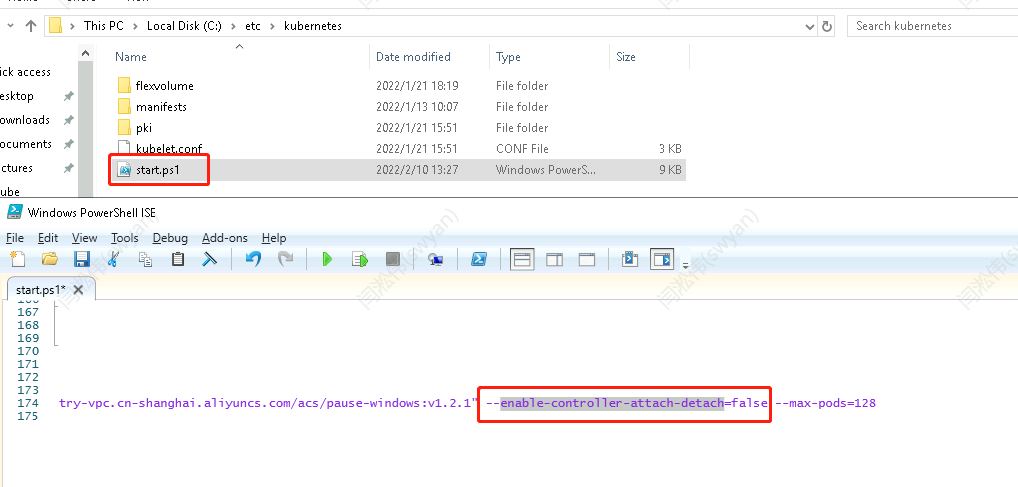
将c:\etc\kubernetes\start 文件中的enable-controller-attach-detach=true改为enable-controller-attach-detach=false,然后重启物理机

 浙公网安备 33010602011771号