
Report Service的确是个不错的东西,特别是VS2008下更显得完美了,而且ASP.net下的ReportViewer也支持打印的功能了,上个版本是不直接支持的。
关于如何使用RS的文章,aspnetx老大翻译的这篇文章不错。只是在部署上遇到了一些麻烦,特别是对中文支持上,下面谈谈几种解决方案。
VS 2005下的部署实际已经很简单了。
1.安装ReportViewer.exe,或者直接下载Microsoft Report Viewer Redistributable 2005 SP1 (完全安装) 安装。
2.再去MS网站下载语言包(ReportViewerLP.exe),在服务器上安装就可以了。
VS2008下ReportViewer的部署:
1.下载Microsoft Report Viewer Redistributable 2008(2.8 MB)在服务器上安装。
2.由于MS官方网站没有提供VS2008 ReportViewer的语言包下载,所以就只能靠自己了。
需要两个dll:
Microsoft.ReportViewer.WebForms.resources.dll
Microsoft.ReportViewer.Common.resources.dll
如果是Winform使用ReportViewer,则需要Microsoft.ReportViewer.WinForms.resources.dll
这几个dll实际上是资源文件编译成的dll,然后复制到运行ReportViewer 的网站下的的bin目录,就可以了,
或者可以加到GAC中,这样就不需要每个网站的bin下都复制这几个dll.
关于获取这几个dll?如果安装了Vs 2008的机器上都会有的,最直接的办法就是在C:\WINDOWS\assembly下可以看到
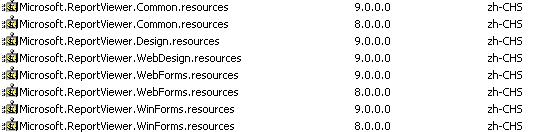
直接用命令: xcopy C:\WINDOWS\assembly\GAC_msil c:\GAC_MSIL /E /c
可以复制所有GAC_msil 下的所有dll
另一种解决方案:英文操作系统下Report Viewer控件客户端工具栏中文的解决办法
应用这个方案可以自定义toolbar上的信息,但是需要设置当前的Culture为zh_CN
我转贴一下代码:
 Code
Code


 }
} }
}web.config:
 <system.web> <globalization uiCulture="zh-CN" culture="zh-CN"/><system.web>
<appSettings> <add key="ReportViewerMessages" value="WebReport.ReportViewerMessagesZhcn,App_Code" /> appSettings>
附件dll下载:/Files/jintan/ReportViewerResources.rar
dll名字:Microsoft.ReportViewer.Common.resources.dll和Microsoft.ReportViewer.WebForms.resources.dll

 浙公网安备 33010602011771号