
【Laravel】最简单配置完成JWT认证
该文章配置仅针对Laravel5.5及以上版本
新建项目 composer create-project laravel/laravel 项目名
1.安装JWT
安装JWT模块包
composer require tymon/jwt-auth 1.*@rc
执行命令,发布jwt-auth配置文件
php artisan vendor:publish --provider="Tymon\JWTAuth\Providers\LaravelServiceProvider"

生成秘钥
php artisan jwt:secret

2.配置文件
修改配置文件config/auth.php
'guards' => [
        'web' => [
            'driver' => 'session',
            'provider' => 'users',
        ],

        'api' => [
            'driver' => 'jwt', //将driver改为jwt模式
            'provider' => 'users',
            'hash' => false,
        ],
    ],
修改User模型app/User.php
(1)增加继承接口 implements JWTSubject
use Tymon\JWTAuth\Contracts\JWTSubject;
...
class User extends Authenticatable implements JWTSubject
(2) 加入2个必须的接口函数(复制到User类下面即可)
    /**
     * Get the identifier that will be stored in the subject claim of the JWT.
     * @return mixed
     */
    public function getJWTIdentifier()
    {
        return $this->getKey();
    }

    /**
     * Return a key value array, containing any custom claims to be added to the JWT.
     * @return array
     */
    public function getJWTCustomClaims()

    {
        return [];
    }
3.添加路由和验证控制器
在router/api.php中增加路由
Route::post('login',[AuthController::class,'login']);
Route::group(['middleware' => 'api','prefix' => 'auth'], function ($router) {
    $router->get('logout', [AuthController::class,'logout']);
    $router->post('refresh', [AuthController::class,'refresh']);
    $router->get('userinfo', [AuthController::class,'userinfo']);
});
增加Auth控制器
php artisan make:controller Api/AuthController
<?php

namespace App\Http\Controllers\Api;
use App\Http\Controllers\Controller;
use Illuminate\Http\Request;

class AuthController extends Controller
{
    //
    public function login(Request $request){
        $identify = $request->only(['username','password']);
        if (! $token = auth('api')->attempt($identify)) {
            return response()->json(['error' => '授权登录失败'], 401);
        }
        return $this->respondWithToken($token);
    }

    public function userinfo(){
        $userinfo = auth('api')->user();
        return response()->json(['msg'=>'success','data'=>$userinfo],200);
    }

    public function logout(){
        $data = auth('api')->logout();
        return response()->json(['msg'=>'success','data'=>$data]);
    }

    public function refresh(){
        return $this->respondWithToken(auth('api')->refresh());
    }

    protected function respondWithToken($token){
        return response()->json([
            'access_token' => $token,
            'token_type' => 'bearer',
            'expires_in' => auth('api')->factory()->getTTL() * 60
        ]);
    }
}
4.验证
登录
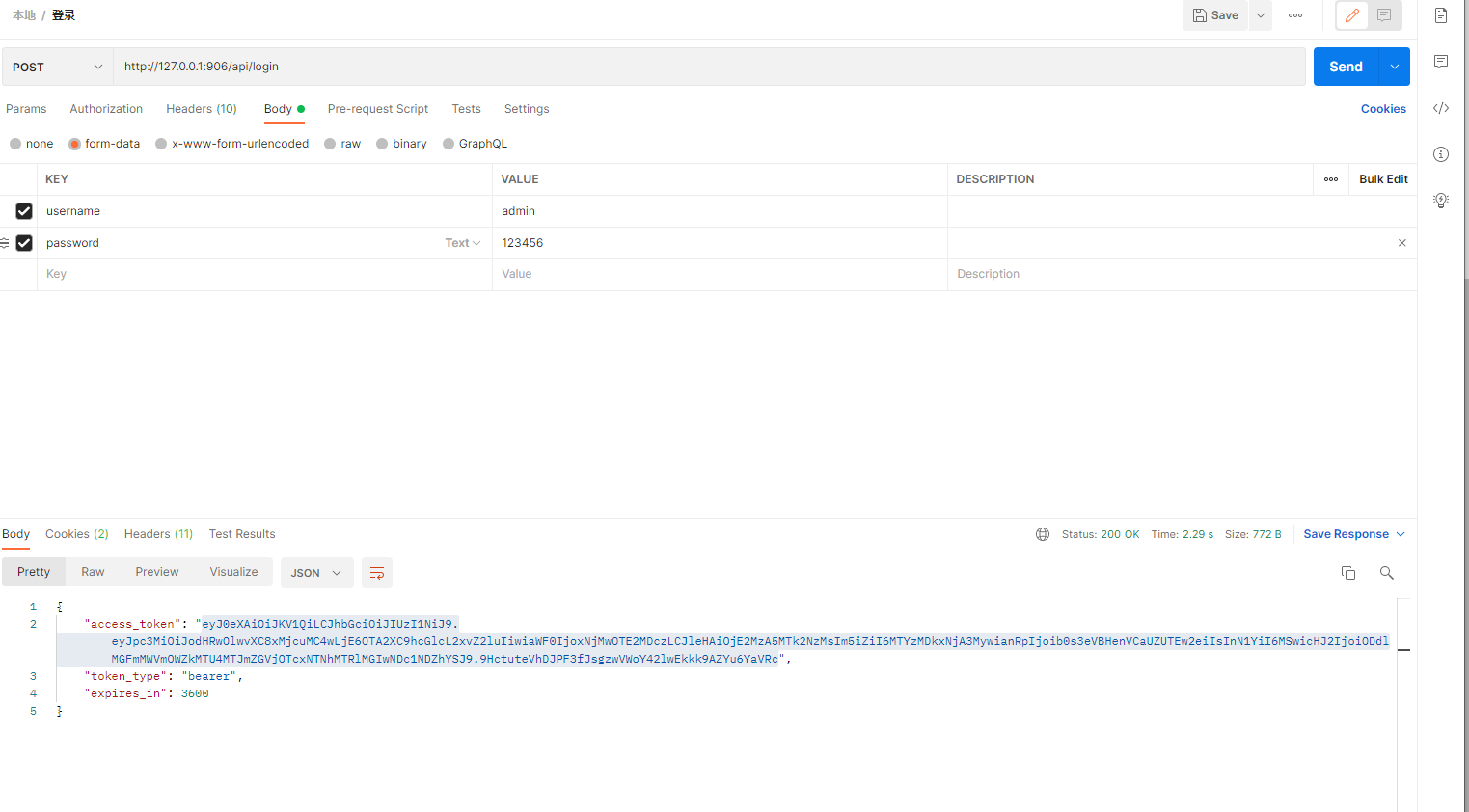
获取用户信息

5.添加无token/token过期验证中间件
(1)生成中间件
php artisan make:middleware JwtAuth
<?php

namespace App\Http\Middleware;

use Closure;
use Illuminate\Support\Facades\Auth;
use Symfony\Component\HttpKernel\Exception\UnauthorizedHttpException;
use Tymon\JWTAuth\Exceptions\JWTException;
use Tymon\JWTAuth\Exceptions\TokenExpiredException;
use Tymon\JWTAuth\Exceptions\TokenInvalidException;
use Tymon\JWTAuth\Http\Middleware\BaseMiddleware;

class JwtAuth extends BaseMiddleware
{
    /**
     * Handle an incoming request.
     *
     * @param  \Illuminate\Http\Request  $request
     * @param  \Closure  $next
     * @return mixed
     */
    public function handle($request, Closure $next,$guard)
    {
        try{
            $this->CheckForToken($request);
            if(Auth::guard($guard)->byId($this->auth->parseToken()->getPayload()->get('sub'))){
                return $next($request);
            }else{
                throw new TokenExpiredException();
            }

        }catch (TokenExpiredException $exception) {
            // 此处捕获到了 token 过期所抛出的 TokenExpiredException 异常,我们在这里需要做的是刷新该用户的 token 并将它添加到响应头中
            try {
                // 刷新用户的 token
                $token = $this->auth->refresh();
                // 使用一次性登录以保证此次请求的成功
                Auth::guard($guard)->onceUsingId($this->auth->manager()->getPayloadFactory()->buildClaimsCollection()->toPlainArray()['sub']);
            } catch (JWTException $exception) {
                // 如果捕获到此异常,即代表 refresh 也过期了,用户无法刷新令牌,需要重新登录。
                throw new UnauthorizedHttpException('jwt-auth', '令牌已失效,请重新登录');
            }
        } catch (TokenInvalidException $exception) {
            throw new UnauthorizedHttpException('jwt-auth', $exception->getMessage());
        }
        $response = $next($request);
        if (isset($token)) {
            //如果token发生变化,则在本次响应头中增加新的token
            $response->headers->set('Authorization', $token);
        }
        // 在响应头中返回新的 token
        return $response;
    }
}
(2)修改app/Http/Kernel.php并在路由中使用中间件
   /**
     * The application's route middleware.
     *
     * These middleware may be assigned to groups or used individually.
     *
     * @var array
     */
    protected $routeMiddleware = [
        'auth' => \App\Http\Middleware\Authenticate::class,
        'auth.basic' => \Illuminate\Auth\Middleware\AuthenticateWithBasicAuth::class,
        'bindings' => \Illuminate\Routing\Middleware\SubstituteBindings::class,
        'cache.headers' => \Illuminate\Http\Middleware\SetCacheHeaders::class,
        'can' => \Illuminate\Auth\Middleware\Authorize::class,
        'guest' => \App\Http\Middleware\RedirectIfAuthenticated::class,
        'password.confirm' => \Illuminate\Auth\Middleware\RequirePassword::class,
        'signed' => \Illuminate\Routing\Middleware\ValidateSignature::class,
        'throttle' => \Illuminate\Routing\Middleware\ThrottleRequests::class,
        'verified' => \Illuminate\Auth\Middleware\EnsureEmailIsVerified::class,
        'jwt_auth' => JwtAuth::class //增加这段
    ];
在路由中使用中间件
Route::group(['middleware' => 'jwt_auth:api','prefix' => 'auth'], function ($router) {
    $router->get('logout', [AuthController::class,'logout']);
    $router->post('refresh', [AuthController::class,'refresh']);
    $router->get('userinfo', [AuthController::class,'userinfo']);
});

 浙公网安备 33010602011771号