
ABPVNext问题集锦-SwaggerUI的配置问题,配置Schema自动展开
首先感谢以下兄弟:虚心、老暮、你被写在我的歌里等兄弟
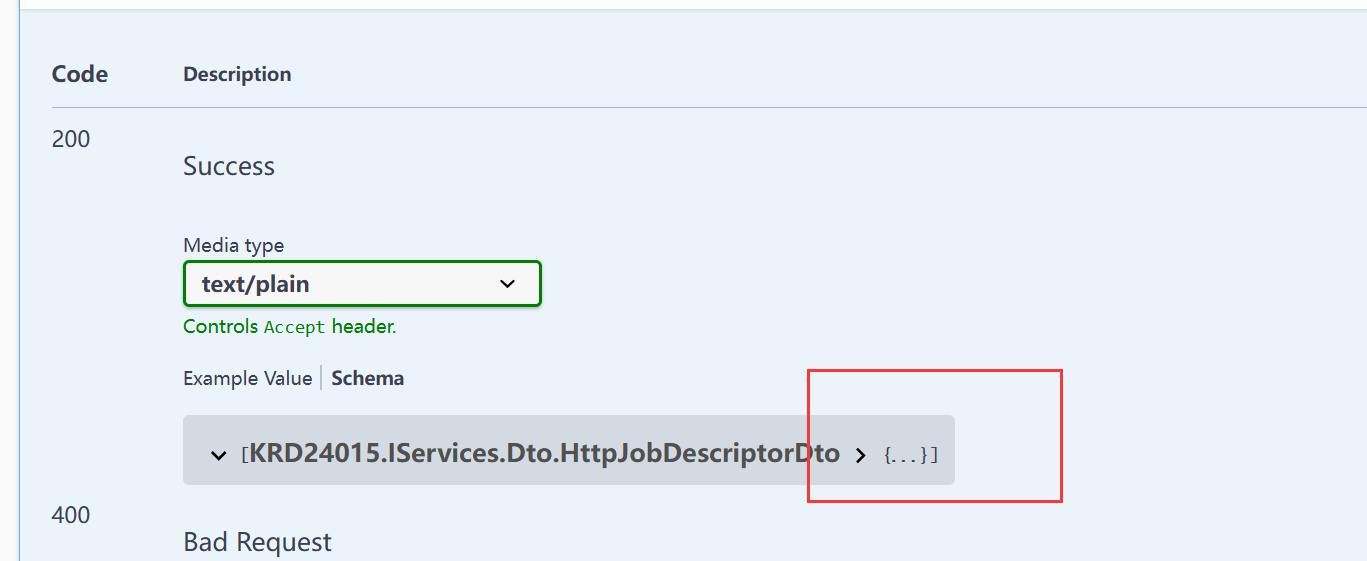
一,ABP框架中,运行的SwaggerUI中,默认情况下,不管Post还是Get等请求接口的Schema默认情况是折叠的,前端接入接口时需要一个个手动点开,如果参数过多比如100个参数 要点100次,使用不是太方便,或那种又有查询、又有新增,并且json里面各种套,对象里面有数组,数组里面套数据, 这种参数就很多了,如下图所示,如何单击Schema时展示的属性及子属性自动展开?
查看swagger源码,如下图所示
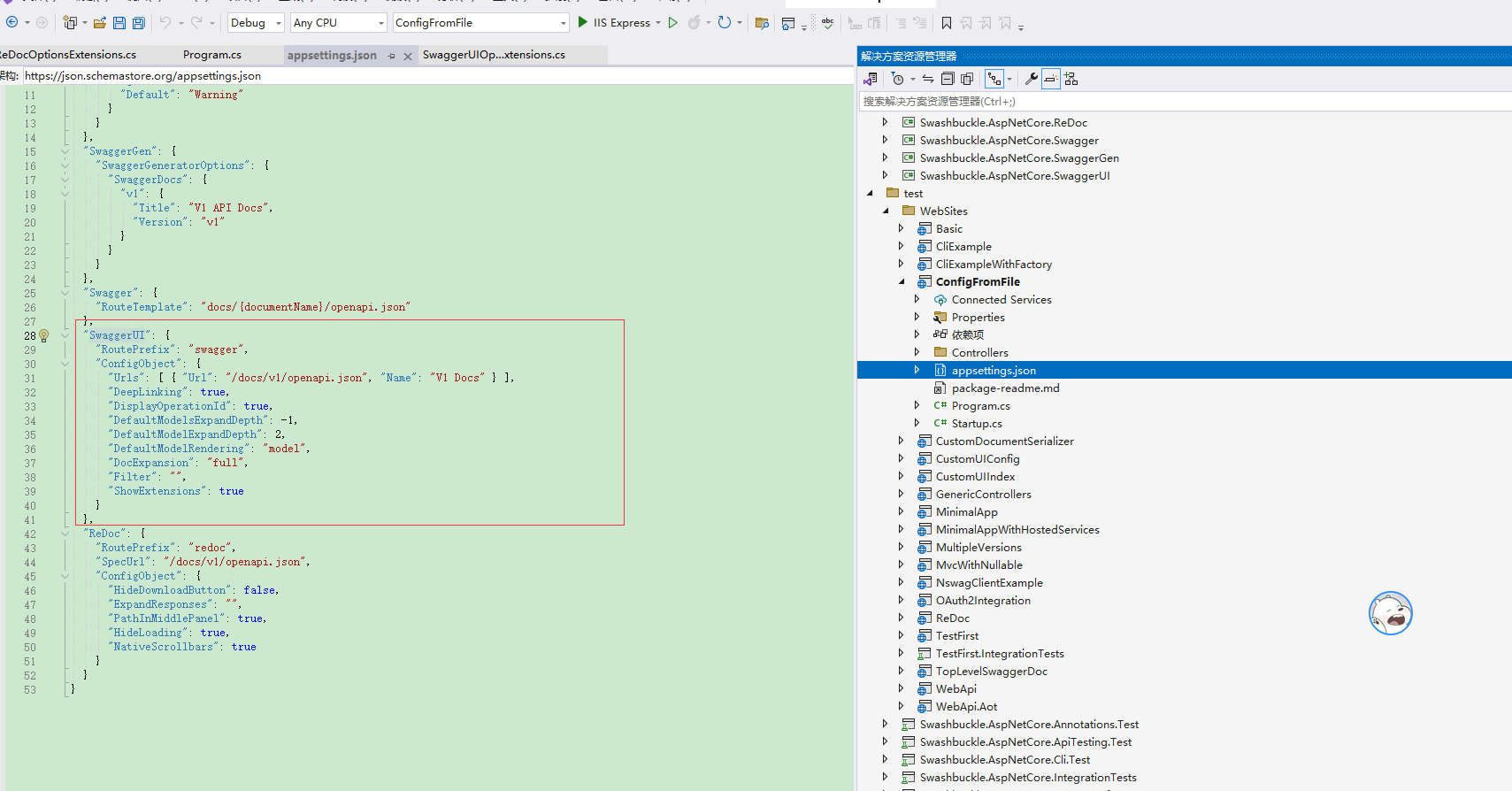
得到启发,进行如下配置:
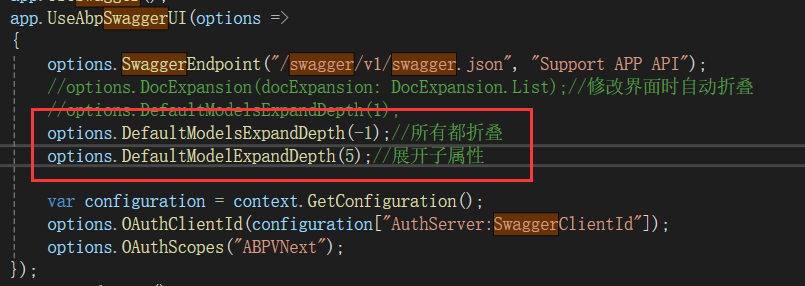
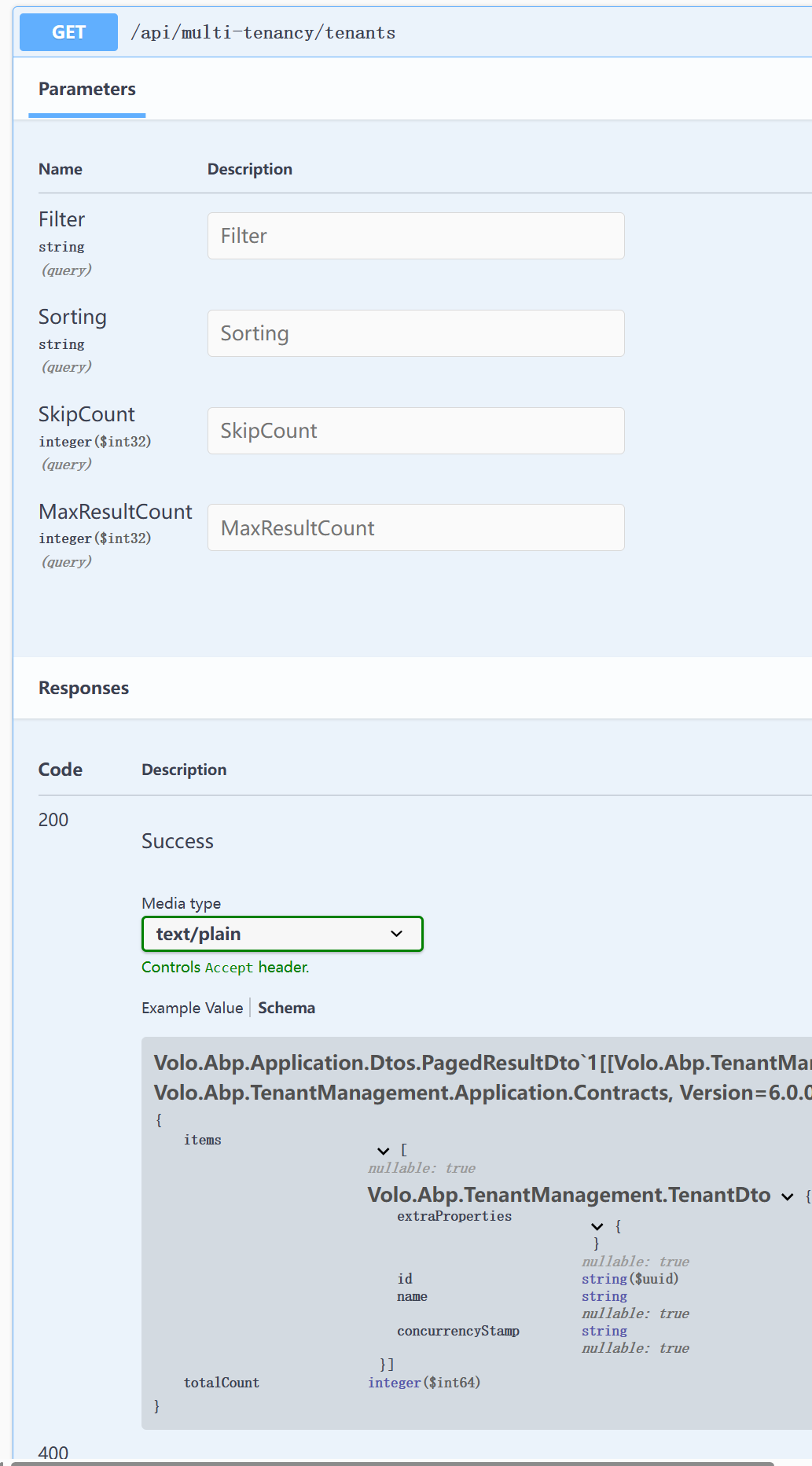
说明:如果嵌套的子属性深度比较大,那么可直接设置:options.DefaultModelExpandDepth(99),加到99就基本上不用配置了,配置后的效果图:
二,SwaggerUI知识扩展
swaggerUI配置选项扩展
using System;
using System.Text;
using System.Linq;
using System.Collections.Generic;
using Swashbuckle.AspNetCore.SwaggerUI;

namespace Microsoft.AspNetCore.Builder
{
    public static class SwaggerUIOptionsExtensions
    {
        /// <summary>
        /// Injects additional CSS stylesheets into the index.html page
        /// </summary>
        /// <param name="options"></param>
        /// <param name="path">A path to the stylesheet - i.e. the link "href" attribute</param>
        /// <param name="media">The target media - i.e. the link "media" attribute</param>
        public static void InjectStylesheet(this SwaggerUIOptions options, string path, string media = "screen")
        {
            var builder = new StringBuilder(options.HeadContent);
            builder.AppendLine($"<link href='{path}' rel='stylesheet' media='{media}' type='text/css' />");
            options.HeadContent = builder.ToString();
        }

        /// <summary>
        /// Injects additional Javascript files into the index.html page
        /// </summary>
        /// <param name="options"></param>
        /// <param name="path">A path to the javascript - i.e. the script "src" attribute</param>
        /// <param name="type">The script type - i.e. the script "type" attribute</param>
        public static void InjectJavascript(this SwaggerUIOptions options, string path, string type = "text/javascript")
        {
            var builder = new StringBuilder(options.HeadContent);
            builder.AppendLine($"<script src='{path}' type='{type}'></script>");
            options.HeadContent = builder.ToString();
        }

        /// <summary>
        /// Adds Swagger JSON endpoints. Can be fully-qualified or relative to the UI page
        /// </summary>
        /// <param name="options"></param>
        /// <param name="url">Can be fully qualified or relative to the current host</param>
        /// <param name="name">The description that appears in the document selector drop-down</param>
        public static void SwaggerEndpoint(this SwaggerUIOptions options, string url, string name)
        {
            var urls = new List<UrlDescriptor>(options.ConfigObject.Urls ?? Enumerable.Empty<UrlDescriptor>());
            urls.Add(new UrlDescriptor { Url = url, Name = name });
            options.ConfigObject.Urls = urls;
        }

        /// <summary>
        /// Enables deep linking for tags and operations
        /// </summary>
        /// <param name="options"></param>
        public static void EnableDeepLinking(this SwaggerUIOptions options)
        {
            options.ConfigObject.DeepLinking = true;
        }
        /// <summary>
        /// Enables persist authorization data
        /// </summary>
        /// <param name="options"></param>
        public static void EnablePersistAuthorization(this SwaggerUIOptions options)
        {
            options.ConfigObject.PersistAuthorization = true;
        }

        /// <summary>
        /// Controls the display of operationId in operations list
        /// </summary>
        /// <param name="options"></param>
        public static void DisplayOperationId(this SwaggerUIOptions options)
        {
            options.ConfigObject.DisplayOperationId = true;
        }

        /// <summary>
        /// The default expansion depth for models (set to -1 completely hide the models)
        /// </summary>
        /// <param name="options"></param>
        /// <param name="depth"></param>
        public static void DefaultModelsExpandDepth(this SwaggerUIOptions options, int depth)
        {
            options.ConfigObject.DefaultModelsExpandDepth = depth;
        }

        /// <summary>
        /// The default expansion depth for the model on the model-example section
        /// </summary>
        /// <param name="options"></param>
        /// <param name="depth"></param>
        public static void DefaultModelExpandDepth(this SwaggerUIOptions options, int depth)
        {
            options.ConfigObject.DefaultModelExpandDepth = depth;
        }

        /// <summary>
        /// Controls how the model is shown when the API is first rendered.
        /// (The user can always switch the rendering for a given model by clicking the 'Model' and 'Example Value' links.)
        /// </summary>
        /// <param name="options"></param>
        /// <param name="modelRendering"></param>
        public static void DefaultModelRendering(this SwaggerUIOptions options, ModelRendering modelRendering)
        {
            options.ConfigObject.DefaultModelRendering = modelRendering;
        }

        /// <summary>
        /// Controls the display of the request duration (in milliseconds) for Try-It-Out requests
        /// </summary>
        /// <param name="options"></param>
        public static void DisplayRequestDuration(this SwaggerUIOptions options)
        {
            options.ConfigObject.DisplayRequestDuration = true;
        }

        /// <summary>
        /// Controls the default expansion setting for the operations and tags.
        /// It can be 'List' (expands only the tags), 'Full' (expands the tags and operations) or 'None' (expands nothing)
        /// </summary>
        /// <param name="options"></param>
        /// <param name="docExpansion"></param>
        public static void DocExpansion(this SwaggerUIOptions options, DocExpansion docExpansion)
        {
            options.ConfigObject.DocExpansion = docExpansion;
        }

        /// <summary>
        /// Enables filtering. The top bar will show an edit box that you can use to filter the tagged operations that are shown.
        /// If an expression is provided it will be used and applied initially.
        /// Filtering is case sensitive matching the filter expression anywhere inside the tag
        /// </summary>
        /// <param name="options"></param>
        /// <param name="expression"></param>
        public static void EnableFilter(this SwaggerUIOptions options, string expression = null)
        {
            options.ConfigObject.Filter = expression ?? "";
        }

        /// <summary>
        /// Enables the "Try it out" section by default.
        /// </summary>
        /// <param name="options"></param>
        public static void EnableTryItOutByDefault(this SwaggerUIOptions options)
        {
            options.ConfigObject.TryItOutEnabled = true;
        }

        /// <summary>
        /// Limits the number of tagged operations displayed to at most this many. The default is to show all operations
        /// </summary>
        /// <param name="options"></param>
        /// <param name="count"></param>
        public static void MaxDisplayedTags(this SwaggerUIOptions options, int count)
        {
            options.ConfigObject.MaxDisplayedTags = count;
        }

        /// <summary>
        /// Controls the display of vendor extension (x-) fields and values for Operations, Parameters, and Schema
        /// </summary>
        /// <param name="options"></param>
        public static void ShowExtensions(this SwaggerUIOptions options)
        {
            options.ConfigObject.ShowExtensions = true;
        }

        /// <summary>
        /// Controls the display of extensions (pattern, maxLength, minLength, maximum, minimum) fields and values for Parameters
        /// </summary>
        /// <param name="options"></param>
        public static void ShowCommonExtensions(this SwaggerUIOptions options)
        {
            options.ConfigObject.ShowCommonExtensions = true;
        }

        /// <summary>
        /// List of HTTP methods that have the Try it out feature enabled. An empty array disables Try it out for all operations.
        /// This does not filter the operations from the display
        /// </summary>
        /// <param name="options"></param>
        /// <param name="submitMethods"></param>
        public static void SupportedSubmitMethods(this SwaggerUIOptions options, params SubmitMethod[] submitMethods)
        {
            options.ConfigObject.SupportedSubmitMethods = submitMethods;
        }

        /// <summary>
        /// OAuth redirect URL
        /// </summary>
        /// <param name="options"></param>
        /// <param name="url"></param>
        public static void OAuth2RedirectUrl(this SwaggerUIOptions options, string url)
        {
            options.ConfigObject.OAuth2RedirectUrl = url;
        }

        [Obsolete("The validator is disabled by default. Use EnableValidator to enable it")]
        public static void ValidatorUrl(this SwaggerUIOptions options, string url)
        {
            options.ConfigObject.ValidatorUrl = url;
        }

        /// <summary>
        /// You can use this parameter to enable the swagger-ui's built-in validator (badge) functionality
        /// Setting it to null will disable validation
        /// </summary>
        /// <param name="options"></param>
        /// <param name="url"></param>
        public static void EnableValidator(this SwaggerUIOptions options, string url = "https://online.swagger.io/validator")
        {
            options.ConfigObject.ValidatorUrl = url;
        }

        /// <summary>
        /// Default clientId
        /// </summary>
        /// <param name="options"></param>
        /// <param name="value"></param>
        public static void OAuthClientId(this SwaggerUIOptions options, string value)
        {
            options.OAuthConfigObject.ClientId = value;
        }

        /// <summary>
        /// Default userName
        /// </summary>
        /// <param name="options"></param>
        /// <param name="value"></param>
        public static void OAuthUsername(this SwaggerUIOptions options, string value)
        {
            options.OAuthConfigObject.Username = value;
        }

        /// <summary>
        /// Default clientSecret
        /// </summary>
        /// <param name="options"></param>
        /// <param name="value"></param>
        /// <remarks>Setting this exposes the client secrets in inline javascript in the swagger-ui generated html.</remarks>
        public static void OAuthClientSecret(this SwaggerUIOptions options, string value)
        {
            options.OAuthConfigObject.ClientSecret = value;
        }

        /// <summary>
        /// realm query parameter (for oauth1) added to authorizationUrl and tokenUrl
        /// </summary>
        /// <param name="options"></param>
        /// <param name="value"></param>
        public static void OAuthRealm(this SwaggerUIOptions options, string value)
        {
            options.OAuthConfigObject.Realm = value;
        }

        /// <summary>
        /// Application name, displayed in authorization popup
        /// </summary>
        /// <param name="options"></param>
        /// <param name="value"></param>
        public static void OAuthAppName(this SwaggerUIOptions options, string value)
        {
            options.OAuthConfigObject.AppName = value;
        }

        /// <summary>
        /// Scope separator for passing scopes, encoded before calling, default value is a space (encoded value %20)
        /// </summary>
        /// <param name="options"></param>
        /// <param name="value"></param>
        public static void OAuthScopeSeparator(this SwaggerUIOptions options, string value)
        {
            options.OAuthConfigObject.ScopeSeparator = value;
        }

        /// <summary>
        /// String array of initially selected oauth scopes, default is empty array
        /// </summary>
        public static void OAuthScopes(this SwaggerUIOptions options, params string[] scopes)
        {
            options.OAuthConfigObject.Scopes = scopes;
        }

        /// <summary>
        /// Additional query parameters added to authorizationUrl and tokenUrl
        /// </summary>
        /// <param name="options"></param>
        /// <param name="value"></param>
        public static void OAuthAdditionalQueryStringParams(
            this SwaggerUIOptions options,
            Dictionary<string, string> value)
        {
            options.OAuthConfigObject.AdditionalQueryStringParams = value;
        }

        /// <summary>
        /// Only activated for the accessCode flow. During the authorization_code request to the tokenUrl,
        /// pass the Client Password using the HTTP Basic Authentication scheme (Authorization header with
        /// Basic base64encoded[client_id:client_secret]). The default is false
        /// </summary>
        /// <param name="options"></param>
        public static void OAuthUseBasicAuthenticationWithAccessCodeGrant(this SwaggerUIOptions options)
        {
            options.OAuthConfigObject.UseBasicAuthenticationWithAccessCodeGrant = true;
        }

        /// <summary>
        /// Only applies to authorizatonCode flows. Proof Key for Code Exchange brings enhanced security for OAuth public clients.
        /// The default is false
        /// </summary>
        /// <param name="options"></param>
        public static void OAuthUsePkce(this SwaggerUIOptions options)
        {
            options.OAuthConfigObject.UsePkceWithAuthorizationCodeGrant = true;
        }

        /// <summary>
        /// Function to intercept remote definition, "Try it out", and OAuth 2.0 requests.
        /// </summary>
        /// <param name="options"></param>
        /// <param name="value">MUST be a valid Javascript function: (request: SwaggerRequest) => SwaggerRequest</param>
        public static void UseRequestInterceptor(this SwaggerUIOptions options, string value)
        {
            options.Interceptors.RequestInterceptorFunction = value;
        }

        /// <summary>
        /// Function to intercept remote definition, "Try it out", and OAuth 2.0 responses.
        /// </summary>
        /// <param name="options"></param>
        /// <param name="value">MUST be a valid Javascript function: (response: SwaggerResponse ) => SwaggerResponse </param>
        public static void UseResponseInterceptor(this SwaggerUIOptions options, string value)
        {
            options.Interceptors.ResponseInterceptorFunction = value;
        }
    }
}
常用扩展属性说明
Swagger UI提供了多种配置选项,可以通过SwaggerUIOptions类来自定义Swagger UI界面的行为。SwaggerUIOptionsExtensions是Swagger UI的一个扩展,它提供了一组方法来进一步配置Swagger UI。以下是一些常见的配置项及其说明:
- DisplayOperationId: 决定是否在Swagger UI中显示操作ID。操作ID是API操作的唯一标识符。
uiConfig.DisplayOperationId(true);
- DefaultModelsExpandDepth: 设置默认展开模型的深度。这个值决定了在Swagger UI中模型的嵌套对象默认展开的层数。
uiConfig.DefaultModelsExpandDepth(1); // 默认展开一层嵌套对象
- DefaultModelExpandDepth: 这个配置项与DefaultModelsExpandDepth类似,也用于设置默认展开模型的深度。
uiConfig.DefaultModelExpandDepth(1); // 默认展开一层嵌套对象
- DefaultModelRendering: 控制Swagger UI中模型的默认渲染方式。
uiConfig.DefaultModelRendering(ModelRendering.EXAMPLE); // 显示模型示例
- DeepLinking: 允许在Swagger UI中直接点击链接以打开API操作。
uiConfig.DeepLinking(true);
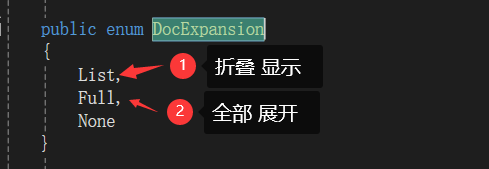
- DocExpansion: 设置文档展开的默认行为。
uiConfig.DocExpansion(DocExpansion.NONE); // 不自动展开文档
- MaxDisplayedTags: 设置Swagger UI中显示的最大标签数。
uiConfig.MaxDisplayedTags(10); // 最多显示10个标签
- OperationsSorter: 设置Swagger UI中API操作的排序方式。
uiConfig.OperationsSorter(OperationsSorter.ALPHA); // 按字母顺序排序
- TagsSorter: 设置Swagger UI中标签的排序方式。
uiConfig.TagsSorter(TagsSorter.ALPHA); // 按字母顺序排序
- ValidatorUrl: 设置或禁用Swagger UI中的在线验证器。
uiConfig.ValidatorUrl("https://online.swagger.io/validator");
请注意,Swagger UI的配置选项可能会随着版本的更新而变化。
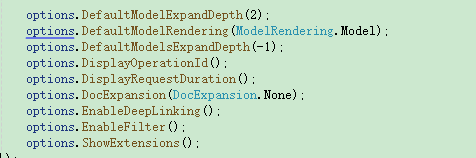
全配置如下图所示
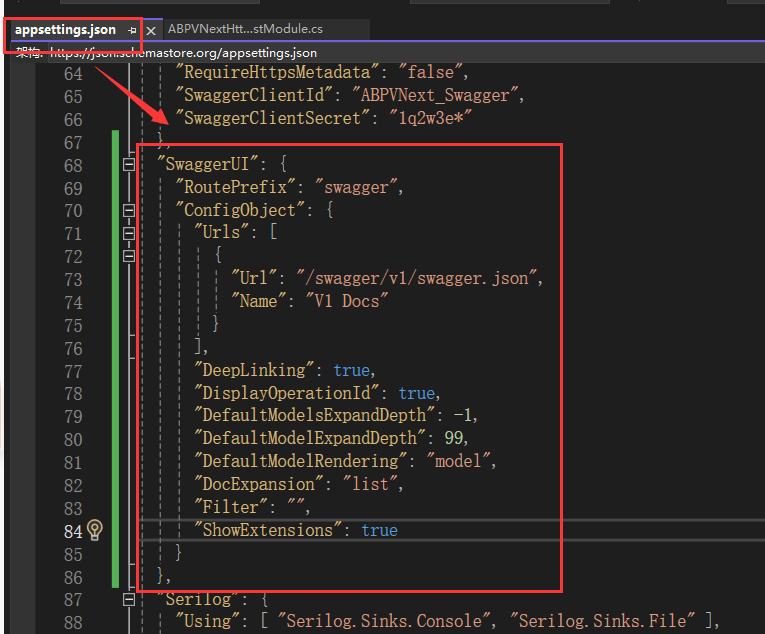
三,SwaggerUI配置写在appsetting.json文件
程序启动项目中配置:
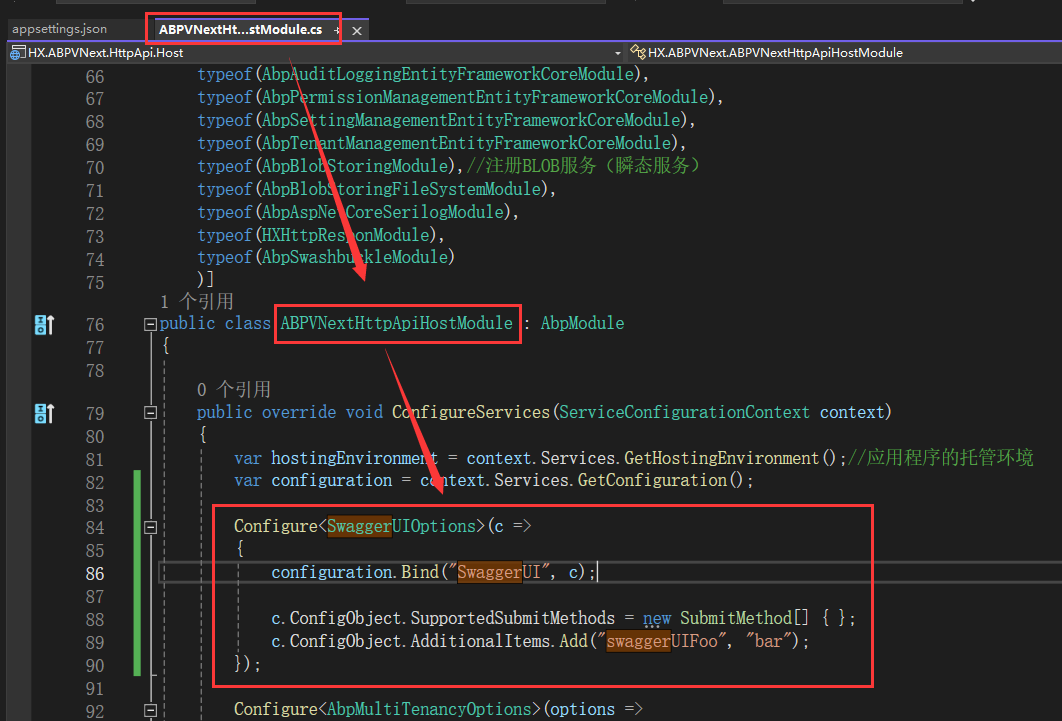
这样配置后,配置项的值可以在appsetting.json中动态配置
示例代码
  "SwaggerUI": {
    "RoutePrefix": "swagger",
    "ConfigObject": {
      "Urls": [
        {
          "Url": "/swagger/v1/swagger.json",
          "Name": "V1 Docs"
        }
      ],
      "DeepLinking": true,
      "DisplayOperationId": false,
      "DefaultModelsExpandDepth": -1,
      "DefaultModelExpandDepth": 99,
      "DefaultModelRendering": "example",//另外一种模式:model
      "DocExpansion": "list",
      "Filter": "",
      "ShowExtensions": true
    }
  },
       Configure<SwaggerUIOptions>(c =>
       {
           configuration.Bind("SwaggerUI", c);
           ////SupportedSubmitMethods属性定义了Swagger UI中允许提交的HTTP方法类型。将其设置为空数组将隐藏所有HTTP方法的提交按钮。
           //c.ConfigObject.SupportedSubmitMethods = new SubmitMethod[] { };
           ////AdditionalItems是一个字典,允许你添加任何额外的键值对。在这个例子中,添加了一个键为"swaggerUIFoo",值为"bar"的项。这些自定义项可以用来扩展Swagger UI的功能或提供一些自定义的配置
           //c.ConfigObject.AdditionalItems.Add("swaggerUIFoo", "bar");
       });

 浙公网安备 33010602011771号