
c#读取txt文件并导入到数据库
这是一个ado.net和文件操作相结合的一个例子,比较经典哦。做的过程中出现了好多问题最终还是做出来了,学习的确需要别人的帮助,如果别人有问题了不管多忙都先学着去帮助别人,因为你要相信你并不是什么都会。学习相互提高才是最好的状态。做这个小例子我问了一个网上的“高手”他却骗我说在加班,不帮我解决问题。强烈鄙视这类人,不是熟人就不能问问题了吗?让这些人见鬼去吧。
我先贴代码啊,后面再给大家说我遇到的问题
-
using System;
-
using System.Collections.Generic;
-
using System.ComponentModel;
-
using System.Data;
-
using System.Drawing;
-
using System.Linq;
-
using System.Text;
-
using System.Windows.Forms;
-
using System.IO;
-
using System.Data.SqlClient;
-
-
namespace 文件的导入
-
{
-
public partial class Form1 : Form
-
{
-
public Form1()
-
{
-
InitializeComponent();
-
}
-
-
private void nybutton_Click(object sender, EventArgs e)
-
{
-
if(myimport.ShowDialog()!=DialogResult.OK){
-
return;
-
}
-
//使用FileStream读取文件
-
FileStream fileStream = File.OpenRead(myimport.FileName);
-
-
-
-
SqlConnection conn = new SqlConnection(@"Data Source=.\SQLEXPRESS;AttachDbFilename=g:\vsworkspace\文件的导入\文件的导入\hnspi.mdf;Integrated Security=True;User Instance=True");
-
-
-
-
-
StreamReader reader = new StreamReader(fileStream);
-
-
-
conn.Open();
-
//向数据库插入数据
-
SqlCommand command = conn.CreateCommand();
-
-
command.CommandText = "insert into student (sno,sname) values (@Sno,@Sname)";
-
string line = null;
-
while ((line = reader.ReadLine())!= null)
-
{
-
string[] str = line.Split(',');
-
-
string num = str[0];
-
string name= str[1];
-
command.Parameters.Clear(); //每次插入都要清除参数
-
command.Parameters.Add(new SqlParameter("Sno", num));
-
command.Parameters.Add(new SqlParameter("Sname", name));
-
//int tem=command.ExecuteNonQuery();
-
-
if (command.ExecuteNonQuery() > 0)
-
-
{
-
MessageBox.Show("1条数据保存成功");
-
}
-
//MessageBox.Show(command.ExecuteNonQuery().ToString());
-
}
-
-
fileStream.Close();
-
reader.Close();
-
conn.Dispose();
-
-
}
-
-
-
-
}
-
}
-
-
// MessageBox.Show("数据保存成功");
-
-
我做的时候遇到了这2个问题
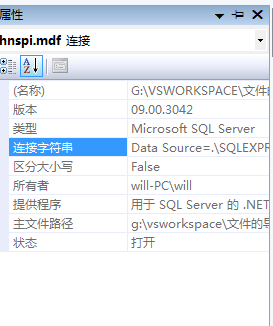
1.连接字符串不对,在这里可以把它复制过来,就是右击数据连接下面的mdf文件,找到属性
2.插入的时候没有clear参数,这个问题是最容易出现的
程序中的东西的确需要仔细琢磨,遇到问题了不要轻易放弃。因为我也是在百度里找了好几十页的连接才找到解决方法的。希望能够和大家分享我的代码和开发经验。

 浙公网安备 33010602011771号