[转载] - 修改UrlRewrite以对域名进行重写,即实现二级或多级域名
2008-05-31 10:33 黄明 阅读(663) 评论(0) 收藏 举报
项目中需要用到二级域名转跳 实现多级城市子域名
原来一直用的HttpHandle 实现语义页面重写
现在有二级域名及多级域名这个需求了
在网上找了一下,摘录一下:
大家应该知道,微软的URLRewrite能够对URL进行重写,但是也只能对域名之后的部分进行重写,而不能对域名进行重写,如:
可将
http://www.abc.com/1234/
重写为
http://www.abc.com/show.aspx?id=1234
但不能将
http://1234.abc.com 重写为 http://www.abc.com/show.aspx?id=1234
要实现这个功能,前提条件就是 www.abc.com 是[泛解析]的,再就是要修改一下URLRewriter了。
 *
*
关于泛解析,就是在服务器上对域名进行处理
例:在万网的域名解析管理上,将添加一个新的A记录, *.abc.com 的域名指向你的服务器地址
这样凡是 .abc.com 主域名的二级域名处理就交给你的服务器处理了。
总共要修改2个文件
1.BaseModuleRewriter.cs
protected virtual void BaseModuleRewriter_AuthorizeRequest(object sender, EventArgs e)
 {
{
 HttpApplication app = (HttpApplication) sender;
Rewrite(app.Request.Path, app);
 }
}
修改为
protected virtual void BaseModuleRewriter_AuthorizeRequest(object sender, EventArgs e)
{
HttpApplication app = (HttpApplication) sender;
Rewrite(app.Request.Url.AbsoluteUri, app);
}
就是将 app.Request.Path 替换成了 app.Request.Url.AbsoluteUri
2.ModuleRewriter.cs
for(int i = 0; i < rules.Count; i++)
{
// get the pattern to look for, and Resolve the Url (convert ~ into the appropriate directory)
string lookFor = "^" + RewriterUtils.ResolveUrl(app.Context.Request.ApplicationPath, rules[i].LookFor) + "$";
// Create a regex (note that IgnoreCase is set)
Regex re = new Regex(lookFor, RegexOptions.IgnoreCase);
// See if a match is found
if (re.IsMatch(requestedPath))
 {
{
// match found - do any replacement needed
string sendToUrl = RewriterUtils.ResolveUrl(app.Context.Request.ApplicationPath, re.Replace(requestedPath, rules[i].SendTo));
// log rewriting information to the Trace object
app.Context.Trace.Write("ModuleRewriter", "Rewriting URL to " + sendToUrl);
// Rewrite the URL
RewriterUtils.RewriteUrl(app.Context, sendToUrl);
break; // exit the for loop
 }
}
}
修改为:
for(int i = 0; i < rules.Count; i++)
{
// get the pattern to look for, and Resolve the Url (convert ~ into the appropriate directory)
string lookFor = "^" + rules[i].LookFor + "$";
// Create a regex (note that IgnoreCase is set)
Regex re = new Regex(lookFor, RegexOptions.IgnoreCase);
// See if a match is found
if (re.IsMatch(requestedPath))
{
// match found - do any replacement needed
string sendToUrl = RewriterUtils.ResolveUrl(app.Context.Request.ApplicationPath, re.Replace(requestedPath, rules[i].SendTo));
// log rewriting information to the Trace object
app.Context.Trace.Write("ModuleRewriter", "Rewriting URL to " + sendToUrl);
// Rewrite the URL
RewriterUtils.RewriteUrl(app.Context, sendToUrl);
break; // exit the for loop
}
}
将
string lookFor = "^" + RewriterUtils.ResolveUrl(app.Context.Request.ApplicationPath, rules[i].LookFor) + "$";
改成了
string lookFor = "^" + rules[i].LookFor + "$";
完成这2处改动之后重新编译项目,将生成的dll复制到bin目录下。
再就是写web.config里的重写正则了
<RewriterRule>
<LookFor>http://(\d+)\.abc\.com</LookFor>
<SendTo>/show.aspx?id=$1</SendTo>
</RewriterRule>
好了大功告成,你在IE地址栏输入
http://1234.abc.com,
就可以看到
http://www.abc.com/show.aspx?id=1234 的结果了
输入了域名http://1234.abc.com,浏览器提示找不到网页。首先,你应该确认你的域名是否支持泛域名解析,就是让所有的二级,三级域名都指向你的server。其次,要保证你的站点是服务器上的默认站点,就是80端口主机头为空的站点即可以直接用IP可以访问的http://1234.abc.com,要么要提示你的站点的错误信息,要么会正确的执行你定义的URLRewrite,要么显示你的站点的首页。
2.不能执行重写的问题
如果你确认你的域名解析是正确的,但是还是不能重写,访问http://1234.abc.com会提示路径"/"找不到...,
如果是这样的话,你先添加 ASPNET_ISAPI的通配符应用程序映射(这一步是必需的,Sorry!没有在上篇文章中提出来)。
操作方法:IIS站点属性 ->主目录 -> 配置
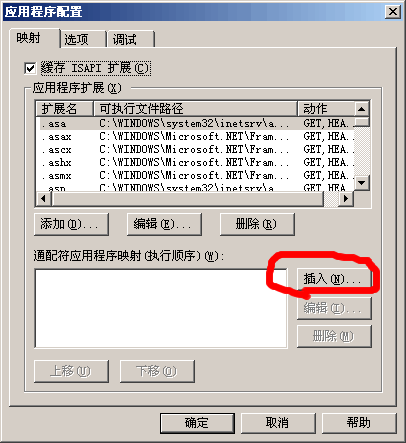
点击插入按键
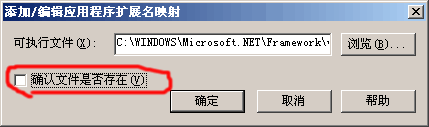
选择或输入C:"WINDOWS"Microsoft.NET"Framework"v1.1.4322"aspnet_isapi.dll
取消"确认文件是否存在"前的钩.
确定
在来访问http://1234.abc.com 应该是没有问题了。
3. 默认首页失效,因为把请球直接交给asp.net处理,IIS定义的默认首页将会失效,出现这种情形:
访问 http://www.abc.com 不能访问首页,而通过http://1234.abc.com/default.aspx可以访问。
解决:
请自己在Web.Config中设置 lookfor / to /default.aspx 或 index.aspx ..的重写,完全可以解决问题。
Web.Config
<RewriterRule>
<LookFor>/</LookFor>
<SendTo>/default.aspx</SendTo>
</RewriterRule>
以上部分内容是转载于网络,将容易忘记的内容作了补充。
原来一直用的HttpHandle 实现语义页面重写
现在有二级域名及多级域名这个需求了
在网上找了一下,摘录一下:
大家应该知道,微软的URLRewrite能够对URL进行重写,但是也只能对域名之后的部分进行重写,而不能对域名进行重写,如:
可将
http://www.abc.com/1234/
重写为
http://www.abc.com/show.aspx?id=1234
但不能将
http://1234.abc.com 重写为 http://www.abc.com/show.aspx?id=1234
要实现这个功能,前提条件就是 www.abc.com 是[泛解析]的,再就是要修改一下URLRewriter了。
* 关于泛解析,就是在服务器上对域名进行处理 例:在万网的域名解析管理上,将添加一个新的A记录, *.abc.com 的域名指向你的服务器地址 这样凡是 .abc.com 主域名的二级域名处理就交给你的服务器处理了。总共要修改2个文件
1.BaseModuleRewriter.cs
protected virtual void BaseModuleRewriter_AuthorizeRequest(object sender, EventArgs e) {
 HttpApplication app = (HttpApplication) sender; Rewrite(app.Request.Path, app); }
修改为
protected virtual void BaseModuleRewriter_AuthorizeRequest(object sender, EventArgs e) { HttpApplication app = (HttpApplication) sender; Rewrite(app.Request.Url.AbsoluteUri, app); }就是将 app.Request.Path 替换成了 app.Request.Url.AbsoluteUri
2.ModuleRewriter.cs
for(int i = 0; i < rules.Count; i++) { // get the pattern to look for, and Resolve the Url (convert ~ into the appropriate directory) string lookFor = "^" + RewriterUtils.ResolveUrl(app.Context.Request.ApplicationPath, rules[i].LookFor) + "$"; // Create a regex (note that IgnoreCase is set) Regex re = new Regex(lookFor, RegexOptions.IgnoreCase); // See if a match is found if (re.IsMatch(requestedPath)) { // match found - do any replacement needed string sendToUrl = RewriterUtils.ResolveUrl(app.Context.Request.ApplicationPath, re.Replace(requestedPath, rules[i].SendTo)); // log rewriting information to the Trace object app.Context.Trace.Write("ModuleRewriter", "Rewriting URL to " + sendToUrl); // Rewrite the URL RewriterUtils.RewriteUrl(app.Context, sendToUrl); break; // exit the for loop } }
修改为:
for(int i = 0; i < rules.Count; i++) { // get the pattern to look for, and Resolve the Url (convert ~ into the appropriate directory) string lookFor = "^" + rules[i].LookFor + "$"; // Create a regex (note that IgnoreCase is set) Regex re = new Regex(lookFor, RegexOptions.IgnoreCase); // See if a match is found if (re.IsMatch(requestedPath)) { // match found - do any replacement needed string sendToUrl = RewriterUtils.ResolveUrl(app.Context.Request.ApplicationPath, re.Replace(requestedPath, rules[i].SendTo)); // log rewriting information to the Trace object app.Context.Trace.Write("ModuleRewriter", "Rewriting URL to " + sendToUrl); // Rewrite the URL RewriterUtils.RewriteUrl(app.Context, sendToUrl); break; // exit the for loop } }将
string lookFor = "^" + RewriterUtils.ResolveUrl(app.Context.Request.ApplicationPath, rules[i].LookFor) + "$";
改成了
string lookFor = "^" + rules[i].LookFor + "$";
完成这2处改动之后重新编译项目,将生成的dll复制到bin目录下。
再就是写web.config里的重写正则了
<RewriterRule> <LookFor>http://(\d+)\.abc\.com</LookFor> <SendTo>/show.aspx?id=$1</SendTo></RewriterRule>好了大功告成,你在IE地址栏输入
http://1234.abc.com,
就可以看到
http://www.abc.com/show.aspx?id=1234 的结果了
问题:
1.域名解析问题输入了域名http://1234.abc.com,浏览器提示找不到网页。首先,你应该确认你的域名是否支持泛域名解析,就是让所有的二级,三级域名都指向你的server。其次,要保证你的站点是服务器上的默认站点,就是80端口主机头为空的站点即可以直接用IP可以访问的http://1234.abc.com,要么要提示你的站点的错误信息,要么会正确的执行你定义的URLRewrite,要么显示你的站点的首页。
2.不能执行重写的问题
如果你确认你的域名解析是正确的,但是还是不能重写,访问http://1234.abc.com会提示路径"/"找不到...,
如果是这样的话,你先添加 ASPNET_ISAPI的通配符应用程序映射(这一步是必需的,Sorry!没有在上篇文章中提出来)。
操作方法:IIS站点属性 ->主目录 -> 配置
点击插入按键
选择或输入C:"WINDOWS"Microsoft.NET"Framework"v1.1.4322"aspnet_isapi.dll
取消"确认文件是否存在"前的钩.
确定
在来访问http://1234.abc.com 应该是没有问题了。
3. 默认首页失效,因为把请球直接交给asp.net处理,IIS定义的默认首页将会失效,出现这种情形:
访问 http://www.abc.com 不能访问首页,而通过http://1234.abc.com/default.aspx可以访问。解决:请自己在Web.Config中设置 lookfor / to /default.aspx 或 index.aspx ..的重写,完全可以解决问题。
<RewriterRule> <LookFor>/</LookFor> <SendTo>/default.aspx</SendTo></RewriterRule>以上部分内容是转载于网络,将容易忘记的内容作了补充。

 浙公网安备 33010602011771号