
2021 5 11 团队博客9
这次是实现了首页的三个底部导航栏,方便后续添加相对应的功能。
效果如下:
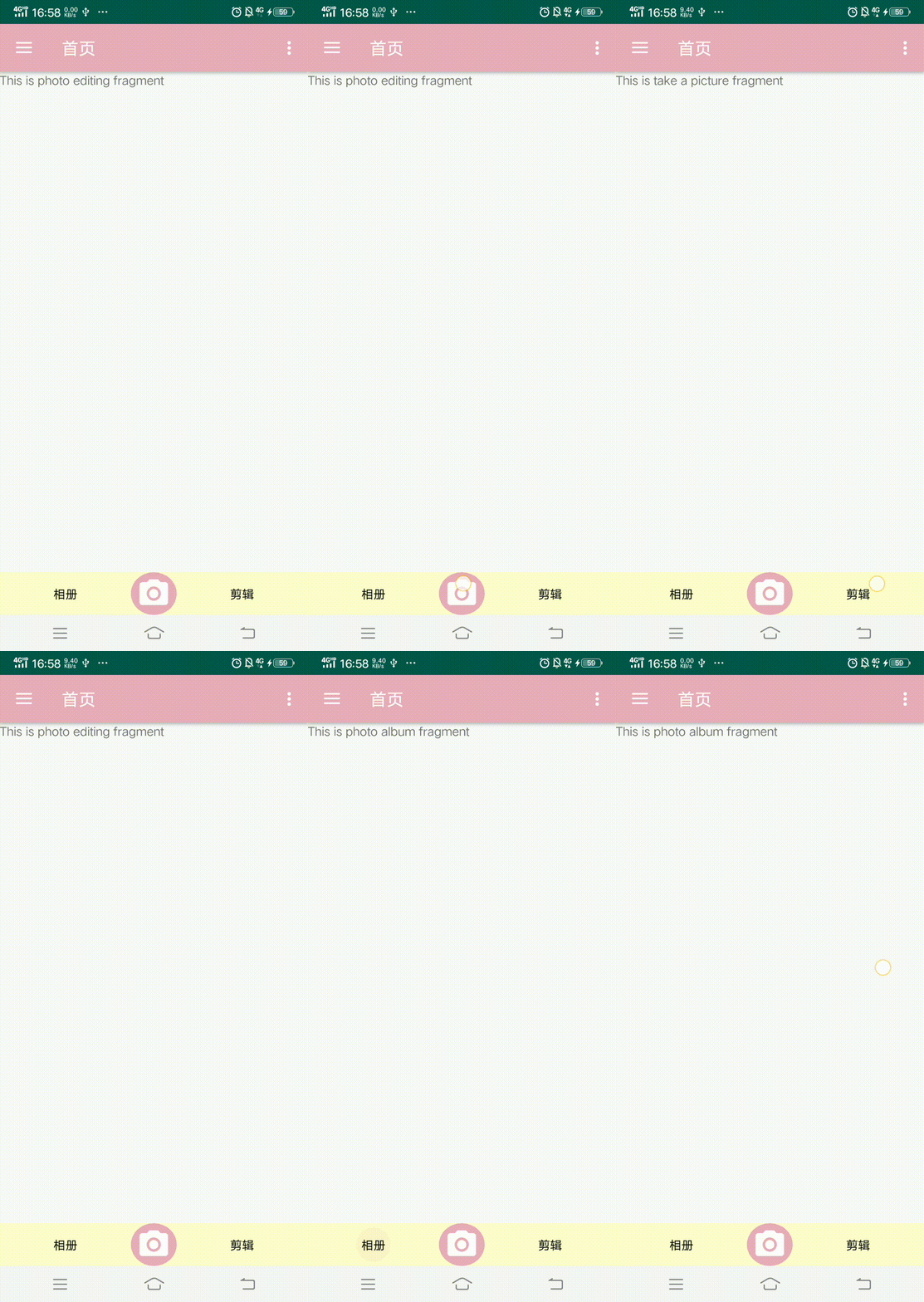
部分代码如下(省略了一些后端代码):
fragment_home.xml

 1 <?xml version="1.0" encoding="utf-8"?>
 2 <LinearLayout xmlns:android="http://schemas.android.com/apk/res/android"
 3     xmlns:app="http://schemas.android.com/apk/res-auto"
 4     android:layout_width="match_parent"
 5     android:layout_height="match_parent"
 6     android:orientation="vertical"
 7     xmlns:tools="http://schemas.android.com/tools">
 8
 9     <FrameLayout
10         android:id="@+id/home_fragment_container"
11         android:layout_width="match_parent"
12         android:layout_height="0dp"
13         android:layout_weight="1">
14     </FrameLayout>
15
16     <include layout="@layout/home_tab_view_navigation"/>
17
18 </LinearLayout>
home_tab_view_navigation.xml
 1 <?xml version="1.0" encoding="utf-8"?>
 2 <LinearLayout xmlns:android="http://schemas.android.com/apk/res/android"
 3     android:orientation="horizontal"
 4     android:layout_width="match_parent"
 5     android:layout_height="50dp"
 6     android:layout_gravity="bottom">
 7
 8     <RadioGroup
 9         android:id="@+id/home_tb"
10         android:layout_width="match_parent"
11         android:layout_height="match_parent"
12         android:layout_alignParentBottom="true"
13         android:background="@color/colorTab"
14         android:orientation="horizontal">
15
16         <RadioButton
17             android:id="@+id/photo_album"
18             style="@style/Custom.TabRadioButton"
19             android:layout_width="100dp"
20             android:checked="true"
21             android:text="相册" />
22
23 <!--        <View style="@style/Custom.TabRadioButton" />-->
24
25         <ImageView
26             android:id="@+id/take_a_picture"
27             style="@style/Custom.TabRadioButton"
28             android:background="@drawable/background_camera"
29             android:src="@drawable/ic_menu_camera" />
30
31         <RadioButton
32             android:id="@+id/photo_editing"
33             style="@style/Custom.TabRadioButton"
34             android:layout_width="100dp"
35             android:text="剪辑" />
36
37     </RadioGroup>
38
39 </LinearLayout>
activity_photo_album.xml
 1 <?xml version="1.0" encoding="utf-8"?>
 2 <LinearLayout xmlns:android="http://schemas.android.com/apk/res/android"
 3     xmlns:app="http://schemas.android.com/apk/res-auto"
 4     xmlns:tools="http://schemas.android.com/tools"
 5     android:layout_width="match_parent"
 6     android:layout_height="match_parent"
 7     android:orientation="vertical">
 8
 9     <TextView
10         android:layout_width="wrap_content"
11         android:layout_height="wrap_content"
12         android:text="This is photo album fragment" />
13
14 </LinearLayout>
activity_photo_editing.xml
 1 <?xml version="1.0" encoding="utf-8"?>
 2 <LinearLayout xmlns:android="http://schemas.android.com/apk/res/android"
 3     xmlns:app="http://schemas.android.com/apk/res-auto"
 4     xmlns:tools="http://schemas.android.com/tools"
 5     android:layout_width="match_parent"
 6     android:layout_height="match_parent"
 7     android:orientation="vertical">
 8
 9     <TextView
10         android:layout_width="wrap_content"
11         android:layout_height="wrap_content"
12         android:text="This is photo editing fragment" />
13
14 </LinearLayout>
activity_take_a_picture.xml
 1 <?xml version="1.0" encoding="utf-8"?>
 2 <LinearLayout xmlns:android="http://schemas.android.com/apk/res/android"
 3     xmlns:app="http://schemas.android.com/apk/res-auto"
 4     xmlns:tools="http://schemas.android.com/tools"
 5     android:layout_width="match_parent"
 6     android:layout_height="match_parent"
 7     android:orientation="vertical">
 8
 9     <TextView
10         android:layout_width="wrap_content"
11         android:layout_height="wrap_content"
12         android:text="This is take a picture fragment" />
13
14 </LinearLayout>
HomeFragment.java
  1 package com.michael.cloudphotos;
  2
  3 import android.os.Bundle;
  4 import android.view.LayoutInflater;
  5 import android.view.View;
  6 import android.view.ViewGroup;
  7 import android.widget.ImageView;
  8 import android.widget.RadioButton;
  9 import androidx.annotation.NonNull;
 10 import androidx.fragment.app.Fragment;
 11 import androidx.fragment.app.FragmentManager;
 12 import androidx.fragment.app.FragmentTransaction;
 13
 14 import com.michael.cloudphotos.Home_Fragment.Photo_Album_Fragment;
 15 import com.michael.cloudphotos.Home_Fragment.Photo_Editing_Fragment;
 16 import com.michael.cloudphotos.Home_Fragment.Take_A_Picture_Fragment;
 17
 18
 19 public class HomeFragment extends Fragment {
 20
 21     private RadioButton mphoto_album;
 22     private RadioButton mphoto_editing;
 23     private ImageView mpicture;
 24
 25     private Photo_Album_Fragment photo_album_fragment;
 26     private Photo_Editing_Fragment photo_editing_fragment;
 27     private Take_A_Picture_Fragment take_a_picture_fragment;
 28
 29     public View onCreateView(@NonNull LayoutInflater inflater, ViewGroup container, Bundle savedInstanceState) {
 30         View root = inflater.inflate(R.layout.fragment_home, container, false);
 31
 32         //初始化,各种View
 33         mphoto_album=root.findViewById(R.id.photo_album);
 34         mphoto_editing=root.findViewById(R.id.photo_editing);
 35         mpicture=root.findViewById(R.id.take_a_picture);
 36
 37         //进入首页,直接选择第一个“相册”页面
 38         select(0);
 39
 40         mphoto_album.setOnClickListener(new View.OnClickListener() {
 41             @Override
 42             public void onClick(View v) {
 43                 select(0);
 44             }
 45         });
 46
 47         mphoto_editing.setOnClickListener(new View.OnClickListener() {
 48             @Override
 49             public void onClick(View v) {
 50                 select(1);
 51             }
 52         });
 53
 54         mpicture.setOnClickListener(new View.OnClickListener() {
 55             @Override
 56             public void onClick(View v) {
 57                 select(2);
 58             }
 59         });
 60
 61         return root;
 62     }
 63
 64     private void select(int i){
 65         FragmentManager fm = getFragmentManager();  //获得Fragment管理器
 66         FragmentTransaction ft = fm.beginTransaction(); //开启一个事务
 67
 68         hideFragment(ft);   //先隐藏 Fragment
 69
 70         switch (i){
 71             case 0:
 72                 if (photo_album_fragment == null){
 73                     photo_album_fragment = new Photo_Album_Fragment();
 74                     ft.add(R.id.home_fragment_container,photo_album_fragment);
 75                 }else{
 76                     ft.show(photo_album_fragment);
 77                 }
 78                 break;
 79             case 1:
 80                 if (photo_editing_fragment == null){
 81                     photo_editing_fragment = new Photo_Editing_Fragment();
 82                     ft.add(R.id.home_fragment_container,photo_editing_fragment);
 83                 }else {
 84                     ft.show(photo_editing_fragment);
 85                 }
 86                 break;
 87             case 2:
 88                 if (take_a_picture_fragment == null){
 89                     take_a_picture_fragment = new Take_A_Picture_Fragment();
 90                     ft.add(R.id.home_fragment_container,take_a_picture_fragment);
 91                 }else {
 92                     ft.show(take_a_picture_fragment);
 93                 }
 94                 break;
 95         }
 96         ft.commit();   //提交事务
 97     }
 98
 99     //隐藏所有Fragment
100     private void hideFragment(FragmentTransaction fragmentTransaction){
101         if (photo_album_fragment != null){
102             fragmentTransaction.hide(photo_album_fragment);
103         }
104         if (photo_editing_fragment != null){
105             fragmentTransaction.hide(photo_editing_fragment);
106         }
107         if (take_a_picture_fragment != null){
108             fragmentTransaction.hide(take_a_picture_fragment);
109         }
110     }
111
112
113 }

 浙公网安备 33010602011771号