
小工具——IO复制文件
IO复制文件
利用输入输出流复制文件,设置缓冲数组能让操作更快。
IO主要步骤:创建源、选择流、操作和关闭流(先开的后关闭原则)
代码如下:
//文件copy工具类
package com.xu.baseclass;

import java.io.File;
import java.io.FileInputStream;
import java.io.FileNotFoundException;
import java.io.FileOutputStream;
import java.io.IOException;
import java.io.InputStream;
import java.io.OutputStream;

public class FileCopyTool {
    public static void main(String[] args) {
        copyFile("英语阅读.jpg", "engread.jpg");
    }

    //封装拷贝方法,方便调用
    public static void copyFile(String src, String end) {
        //创建源
        FileInputStream fis = null;
        FileOutputStream fos = null;
        try {
            //选择流
            fis = new FileInputStream(src);
            fos = new FileOutputStream(end);
            //缓冲数组
            byte[] buff = new byte[1024];
            int len = 0;
            while ((len = fis.read(buff)) != -1) {
                //写出缓冲数组信息len = fis.read(buff)读出数组长度,若文件结束了则read返回是-1
                fos.write(buff, 0, len);
            }
            fos.flush();//刷新


        } catch (FileNotFoundException e) {
            e.printStackTrace();
        } catch (IOException e) {
            e.printStackTrace();
        } finally {
            //关闭流,先开后关原则
            //关闭输出流
            if (fos != null) {
                try {
                    fos.close();
                } catch (IOException e) {
                    e.printStackTrace();
                }
            }
            //关闭输入流
            if (fis != null) {
                try {
                    fis.close();
                } catch (IOException e) {
                    e.printStackTrace();
                }
            }

        }

    }
}
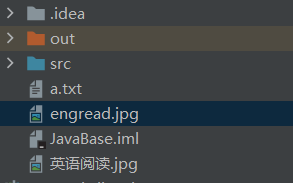
结果如下:

 浙公网安备 33010602011771号