关于百度oauth2.0登陆的诸多问题

众所周知(至少对于用百度作为第三方平台的人是的),百度账号登陆是真的很容易申请到一个id,但是,他有一个问题,就是:


很容易出错


我做这个东西的时候,至少弄出了不下十个错误。现在,我就告诉大家这些问题如何解决
1、百度开发者管理中心怎么进
回答:不要指望在百度上能直接找到连接,你只能点击下方链接进入,也不要指望在百度开发者中心主页进入,更不要指望着自己乱猜网址。
连接:http://developer.baidu.com/console#app/project点击此处跳转

(你要是乱打网址进去了,那么:欧皇,请受我一拜!)
2、怎么创建应用
在这里插入图片描述
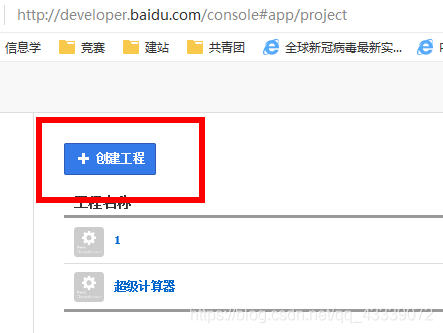
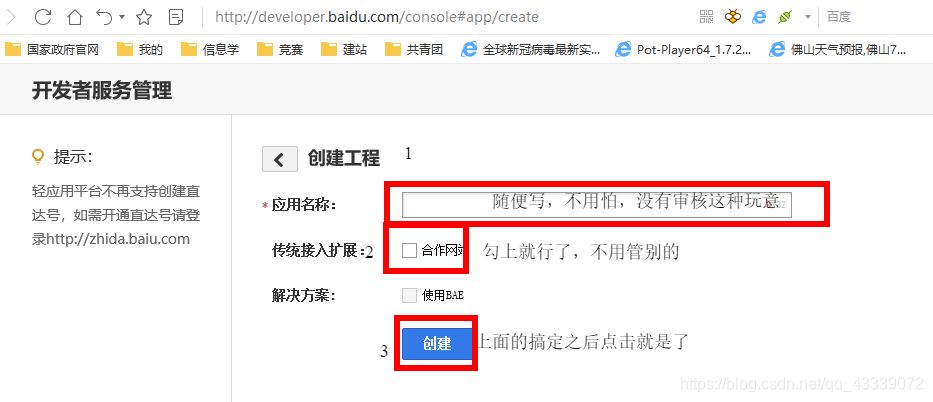
点击创建工程(若按钮被百度隐藏,请点击此处或复制下方链接http://developer.baidu.com/console#app/create)
在这里插入图片描述
按提示填写相关信息
至此,创建工程就可以了

3、怎么登陆
这个问题可算是折腾我半天了。
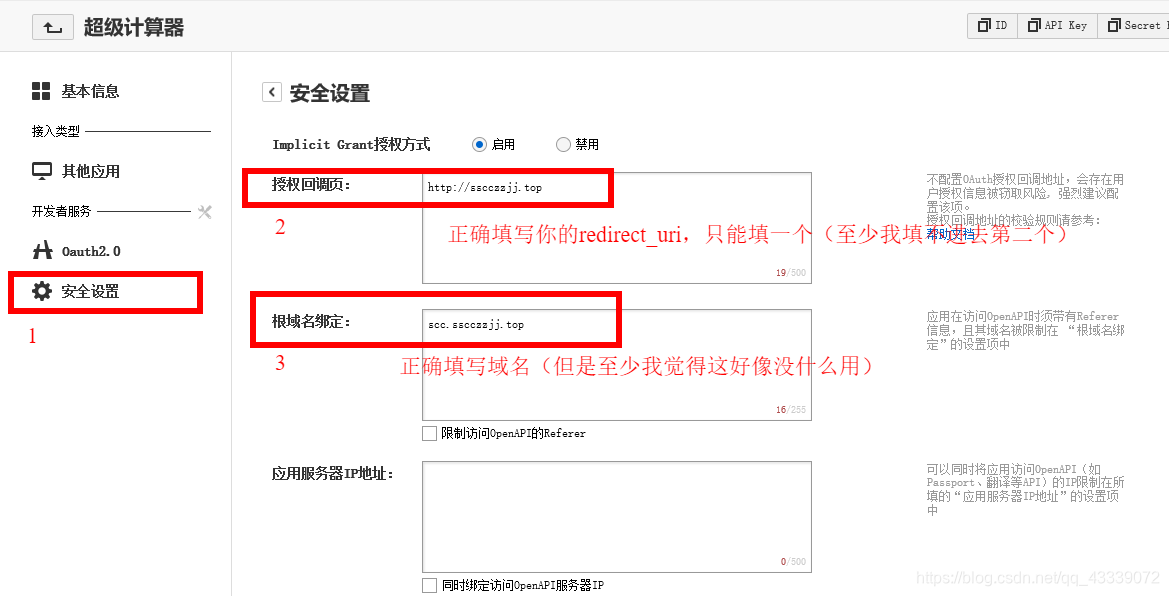
1、初始设置
在这里插入图片描述
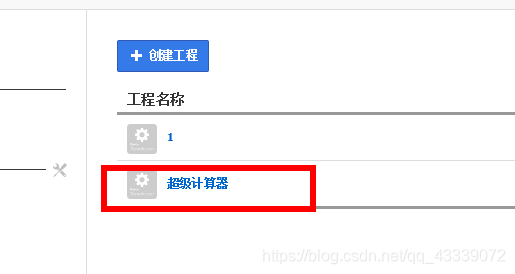
点击你要进入的工程
在这里插入图片描述
按图示填写信息,然后点击保存

====================
至此,你已经搞定了后台工作

====================
废话不多说,php代码直接上
1、注册(我是在注册时强制绑定百度账号的,但是如果你只是想作为一种第三方登陆工具,也可以参考,你可以只看获取code和access_token的部分

<?php

//常量设置
header("charset=utf-8");

//连接数据库
	$con = mysql_connect("localhost","这里填账号",这里填密码);
	if (!$con)
	{
		die('Could not connect: ' . mysql_error());
	}
	mysql_select_db("sfydb_6273437", $con);

//这说明是传回了code
if($_GET['code']!="")
{

	//判断是否已注册
	$result = mysql_query("SELECT * FROM userlist where Userid = '".$_GET['Userid']."'");
	$count=mysql_num_rows($result);
	if($count!=0)
	{
		die("这个账号已经被注册过了");
	}
	
	//获取token
	$url="https://openapi.baidu.com/oauth/2.0/token?grant_type=authorization_code&code=".$_GET['code']."&client_id=BIPCjdmpveslLNrKovbStQ3t&client_secret=我当然不会告诉你secret是多少&redirect_uri=http://sscczzjj.top?Userid=".$_GET['Userid']."%26Password=".str_replace("=","%253D",$_GET['Password']);
	$html = file_get_contents($url);
	$TokenText = json_decode($html, true);

	//获取失败
	if($TokenText["error"]!="")
	{
		die($TokenText["error_description"]);
	}

	//读取资料
	$url="https://openapi.baidu.com/rest/2.0/passport/users/getLoggedInUser?access_token=".$TokenText['access_token'];
	$html = file_get_contents($url);
	$InfoText = json_decode($html, true);
	
	//判断此id是否已注册
	$result = mysql_query("SELECT * FROM userlist where Baiduuid = '".$InfoText['openid']."'");
	$count=mysql_num_rows($result);
	if($count!=0)
	{
		die("此百度id已注册过一个账号");
	}

	//获取失败
	if($InfoText["error_msg"]!="")
	{
		die($InfoText["error_msg"]);
	}

	//写数据库
	mysql_query("INSERT INTO userlist (Userid, Password, AccessToken, UserName, Baiduuid, Cookie, RefershToken) VALUES ('".$Userid."', '".$Password."', '".$TokenText['access_token']."', '".$InfoText['uname']."', '".$InfoText['openid']."', '".$Cookie."', '".$TokenText['refresh_token']."')");
	
	//返回成功
	die("注册成功,请选择登陆操作进行登陆");
}

//表明是由客户端发起注册请求
if($_GET['firstinto']!="")
{
	//判断是否已注册
	$result = mysql_query("SELECT * FROM userlist where Userid = '".$_GET['Userid']."'");
	$count=mysql_num_rows($result);
	if($count!=0)
	{
		die("这个账号已经被注册过了");
	}

	//获取code
	$url="https://openapi.baidu.com/oauth/2.0/authorize?response_type=code&confirm_login=1&client_id=BIPCjdmpveslLNrKovbStQ3t&redirect_uri=http://sscczzjj.top?Userid=".$_GET['Userid']."%26Password=".str_replace("=","%253D",$_GET['Password']);
	Header("Location:$url");
}


//加密
function encryptForDotNet($input, $key)
{
	$iv = $key;
	$addnum = 8 - ( strlen($input) % 8 );
	for ($i = 0; $i < $addnum; $i++)
	{
		$input .= chr($addnum);
	}
	$output = mcrypt_encrypt(MCRYPT_DES, $key, $input, MCRYPT_MODE_CBC, $iv);
	return base64_encode($output);
}
//解密
function decryptForDotNet($input, $key)
{
	$iv = $key;
	$output = base64_decode($input);
	$output = mcrypt_decrypt(MCRYPT_DES, $key, $output, MCRYPT_MODE_CBC, $iv);
	for ($i = 0; $i <= 8; $i++)
	{
		$output = str_replace(chr($i), "", $output);
	}
	return $output;
}
?>

2、登陆

<?php

//常量设置
$con = mysql_connect("localhost","这里填写账号",这里填写密码);
if (!$con)
{
	die('Could not connect: ' . mysql_error());
}
mysql_select_db("sfydb_6273437", $con);
Login();

//主函数
function Login()
{
	$Password=decryptForDotNet($_GET['Password'],"AA");
	$Userid=$_GET['Userid'];
	$result = mysql_query("SELECT * FROM userlist where Userid = '".$Userid."'");
	$count=mysql_num_rows($result);
	if($count==0)
	{
		die("NoUser");
	}
	$row = mysql_fetch_array($result);
	if($row['Password']!=$_GET['Password'])
	{
		die("WrongPassword");
	}
	if($row['BaiduUid']=="")
	{
		die("NoToken.PleaseUseRegister");
	}

	//生成Cookie
	$Cookie = '';
	for ($i=1;$i<=1024;$i++)
	{    
	    $randstr = chr(rand(97,122));
	    $Cookie .= $randstr; 
	}
	$Cookie =encryptForDotNet($Cookie,"t68[]a*G");
	mysql_query("UPDATE userlist SET Cookie = '.$Cookie.' WHERE Userid='".$Userid."'");
	die("=".$Cookie);
}
//加密
function encryptForDotNet($input, $key)
{
	$iv = $key;
	$addnum = 8 - ( strlen($input) % 8 );
	for ($i = 0; $i < $addnum; $i++)
	{
		$input .= chr($addnum);
	}
	$output = mcrypt_encrypt(MCRYPT_DES, $key, $input, MCRYPT_MODE_CBC, $iv);
	return base64_encode($output);
}
//解密
function decryptForDotNet($input, $key)
{
	$iv = $key;
	$output = base64_decode($input);
	$output = mcrypt_decrypt(MCRYPT_DES, $key, $output, MCRYPT_MODE_CBC, $iv);
	for ($i = 0; $i <= 8; $i++)
	{
		$output = str_replace(chr($i), "", $output);
	}
	return $output;
}
?>

至此,后端搞定

废话还是不多说,再来个前端VBNET代码

1、代码


Imports System.Security.Cryptography
Imports System.Text
Imports System.IO

Public Class Login
    Private Sub CheckBox1_CheckedChanged(sender As Object, e As EventArgs) Handles CheckBox1.CheckedChanged
        If CheckBox1.Checked = True Then
            TextBox1.PasswordChar = ""
            TextBox2.PasswordChar = ""
        Else
            TextBox1.PasswordChar = "*"
            TextBox2.PasswordChar = "*"
        End If
    End Sub

    Private Sub RadioButton1_Click(sender As Object, e As EventArgs) Handles RadioButton1.Click
        TextBox1.Enabled = False
        GroupBox2.Enabled = False
        TextBox1.Text = ""
    End Sub

    Private Sub RadioButton2_Click(sender As Object, e As EventArgs) Handles RadioButton2.Click
        TextBox1.Enabled = True
    End Sub

    Private Sub Button1_Click(sender As Object, e As EventArgs) Handles Button1.Click
        Dim LoginResult1 As String = ""
        If RadioButton1.Checked = True Then
            LoginResult1 = CookieCenter.Password_Sign_in(TextBox3.Text, TextBox2.Text)
            If LoginResult1 <> "OK" Then
                MsgBox(LoginResult1, MsgBoxStyle.Exclamation, "Error")
            End If
        Else
            If TextBox1.Text <> TextBox2.Text Then
                MsgBox("DifferentPassword", MsgBoxStyle.Exclamation, "Error")
                Return
            End If
            If CookieCenter.CheckUnallowedChar(TextBox3.Text) = False OrElse CookieCenter.CheckUnallowedChar(TextBox2.Text) = False Then
                MsgBox("IncludesUnecpectedChar", MsgBoxStyle.Exclamation, "Error")
                Return
            End If
            If TextBox3.Text.Length > 20 OrElse TextBox2.Text.Length > 20 Then
                MsgBox("UserOrPasswordToLong", MsgBoxStyle.Exclamation, "Error")
                Return
            End If
            If TextBox3.Text.Length < 4 OrElse TextBox2.Text.Length < 6 Then
                MsgBox("UserOrPasswordToShort", MsgBoxStyle.Exclamation, "Error")
                Return
            End If
            GroupBox2.Enabled = True
            TextBox4.Text = "Http://sscczzjj.top/?firstinto=abc&Userid=" + TextBox3.Text + "&Password=" + SecurityCenter.EncriptStr(TextBox2.Text, "AA").Replace("=", "%3D")
            WebBrowser1.Url = New Uri("Http://sscczzjj.top/?firstinto=abc&Userid=" + TextBox3.Text + "&Password=" + SecurityCenter.EncriptStr(TextBox2.Text, "AA").Replace("=", "%3D"))
            'LoginResult1 = CookieCenter.Sign_up(TextBox3.Text, TextBox2.Text)
        End If
    End Sub
End Class


Public Class SecurityCenter '与php配套的加解密

    Public Shared Function EncriptStr(ByVal input As String, ByVal password As String, ByVal Optional encoding As Encoding = Nothing) As String
        encoding = If(encoding, Encoding.[Default])
        Dim iv = encoding.GetBytes(password)
        Dim key = encoding.GetBytes(password)
        Dim datas = encoding.GetBytes(input)
        Dim desCryptoServiceProvider = New DESCryptoServiceProvider()
        Using memoryStream = New MemoryStream()
            Using cryptoStream = New CryptoStream(memoryStream, desCryptoServiceProvider.CreateEncryptor(iv, key), CryptoStreamMode.Write)
                cryptoStream.Write(datas, 0, datas.Length)
                cryptoStream.FlushFinalBlock()
                Return Convert.ToBase64String(memoryStream.ToArray())
            End Using
        End Using
    End Function

    Public Shared Function DecriptStr(ByVal input As String, ByVal password As String, ByVal Optional encoding As Encoding = Nothing) As String
        encoding = If(encoding, Encoding.[Default])
        Dim iv = encoding.GetBytes(password)
        Dim key = encoding.GetBytes(password)
        Dim datas = Convert.FromBase64String(input)
        Dim desCryptoServiceProvider = New DESCryptoServiceProvider()
        Using memoryStream = New MemoryStream()
            Using cryptoStream = New CryptoStream(memoryStream, desCryptoServiceProvider.CreateDecryptor(iv, key), CryptoStreamMode.Write)
                cryptoStream.Write(datas, 0, datas.Length)
                cryptoStream.FlushFinalBlock()
                Return encoding.GetString(memoryStream.ToArray())
            End Using
        End Using
    End Function
End Class

Public Class HttpRequestions
    Public Shared Function POST(ByVal URL$, ByVal data$)
        Dim http
        On Error Resume Next
        http = CreateObject("WinHttp.WinHttpRequest.5.1")
        With http
            .Open("POST", URL, True)
            .Send(data) '发送请求
            .WaitForResponse() '一直等待到有回应再继续
        End With
        Dim request = http.responseText '此处用于储存返回的数据包
        http = Nothing '清理掉旧的http请求信息防止二次调用时裂开
        Return request '返回数据包
    End Function

    Public Shared Function GET1(ByVal URL$)
        Dim http
        On Error Resume Next
        http = CreateObject("WinHttp.WinHttpRequest.5.1")
        With http
            .Open("GET1", URL, True)
            .Send() '发送请求
            .WaitForResponse() '一直等待到有回应再继续
        End With
        Dim request = http.responseText '此处用于储存返回的数据包
        http = Nothing '清理掉旧的http请求信息防止二次调用时裂开
        Return request '返回数据包
    End Function
End Class

Public Class CookieCenter

    Public Cookie1 As String = ""
    'Public Key As String = "gYt6&^a;"
    Public EPassword As String = ""

    Public Shared Function Password_Sign_in(ByVal User As String, ByVal Password As String) As String
        If CheckUnallowedChar(User) = False OrElse CheckUnallowedChar(Password) = False Then
            Return "IncludesUnecpectedChar"
        End If
        If User.Length > 20 OrElse Password.Length > 20 Then
            Return "UserOrPasswordToLong"
        End If
        If User.Length < 4 OrElse Password.Length < 6 Then
            Return "UserOrPasswordToShort"
        End If
        Dim result As String = ""
        result = HttpRequestions.POST("Http://sscczzjj.top/PasswordLogin.php?Userid=" + User + "&Password=" + SecurityCenter.EncriptStr(Password, "AAA"), "")
        If result.StartsWith("=") = True Then
            My.Settings("Cookie") = result.Replace("=", "")
            Return "OK"
        Else
            MsgBox(result, MsgBoxStyle.Exclamation, "Error")
            Return "Failed"
        End If
    End Function

    Public Shared Function CheckUnallowedChar(ByVal CheckStringed As String) As Boolean
        For i = 32 To 47
            If CheckStringed.Replace(ChrW(i), "") <> CheckStringed Then
                Return False
            End If
        Next
        For i = 58 To 63
            If CheckStringed.Replace(ChrW(i), "") <> CheckStringed Then
                Return False
            End If
        Next
        For i = 91 To 96
            If CheckStringed.Replace(ChrW(i), "") <> CheckStringed Then
                Return False
            End If
        Next
        For i = 123 To 127
            If CheckStringed.Replace(ChrW(i), "") <> CheckStringed Then
                Return False
            End If
        Next
        Return True
    End Function
End Class

2、设计器代码

<Global.Microsoft.VisualBasic.CompilerServices.DesignerGenerated()> _
Partial Class Login
    Inherits System.Windows.Forms.Form

    'Form 重写 Dispose,以清理组件列表。
    <System.Diagnostics.DebuggerNonUserCode()> _
    Protected Overrides Sub Dispose(ByVal disposing As Boolean)
        Try
            If disposing AndAlso components IsNot Nothing Then
                components.Dispose()
            End If
        Finally
            MyBase.Dispose(disposing)
        End Try
    End Sub

    'Windows 窗体设计器所必需的
    Private components As System.ComponentModel.IContainer

    '注意: 以下过程是 Windows 窗体设计器所必需的
    '可以使用 Windows 窗体设计器修改它。  
    '不要使用代码编辑器修改它。
    <System.Diagnostics.DebuggerStepThrough()> _
    Private Sub InitializeComponent()
        Me.WebBrowser1 = New System.Windows.Forms.WebBrowser()
        Me.TabControl1 = New System.Windows.Forms.TabControl()
        Me.LAR = New System.Windows.Forms.TabPage()
        Me.GroupBox2 = New System.Windows.Forms.GroupBox()
        Me.GroupBox1 = New System.Windows.Forms.GroupBox()
        Me.TextBox4 = New System.Windows.Forms.TextBox()
        Me.Label6 = New System.Windows.Forms.Label()
        Me.Label4 = New System.Windows.Forms.Label()
        Me.Button1 = New System.Windows.Forms.Button()
        Me.CheckBox1 = New System.Windows.Forms.CheckBox()
        Me.RadioButton2 = New System.Windows.Forms.RadioButton()
        Me.RadioButton1 = New System.Windows.Forms.RadioButton()
        Me.Label5 = New System.Windows.Forms.Label()
        Me.TextBox3 = New System.Windows.Forms.TextBox()
        Me.TextBox2 = New System.Windows.Forms.TextBox()
        Me.TextBox1 = New System.Windows.Forms.TextBox()
        Me.Label3 = New System.Windows.Forms.Label()
        Me.Label2 = New System.Windows.Forms.Label()
        Me.Label1 = New System.Windows.Forms.Label()
        Me.TabControl1.SuspendLayout()
        Me.LAR.SuspendLayout()
        Me.GroupBox2.SuspendLayout()
        Me.GroupBox1.SuspendLayout()
        Me.SuspendLayout()
        '
        'WebBrowser1
        '
        Me.WebBrowser1.Dock = System.Windows.Forms.DockStyle.Fill
        Me.WebBrowser1.Location = New System.Drawing.Point(3, 17)
        Me.WebBrowser1.MinimumSize = New System.Drawing.Size(20, 20)
        Me.WebBrowser1.Name = "WebBrowser1"
        Me.WebBrowser1.Size = New System.Drawing.Size(500, 464)
        Me.WebBrowser1.TabIndex = 0
        Me.WebBrowser1.Url = New System.Uri("", System.UriKind.Relative)
        '
        'TabControl1
        '
        Me.TabControl1.Appearance = System.Windows.Forms.TabAppearance.Buttons
        Me.TabControl1.Controls.Add(Me.LAR)
        Me.TabControl1.Dock = System.Windows.Forms.DockStyle.Fill
        Me.TabControl1.ItemSize = New System.Drawing.Size(150, 21)
        Me.TabControl1.Location = New System.Drawing.Point(0, 0)
        Me.TabControl1.Name = "TabControl1"
        Me.TabControl1.SelectedIndex = 0
        Me.TabControl1.Size = New System.Drawing.Size(862, 521)
        Me.TabControl1.SizeMode = System.Windows.Forms.TabSizeMode.Fixed
        Me.TabControl1.TabIndex = 1
        '
        'LAR
        '
        Me.LAR.AutoScroll = True
        Me.LAR.BorderStyle = System.Windows.Forms.BorderStyle.FixedSingle
        Me.LAR.Controls.Add(Me.GroupBox2)
        Me.LAR.Controls.Add(Me.GroupBox1)
        Me.LAR.Location = New System.Drawing.Point(4, 25)
        Me.LAR.Name = "LAR"
        Me.LAR.Padding = New System.Windows.Forms.Padding(3)
        Me.LAR.Size = New System.Drawing.Size(854, 492)
        Me.LAR.TabIndex = 0
        Me.LAR.Text = "Login And Register"
        Me.LAR.UseVisualStyleBackColor = True
        '
        'GroupBox2
        '
        Me.GroupBox2.AutoSizeMode = System.Windows.Forms.AutoSizeMode.GrowAndShrink
        Me.GroupBox2.Controls.Add(Me.WebBrowser1)
        Me.GroupBox2.Dock = System.Windows.Forms.DockStyle.Right
        Me.GroupBox2.Enabled = False
        Me.GroupBox2.Location = New System.Drawing.Point(343, 3)
        Me.GroupBox2.Name = "GroupBox2"
        Me.GroupBox2.Size = New System.Drawing.Size(506, 484)
        Me.GroupBox2.TabIndex = 3
        Me.GroupBox2.TabStop = False
        Me.GroupBox2.Text = "未授权用户可以在这里授权"
        '
        'GroupBox1
        '
        Me.GroupBox1.Controls.Add(Me.TextBox4)
        Me.GroupBox1.Controls.Add(Me.Label6)
        Me.GroupBox1.Controls.Add(Me.Label4)
        Me.GroupBox1.Controls.Add(Me.Button1)
        Me.GroupBox1.Controls.Add(Me.CheckBox1)
        Me.GroupBox1.Controls.Add(Me.RadioButton2)
        Me.GroupBox1.Controls.Add(Me.RadioButton1)
        Me.GroupBox1.Controls.Add(Me.Label5)
        Me.GroupBox1.Controls.Add(Me.TextBox3)
        Me.GroupBox1.Controls.Add(Me.TextBox2)
        Me.GroupBox1.Controls.Add(Me.TextBox1)
        Me.GroupBox1.Controls.Add(Me.Label3)
        Me.GroupBox1.Controls.Add(Me.Label2)
        Me.GroupBox1.Controls.Add(Me.Label1)
        Me.GroupBox1.Dock = System.Windows.Forms.DockStyle.Left
        Me.GroupBox1.Location = New System.Drawing.Point(3, 3)
        Me.GroupBox1.Name = "GroupBox1"
        Me.GroupBox1.Size = New System.Drawing.Size(334, 484)
        Me.GroupBox1.TabIndex = 2
        Me.GroupBox1.TabStop = False
        Me.GroupBox1.Text = "登陆"
        '
        'TextBox4
        '
        Me.TextBox4.Location = New System.Drawing.Point(77, 207)
        Me.TextBox4.Name = "TextBox4"
        Me.TextBox4.ReadOnly = True
        Me.TextBox4.Size = New System.Drawing.Size(248, 21)
        Me.TextBox4.TabIndex = 13
        '
        'Label6
        '
        Me.Label6.AutoSize = True
        Me.Label6.Location = New System.Drawing.Point(18, 210)
        Me.Label6.Name = "Label6"
        Me.Label6.Size = New System.Drawing.Size(53, 12)
        Me.Label6.TabIndex = 12
        Me.Label6.Text = "你的链接"
        '
        'Label4
        '
        Me.Label4.AutoSize = True
        Me.Label4.Location = New System.Drawing.Point(18, 131)
        Me.Label4.Name = "Label4"
        Me.Label4.Size = New System.Drawing.Size(299, 72)
        Me.Label4.TabIndex = 1
        Me.Label4.Text = "1、为了防止某些别有用心的人随意注册账号,注册需要" & Global.Microsoft.VisualBasic.ChrW(13) & Global.Microsoft.VisualBasic.ChrW(10) & "与百度账号绑定,输入完密码之后您可以获得激活链" & Global.Microsoft.VisualBasic.ChrW(13) & Global.Microsoft.VisualBasic.ChrW(10) & "接,您可以复制链接后在浏览器打开以完成验证,也" & Global.Microsoft.VisualBasic.ChrW(13) & Global.Microsoft.VisualBasic.ChrW(10) & "可以在右" &
    "侧的窗口中登陆百度账号验证" & Global.Microsoft.VisualBasic.ChrW(13) & Global.Microsoft.VisualBasic.ChrW(10) & "2、链接中包含密码的密文,请勿外泄" & Global.Microsoft.VisualBasic.ChrW(13) & Global.Microsoft.VisualBasic.ChrW(10) & "3、在授权成功之前,此账号仍可被其他用户注册"
        '
        'Button1
        '
        Me.Button1.Location = New System.Drawing.Point(250, 99)
        Me.Button1.Name = "Button1"
        Me.Button1.Size = New System.Drawing.Size(75, 23)
        Me.Button1.TabIndex = 11
        Me.Button1.Text = "执行"
        Me.Button1.UseVisualStyleBackColor = True
        '
        'CheckBox1
        '
        Me.CheckBox1.AutoSize = True
        Me.CheckBox1.Location = New System.Drawing.Point(172, 102)
        Me.CheckBox1.Name = "CheckBox1"
        Me.CheckBox1.Size = New System.Drawing.Size(72, 16)
        Me.CheckBox1.TabIndex = 10
        Me.CheckBox1.Text = "显示密码"
        Me.CheckBox1.UseVisualStyleBackColor = True
        '
        'RadioButton2
        '
        Me.RadioButton2.AutoSize = True
        Me.RadioButton2.Location = New System.Drawing.Point(119, 102)
        Me.RadioButton2.Name = "RadioButton2"
        Me.RadioButton2.Size = New System.Drawing.Size(47, 16)
        Me.RadioButton2.TabIndex = 9
        Me.RadioButton2.TabStop = True
        Me.RadioButton2.Text = "注册"
        Me.RadioButton2.UseVisualStyleBackColor = True
        '
        'RadioButton1
        '
        Me.RadioButton1.AutoSize = True
        Me.RadioButton1.Checked = True
        Me.RadioButton1.Location = New System.Drawing.Point(66, 102)
        Me.RadioButton1.Name = "RadioButton1"
        Me.RadioButton1.Size = New System.Drawing.Size(47, 16)
        Me.RadioButton1.TabIndex = 8
        Me.RadioButton1.TabStop = True
        Me.RadioButton1.Text = "登陆"
        Me.RadioButton1.UseVisualStyleBackColor = True
        '
        'Label5
        '
        Me.Label5.AutoSize = True
        Me.Label5.Location = New System.Drawing.Point(30, 104)
        Me.Label5.Name = "Label5"
        Me.Label5.Size = New System.Drawing.Size(29, 12)
        Me.Label5.TabIndex = 7
        Me.Label5.Text = "操作"
        '
        'TextBox3
        '
        Me.TextBox3.Location = New System.Drawing.Point(65, 18)
        Me.TextBox3.Name = "TextBox3"
        Me.TextBox3.Size = New System.Drawing.Size(260, 21)
        Me.TextBox3.TabIndex = 5
        '
        'TextBox2
        '
        Me.TextBox2.Location = New System.Drawing.Point(65, 45)
        Me.TextBox2.Name = "TextBox2"
        Me.TextBox2.PasswordChar = Global.Microsoft.VisualBasic.ChrW(42)
        Me.TextBox2.Size = New System.Drawing.Size(260, 21)
        Me.TextBox2.TabIndex = 4
        '
        'TextBox1
        '
        Me.TextBox1.Enabled = False
        Me.TextBox1.Location = New System.Drawing.Point(65, 72)
        Me.TextBox1.Name = "TextBox1"
        Me.TextBox1.PasswordChar = Global.Microsoft.VisualBasic.ChrW(42)
        Me.TextBox1.Size = New System.Drawing.Size(260, 21)
        Me.TextBox1.TabIndex = 3
        '
        'Label3
        '
        Me.Label3.AutoSize = True
        Me.Label3.Location = New System.Drawing.Point(6, 75)
        Me.Label3.Name = "Label3"
        Me.Label3.Size = New System.Drawing.Size(53, 12)
        Me.Label3.TabIndex = 2
        Me.Label3.Text = "确认密码"
        '
        'Label2
        '
        Me.Label2.AutoSize = True
        Me.Label2.Location = New System.Drawing.Point(30, 48)
        Me.Label2.Name = "Label2"
        Me.Label2.Size = New System.Drawing.Size(29, 12)
        Me.Label2.TabIndex = 1
        Me.Label2.Text = "密码"
        '
        'Label1
        '
        Me.Label1.AutoSize = True
        Me.Label1.Location = New System.Drawing.Point(30, 21)
        Me.Label1.Name = "Label1"
        Me.Label1.Size = New System.Drawing.Size(29, 12)
        Me.Label1.TabIndex = 0
        Me.Label1.Text = "账号"
        '
        'Login
        '
        Me.AutoScaleDimensions = New System.Drawing.SizeF(6.0!, 12.0!)
        Me.AutoScaleMode = System.Windows.Forms.AutoScaleMode.Font
        Me.ClientSize = New System.Drawing.Size(862, 521)
        Me.Controls.Add(Me.TabControl1)
        Me.FormBorderStyle = System.Windows.Forms.FormBorderStyle.FixedSingle
        Me.MaximizeBox = False
        Me.Name = "Login"
        Me.StartPosition = System.Windows.Forms.FormStartPosition.CenterScreen
        Me.Text = "Login"
        Me.TabControl1.ResumeLayout(False)
        Me.LAR.ResumeLayout(False)
        Me.GroupBox2.ResumeLayout(False)
        Me.GroupBox1.ResumeLayout(False)
        Me.GroupBox1.PerformLayout()
        Me.ResumeLayout(False)

    End Sub

    Friend WithEvents WebBrowser1 As WebBrowser
    Friend WithEvents TabControl1 As TabControl
    Friend WithEvents LAR As TabPage
    Friend WithEvents GroupBox2 As GroupBox
    Friend WithEvents GroupBox1 As GroupBox
    Friend WithEvents Button1 As Button
    Friend WithEvents CheckBox1 As CheckBox
    Friend WithEvents RadioButton2 As RadioButton
    Friend WithEvents RadioButton1 As RadioButton
    Friend WithEvents Label5 As Label
    Friend WithEvents TextBox3 As TextBox
    Friend WithEvents TextBox2 As TextBox
    Friend WithEvents TextBox1 As TextBox
    Friend WithEvents Label3 As Label
    Friend WithEvents Label2 As Label
    Friend WithEvents Label1 As Label
    Friend WithEvents TextBox4 As TextBox
    Friend WithEvents Label6 As Label
    Friend WithEvents Label4 As Label
End Class

至此,前端搞定

好啦,现在你可以用百度账号登陆啦

4、根域名相同但是还是redirect_uri错误
回答:别想啦,根域名验证是没用的,只能通过校验回调页来搞

5、为什么没有uid
回答:很简单,百度的文档太久了,实际获得的是openid而不是uid

6、如何获得code
回答:这是通过将code追加在redir_uri之后并重定向到这个uri来实现,所以你需要一个页面来接受这个code

7、redir_uri后面能带参数吗
回答:能,这个百度还是做得到的,他会用&code=xxx的形式追加

8、如何获得code
回答:其实没有百度说的那么复杂,就是将内容直接发回给当前网址,你可以像发送POST或GET请求一样,直接获取返回的json包。但你需要注意,这里的redirect_uri必须和code中的redirect_uri的网址一样(不包括参数),建议直接将获取code与获取token放在一个网址中(我就是这么做的)

9、可以正常获取code,但是得不到token
回答:token中的redirect_uri必须是获取code时填写的uri
例如:在您获取code时输入http://sscczzjj.top/作为redirect_uri,那么在你获取token也要用http://sscczzjj.top作为redirect_uri,而不能用http://sscczzjj.top/1作为uri(即使你将他们都添加到回调uri中)

10、只能填一个授权回调地址
回答:很抱歉,我没研究出来这个问题如何解决,所以我干脆就只写一个,嘿嘿嘿。

11、授权回调地址要填参数吗
回答:不要填,也不需要,百度不会管这个回调地址后面的参数,他只关心地址

以上就是全部内容,如果您还有别的疑问,请留言

开发不容易,发文也不容易,独自解决问题也不容易,客官您喜欢就三连一下吧

posted @ 2026-01-02 20:57  Nahida  阅读(0)  评论(0)    收藏  举报