

Java 多线程
多线程
1.进程
一个进程可以有多个线程,如视频中同时听声音,看图像,看弹幕,等等
1.说起进程,就不得不说下程序。程序是指令和数据的有序集合,其本身没有任何运行的含义,是一个静态的概念。
2.而进程是执行程序的一次执行过程,它是动态的概念。是系统资源分配的单位
3.通常在一个进程中可以包含若干个线程,当然一个进程至少有一个线程,不然没有存在的意义。线程是CPU调度和执行的单位。
2.线程
1.线程就是独立的执行路径;
2.在程序运行时,即使没有自己创建线程,后台也会有多个线程,如主线程,gc线程;
3.main()称之为主线程,为系统的入口,用于执行整个程序;
4.在一个进程中,如果开辟了多个线程,线程的运行由调度器(CPU)安排调度,调度器是与操作系统紧密相关的,先后顺序是不能人为的干预的。
5.对同一份资源操作时,会存在资源抢夺的问题,需要加入并发控制。
6.线程会带来额外的开销,如cpu调度时间,并发控制开销。
7.每个线程在自己的工作内存交互,内存控制不当会造成数据不一致;
3.多线程
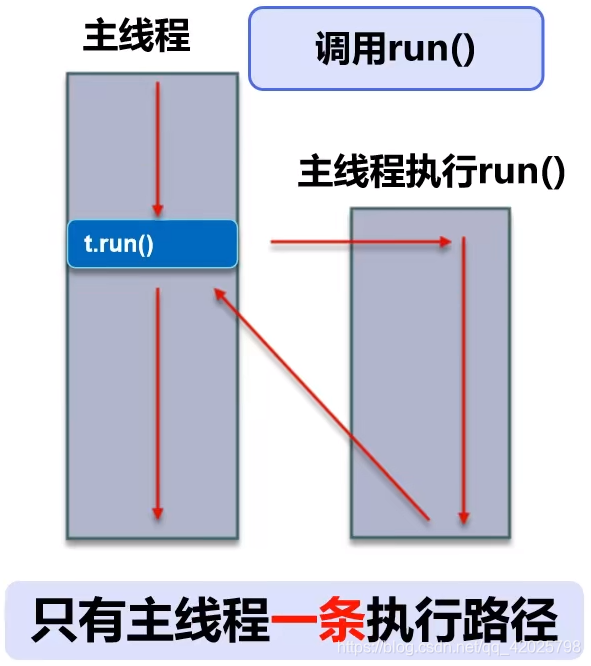
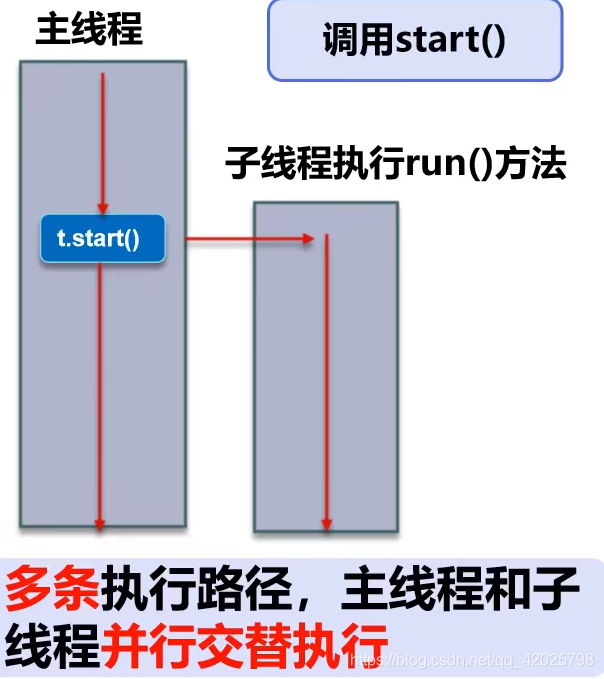
注意:很多多线程是模拟出来的,真正的多线程是指有多个CPU,即多核,如服务器。如果是模拟出来的多线程,即在一个CPU的情况下,在同一时间点,cpu 只能执行一个代码,因为切换的很快,所以有同时执行的错觉。
原来的方法调用
多线程下的方法调用
线程实现三种方式
1.继承Thread类
2.实现Runnable 接口
3.实现Callable 接口
1.继承Thread类
继承Thread类实现多线程步骤如下:
1.自定义线程类继承Thread类
2.重写run() 方法,编写线程执行体
3.创建线程对象,调用start() 方法启动线程
创建线程方式1:继承Thread(通过查看源码发现Thread 是实现Runnable接口的)
注意:线程开启不一定立即执行,由CPU调度安排。
/**
 * 继承Thread类实现多线程
 */
public class TestThread1 extends Thread{
    @Override
    public void run() {
        for (int i = 0; i < 10; i++) {
            System.out.println("我在学JAVA--"+i);
        }
    }

    public static void main(String[] args) {
        Thread t = new TestThread1();
        t.start();

        for (int i = 0; i < 10; i++) {
            System.out.println("我在敲代码--"+i);
        }
    }
}
2.实现Runnable 接口
/**
 * 实现runnable接口
 */
public class TestThread3 implements Runnable{
    @Override
    public void run() {
        for (int i = 0; i < 10; i++) {
            System.out.println("我在学JAVA--"+i);
        }
    }

    public static void main(String[] args) {
        TestThread3 t = new TestThread3();
        Thread thread = new Thread(t);
        thread.start();

        for (int i = 0; i < 10; i++) {
            System.out.println("我在敲代码--"+i);
        }
    }
}
Thread 和Runnable小结
继承Thread类
1.子类继承Thread 类具有多线程能力
2.启动线程:子类对象.start()
3.不建议使用:避免OOP单继承局限性
实现Runnable 接口
1.实现接口Runnable 具有多线程能力
2.启动线程:传入目标对象+Thread对象.start()
3.推荐使用:避免单继承局限性,灵活方便,方便同一个对象被多个线程使用
/**
 * 龟兔赛跑实例
 */
public class TestThread4 implements Runnable{
    //胜利者
    private static String winner;
    @Override
    public void run() {
        int steps=0;
        for (int i = 0; i <= 50; i++) {
            if (i==25){
                if(Thread.currentThread().getName().equals("兔子"))
                {
                    try {
                        Thread.sleep(1);
                    } catch (InterruptedException e) {
                        e.printStackTrace();
                    }
                }
            }

            //判断比赛是否结束
            boolean flag = gameOver(i);
            //如果比赛结束了,就停止程序
            if (flag) {
                break;
            }
            System.out.println(Thread.currentThread().getName() + "-->跑了" + i + "步");
        }
    }

    //判断是否完成比赛
    private boolean gameOver(int steps) {
        if (winner != null) {//已经由胜利者了
            return true;
        } else {
            if (steps >= 50) {
                winner = Thread.currentThread().getName();
                System.out.println("胜利者是:" + winner);
                return true;
            }

        }
        return false;
    }


    public static void main(String[] args) {
        TestThread4 t = new TestThread4();
        new Thread(t,"兔子").start();
        new Thread(t,"乌龟").start();
    }
}
3.实现Callable 接口
1.实现Callable接口,需要返回值类型
2.重写call 方法,需要抛出异常
3.创建目标对象
4.创建执行服务:
5.提交执行:
6.获取结果:
7.关闭服务:
/**
 * 实现Callable接口
 * 好处:
 * 1.可以定义返回值
 * 2.可以抛出异常
 */
public class TestThread5 implements Callable<Boolean> {

    public static void main(String[] args) throws ExecutionException, InterruptedException {
        TestThread5 testThread5 = new TestThread5();

        //1.创建执行服务
        ExecutorService ser = Executors.newFixedThreadPool(1);
        //2.提交执行
        Future<Boolean> r1 = ser.submit(testThread5);
        //获取结果
        Boolean rs1 = r1.get();

        //关闭服务
        ser.shutdownNow();
    }

    @Override
    public Boolean call() throws Exception {
        for (int i = 0; i < 10; i++) {
            System.out.println("我在学JAVA--"+i);
        }
        return null;
    }
}
4.静态代理模式
静态代理总结:
1.真实对象和代理对象都要实现同一个接口
2.代理对象要代理真实角色
好处:
代理对象可以做很多对象做不了的事情
真实对象专注做自己的事情
//静态代理模式
public class Demo01 {
    public static void main(String[] args) {
        Restaurant restaurant = new Restaurant(new You());
        restaurant.eat();
    }
}

interface Eat{
    public void eat();
}

class You implements Eat{

    @Override
    public void eat() {
        System.out.println("正在吃饭……");
    }
}

class Restaurant implements Eat{
    public Eat person;

    public Restaurant(Eat person) {
        this.person = person;
    }

    @Override
    public void eat() {
        before();
        this.person.eat();
        after();
    }

    private void after() {
        System.out.println("收拾碗筷……");
    }

    private void before() {
        System.out.println("准备食物……");
    }
}
5.Lambda表达式
(params) -> expression  [表达式]
(params) -> statement [语句]
(params) -> {statement }
123
new Thread(()-> System.out.println("多线程学习")).start();
1
为什么要使用lambda 表达式
1.避免你们内部类定义过多
2.可以让你的代码看起来很简洁
3.去掉了一堆没有意义的代码,只留下核心的逻辑
函数式接口的定义
1.任何接口,如果只包含唯一一个抽象方法,那么它就是一个函数式接口。
2.对于函数式接口,我们可以通过lambda 表达式来创建该接口的对象。
//Lambda表达式
public class Demo02 {
    public static void main(String[] args) {
        Study study=()-> System.out.println("正在读书……");
        //有参数的情况下Study study=(int a)-> {System.out.println("正在读书……");}
        //可以将参数类型int,(),{}省略掉Study study=a-> System.out.println("正在读书……");
        study.read();
    }
}

interface Study{
    public void read();
}
6.线程状态
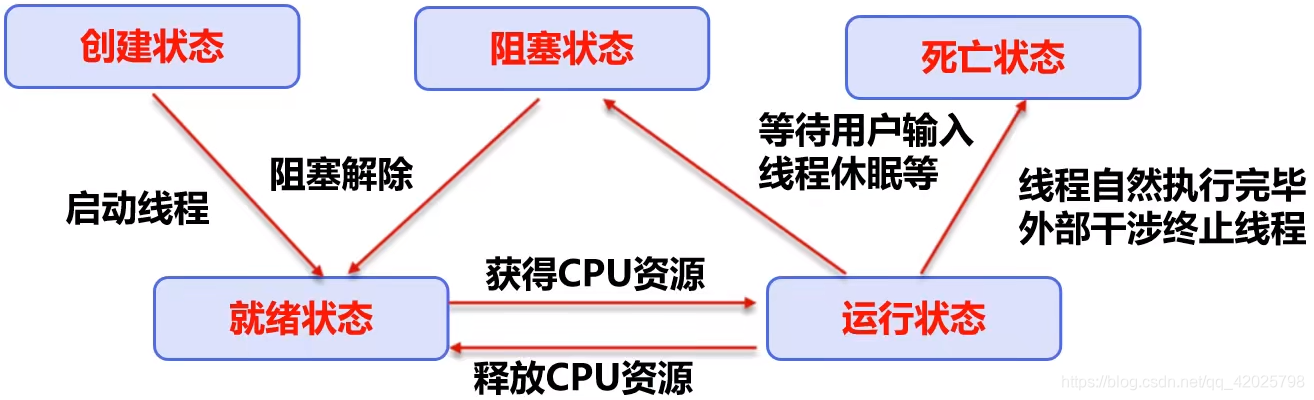
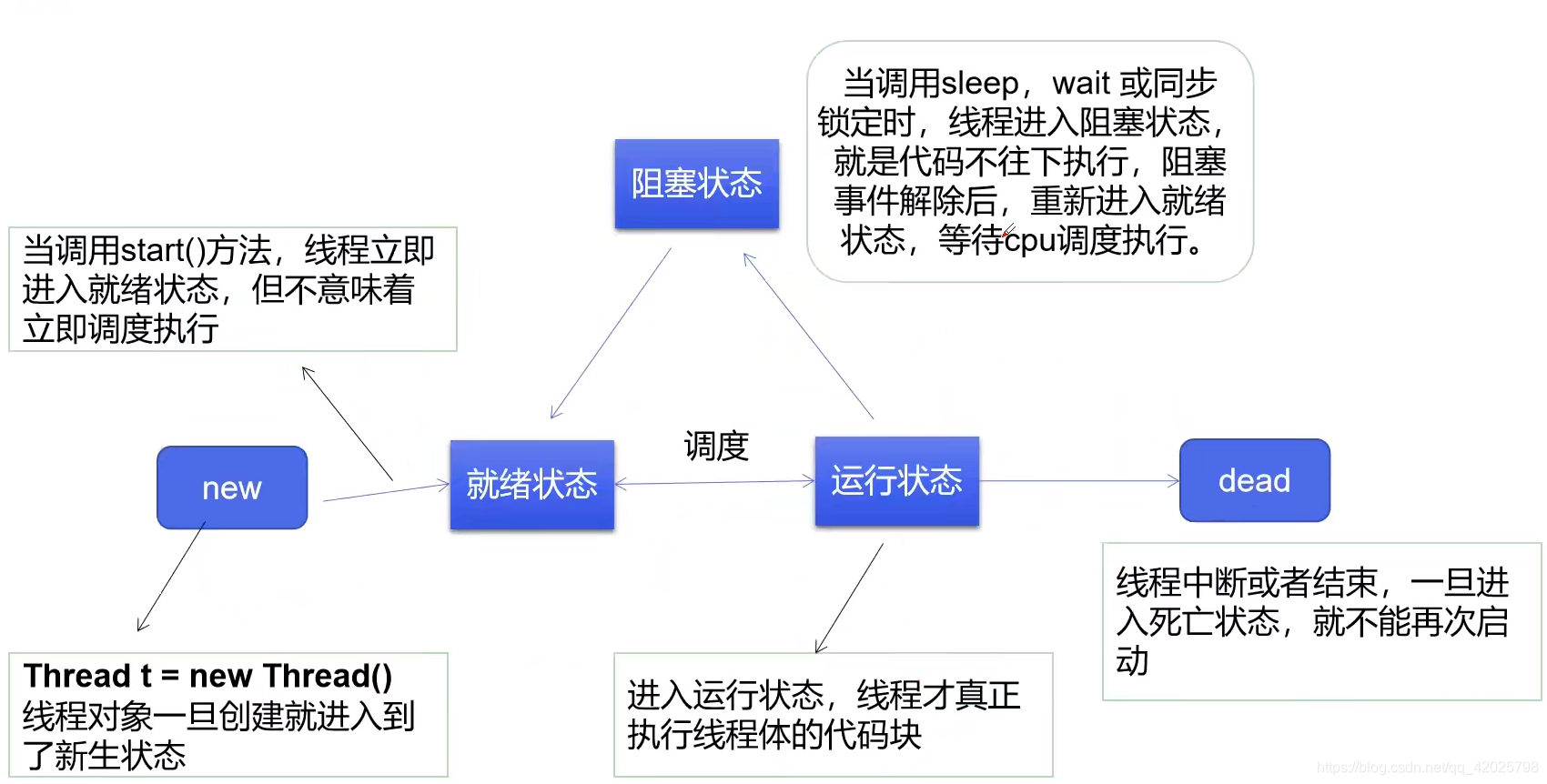
线程方法
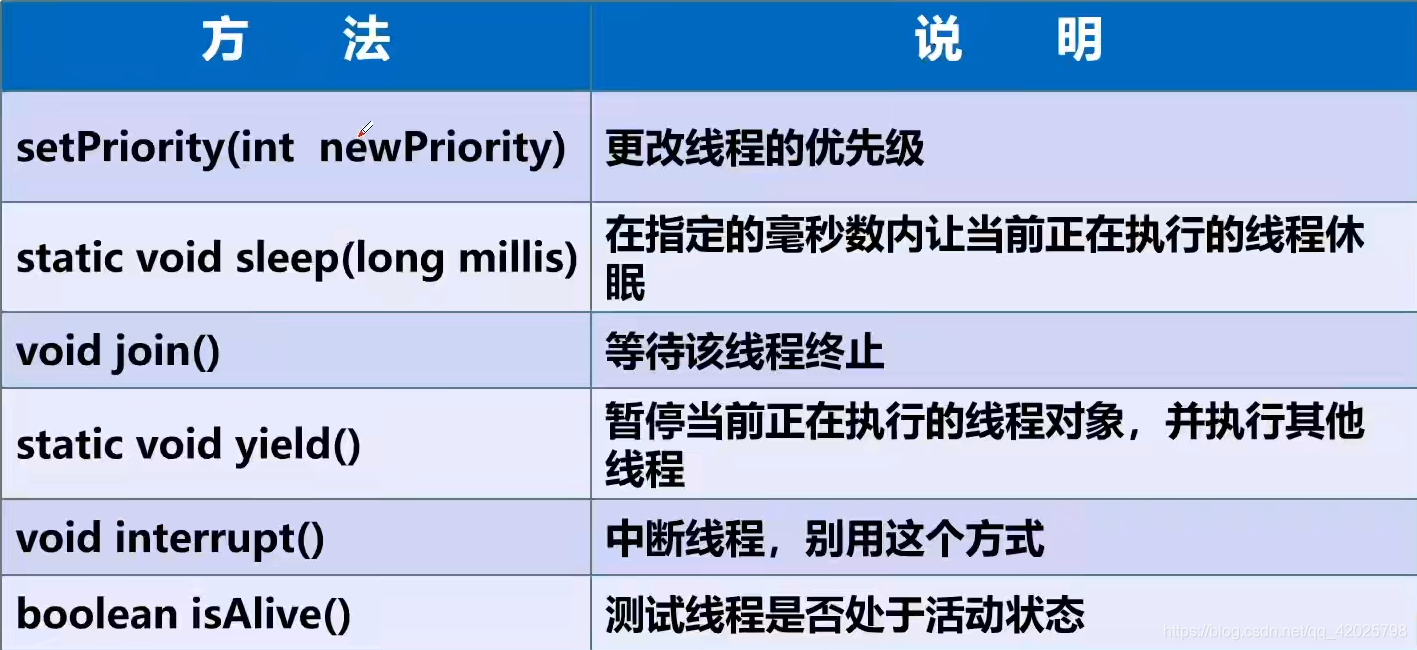
1.线程停止
1.建议线程正常停止----》利用次数。不建议死循环
2.建议使用标志位----》设置一个标志位
3.不用使用stop或destory 等过时或者JDK 不建议使用的方法
public class TestStop implements Runnable
    //1.设置一个标志位
    private boolean flag = true;

    @Override
    public void run() {
        int i = 0;
        while (flag) {
            System.out.println("run...Thread->" + i++);
        }
    }

    //2.设置一个公开的方法停止线程,转换标志位
    public void stop() {
        this.flag = false;
    }

    public static void main(String[] args) {
        TestStop testStop = new TestStop();
        //开启线程
        new Thread(testStop).start();

        for (int i = 0; i < 1000; i++) {
            System.out.println("main" + i);
            if (i == 900) {
                //调用stop方法切换标志位,让线程停止
                testStop.stop();
                System.out.println("该线程停止了");
            }
        }
    }
}
2.线程休眠(sleep)
1.sleep(时间)指定当前线程阻塞的毫秒数;
2.sleep 存在异常InterruptedException;
3.sleep 时间达到后线程进入就绪状态
4.sleep 可以模拟网络延时,倒计时等。
5.每一个对象都有一个锁,sleep不会释放锁;
//sleep的用法
//模拟时钟
public class Demo03 implements Runnable{
    public static void main(String[] args) {
        Demo03 demo03 = new Demo03();
        Thread thread = new Thread(demo03);
        thread.start();
    }

    @Override
    public void run() {
        Date time=new Date(System.currentTimeMillis());
        for (int i = 0; i < 10; i++) {
            try {
                Thread.sleep(1000);
                System.out.print("现在时间为:");
                System.out.println(new SimpleDateFormat("yyyy-MM-dd HH:mm:ss").format(time));
                time=new Date(System.currentTimeMillis());
            } catch (InterruptedException e) {
                e.printStackTrace();
            }
        }
 }
}
3.线程礼让(yield)
1.礼让线程,让当前正在执行的线程暂停,但不阻塞
2.将线程从运行状态转为就绪状态
3.让cpu 重新调度,礼让不一定成功!看cpu心情
public class TestYield {
    public static void main(String[] args) {
        MyYield myYield = new MyYield();
        new Thread(myYield,"A").start();
        new Thread(myYield,"B").start();
    }
}

class MyYield implements Runnable {
    @Override
    public void run() {
        System.out.println(Thread.currentThread().getName()+"线程开始执行");
        Thread.yield();//礼让
        System.out.println(Thread.currentThread().getName()+"线程停止执行");
    }
}
4.线程强制执行:(join)
Join 合并线程,待此线程执行完成后,再执行其他线程,其他线程阻塞
可以想象成插队
public class TestJoin implements Runnable {

    @Override
    public void run() {
        for (int i = 0; i < 100; i++) {
            System.out.println("线程VIP 来了" + i);
        }
    }

    public static void main(String[] args) throws InterruptedException {
        TestJoin testJoin = new TestJoin();
        Thread thread = new Thread(testJoin);
        //启动线程
        thread.start();
        //主线程
        for (int i = 0; i < 200; i++) {
            if (i == 100) {
                thread.join();//插队
            }
            System.out.println("main" + i);
        }
    }
}
5.线程状态(Thread.State)
线程状态,线程可以处于以下状态之一:
NEW
尚未启动的线程处于此状态
RUNNABLE
在Java虚拟机中执行的线程处于此状态
BLOCKED
被阻塞等待监视器锁定的线程处于此状态
WAITING
正在等待另一个线程执行特定动作的线程处于此状态
TIMED WAITING
正在等待另一个线程执行动作达到指定等待时间的线程处于此状态
TERMINATED
terminated:已退出的线程处于此状态
一个线程可以在给定时间点处于一个状态,这些状态不反映任何操作系统线程状态的虚拟机状态。
//观测线程状态
public class Demo04 implements Runnable{
    public static void main(String[] args) throws InterruptedException {
        Demo04 demo04 = new Demo04();
        Thread thread =  new Thread(demo04);
        System.out.println(thread.getState());

        thread.start();
        System.out.println(thread.getState());

        while (thread.getState() != Thread.State.TERMINATED){
            Thread.sleep(100);
            System.out.println(thread.getState());//输出线程状态
        }
    }

    @Override
    public void run() {
        for (int i = 0; i < 5; i++) {
            try {
                Thread.sleep(1000);
            }catch (Exception e){
                e.printStackTrace();
            }
            System.out.println("/");
        }
    }
}
6.线程优先级
1.Java提供一个线程调度器来监控程序中启动后进入就绪状态的所有线程,线程调度器安装优先级决定应该调度哪个线程来执行。
2.线程的优先级用数字表示,范围从1——10
Thread.MIN_PRIORITY = 1;
Thread.MAX_PRIORITY = 10;
Thread.NOPM_PRIORITY = 5;
使用以下方式改变或获取优先级
getPriority()
setPriority(int xx)
//线程优先级
public class Demo05 implements Runnable{
    public static void main(String[] args) {
        //获取主线程的优先级
        System.out.println(Thread.currentThread().getName()+"=="+Thread.currentThread().getPriority());

        Demo05 demo05 = new Demo05();
        Thread t1 = new Thread(demo05,"A");
        t1.start();

        Thread t2 = new Thread(demo05,"B");
        //优先级小于1大于10会报错
        t2.setPriority(2);
        t2.start();

        Thread t3 = new Thread(demo05,"C");
        t3.setPriority(Thread.MAX_PRIORITY);
        t3.start();
    }

    @Override
    public void run() {
        System.out.println(Thread.currentThread().getName()+"优先级为:"+Thread.currentThread().getPriority());
    }
}
优先级低只是意味着获得调度的概率低,并不是优先级低就不会被调用,这都是看CPU的调度。
7.守护(daemon)线程
1.线程分为用户线程和守护线程
2.虚拟机必须确保用户线程执行完毕
3.虚拟机不用等待守护线程执行完毕
如:后台记录操作日志、监控内存、垃圾回收等等…
public class TestDaemon {
    public static void main(String[] args) {
        God god = new God();
        You you = new You();

        Thread thread = new Thread(god);
        thread.setDaemon(true);//默认是false表示是用户线程,正常的线程都是用户线程


        thread.start();//上帝守护线程启动

        new Thread(you).start();//你 用户线程启动

    }
}

//你
class You implements Runnable {

    @Override
    public void run() {
        for (int i = 0; i < 36500; i++) {
            System.out.println("你一生都开心活着");
        }
        System.out.println("=========goodbye! world=======");
    }
}

//上帝
class God implements Runnable {
    @Override
    public void run() {
        while (true) {
            System.out.println("上帝保护着你");
        }
    }
}
7.线程同步机制(synchronized)
多个线程操作同一个资源
并发:同一个对象被多个线程同时操作
处理多线程问题时,多个线程访问同一个对象(并发),并且某些线程还想修改这个对象,这个时候我们就需要线程同步,线程同步就是一种机制,多个需要同时访问此对象的线程进入这个对象的等待池形成队列,等待前面线程使用完毕,下一个线程再使用。
队列和锁:
由于同一个进程的多个线程共享同一块存储空间,在带来方便的同时,也带来了访问冲突问题,为了保证数据在方法中被访问时的正确性,在访问时加入 锁机制 synchronized ,当一个线程获得对象的排它锁,独占资源,其他线程必须等待,使用后释放锁即可。
存在以下问题:
1.一个线程有锁会导致其他需要此锁的线程挂起;
2.在多线程竞争下,加锁,释放锁会导致比较多的上下文切换 和 调度延时,引起性能问题;
3.如果一个优先级高的线程等待一个优先级低的线程释放锁 会导致优先级倒置,引起性能问题。
同步方法:
由于我们可以通过private 关键字来保证数据对象只能被方法访问,所以我们只需要对方法提出一套机制,这套机制就是synchronized 关键字,它包括两种用法:synchronized 方法和synchronized 块;
java 同步方法:public synchronized void method(int args){}synchronized 方法 控制对 “ 对象”的访问,每个对象对应一把锁,每个synchronized 方法都必须获得调用该方法的对象的锁才能执行,否则线程会阻塞,方法一旦执行,就独占该锁,直到该方法返回才释放锁,后面被阻塞的线程才能获得这个锁,继续执行。
缺陷:若将一个大的方法声明为synchronized 将会影响效率。
方法里面需要修改的内容才需要锁,锁的太多,浪费资源。
同步块:synchronized (obj){ }
obj 称之为 同步监视器
obj 可以是任何对象,但是推荐使用共享资源作为同步监视器
同步方法中无需指定同步监视器,因为同步方法的同步监视器就是this,就是和这个对象本身,或者是class同步监视器的执行过程
1.第一个线程访问,锁定同步监视器,执行其中代码
2.第二个线程访问,发现同步监视器,无法访问
3.第一个线程访问完毕,解锁同步监视器
4.第二个线程访问,发现同步监视器没有锁,然后锁定并访问锁的对象就是变化的量,需要增删改的数据
//买票案例
public class Demo01 {
    public static void main(String[] args) {
        Buy buy = new Buy();
        Thread t1 = new Thread(buy,"学生");
        Thread t2 = new Thread(buy,"老师");
        Thread t3 = new Thread(buy,"黄牛");
        t2.start();
        t1.start();
        t3.start();
    }
}

class Buy implements Runnable {
    private int ticketNum=1000;
    private boolean flag=true;
    @Override
    public void run() {
        while (flag){
            buy();
        }
    }

    private synchronized void buy(){
        if (ticketNum <= 0) {
            flag = false;
            return;
        }
        System.out.println(Thread.currentThread().getName()+"拿到了"+ticketNum--+"张票");
//        try {
//            Thread.sleep(100);
//        } catch (InterruptedException e) {
//            e.printStackTrace();
//        }
        //同步和sleep无关,sleep是为了防止运行太快导致只有一个人抢到票,将票数设置足够多的时候学生老师黄牛都能拿到票
        //注意锁的是buy方法而非run方法!!
    }
}
// 银行取钱案例
public class Demo02 {
    public static void main(String[] args) {
        Account account=new Account(100,"买房基金");
        Bank bank = new Bank(account,40);
        Thread thread = new Thread(bank,"小明");
        thread.start();

        Bank bank1 = new Bank(account,80);
        Thread thread1 = new Thread(bank1,"李华");
        thread1.start(); }
}

//账户
class Account {
    int money;//余额
    String name;//卡名

    Account(int money, String name) {
        this.money = money;
        this.name = name;
    }

    public int getMoney() {
        return money;
    }

    public void setMoney(int money) {
        this.money = money;
    }

    public String getName() {
        return name;
    }

    public void setName(String name) {
        this.name = name;
    }
}

class Bank extends Account implements Runnable {
    Account account;
    //取了多少钱
    int drawingMoney;
    //现在手里有多少钱
    int nowMoney;

    public Bank(Account account, int drawingMoney) {
        super(account.money,account.name);
        this.account = account;
        this.drawingMoney = drawingMoney;
    }

    @Override
    public void run() {
        synchronized (account) {
            if (account.money < drawingMoney) {
                System.out.println(Thread.currentThread().getName() + "想取金额过多,账户余额不够,取钱失败");
                return;
            }
            try {
                Thread.sleep(2000);
            } catch (InterruptedException e) {
                e.printStackTrace();
            }
            //卡内余额 = 余额 减去 你取的前
            account.money = account.money - drawingMoney;
            //你手里的钱
            nowMoney = nowMoney + drawingMoney;

            System.out.println(account.name + "余额为:" + account.money);
            System.out.println(Thread.currentThread().getName() + "手里的钱:" + nowMoney);

        }
    }
}
//集合
public class Demo03 {
    public static void main(String[] args) throws InterruptedException {
        List<String> list = new ArrayList<>();
        for (int i = 0; i < 10000; i++) {
            new Thread(()->{
                synchronized (list){
                    list.add(Thread.currentThread().getName());
                }
            }).start();
        }
        Thread.sleep(3000);
        System.out.println(list.size());
    }
}
8.死锁
多个线程互相抱着对象需要的资源,然后形成僵持。
多个线程各自占有一些资源,并且互相等待其他线程占有的资源才能运行,而导致这两个或者多个线程都在等待对方释放资源,都停止执行的情形,某一个同步块同时拥有“两个以上对象的锁时”,就可能发生“死锁”的问题。
//死锁案例
public class Demo01 {
    public static void main(String[] args) {
        Child c1 = new Child("小明",0);
        Child c2 = new Child("李华",1);
        c1.start();
        c2.start();
    }
}

class Milk{}
class Coffee{}

class Child extends Thread{
    int choice;
    String name;
    //需要的资源只有一份,用static 来保证只有一份
    static Milk milk=new Milk();
    static Coffee coffee=new Coffee();

    public Child(String name, int choice) {
        this.choice = choice;
        this.name = name;
    }

    @Override
    public void run() {
        try {
            drink();
        } catch (InterruptedException e) {
            e.printStackTrace();
        }
    }

    private void drink() throws InterruptedException {
        //在synchronized (milk)里面嵌套synchronized (coffee)代表获取牛奶后继续获取咖啡,并不会释放锁
        //下面这种方式在执行完第一个方法后会释放锁,不会造成死锁
        if (choice==0){
            synchronized (milk){
                System.out.println(this.name+"获得了牛奶的锁");
                Thread.sleep(1000);
            }
            synchronized (coffee){
                System.out.println(this.name+"获得了咖啡的锁");
            }
        }
        else{
            synchronized (coffee){
                System.out.println(this.name+"获得了咖啡的锁");
                Thread.sleep(3000);
            }
            synchronized (milk){
                System.out.println(this.name+"获得了牛奶的锁");
            }
        }
    }
}
产生死锁的四个必要条件:
1.互斥条件:一个资源每次只能被一个进程使用。
2.请求与保持条件:一个进程因请求资源而阻塞,对已获得的资源保持不放。
3.不剥夺条件:进程已获得的资源,在未使用完之前,不能强行剥夺。
4.循环等待条件:若干个进程之间形成一种头尾相接的循环等待资源关系。
9.Lock(锁)
可重入锁
1.从JDK 5.0开始,Java提供了更强大的线程同步机制——通过显式定义同步锁对象来实现同步。同步锁使用Lock对象充当
2.java.util.concurrent.locks.Lock接口是控制多个线程对共享资源进行访问的工具。锁提供了对共享资源的独占访问,每次只能有一个线程对Lock对象加锁,线程开始访问共享资源之前应先获得Lock对象。
3.ReentrantLock 类实现了Lock,它拥有与 synchronized 相同的并发性和内存语义,在实现线程安全的控制中,比较常用的是ReentrantLock,可以显式加锁、释放锁。
lock锁案例
//lock锁的使用
public class Demo05 {
    public static void main(String[] args) {
        TestLock thread = new TestLock();
        new Thread(thread).start();
        new Thread(thread).start();
        new Thread(thread).start();
    }
}

class TestLock extends Thread{
    int num=10;
    //定义lock锁
    private  final ReentrantLock reentrantLock = new ReentrantLock();
    @Override
    public void run() {
        while (true)
        {
            try{
                reentrantLock.lock();//加锁
                if (num>0) {
                    try {
                        Thread.sleep(100);
                    } catch (InterruptedException e) {
                        e.printStackTrace();
                    }
                    System.out.println(num--);
                }
                else
                    break;
            }finally {
                reentrantLock.unlock();//解锁
            }
        }
    }
}
10.生产者消费者问题
1.假设仓库中只能存放一件产品,生产者将生产出来的产品放入仓库﹐消费者将仓库中产品取走消费。
2.如果仓库中没有产品﹐则生产者将产品放入仓库﹐否则停止生产并等待,直到仓库中的产品被消费者取走为止。
3.如果仓库中放有产品,则消费者可以将产品取走消费﹐否则停止消费并等待,直到仓库再次放入产品为止。
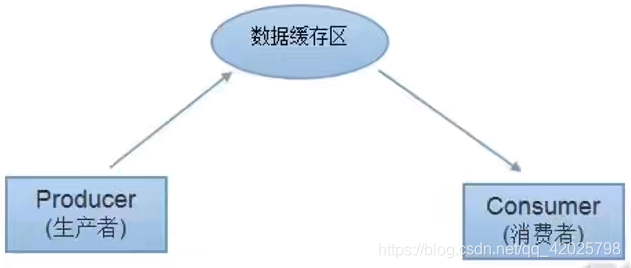
这是一个线程同步问题,生产者和消费者共享同一个资源,并且生产者和消费者之间相互依赖,互为条件。
1.对于生产者﹐没有生产产品之前,要通知消费者等待﹒而生产了产品之后﹐又需要马上通知消费者消费
2.对于消费者﹐在消费之后﹐要通知生产者已经结束消费﹐需要生产新的产品以供消费.
3.在生产者消费者问题中,仅有synchronized是不够的
synchronized可阻止并发更新同一个共享资源,实现了同步
synchronized不能用来实现不同线程之间的消息传递(通信)
Java提供了几个方法解决线程之间的通信问题
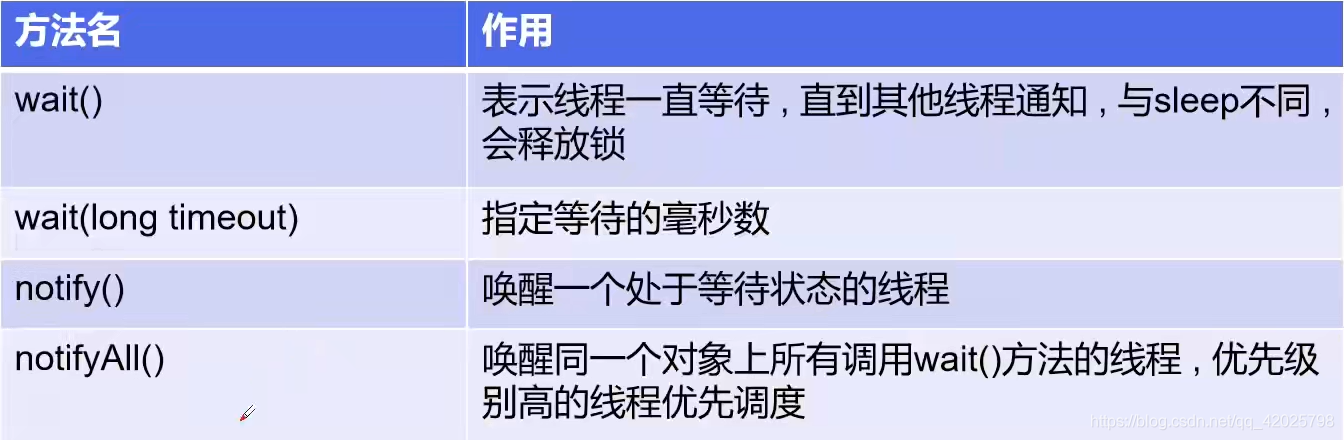
注意:均是Object类 的方法,都只能在同步方法或者同步代码块中使用,否则会抛出lllegalMonitorStateException
1.管程法
解决方式1:
并发协作模型“生产者/消费者模式”—>管程法
1.生产者:负责生产数据的模块(可能是方法﹐对象﹐线程,进程);
2.消费者∶负责处理数据的模块(可能是方法,对象﹐线程﹐进程);
3.缓冲区:消费者不能直接使用生产者的数据﹐他们之间有个“缓冲区
生产者将生产好的数据放入缓冲区,消费者从缓冲区拿出数据
//生产者消费者案例
public class Demo02 {
    public static void main(String[] args) {
        SynContainer synContainer = new SynContainer();
        Consumer consumer = new Consumer(synContainer);
        Producter producter = new Producter(synContainer);
        consumer.start();
        producter.start();
    }
}

class Chicken{
    int id;

    public Chicken(int id) {
        this.id = id;
    }
}

class Consumer extends Thread{
    SynContainer container;

    public Consumer(SynContainer container) {
        this.container = container;
    }
    //消费
    @Override
    public  void run() {
//        try {
//            Thread.sleep(4000);
//        } catch (InterruptedException e) {
//            e.printStackTrace();
//        }
        for (int i = 1; i <= 50; i++) {
            try {
                Chicken chicken = container.get();
                //System.out.println("消费了第"+chicken.id+"只鸡");
            } catch (InterruptedException e) {
                e.printStackTrace();
            }
        }
    }
}

class Producter extends Thread{
    SynContainer synContainer;
    Producter(SynContainer synContainer) {
        this.synContainer = synContainer;
    }
    @Override
    public void run() {
        for (int i = 1; i <= 50; i++) {
            Chicken chicken = new Chicken(i);
            try {
                synContainer.push(chicken);

            } catch (InterruptedException e) {
                e.printStackTrace();
            }
        }
    }
}
class SynContainer{
    Chicken[] chickens=new Chicken[10];
    int count=0;//仓库中的数量

    public synchronized void push(Chicken chicken) throws InterruptedException {
        if (count==chickens.length){
            this.wait();
        }
        chickens[count]=chicken;
        System.out.println("生产了第"+chicken.id+"只鸡");
        count++;
        this.notifyAll();
    }

    public synchronized Chicken get() throws InterruptedException {
        if (count==0)
        {
            this.wait();
        }
        count--;
        Chicken chicken=chickens[count];
        System.out.println("消费了第"+chicken.id+"只鸡");
        this.notifyAll();
        return chicken;
    }
}
wait()使当前线程阻塞,前提是必须先获得锁,一般配合synchronized关键字使 用,即,一般在synchronized同步代码块里使用wait()、notify/notifyAll()方法。
由于wait()、notify/notifyAll()在synchronized代码块执行,说明当前线程一定是获 取了锁的。当线程执行wait()方法时候,会释放当前的锁,然后让出CPU,进入等待状 态。只有当notify/notifyAll()被执行时候,才会唤醒一个或多个正处于等待状态的线 程,然后继续往下执行,直到执行完synchronized代码块的代码或是中途遇到wait(), 再次释放锁。也就是说,notify/notifyAll()的执行只是唤醒沉睡的线程,而不会立即释 放锁,锁的释放要看代码块的具体执行情况。所以在编程中,尽量在使用了 notify/notifyAll()后立即退出临界区,以唤醒其他线程。
2.信号灯法
//生产者消费者案例
//信号灯法
public class Demo03 {
    public static void main(String[] args) {
        Tv tv = new Tv();
        new Performer(tv).start();
        new Watcher(tv).start();
    }
}

class Performer extends Thread{
    Tv tv;
    Performer(Tv tv){
        this.tv=tv;
    }
    @Override
    public void run() {
        for (int i = 0; i < 20; i++) {
            if (i%2==0){
                tv.perform("走近科学");
            }
            else {
                tv.perform("开学第一课");
            }
        }
    }
}

class Watcher extends Thread{
    Tv tv;
    Watcher(Tv tv){
        this.tv=tv;
    }
    @Override
    public void run() {
        for (int i = 0; i < 20; i++) {
            tv.watch();
        }
    }
}

class Tv{
    String program;
    boolean flag=true;

    public synchronized void perform(String program){
        if (flag==false){
            try {
                this.wait();
            } catch (InterruptedException e) {
                e.printStackTrace();
            }
        }
        System.out.println("表演了"+program+"节目");
        this.program=program;
        this.flag=!this.flag;
        this.notify();

    }

    public synchronized void watch(){
        if (flag==true){
            try {
                this.wait();
            } catch (InterruptedException e) {
                e.printStackTrace();
            }
        }
        System.out.println("观看了"+program+"节目");
        this.flag=!this.flag;
        this.notify();
    }
}
11.线程池
背景:经常创建和销毁、使用量特别大的资源,比如并发情况下的线程,对性能影响很大。
思路︰提前创建好多个线程,放入线程池中,使用时直接获取,使用完放回池中。可以避免频繁创建销毁、实现重复利用。类似生活中的公共交通工具。
好处:
1.提高响应速度(减少了创建新线程的时间)
2.降低资源消耗(重复利用线程池中线程,不需要每次都创建)
3.便于线程管理(…)
corePoolSize:核心池的大小
maximumPoolSize:最大线程数
keepAliveTime:线程没有任务时最多保持多长时间后会终止
JDK 5.0起提供了线程池相关API:
ExecutorService和Executors
ExecutorService:真正的线程池接口。常见子类ThreadPoolExecutor
void execute(Runnable cgmmand):执行任务/命令,没有返回值,一般用来执行Runnable
Future submit(Callable task):执行任务,有返回值,一般又来执行Callable
void shutdown():关闭连接池
Executors:
工具类、线程池的工厂类,用于创建并返回不同类型的线程池
public class TestPool {
    public static void main(String[] args) {
        //1.创建服务,创建线程池
        ExecutorService service = Executors.newFixedThreadPool(10);

        //执行
        service.execute(new MyThread());
        service.execute(new MyThread());
        service.execute(new MyThread());
        service.execute(new MyThread());

        //2.关闭连接
        service.shutdown();

    }
}

class MyThread implements Runnable {
    @Override
    public void run() {
        System.out.println(Thread.currentThread().getName());
    }
}

 浙公网安备 33010602011771号