
MyBatis-generator
在idea中创建maven工程,
在src/main/resources下添加personal-db.properties、personal-generatorconfig.xml
personal-db.properties:
jdbc.driverLocation=E:\\repository\\mysql\\mysql-connector-java\\5.1.38\\mysql-connector-java-5.1.38.jar
jdbc.driverClass=com.mysql.jdbc.Driver
jdbc.connectionURL=jdbc:mysql://localhost:3306/mydb
jdbc.userId=root
jdbc.password=1234
personal-generatorconfig.xml:
<?xml version="1.0" encoding="UTF-8"?>
<!DOCTYPE generatorConfiguration
        PUBLIC "-//mybatis.org//DTD MyBatis Generator Configuration 1.0//EN"
        "http://mybatis.org/dtd/mybatis-generator-config_1_0.dtd">
<generatorConfiguration>
    <!--<properties resource="classpath*:personal-db.properties"></properties>-->
    <classPathEntry location="E:\\repository\\mysql\\mysql-connector-java\\5.1.38\\mysql-connector-java-5.1.38.jar" />
    <!--classPathEntry location="E:\\repository\\mysql\\mysql-connector-java\\5.1.38\\mysql-connector-java-5.1.38.jar" /-->
    <context id="context1" targetRuntime="MyBatis3">

        <commentGenerator>
            <!-- 去除自动生成的注释 -->
            <property name="suppressAllComments" value="true" />
        </commentGenerator>

        <!-- 数据库连接配置 -->
        <jdbcConnection driverClass="com.mysql.jdbc.Driver"
                        connectionURL="jdbc:mysql://localhost:3306/mydb"
                        userId="root"
                        password="1234" />
        <!--jdbcConnection driverClass="com.mysql.jdbc.Driver"
                        connectionURL="jdbc:mysql://localhost:3306/test"
                        userId="root"
                        password="mysql" /-->

        <!-- 非必需,类型处理器,在数据库类型和java类型之间的转换控制-->
        <javaTypeResolver>
            <property name="forceBigDecimals" value="false"/>
        </javaTypeResolver>
        <!--配置生成的实体包
            targetPackage:生成的实体包位置,默认存放在src目录下
            targetProject:目标工程名
         -->
        <javaModelGenerator targetPackage="cn.ycc.common.domain.entity"
                            targetProject="src/main/java" />

        <!-- 实体包对应映射文件位置及名称,默认存放在src目录下 -->
        <sqlMapGenerator targetPackage="cn.ycc.common.mapper.xml_mapper" targetProject="src/main/java" />

        <!-- 配置表
            schema:不用填写
            tableName: 表名
            enableCountByExample、enableSelectByExample、enableDeleteByExample、enableUpdateByExample、selectByExampleQueryId:
            去除自动生成的例子
        -->
        <table schema="mydb" domainObjectName = "AssayBaseInfo" tableName="tb_assayBaseInfo" enableCountByExample="false" enableSelectByExample="false"
               enableDeleteByExample="false" enableUpdateByExample="false" selectByExampleQueryId="false" >
        </table>
        <table schema="mydb" domainObjectName = "Assay" tableName="tb_assay" enableCountByExample="false" enableSelectByExample="false"
               enableDeleteByExample="false" enableUpdateByExample="false" selectByExampleQueryId="false" >
        </table>
        <table schema="mydb" domainObjectName = "AssayContent" tableName="tb_assayContent" enableCountByExample="false" enableSelectByExample="false"
               enableDeleteByExample="false" enableUpdateByExample="false" selectByExampleQueryId="false" >
        </table>
        <table schema="mydb" domainObjectName = "Observer" tableName="tb_observer" enableCountByExample="false" enableSelectByExample="false"
               enableDeleteByExample="false" enableUpdateByExample="false" selectByExampleQueryId="false" >
        </table>
        <table schema="mydb" domainObjectName = "ReplyMessage"  tableName="tb_replyMessage" enableCountByExample="false" enableSelectByExample="false"
               enableDeleteByExample="false" enableUpdateByExample="false" selectByExampleQueryId="false" >
        </table>
    </context>
</generatorConfiguration>
在IDEA中添加Run选项,使用mybatis-generator-maven-plugin

配置如下
1)Name写generator会在run菜单生成一个名叫generator的选项;
2)CommandLine写要执行的命令,mybatis-generator:generate -e
3)working directory写你pom所在的工程,我这里是区分模块开发的,所以在dao模块下。

run -> generator执行;
生成的结构如下(请忽略马赛克)

Eclipse中:
Help--Eclipser Marketplace中查找:Mybatis Generator 1.3.5安装
New--other--查找如下
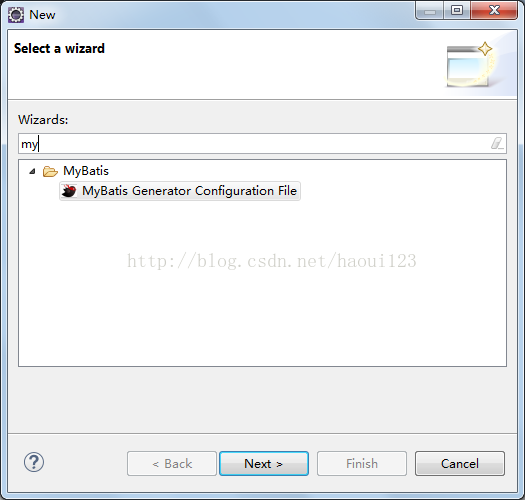
点击next,选择你要将文件生成到哪里的项目名
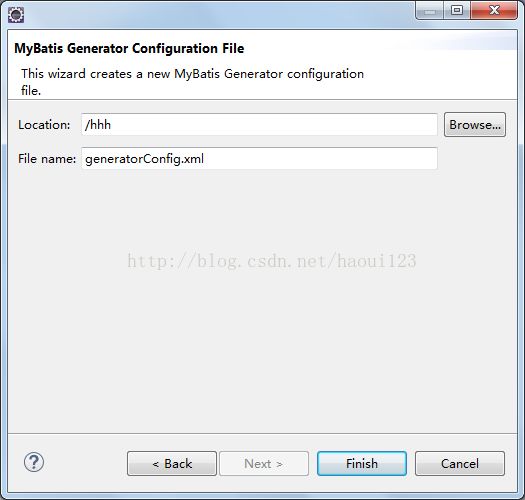
点击finish关闭。就会在hhh项目中生成文件generatorConfig.xml。
注意:hhh项目中要有数据库相关jar包及要生成的包 mapper/pojo,因为一会要在配置文件中进行配置。
注意:hhh项目中要有数据库相关jar包及要生成的包 mapper/pojo,因为一会要在配置文件中进行配置。
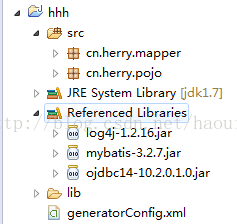
配置generatorConfig.xml如idea配置文件
[html] view plain copy
<?xml version="1.0" encoding="UTF-8"?>
<!DOCTYPE generatorConfiguration PUBLIC "-//mybatis.org//DTD MyBatis Generator Configuration 1.0//EN" "http://mybatis.org/dtd/mybatis-generator-config_1_0.dtd">
<generatorConfiguration>
    <context id="testTables" targetRuntime="MyBatis3">
        <commentGenerator>
            <!-- 是否去除自动生成的注释 true:是 : false:否 -->
            <property name="suppressAllComments" value="true" />
        </commentGenerator>
        <!--数据库连接的信息:驱动类、连接地址、用户名、密码 -->
        <!--
        <jdbcConnection driverClass="oracle.jdbc.driver.OracleDriver"
            connectionURL="jdbc:oracle:thin:@150.16.17.22:1521/wsbs" userId="hr"
            password="hr123">
        </jdbcConnection>-->
        <jdbcConnection driverClass="oracle.jdbc.OracleDriver"
            connectionURL="jdbc:oracle:thin:@150.16.17.22:1521:wsbs"
            userId="hr"
            password="hr123">
        </jdbcConnection>

        <!-- 默认false,把JDBC DECIMAL 和 NUMERIC 类型解析为 Integer,为 true时把JDBC DECIMAL 和
            NUMERIC 类型解析为java.math.BigDecimal -->
        <javaTypeResolver>
            <property name="forceBigDecimals" value="false" />
        </javaTypeResolver>

        <!-- targetProject:生成PO类的位置 -->
        <javaModelGenerator targetPackage="cn.herry.pojo"
            targetProject="hhh/src">
            <!-- enableSubPackages:是否让schema作为包的后缀 -->
            <property name="enableSubPackages" value="false" />
            <!-- 从数据库返回的值被清理前后的空格 -->
            <property name="trimStrings" value="true" />
        </javaModelGenerator>
        <!-- targetProject:mapper映射文件生成的位置 -->
        <sqlMapGenerator targetPackage="cn.herry.mapper"
            targetProject="hhh/src">
            <!-- enableSubPackages:是否让schema作为包的后缀 -->
            <property name="enableSubPackages" value="false" />
        </sqlMapGenerator>
        <!-- targetPackage:mapper接口生成的位置 -->
        <javaClientGenerator type="XMLMAPPER"
            targetPackage="cn.herry.mapper"
            targetProject="hhh/src">
            <!-- enableSubPackages:是否让schema作为包的后缀 -->
            <property name="enableSubPackages" value="false" />
        </javaClientGenerator>
        <!-- 指定数据库表 -->
        <!--<table tableName="items"></table> -->
        <table tableName="demo"></table>
    </context>
</generatorConfiguration>
自动生成mapper.java和mapper.xml等文件
右键generatorConfig.xml,选择如下:
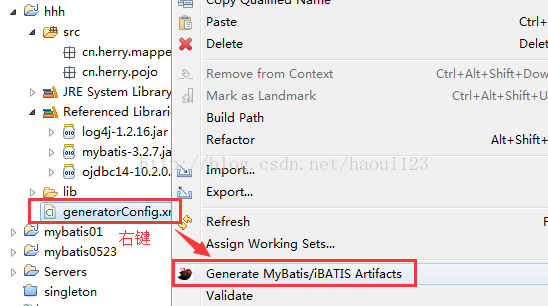
即可;

 浙公网安备 33010602011771号