
A beginner's guide to writing a custom stream buffer (std::streambuf)
Posted on 2015-09-08 16:34 bw_0927 阅读(1619) 评论(0) 收藏 举报http://www.mr-edd.co.uk/blog/beginners_guide_streambuf
http://www.cnblogs.com/my_life/articles/5362551.html
The C++ standard library provides the primary interface to manipulating the contents of files on disk through the std::ofstream, std::ifstream and std::fstream classes. We also havestringstreams, which allow you to treat strings as streams and therefore compose a string from the textual representations of various types.
std::ostringstream oss;
oss << "Hello, world!\\n";
oss << 123 << '\\n';
std::string s = oss.str();
Boost's lexical_cast facility uses this to good effect to allow conversions between types whose text representations are compatible, as well as a simple facility for quickly getting a string representation for an object of an 'output streamable type'.
using boost::lexical_cast;
using std::string;

int x = 5;
string s = lexical_cast<string>(x);
assert(s == "5");
At the heart of this flexibility is the stream buffer, which deals with the buffering and transportation of characters to or from their target or source, be it a file, a string, the system console or something else entirely. We could stream text over a network connection or from the flash memory of a particular device all through the same interface. The stream buffer is defined in a way that is orthogonal to the stream that is using it and so we are often able to swap and change the buffer a given stream is using at any given moment to redirect output elsewhere, if we so desire. I guess C++ streams are an example of the strategy design pattern in this respect.
For instance, we can edit the standard logging stream (std::clog) to write in to a string stream, rather than its usual target, by making it use the string stream's buffer:
#include <iostream>
#include <iomanip>
#include <string>
#include <sstream>

int main()
{
    std::ostringstream oss;

    // Make clog use the buffer from oss
    std::streambuf *former_buff =
        std::clog.rdbuf(oss.rdbuf());

    std::clog << "This will appear in oss!" << std::flush;

    std::cout << oss.str() << '\\n';

    // Give clog back its previous buffer
    std::clog.rdbuf(former_buff);

    return 0;
}
Since all aspects of buffering are handled by a streambuf-derived member, it is necessary to get at that member with rdbuf().
流继承结构
http://www.cplusplus.com/reference/istream/iostream/
http://www.cplusplus.com/reference/iolibrary/
// redirecting cout's output thrrough its stream buffer #include <iostream> // std::streambuf, std::cout #include <fstream> // std::ofstream int main () { std::streambuf *psbuf, *backup; std::ofstream filestr; filestr.open ("test.txt"); backup = std::cout.rdbuf(); // back up cout's streambuf psbuf = filestr.rdbuf(); // get file's streambuf std::cout.rdbuf(psbuf); // assign streambuf to cout std::cout << "This is written to the file"; std::cout.rdbuf(backup); // restore cout's original streambuf filestr.close(); return 0; }
Let's first look at some of the underlying concepts behind a stream buffer. All stream buffers are derived from thestd::streambufbase class, whose virtual functions we must override in order to implement the customised behaviour of our particular stream buffer type. Anstd::streambufis an abstraction of an array of chars that has its data sourced from or sent to a sequential access device. Under certain conditions the array will be re-filled (for an input buffer) or flushed and emptied (for an output buffer).
When inserting data in to an ostream (using <<, for example), data is written in to the buffer's array. When this array overflows, the data in the array is flushed to the destination (or sink) and the state associated with the array is reset, ready for more characters.
When extracting data from an istream (using >>, for example), data is read from the buffer's array. When there is no more data left to read, that is, when the array underflows, the contents of the array are re-filled with data from the source and the state associated with the array is reset.
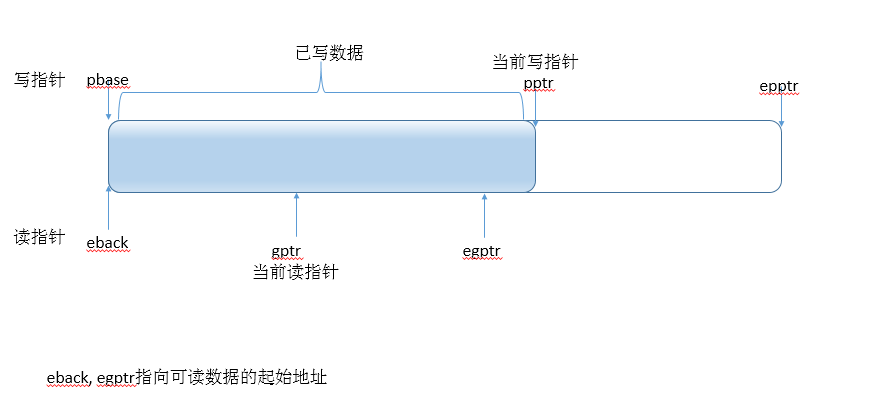
To keep track of the different areas in the stream buffer arrays, six pointers are maintained internally, three for input and three for output.
For an output stream buffer(接收输入的buffer,写指针, cout << x ), there are:
- the put base pointer, as returned from
std::streambuf::pbase(), which points to the first element of the buffer's internal array, - the put pointer, as returned from
std::streambuf::pptr(), which points to the next character in the buffer that may be written to - and the end put pointer as returned from
std::streambuf::epptr(), which points to one-past-the-last-element of the buffer's internal array.

Typically, pbase() and epptr() won't change at all; it will only be pptr() that changes as the buffer is used.
For an input stream buffer(已有数据的buffer,读指针, cin >> x), we have 3 different pointers to contend with, though they have a roughly analogous purpose. We have:
- the end back pointer, as returned from
std::streambuf::eback(), which points to the last character (lowest in address) in the buffer's internal array in to which a character may be put back,-
换个好理解的描述
-
char* eback() const;
-
Pointer to beginning of input sequenceReturns a pointer to the first element of the array with the portion of the controlled input sequence that is currentlybuffered.
-
- the get pointer, as returned from
std::streambuf::gptr(), which points to the character in the buffer that will be extracted next by theistream - and the end get pointer, as returned from
std::streambuf::egptr(), which points to one-past-the-last-element of the buffer's internal array.

Again, it is typically the case that eback() and egptr() won't change during the life-time of thestreambuf.
http://www.cnblogs.com/my_life/articles/5801756.html
,eback()返回缓冲区中有效数据的起始位置。epptr()返回缓冲区有效数据末端位置。pptr()返回当前读取位置。
Input stream buffers, written for use with istreams, tend to be a little bit more complex than output buffers, written for ostreams. This is because we should endeavor to allow the user to put characters back in to the stream, to a reasonable degree, which is done through the std::istream's putback() member function.
输入缓冲比输出缓冲稍微复杂一点,因为输入缓冲需要一个putback()的特性:Attempts to decrease the current location in the stream by one character, making the last character extracted from the stream once again available to be extracted by input operations.
Now you may have noticed that we are deriving from std::streambuf in order to create both an output buffer and an input buffer; there is no std::istreambuf or std::ostreambuf. This is because it is possible to provide a stream buffer that manipulates the same internal array as a buffer for both reading from and writing to an external entity. This is what std::fstream does, for example. However, implementing a dual-purpose streambuf is a fair bit trickier, so I won't be considering it in this post.
cin.peek()从输入流中读取一个字符,但是并不从输入流中删除这个字符,即它可以在不破坏输入流中内容的情况下浏览输入流中的内容,一般用它根据流中的内容作一些检查和预处理工作。
putback是將字符放回到輸入流中,一般輸入流中字符的長度是不變的。
如:
char ch;
cin>>ch
double f
if(isdigit(ch))
{
cin.putback(ch);
cin>>f;
}
字符串作爲輸入流可以使用類
std::streambuf is actually atypedef for std::basic_streambuf<char>.
Internally, thebasic_streambuf class is an elaborated base class designed to provide a uniform public interface for all derived classes: These public functions call virtual protected members that derived classes may override to implement specific behavior. These overridden virtual functions have access to the internals of thebasic_streambuf class by means of a set of protected functions (see below).
Example 1: FILE buffers to integrate with C code
For our first example, let's look at the case where you might have some legacy C code to contend with. Let's say you're handed a FILE* but you want to use a C++ stream interface to read or write data, rather than the traditional FILE* interface provided by the C standard library. We'll start out with the case where we have a FILE* that is open for reading and we would like to wrap it in anstd::istream in order to extract the data.
Here's the interface.
#include <streambuf>
#include <vector>
#include <cstdlib>
#include <cstdio>

class FILE_buffer : public std::streambuf
{
    public:
        explicit FILE_buffer(FILE *fptr, std::size_t buff_sz = 256, std::size_t put_back = 8);

    private:
        // overrides base class underflow()
        int_type underflow();

        // copy ctor and assignment not implemented;
        // copying not allowed
        FILE_buffer(const FILE_buffer &);
        FILE_buffer &operator= (const FILE_buffer &);

    private:
        FILE *fptr_;
        const std::size_t put_back_;
        std::vector<char> buffer_;
};
In the simplest implementation, we only have to override a single virtual function from the base class and add our own constructor, which is nice.
The constructor specifies the FILE* we'll be reading from, and the size of the internal array, which is specified via a combination of the remaining two arguments. To keep the implementation simple, we'll mandate that the following invariants hold (and are set up by the constructor):
- The put-back area that we reserve will be the largest of 1 and that given as the 3rd constructor argument (put-back区域的大小是max(1, 第三个参数))
- The remaining buffer area will be at least as big as the put-back area i.e. the largest of the put-back area's size and the size given by the 2nd constructor argument (剩余的空间大小至少是put-back的区域大小)
Now, we'll use an std::vector<char> as our buffer area. The first put_back_ characters of this buffer will be used as our put-back area.
So let's have a look at the constructor's implementation, first of all:
#include "file_buffer.hpp"

#include <algorithm>
#include <cstring>

using std::size_t;

FILE_buffer::FILE_buffer(FILE *fptr, size_t buff_sz, size_t put_back) :
    fptr_(fptr),
    put_back_(std::max(put_back, size_t(1))),   //保留空间的大小
    buffer_(std::max(buff_sz, put_back_) + put_back_)   //总空间=保留空间+最少的剩余空间
{
    char *end = &buffer_.front() + buffer_.size();
    setg(end, end, end);
}
In the initialiser list, we're setting up the invariants that I spoke of. Now in the body of the constructor, we call std::streambuf::setg() with the end address of the buffer as all three arguments.
Calling setg() is how we tell the streambuf about any updates to the positions of eback(), gptr()and egptr(). To start with we'll have them all point to the same location, which will signal to us that we need to re-fill the buffer in our implementation of underflow()【说明无数据可读了】, which we'll look at now.把读指针都指向了缓冲区末尾,这就暗示我们需要实现underflow()函数来refill buffer。
underflow() is contractually bound to give us the current character from the data source. Typically, this means it should return the next available character in the buffer (the one at gptr()).
However, if we've reached the end of the buffer, underflow() should re-fill it with data from the source FILE* and then return the first character of the newly replenished array. However, if the buffer is re-filled, we will need to call setg() again, to tell the streambuf that we've updated the three delimiting pointers. 当读指针到了end of the buff, should re-fill
When the data source really is depleted, an implementation of underflow() needs to returntraits_type::eof(). traits_type is a typedef that we inherited from the std::streambuf base class. Note that underflow() returns an int_type, which is an integral type large enough to accommodate the value of eof(), as well as the value of any given char.
当source真的已经无数据可refill了,返回eof()。underflow()返回int_type, 这个类型足够大,足够存储所有可能的值,包括eof().
Example 2: reading from an array of bytes in memory
In this example, we'll look at the situation where you already have a read-only array of bytes in memory and you'd like to wrap it in an std::istream to pluck out data in a formatted manner. This example is a little different from the previous one in that we don't really need a buffer. There's simply no advantage to having one because the data is the buffer, here. So all our stream buffer will do is pass through characters one at a time from the source.
overflow is called whenever the put pointer is equal to the end put pointer i.e. whenpptr() == epptr().
It is sync()'s job to write the current buffered data to the target, even when the buffer isn't full.
http://mmoaay.gitbooks.io/boost-asio-cpp-network-programming-chinese/content/Chapter6.html
underflow() has to return the current character in the source, or traits_type::eof() if the source is depleted.
underflow()要么返回当前值; 要么返回eof,如果source确实没有数据了。
Now we come on to uflow(), whose responsibility it is to return the current character and then increment the buffer pointer. The default implementation in std::streambuf::uflow() is to callunderflow() and return the result after incrementing the get pointer (as returned by gptr()). However, we aren't using the get pointer (we haven't called setg()) and so the default implementation is inappropriate. So we override uflow() like so:
char_array_buffer::int_type char_array_buffer::uflow()
{
    if (current_ == end_)
        return traits_type::eof();

    return traits_type::to_int_type(*current_++);
}
这我们这种情况下(是用别的只读buffer来初始化的),uflow()的默认行为是不对的,所以我们需要重写。
何时需要重写uflow: you'll find that the need to override uflow() typically arises in stream buffers that don't use a writeable array for intermediate storage.
overflow is called whenever the put pointer is equal to the end put pointer i.e. whenpptr() == epptr(). It is overflow()'s responsibility to write the contents of any internal buffer and the character it is given as an argument to the target. It should return something other thantraits_type::eof() on success.
It is sync()'s job to write the current buffered data to the target, even when the buffer isn't full. This could happen when the std::flush manipulator is used on the stream, for example. sync()should return -1 on failure.
继承自streambuf的读buffer需要处理underflow(), 用来从源端refilll数据
继承自streambuf的写buffer需要处理overflow(), 无缓冲可写时,用来把缓冲中的数据写入目标。sync()也是把数据写入target,但并一定是无缓冲可写时才调用,可由flush()触发。

 浙公网安备 33010602011771号