
CPU, top 按线程显示,按CPU TIME排序
https://www.panzhongxian.cn/cn/2020/09/cpu-strike-to-100-analysis/
https://www.panzhongxian.cn/cn/2020/11/how-to-profile-cpu/
tcpdump -i any tcp port 20391 -Xs0 -c 5000 -w service_spp.pcap #打印响应内容
http://www.blogjava.net/hankchen/archive/2012/05/09/377735.html
ps -mp 9522 -o THREAD,tid,time,stime,etime
time: CPU时间
stime: start time 程序启动时的时间
etime: ELAPSED time 程序已运行的时间
lstart:time the command started
[root@21vnet-cd01-001 stream-server]# ps -mp 9522 -o THREAD,tid,time,stime,etime
USER %CPU PRI SCNT WCHAN USER SYSTEM TID TIME STIME ELAPSED
sysadmin 9.9 - - - - - - 1-00:12:37 Sep29 10-03:21:07
sysadmin 0.0 19 - pause - - 9522 00:00:27 Sep29 10-03:21:07
sysadmin 0.9 19 - hrtime - - 9523 02:23:17 Sep29 10-03:21:07
sysadmin 4.3 19 - hrtime - - 9524 10:36:41 Sep29 10-03:21:07
sysadmin 0.0 19 - futex_ - - 9525 00:00:33 Sep29 10-03:21:07
https://www.cnblogs.com/my_life/articles/12922753.html
-C cmdlist Select by command name.
ps -C nginx
-m Show threads after processes.
一个应用占用CPU很高,除了确实是计算密集型应用之外,通常原因都是出现了死循环。
(友情提示:本博文章欢迎转载,但请注明出处:hankchen,http://www.blogjava.net/hankchen)
以我们最近出现的一个实际故障为例,介绍怎么定位和解决这类问题。
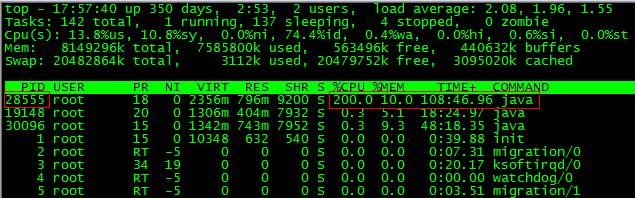
根据top命令,发现PID为28555的Java进程占用CPU高达200%,出现故障。
通过ps aux | grep PID命令,可以进一步确定是tomcat进程出现了问题。但是,怎么定位到具体线程或者代码呢?
首先显示线程列表:
ps -mp pid -o THREAD,tid,time

找到了耗时最高的线程28802,占用CPU时间快两个小时了!
其次将需要的线程ID转换为16进制格式:
printf "%x\n" tid

最后打印线程的堆栈信息:
jstack pid |grep tid -A 30
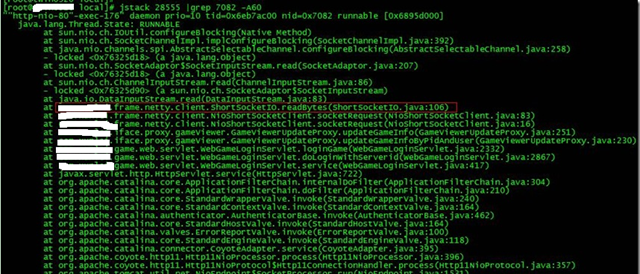
找到出现问题的代码了!
现在来分析下具体的代码:ShortSocketIO.readBytes(ShortSocketIO.java:106)
ShortSocketIO是应用封装的一个用短连接Socket通信的工具类。readBytes函数的代码如下:
public byte[] readBytes(int length) throws IOException {
if ((this.socket == null) || (!this.socket.isConnected())) {
throw new IOException("++++ attempting to read from closed socket");
}
byte[] result = null;
ByteArrayOutputStream bos = new ByteArrayOutputStream();
if (this.recIndex >= length) {
bos.write(this.recBuf, 0, length);
byte[] newBuf = new byte[this.recBufSize];
if (this.recIndex > length) {
System.arraycopy(this.recBuf, length, newBuf, 0, this.recIndex - length);
}
this.recBuf = newBuf;
this.recIndex -= length;
} else {
int totalread = length;
if (this.recIndex > 0) {
totalread -= this.recIndex;
bos.write(this.recBuf, 0, this.recIndex);
this.recBuf = new byte[this.recBufSize];
this.recIndex = 0;
}
int readCount = 0;
while (totalread > 0) {
if ((readCount = this.in.read(this.recBuf)) > 0) {
if (totalread > readCount) {
bos.write(this.recBuf, 0, readCount);
this.recBuf = new byte[this.recBufSize];
this.recIndex = 0;
} else {
bos.write(this.recBuf, 0, totalread);
byte[] newBuf = new byte[this.recBufSize];
System.arraycopy(this.recBuf, totalread, newBuf, 0, readCount - totalread);
this.recBuf = newBuf;
this.recIndex = (readCount - totalread);
}
totalread -= readCount;
}
}
}
问题就出在标红的代码部分。如果this.in.read()返回的数据小于等于0时,循环就一直进行下去了。而这种情况在网络拥塞的时候是可能发生的。
至于具体怎么修改就看业务逻辑应该怎么对待这种特殊情况了。
最后,总结下排查CPU故障的方法和技巧有哪些:
1、top命令:Linux命令。可以查看实时的CPU使用情况。也可以查看最近一段时间的CPU使用情况。
2、PS命令:Linux命令。强大的进程状态监控命令。可以查看进程以及进程中线程的当前CPU使用情况。属于当前状态的采样数据。
3、jstack:Java提供的命令。可以查看某个进程的当前线程栈运行情况。根据这个命令的输出可以定位某个进程的所有线程的当前运行状态、运行代码,以及是否死锁等等。
4、pstack:Linux命令。可以查看某个进程的当前线程栈运行情况。

 浙公网安备 33010602011771号