
最初,只以为把代码改好,把该有的功能实现了,我的任务就算是完成了。
当自己 验项目的时候才发现,自己的错误 有很多,欠缺思考。和师傅在一起讨论,找出每一个优化的点, 每一个需要改进的地方, 这都是我 对我极达的成长。
下面就开始
- 每一个 text box 要限制它的输入,当输入学号时,就不能输入汉字和标点。以及限制字符数。
Private Sub txtSID_KeyPress(KeyAscii As Integer)
    If KeyAscii = 8 Then Exit Sub
    If KeyAscii < 48 Or KeyAscii > 57 Then KeyAscii = 0
    '这条语句用来判断输入的字符是否在0-9的范围,如果不在这个范围,就把这个输入的字符屏蔽掉
   If Len(txtSID.Text) > 5 Then
        KeyAscii = 0
        MsgBox "学号字数超出。最大六位"
        txtSID.Text = ""
    End If

End Sub
-
当添加完成一个信息时, 一般要重新打开。 修改为当点击添加完成按钮时,清空所有控件里面的信息。
-
当要退出系统时 加一个提示框。
`Private Sub exitMenu_Click()If MsgBox(“是否退出程序?”, vbOKCancel, “请选择”) = vbOK Then
Unload Me
End If
End Sub` -
修改密码 时 不能直接 输入新密码, 应该加一步 输入旧密码, 还有就是 密码不能复制粘贴,新旧密码不可重复。
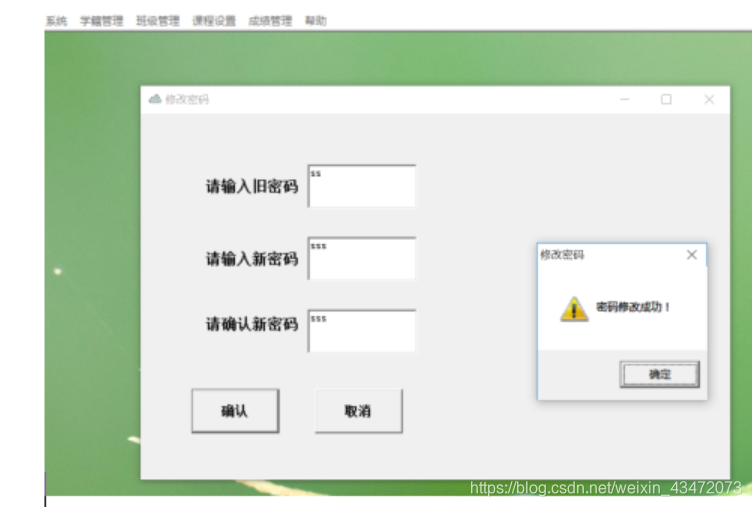
Private Sub cmdOK_Click()
    Dim txtSQL, MsgText As String
    Dim mrc As ADODB.Recordset

    txtSQL = "select*from user_info where user_ID='" & UserName & "'"
            Set mrc = ExecuteSQL(txtSQL, MsgText)

            '判断旧密码是否正确
    If Trim(txtMypwd.Text) <> Trim(mrc.Fields(1)) Then
      MsgBox "旧密码输入,不正确", vbOKOnly + vbExclamation, "警告"
             txtPassword1.SetFocus       '.setfoucus   获得焦点
                    txtPassword1.Text = ""
                    txtPassword2.Text = ""
                    txtMypwd.Text = ""
      Exit Sub
      End If


    If txtMypwd.Text = "" Then
       MsgBox "请输入原密码!"
    Else
    If txtPassword1.Text = "" Or txtPassword2.Text = "" Then
        MsgBox "请输入新密码"
    Else
    If txtMypwd.Text = txtPassword1.Text Or txtMypwd.Text = txtPassword2.Text Then
       MsgBox "原密码和新密码相同"
    Else

    If Trim(txtPassword1.Text) <> Trim(txtPassword2.Text) Then
                    MsgBox "两次密码不一样!", vbOKOnly + vbExclamation, "警告"
                    txtPassword1.SetFocus
                    txtPassword1.Text = ""
                    txtPassword2.Text = ""
                    txtMypwd.Text = ""
    Else
            txtSQL = "select*from user_info where user_ID='" & UserName & "'"
            Set mrc = ExecuteSQL(txtSQL, MsgText)

                    mrc.Fields(1) = txtPassword1.Text


                     mrc.Update

                    mrc.Close
                    MsgBox "密码修改成功!", vbOKOnly + vbExclamation, "修改密码"
                    Unload Me
                    Unload fMainForm

                    '重新打开登陆窗体和Main窗体
              Dim fLogin As New frmLogin

                    fLogin.Show vbModal
                    If Not fLogin.OK Then

                          End
                    End If
                    Unload fLogin
                    fMainForm.Show
                End If
            End If
        End If

 End If


    txtPassword1.Text = ""
    txtPassword2.Text = ""
    txtMypwd.Text = ""

End Sub

 浙公网安备 33010602011771号