
【总结】mybatis
一.config配置文件详解
<?xml version="1.0" encoding="UTF-8" ?>
<!DOCTYPE configuration
PUBLIC "-//mybatis.org//DTD Config 3.0//EN"
"http://mybatis.org/dtd/mybatis-3-config.dtd">
<configuration>
<!--configuration中的这些属性是有顺序的,最好按照本列子中的顺序配置-->
<!--一些重要的全局配置-->
<settings>
<setting name="cacheEnabled" value="true"/>
<setting name="lazyLoadingEnabled" value="true"/>
<setting name="multipleResultSetsEnabled" value="true"/>
<setting name="useColumnLabel" value="true"/>
<setting name="useGeneratedKeys" value="false"/>
<setting name="autoMappingBehavior" value="PARTIAL"/>
<setting name="autoMappingUnknownColumnBehavior" value="WARNING"/>
<setting name="defaultExecutorType" value="SIMPLE"/>
<setting name="defaultStatementTimeout" value="25"/>
<setting name="defaultFetchSize" value="100"/>
<setting name="safeRowBoundsEnabled" value="false"/>
<setting name="mapUnderscoreToCamelCase" value="false"/>
<setting name="localCacheScope" value="STATEMENT"/>
<setting name="jdbcTypeForNull" value="OTHER"/>
<setting name="lazyLoadTriggerMethods" value="equals,clone,hashCode,toString"/>
<setting name="logImpl" value="STDOUT_LOGGING" />
</settings>
<!--类型别名,指定了类型别名后就可以使用别名来代替全限定名-->
<typeAliases>
<!-- 方式1: 给单独的某个实体类配置别名,如同下面的形式 -->
<typeAlias alias="Cbondissuer" type="com.csx.demo.spring.boot.entity.Cbondissuer"/>
<!-- 方式2:为一个包下面的所有类设定别名,此时会使用 Bean 的首字母小写的非限定类名来作为它的别名-->
<package name="domain.blog"/>
</typeAliases>
<!--设置插件-->
<plugins>
<plugin interceptor="com.github.pagehelper.PageInterceptor">
<!--<!–默认值为 false,当该参数设置为 true 时,如果 pageSize=0 或者 RowBounds.limit = 0 就会查询出全部的结果–>-->
<!--如果某些查询数据量非常大,不应该允许查出所有数据-->
<property name="pageSizeZero" value="true"/>
</plugin>
</plugins>
<!--数据源 读取外部properties配置文件-->
<properties resource="db.properties"/>
<environments default="development">
<environment id="development">
<transactionManager type="JDBC"/>
<dataSource type="POOLED">
<property name="driver" value="${jdbc.driver}"/>
<property name="url" value="${jdbc.url}"/>
<property name="username" value="${jdbc.username}"/>
<property name="password" value="${jdbc.password}"/>
</dataSource>
</environment>
</environments>
<mappers>
<!--这边可以使用package和resource两种方式加载mapper-->
<!--推荐使用resource这种-->
<mapper resource="./mappers/CbondissuerMapper.xml"/>
</mappers>
</configuration>
1.settings
| 设置参数 | 描述 | 有效值 | 默认值 |
|---|---|---|---|
| cacheEnabled | 该配置影响的所有映射器中配置的缓存的全局开关 | true,false | true |
| lazyLoadingEnabled | 延迟加载的全局开关。当开启时,所有关联对象都会延迟加载。 特定关联关系中可通过设置fetchType属性来覆盖该项的开关状态。 | true,false | false |
| aggressiveLazyLoading | 当启用时,对任意延迟属性的调用会使带有延迟加载属性的对象完整加载;反之,每种属性将会按需加载。 | true,false | true |
| multipleResultSetsEnabled | 是否允许单一语句返回多结果集(需要兼容驱动)。 | true,false | true |
| useColumnLabel | 使用列标签代替列名。不同的驱动在这方面会有不同的表现 | true,false | true |
| useGeneratedKeys | 允许 JDBC 支持自动生成主键,需要驱动兼容。 如果设置为 true 则这个设置强制使用自动生成主键,尽管一些驱动不能兼容但仍可正常工作(比如 Derby)。 | true,false | false |
| autoMappingBehavior | 指定 MyBatis 应如何自动映射列到字段或属性。 NONE 表示取消自动映射;PARTIAL 只会自动映射没有定义嵌套结果集映射的结果集。 FULL 会自动映射任意复杂的结果集(无论是否嵌套)。 | NONE, PARTIAL, FULL | PARTIAL |
| defaultExecutorType | 配置默认的执行器。SIMPLE 就是普通的执行器;REUSE 执行器会重用预处理语句(prepared statements); BATCH 执行器将重用语句并执行批量更新。 | SIMPLE REUSE BATCH | SIMPLE |
| defaultStatementTimeout | 设置超时时间,它决定驱动等待数据库响应的秒数。 | Any positive integer | Not Set (null) |
| mapUnderscoreToCamelCase | 是否开启自动驼峰命名规则(camel case)映射,即从经典数据库列名 A_COLUMN 到经典 Java 属性名 aColumn 的类似映射。 | true, false | false |
2.plugins
MyBatis 允许你在已映射语句执行过程中的某一点进行拦截调用。默认情况下,MyBatis 允许使用插件来拦截的方法调用包括:
Executor (update, query, flushStatements, commit, rollback, getTransaction, close, isClosed)
ParameterHandler (getParameterObject, setParameters)
ResultSetHandler (handleResultSets, handleOutputParameters)
StatementHandler (prepare, parameterize, batch, update, query)
- mybatis中有两种事务管理器:
①JDBC – 这个配置就是直接使用了 JDBC 的提交和回滚设置,它依赖于从数据源得到的连接来管理事务范围。
②MANAGED – 这个配置几乎没做什么。它从来不提交或回滚一个连接,而是让容器来管理事务的整个生命周期(比如 JEE 应用服务器的上下文)。 默认情况下它会关闭连接,然而一些容器并不希望这样,因此需要将 closeConnection 属性设置为 false 来阻止它默认的关闭行为。
4.数据源的配置(比如:type="POOLED")
有三种内建的数据源类型(也就是 type="[UNPOOLED|POOLED|JNDI]")
①UNPOLLED:UNPOOLED– 这个数据源的实现只是每次被请求时打开和关闭连接
②POLLED:这种数据源的实现利用"池"的概念将 JDBC 连接对象组织起来,避免了创建新的连接实例时所必需的初始化和认证时间
③JNDI:这个数据源的实现是为了能在如 EJB 或应用服务器这类容器中使用
5.mappers映射器
方式1:
<mappers>
  <mapper resource="org/mybatis/builder/AuthorMapper.xml"/>
  <mapper resource="org/mybatis/builder/BlogMapper.xml"/>
  <mapper resource="org/mybatis/builder/PostMapper.xml"/>
</mappers>
方式2:
<mappers>
  <package name="org.mybatis.builder"/>
</mappers>
二.xml映射文件详解
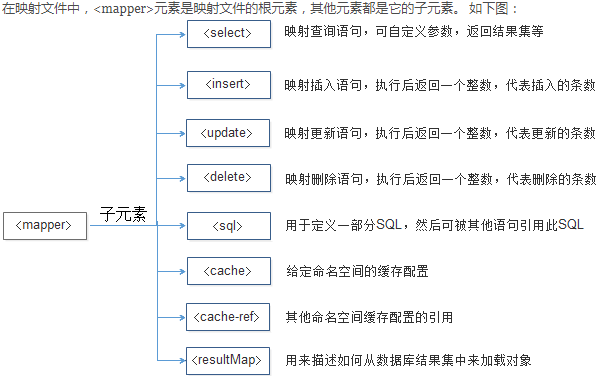
<?xml version="1.0" encoding="UTF-8" ?>
<!DOCTYPE mapper  PUBLIC "-//mybatis.org//DTD Mapper 3.0//EN"
        "http://mybatis.org/dtd/mybatis-3-mapper.dtd">
<mapper namespace="com.itheima.mapper.CustomerMapper">
    <select id="findCustomerById" parameterType="Integer" resultType="com.itheima.po.Customer">
        SELECT * FROM t_customer WHERE id = #{id}
    </select>
    <select id="findCustomerByName" parameterType="String" resultType="com.itheima.po.Customer">
        SELECT * FROM t_customer WHERE username LIKE '%${value}%'
    </select>
    <insert id="addCustomer" parameterType="com.itheima.po.Customer">
        INSERT INTO t_customer(username,jobs,phone) VALUES (#{username}, #{jobs}, #{phone})
    </insert>
    <update id="updateCustomer" parameterType="com.itheima.po.Customer">
        UPDATE t_customer SET username='${username}', jobs='${jobs}',phone='${phone}' WHERE id=${id}
    </update>
    <delete id="deleteCustomer" parameterType="Integer">
        DELETE FROM t_customer WHERE id=#{id}
    </delete>
</mapper>
1.select
| 属性 | 描述 |
|---|---|
| id | 在命名空间中唯一的标识符,可以被用来引用这条语句。 |
| parameterType | 将会传入这条语句的参数类的完全限定名或别名。这个属性是可选的,因为 MyBatis 可以通过 TypeHandler 推断出具体传入语句的参数,默认值为 unset。 |
| resultType | 从这条语句中返回的期望类型的类的完全限定名或别名。注意如果是集合情形,那应该是集合可以包含的类型,而不能是集合本身。使用 resultType 或 resultMap,但不能同时使用。 |
| resultMap | 外部 resultMap 的命名引用。结果集的映射是 MyBatis 最强大的特性,对其有一个很好的理解的话,许多复杂映射的情形都能迎刃而解。使用 resultMap 或 resultType,但不能同时使用。 |
| flushCache | 将其设置为 true,任何时候只要语句被调用,都会导致本地缓存和二级缓存都会被清空,默认值:false。 |
| useCache | 将其设置为 true,将会导致本条语句的结果被二级缓存,默认值:对 select 元素为 true。 |
| timeout | 这个设置是在抛出异常之前,驱动程序等待数据库返回请求结果的秒数。默认值为 unset(依赖驱动)。 |
| fetchSize | 这是尝试影响驱动程序每次批量返回的结果行数和这个设置值相等。默认值为 unset(依赖驱动)。 |
返回复杂对象map
(1)方式1:表的字段名对应map中的key,字段所属的值对应map中的value
<!--注意:返回类型为Map类型-->
<mapper namespace="com.lzj.mybatis.dao.UserDao">
    <select id="getMapUser" resultType="Map">
        select * from users where id=#{id}
    </select>
</mapper>
(2)方式 2:map的key对应指定的字段名字所属值,map的value对应查出数据封装成的bean
public interface UserDao {
    /*用MapKey注解指定字段name作为map中的key*/
    @MapKey("name")
    public Map<String, User> getUserMap(String name);
}
<!--注意:resultType为User类型-->
<mapper namespace="com.lzj.mybatis.dao.UserDao">
    <select id="getUserMap" resultType="com.lzj.mybaits.bean.User">
        select * from users where name=#{name}
    </select>
</mapper>
2.insert
inser>大部分与select相同,除此之外还包含
| 属性 | 描述 |
|---|---|
| keyProperty | (仅对 insert 和 update 有用)标记获取到的自增主键映射为javabean的哪个字段 |
| keycolumn | (仅对 insert 和 update 有用)设置第几列是主键,当主键不是表中第一列时需要设置 |
| useGeneratedKeys | (仅对 insert 和 update 有用)这会令 MyBatis 使用 JDBC 的 getGeneratedKeys 方法来取出由数据库内部生成的主键(比如:像 MySQL 和 SQL Server 这样的关系数据库管理系统的自动递增字段),默认值:false。 |
对于不支持主键自助增长的数据库(如Oracle),或者支持增长的数据库取消了主键自动增长的规则时,可以通过如下配置实现自定义生成主键:
(1)如果t_customer表中没有记录,则将id设置为1,否则就将id的最大值加1来作为新的主键
(2)其中orde属性可以设置为before或者after。当设置为before时,那么它会首先执行selectkey元素中的配置来设置主键,然后在执行插入语句;如果设置为after,则相反。
<insert id="insertCustomer" parameterType="com.itheima.po.Customer">
      <selectKey keyProperty="id" resultType="Integer" order="BEFORE">
          select if(max(id) is null, 1, max(id) +1) as newId from t_customer
      </selectKey>

      insert into t_customer(id,username,jobs,phone)  values(#{id},#{username},#{jobs},#{phone})
</insert>
3.update和delete元素
4.sql片段
sql片段,可以在mapper文件中的任何地方引用,主要作用是减少代码量,复用重复的字段。
<sql id="customerColumns">id,username,jobs,phone</sql>
<select id="findCustomerById" parameterType="Integer" resultType="com.itheima.po.Customer">
    select
    <include refid="customerColumns"/>
    from tableName
    where id = #{id}
</select>
5.resultMap 结果集映射元素
<resultMap type="" id="">
       <constructor>    <!-- 类在实例化时,用来注入结果到构造方法中-->
             <idArg/>      <!-- ID参数;标记结果作为ID-->
             <arg/>          <!-- 注入到构造方法的一个普通结果-->
       </constructor>
       <id/>                 <!-- 用于表示哪个列是主键-->
       <result/>           <!-- 注入到字段或JavaBean属性的普通结果-->
       <association property="" />        <!-- 用于一对一关联 -->
       <collection property="" />          <!-- 用于一对多关联 -->
       <discriminator javaType="">      <!-- 使用结果值来决定使用哪个结果映射-->
            <case value="" />                   <!-- 基于某些值的结果映射 -->
       </discriminator>
</resultMap>
(1)自定义映射:在默认情况下,mybatis程序在运行时会自动的将查询到的数据与需要返回的对象的属性进行匹配赋值(需要表中的列名与对象的属性名称完全一致),然而在实际开发中属性名和列名可能不一致,这个时候就需要使用resultMap元素进行映射处理
    <resultMap id="BaseResultMap" type="cn.jason.bootmybatis.model.Tests">
        <!-- id用来完成主键的映射 效率更高-->
        <id column="id" property="id" jdbcType="BIGINT"/>
        <result column="name" property="name" jdbcType="VARCHAR"/>
        <result column="age" property="age" jdbcType="INTEGER"/>
    </resultMap>


    <select id="selectByPrimaryKey" resultMap="BaseResultMap">
        select
        <include refid="Base_Column_List"/>
        from tests
        where id = #{id,jdbcType=BIGINT}
    </select>
(2)一对一关联
一个对象中关联另一个对象
public class ORMContact {
    private int nId;
    private ORMUser user;
    ...
}
<!-- 对象一对一的关联映射,ORMContact对象中有ORMUser对象 -->
    <resultMap id="ormContact" type="mybatis.orm.mode.ORMContact">
        <id column="n_id" property="nId" jdbcType="INTEGER" />
        <!-- 关联映射,映射一个JavaBean,多个联系对应一个用户,即多对一,也可以处理一对一 -->
        <association property="user" javaType="mybatis.orm.mode.ORMUser">
            <id column="n_userid" property="nUserId" jdbcType="INTEGER" />
            <result column="c_name" property="cName" jdbcType="VARCHAR" />
            <result column="c_sex" property="cSex" jdbcType="VARCHAR" />
            <result column="n_age" property="nAge" jdbcType="INTEGER" />
            <result column="d_birthday" property="dBirthday" jdbcType="TIMESTAMP" />
        </association>
    </resultMap>
(3)一对多映射
public class ORMUser {
    private int nUserId;

    private List contactList;
    ...
}

    <!-- 一对多映射 -->
    <resultMap id="ormUser" type="mybatis.orm.mode.ORMUser">
        <id column="n_userid" property="nUserId" jdbcType="INTEGER" />
        <!-- 映射关联的List,一个用户对多个联系方式,使用List来存放联系方式 -->
        <collection property="contactList" ofType="mybatis.orm.mode.ORMContact">
            <id column="n_id" property="nId" jdbcType="INTEGER" />
            <result column="c_usage" property="cUsage" jdbcType="VARCHAR" />
            <result column="c_number" property="cNumber" jdbcType="VARCHAR" />
        </collection>
    </resultMap>
三.mybatis参数处理
1.值获取方式:
(1)单个参数:mybatis不会做特殊处理,#{参数名}取出参数值
(2)多个参数:被封装成一个map,#{}就是从map获得指定key的值(多个参数,接口必须用@Param注解)
①取值方法1:使用param1,param2或参数的索引也可以
②取值方法2:命名参数@Param("id")Integer id
(3)参数正好是业务逻辑数据模型:可以直接传入pojo #{属性名}
(4)参数不是业务逻辑数据模型:直接传map #{key}取值
(5)参数不是业务逻辑数据模,且经常使用,推荐编一个TO来传
@Param("e")Employee emp e.getname
(6)如果是collection(list set或数组)
取第一个值#{list[0]} 注意,必须用list
2.${}和#{}的区别?
{}是以预编译的形式,将参数设置到sql语句中,Preparedstatement,防止sql注入
${}取出的值直接拼装在sql语句中,无法防止sql注入
对于分库分表的场景,需要用到${}取值
四.mybatis缓存
1.mybatis的两级缓存:
(1)一级缓存(本地缓存):sqlSession级别 级别的缓存,与数据库同一次会话期间查询到的数据放在本地缓存中,以后要获取相同的数据,直接从缓存中拿
配置:cacheEnabled
(2)二级缓存(全局缓存):namespace级别
配置:在一级缓存开启的条件下,还需要在 Mapper 的xml 配置文件中加入
2.一级缓存失效情况?
(1)sqlsession不同
(2)sqlsession相同,查询条件不同
(3)sqlsession相同,两次查询之间进行了增删改操作
(4)手动清空一级缓存
3.工作机制?
(1)一个会话,查询一条数据。这个数据就放在当前会话的一级缓存中
(2)如果会话关闭,一级缓存中的数据被保存到二级缓存。新的会话就会参照二级缓存
五.动态sql(OGNL表达式)
1.if where一般同时使用:
where的作用:(1)有条件成立自动带where(2)去掉第一个成立条件的AND和OR
<select id="findActiveBlogWithTitleLike"  resultType="Blog">
    SELECT * FROM BLOG
    <where>
      <if test="title != null">
          AND title like #{title}
      </if>
    <where>
</select>
2.set
set标签作用:动态的处理多余的逗号
<update id="updateAuthorIfNecessary">
  update Author
    <set>
      <if test="username != null">username=#{username},</if>
      <if test="password != null">password=#{password},</if>
      <if test="email != null">email=#{email},</if>
      <if test="bio != null">bio=#{bio}</if>
    </set>
  where id=#{id}
</update>
3.trim
用于替换where和set标签
<trim prefix="SET" suffixOverrides=",">
      <if test="username != null">username=#{username},</if>
      <if test="password != null">password=#{password},</if>
      <if test="email != null">email=#{email},</if>
      <if test="bio != null">bio=#{bio}</if>
</trim>

<trim prefix="where" prefixOverrides="AND">
  <if test="title != null">
    AND title like #{title}
  </if>
</trim>
4.foreach
迭代一个集合,通常用于in条件
<select id="selectPostIn" resultType="domain.blog.Post">
    SELECT *
    FROM POST P
    WHERE ID in
    <foreach item="item" collection="list" open="(" separator="," close=")">
          #{item}
    </foreach>
</select>
5.choose
相当于java中的switch,只要一个满足就退出
<select id="findActiveBlogLike"  resultType="Blog">
    SELECT * FROM BLOG WHERE state = ‘ACTIVE’
    <choose>
    <when test="title != null">
        AND title like #{title}
    </when>
    <when test="author != null and author.name != null">
        AND author_name like #{author.name}
    </when>
    <otherwise>
        AND featured = 1
    </otherwise>
  </choose>
</select>

 浙公网安备 33010602011771号