
C++day8 liunx基础
4.28
一.chkconfig指令
通过chkconfig可以给服务的各个运行级别设置自启动/关闭。
chkconfig指令管理的服务在 /etc/init.d查看。
注意:在Centos 7.0以后,很多服务使用systemctl管理。
基本用法
1)查看服务 chkconfig --list[|grep “”]
2)设置服务在指定级别启动/关闭 chkconfig --level network on/off
之前的版本
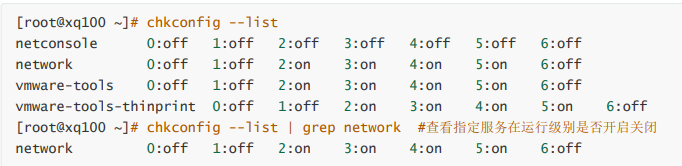
注意: 上面的数字代表linux的运行级别。
我的电脑
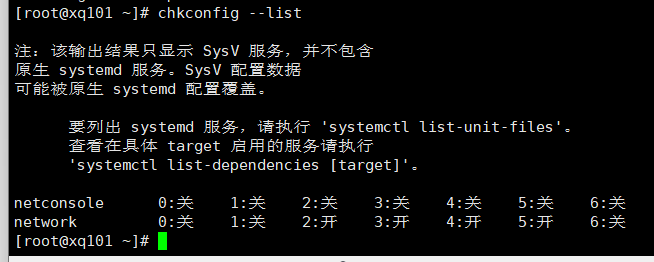
案例:对于network服务,进行各种操作,把network在3运行级别,关闭自启动。
点击查看代码
[root@xq100 ~]# chkconfig --level 3 network off 关闭
[root@xq100 ~]# chkconfig --level 5 network on 打开
注意:chkconfig重新设置服务自启动或者关闭,需要重启机器reboot生效
二.systemctl服务管理指令
systemctl 指令管理的服务在/usr/lib/systemd/system中查看
1)服务启动/停止/重启/重载/查看状态: systemctl [start | stop | restart | status] 服务名
2)查看所有服务的自启动状态
案例:
点击查看代码
[root@xq100 system]# systemctl list-unit-files | grep firewall
firewalld.service enabled
[root@xq100 system]# systemctl status firewalld.service # 查看防火墙状态
[root@xq100 system]# systemctl stop firewalld.service # 停止防火墙状态
[root@xq100 system]# systemctl restart firewalld.service # 重启防火墙
1.查看某一服务是否自启动
点击查看代码
[root@xq100 system]# systemctl is-enabled firewalld.service # 知道完整服务名
enabled
点击查看代码
[root@xq100 system]# systemctl enable firewalld.service
三.firewall防火墙指令
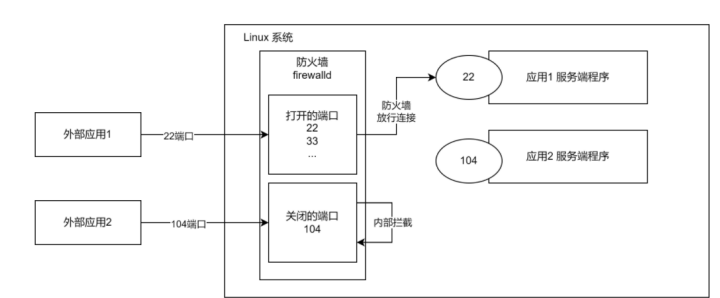
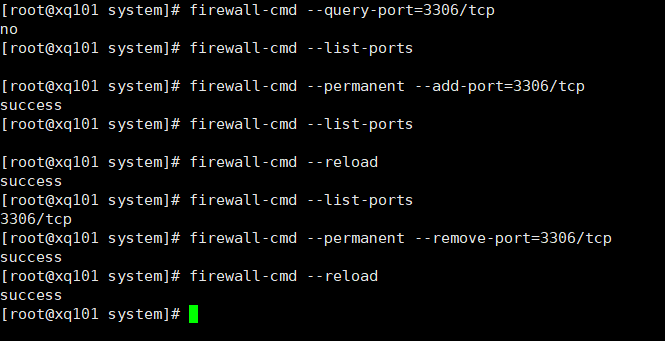
1.防火墙的核心功能:打开或关闭对应端口。关闭端口,则外部的数据请求不能通过对应的端口,与服务器上的程序进行通信
在真正的生产环境,为保证安全,需要启动防火墙并配置打开和关闭的端口。
2.基本语法
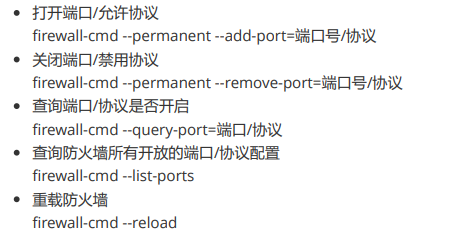
实践:

 浙公网安备 33010602011771号