
C++day5 liunx基础 NAT网络配置
4.25
一.NAT网络配置原理
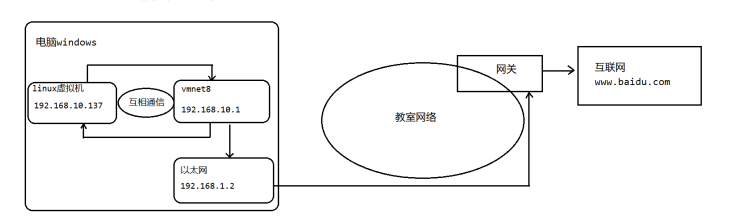
1.为什么我们可以在linux操作系统里面访问外网(比如访问百度)?
通过这幅图理解
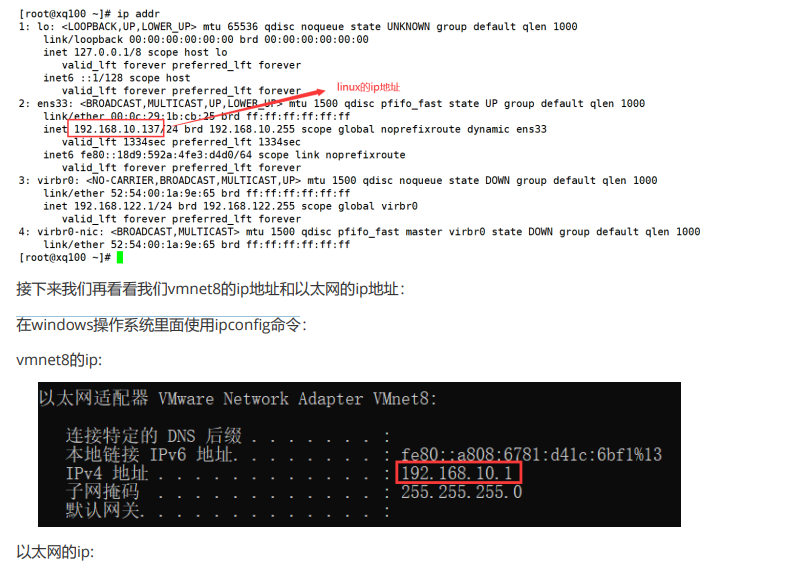
2.查看虚拟机上liunx操作系统的地址
3.来互相ping一下,看能否ping通
点击查看代码
C:\Users\kriss>ping 192.168.10.137
正在 Ping 192.168.10.137 具有 32 字节的数据:
来自 192.168.10.137 的回复: 字节=32 时间<1ms TTL=64
来自 192.168.10.137 的回复: 字节=32 时间<1ms TTL=64
来自 192.168.10.137 的回复: 字节=32 时间<1ms TTL=64
来自 192.168.10.137 的回复: 字节=32 时间<1ms TTL=64
192.168.10.137 的 Ping 统计信息:
数据包: 已发送 = 4,已接收 = 4,丢失 = 0 (0% 丢失),
往返行程的估计时间(以毫秒为单位):
最短 = 0ms,最长 = 0ms,平均 = 0ms
点击查看代码
[root@xq100 ~]# ping 192.168.10.1
PING 192.168.10.1 (192.168.10.1) 56(84) bytes of data.
64 bytes from 192.168.10.1: icmp_seq=1 ttl=64 time=0.120 ms
64 bytes from 192.168.10.1: icmp_seq=2 ttl=64 time=0.188 ms
64 bytes from 192.168.10.1: icmp_seq=3 ttl=64 time=0.162 ms
64 bytes from 192.168.10.1: icmp_seq=4 ttl=64 time=0.141 ms
64 bytes from 192.168.10.1: icmp_seq=5 ttl=64 time=0.175 ms
1)ipaddr 在linux查看ip地址
2)ifconfig 在linux查看ip地址
3)ping 是否ping通指定的ip地址
4)ipconfig 在windows操作系统里面查看网络的ip地址
二.NAT网络配置实例

 浙公网安备 33010602011771号