

当您运行 Microsoft Dynamics CRM 4.0 时,则 AsyncOperationBase 表将增大到很大。 如果表包含数百万个记录,性能是速度较慢。
详见:http://support.microsoft.com/kb/968520/
但是,该操作会删除销售预期报表涉及的数据,影响了该报表的正常使用。所以笔者经过测试,做了如下修改,仅供参考。
1) 停止crm服务器的IIS,备份你的 CRM databases
2) 建立两个索引(index)在数据库里 :
CREATE NONCLUSTERED INDEX CRM_AsyncOperation_CleanupCompleted
ON [dbo].[AsyncOperationBase] ([StatusCode],[StateCode],[OperationType])
GO
CREATE NONCLUSTERED INDEX CRM_DuplicateRecord_CleanupCompleted
ON [dbo].[DuplicateRecordBase] ([AsyncOperationID])
GO
3) 停止 CRM 异步服务 Microsoft Dynamics CRM Async Service
4) 打开SQL Server Management Studio , 运行如下代码
declare @DeleteRowCount int
Select @DeleteRowCount = 2000
declare @DeletedAsyncRowsTable table (AsyncOperationId uniqueidentifier not null)
declare @continue int, @rowCount int
select @continue = 1
while (@continue = 1)
begin
begin tran
insert into @DeletedAsyncRowsTable(AsyncOperationId)
Select top (@DeleteRowCount) AsyncOperationId
from AsyncOperationBase
where ( OperationType in (1, 9, 12, 25, 27) AND StateCode = 3 AND StatusCode in (30, 32) )
or ( OperationType in (10) AND StateCode = 3 AND StatusCode in (32) )
Select @rowCount = 0
Select @rowCount = count(*) from @DeletedAsyncRowsTable
select @continue = case when @rowCount <= 0 then 0 else 1 end
if (@continue = 1)
begin
delete WorkflowLogBase from WorkflowLogBase W, @DeletedAsyncRowsTable d
where W.AsyncOperationId = d.AsyncOperationId
delete BulkDeleteFailureBase From BulkDeleteFailureBase B, @DeletedAsyncRowsTable d
where B.AsyncOperationId = d.AsyncOperationId
delete AsyncOperationBase From AsyncOperationBase A, @DeletedAsyncRowsTable d
where A.AsyncOperationId = d.AsyncOperationId
delete @DeletedAsyncRowsTable
end
commit
end
======================
另附: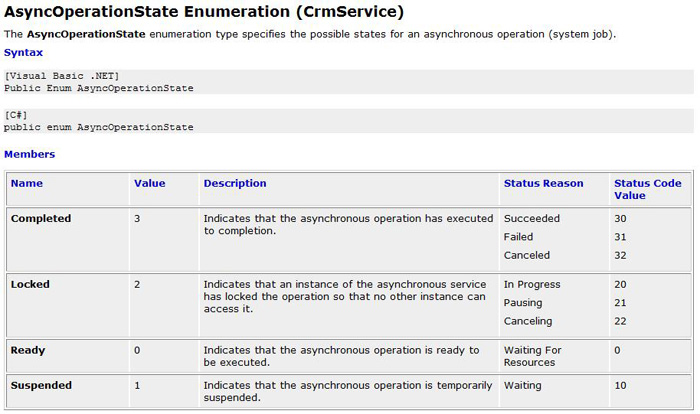
Optimizing and Maintaining Microsoft Dynamics CRM 4.0

 浙公网安备 33010602011771号