sqoop 三种导出数据方式实现export
# 导出 export
SQOOP支持直接从Hive表到RDBMS表的导出操作,也支持HDFS到RDBMS表的操作,
当前需求是从Hive中导出数据到RDBMS,有如下两种方案:
## Ø 从Hive表到RDBMS表的直接导出:
该种方式效率较高,但是此时相当于直接在Hive表与RDBMS表的数据之间做全量、增量和更新对比,当Hive表记录较大时,或者RDBMS有多个分区表时,无法做精细的控制,因此暂时不考虑该方案。
## Ø 从HDFS到RDBMS表的导出:
该方式下需要先将数据从Hive表导出到HDFS,再从HDFS将数据导入到RDBMS。虽然比直接导出多了一步操作,但是可以实现对数据的更精准的操作,特别是在从Hive表导出到HDFS时,可以进一步对数据进行字段筛选、字段加工、数据过滤操作,从而使得HDFS上的数据更“接近”或等于将来实际要导入RDBMS表的数据。在从HDFS导入RDBMS时,也是将一个“小数据集”与目标表中的数据做对比,会提高导出速度
# 不同导出模式介绍
## 全量导出
Ø 应用场景:将Hive表中的全部记录(可以是全部字段也可以部分字段)导出到目标表。
Ø 实现逻辑:
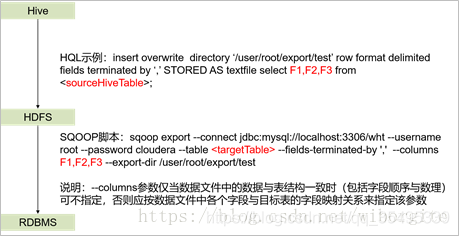
Ø 使用限制:目标表中不能有与Hive中相同的记录,一般只有当目标表为空表时才使用该模式进行首次数据导出。
Ø 参数:源表、目标表、导出字段(select的字段)、映射关系(–column后的参数)
Ø 适用的数据库:Oracle、DB2、SQL Server、PG、MySQL
### 实验记录脚本
```shell
# 1. 生产导数
insert overwrite directory '/tmp/dw_box'
row format delimited fields terminated by '\001'
stored as textfile
select storeid, storename, CanHF, orderfreight, operat_time, dbf, ordersource, orderdate, ptym
from th_test.dw_box_charges where orderdate='2021-09-07' ;
# 2. 从生产hdfs下载数据
[hdfs@bigdata-01 dw_box_charges]$ hadoop dfs -get /tmp/dw_box ./dw_box
[hdfs@bigdata-01 dw_box_charges]$ cd dw_box/
[hdfs@bigdata-01 dw_box]$ ll
total 84
-rw-r--r-- 1 hdfs hdfs 84904 Sep 10 10:54 000000_0
[hdfs@bigdata-01 dw_box]$ pwd
/var/lib/hadoop-hdfs/tangh/newETL/test/dw_box_charges/dw_box
#### 修改下载文件名
[hdfs@bigdata-01 dw_box]$ mv 000000_0 0907
[hdfs@bigdata-01 dw_box]$ ll
total 84
-rw-r--r-- 1 hdfs hdfs 84904 Sep 10 10:54 0907
# 3. 将下载的数据copy到测试环境
[hdfs@bigdata-01 dw_box]$ scp 0907 root@xxx.xx.168.111:/root/data_test/dw_box
# 4. 测试环境将数据上传到hdfs 用于将hdfs文件导入到mysql
[root@node-01 dw_box]# hadoop dfs -put 0907 /user/tmp/
[root@node-01 dw_box]# hadoop dfs -ls /user/tmp/
DEPRECATED: Use of this script to execute hdfs command is deprecated.
Instead use the hdfs command for it.
Found 1 items
-rw-r--r-- 2 root supergroup 84904 2021-09-10 12:13 /user/tmp/0907
# 5. mysql 建表
drop table if exists tangh.dw_box_charges2 ;
CREATE TABLE tangh.dw_box_charges2 (
storeid varchar(100) NOT NULL,
storename varchar(100) DEFAULT NULL,
CanHF decimal(12,4) DEFAULT NULL,
orderfreight varchar(19) DEFAULT NULL,
operat_time varchar(19) DEFAULT NULL,
dbf double DEFAULT '0' COMMENT '打包费',
ordersource varchar(10) NOT NULL DEFAULT 'gfs' COMMENT 'st/gfs 堂食/功夫送',
orderdate varchar(20) default NULL,
ptym varchar(6) ,
PRIMARY KEY (storeid,orderdate,ordersource),
KEY idx_sid (storeid),
KEY idx_date (orderdate)
) ENGINE=InnoDB DEFAULT CHARSET=utf8
# 6. 用sqoop将hdfs文件全量导入MySQL表
#### 注意: --columns列名之间不能有逗号!!!
sqoop export \
--connect jdbc:mysql://xxx.xx.168.116:3306/tangh \
--username test --password 123456 \
--table dw_box_charges2 \
--fields-terminated-by '\001' \
--columns storeid,storename,CanHF,orderfreight,operat_time,dbf,ordersource,orderdate,ptym \
--export-dir /user/tmp/0907
# 7. 全量导入完成
```
## 增量导出
Ø 应用场景:将Hive表中的增量记录以及有修改的记录同步到目标表中。
Ø 实现逻辑
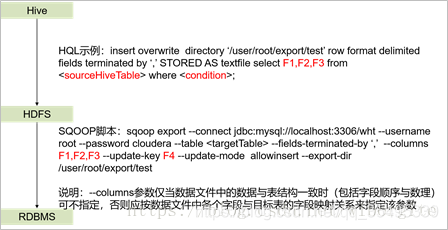
Ø 使用限制:update-key可以是多个字段,但这些字段的记录都应该是未被更新过的,若该参数指定的字段有更新,则对应记录的更新不会被同步到目标表中。
Ø 参数:源表、目标表、筛选字段及其取值范围、导出字段(select的字段)、映射关系(–column后的参数)、更新的参考字段(–update-key后的参数)
Ø 适用的数据库:Oracle、SQL Server、MySQL
### 实验记录脚本
```shell
# 1. 生产导数 在生产环境
insert overwrite directory '/tmp/dw_box'
row format delimited fields terminated by '\001'
stored as textfile
select storeid, storename, CanHF, orderfreight, operat_time, dbf, ordersource, orderdate, ptym
from th_test.dw_box_charges where orderdate='2021-09-08' ;
# 2. 从生产hdfs下载数据
[hdfs@bigdata-01 dw_box]$ hadoop dfs -get /tmp/dw_box/*
[hdfs@bigdata-01 dw_box]$ mv 000000_0 0908
# 3. 将下载的数据copy到测试环境 测试环境root密码(双引号内): "X9q6=gwxW5llBu;MTZaszrtT~AVkf^"
[hdfs@bigdata-01 dw_box]$ scp 0908 root@xxx.xx.168.111:/root/data_test/dw_box
# 4. 测试环境将数据上传到hdfs 用于将hdfs文件导入到mysql
[root@node-01 dw_box]# hadoop dfs -put 0908 /user/tmp/
# 5. 用sqoop将hdfs文件增量导入MySQL表
#### --update-mode allowinsert \
#### 注意: --columns列名之间不能有逗号!!!
sqoop export \
--connect jdbc:mysql://xxx.xx.168.116:3306/tangh \
--username test --password 123456 \
--table dw_box_charges2 \
--fields-terminated-by '\001' \
--columns storeid,storename,CanHF,orderfreight,operat_time,dbf,ordersource,orderdate,ptym \
--update-key storeid,orderdate,ordersource \
--update-mode allowinsert \
--export-dir /user/tmp/0908
# 以上脚本运行数据成功增量导出
select * from tangh.dw_box_charges2
where storeid in('CN010001','CN010003');
结果:
CN010001 昆泰店 543.5 1443.0 2021-09-10 09:15:00 0 gfs 2021-09-07 202109
CN010001 昆泰店 0 0.0 2021-09-10 09:15:00 54.4 st 2021-09-07 202109
CN010001 昆泰店 550 1534.0 2021-09-10 09:15:00 0 gfs 2021-09-08 202109
CN010001 昆泰店 0 0.0 2021-09-10 09:15:00 61.4 st 2021-09-08 202109
CN010003 西单商场店 599 0.0 2021-09-10 09:15:00 0 gfs 2021-09-07 202109
CN010003 西单商场店 0 0.0 2021-09-10 09:15:00 8 st 2021-09-07 202109
CN010003 西单商场店 520 17.0 2021-09-10 09:15:00 0 gfs 2021-09-08 202109
CN010003 西单商场店 0 0.0 2021-09-10 09:15:00 5 st 2021-09-08 202109
select count(1),ptym,orderdate from tangh.dw_box_charges2 group by ptym,orderdate;
结果:
1065 202109 2021-09-07
1068 202109 2021-09-08
```
## 更新导出
Ø 应用场景:将Hive表中的有更新的记录同步到目标表。
Ø 实现逻辑:
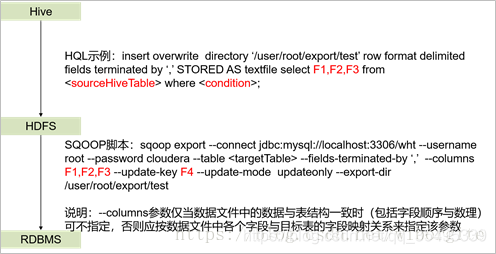
Ø 使用限制:update-key可以是多个字段,但这些字段的记录都应该是未被更新过的,若该参数指定的字段有更新,则对应记录的更新不会被同步到目标表中。
Ø 参数:源表、目标表、筛选字段及其取值范围、导出字段(select的字段)、映射关系(–column后的参数)、更新的参考字段(–update-key后的参数)
Ø 适用的数据库:Oracle、DB2、SQL Server、PG、MySQL
### 实验记录脚本
```shell
# 1. 准备实验数据
#### 修改/root/data_test/dw_box/0908文件的数据
[root@node-01 dw_box]# pwd
/root/data_test/dw_box
[root@node-01 dw_box]# cp 0908 0908_v2
[root@node-01 dw_box]# vim 0908_v2
:%s/昆泰店/昆泰店(门店名称被修改了!!)/g
# 2. 将被修改了的数据文件0908_v2上传到hdfs
[root@node-01 dw_box]# hadoop dfs -put 0908_v2 /user/tmp/
# 3. 用sqoop将hdfs文件修改数据导入MySQL表
#### --update-mode allowinsert \
#### 注意: --columns列名之间不能有逗号!!!
sqoop export \
--connect jdbc:mysql://xxx.xx.168.116:3306/tangh \
--username test --password 123456 \
--table dw_box_charges2 \
--fields-terminated-by '\001' \
--columns storeid,storename,CanHF,orderfreight,operat_time,dbf,ordersource,orderdate,ptym \
--update-key storeid,orderdate,ordersource \
--update-mode updateonly \
--export-dir /user/tmp/0908_v2
# 以上脚本验证数据成功被更新
select * from tangh.dw_box_charges2
where storeid in('CN010001','CN010003') ;
结果:
CN010001 昆泰店 543.5 1443.0 2021-09-10 09:15:00 0 gfs 2021-09-07 202109
CN010001 昆泰店 0 0.0 2021-09-10 09:15:00 54.4 st 2021-09-07 202109
CN010001 昆泰店(门店名称被修改了!!) 550 1534.0 2021-09-10 09:15:00 0 gfs 2021-09-08 202109
CN010001 昆泰店(门店名称被修改了!!) 0 0.0 2021-09-10 09:15:00 61.4 st 2021-09-08 202109
CN010003 西单商场店 599 0.0 2021-09-10 09:15:00 0 gfs 2021-09-07 202109
CN010003 西单商场店 0 0.0 2021-09-10 09:15:00 8 st 2021-09-07 202109
CN010003 西单商场店 520 17.0 2021-09-10 09:15:00 0 gfs 2021-09-08 202109
CN010003 西单商场店 0 0.0 2021-09-10 09:15:00 5 st 2021-09-08 202109
select count(1),ptym,orderdate from tangh.dw_box_charges2 group by ptym,orderdate ;
结果:
1065 202109 2021-09-07
1068 202109 2021-09-08
```

 浙公网安备 33010602011771号