
搭建HaProxy结合Rabbitmq集群
1.搭建好rabbitmq集群环境
搭建rabbitmq集群链接:https://www.cnblogs.com/mrsans/articles/11543521.html
2.下载haproxy文件,这里直接使用yum源进行的安装
yum install haproxy
3.查看文件和相关配置文件所在路径
rpm -qc haproxy
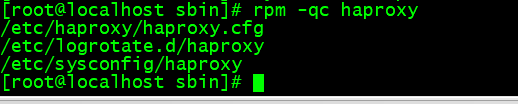
可见配置文件默认所在位置:
/etc/haproxy/haproxy.cfg
4.配置haproxy.cfg文件,如下:
#全局配置
global
        #日志输出配置,所有日志都记录在本机,通过local0输出
        log 127.0.0.1 local0 info
        #最大连接数
        maxconn 4096
        #改变当前的工作目录
        chroot  /var/lib/haproxy
        #以指定的UID运行haproxy进程
        uid 99
        #以指定的GID运行haproxy进程
        gid 99
        #以守护进程方式运行haproxy #debug #quiet
        daemon
        #debug
        #当前进程pid文件
        pidfile  /var/run/haproxy.pid

#默认配置
defaults
        #应用全局的日志配置
        log global
        #默认的模式mode{tcp|http|health}
        #tcp是4层,http是7层,health只返回OK
        mode tcp
        #日志类别tcplog
        option tcplog
        #不记录健康检查日志信息
        option dontlognull
        #3次失败则认为服务不可用
        retries 3
        #每个进程可用的最大连接数
        maxconn 2000
        #连接超时
        timeout connect 5s
        #客户端超时
        timeout client 120s
        #服务端超时
        timeout server 120s

#绑定配置
listen rabbitmq_cluster
        bind 192.168.25.22:5671
        #配置TCP模式
        mode tcp
        #简单的轮询
        balance roundrobin
        #RabbitMQ集群节点配置
        server rmq_node1 192.168.25.20:5672 check inter 5000 rise 2 fall 3 weight 1
        server rmq_node2 192.168.25.21:5672 check inter 5000 rise 2 fall 3 weight 1

#haproxy监控页面地址
listen monitor :8100
        mode http  # 选择使用http方式访问监控界面
        option httplog # 日志方式
        stats enable  # 启用
        stats uri /stats  # 访问的uri  http://ip:port/stats
        stats refresh 5 # 每过5s自动刷新页面
frontend front_rabbitmq_management
  bind :15672 # 绑定本机的端口,最好和下面的backend的真实服务器端口对应,方便查找
  default_backend back_rabbitmq_management  # 选择backend 节点的名称

backend back_rabbitmq_management   # 起个名字
  balance source # 选择负载均衡方式
  server PC 192.168.25.20:15672 check   # 配置对应的访问后台的地址
  server node2 192.168.25.21:15672 check # 配置对应的访问后台的地址
5.启动haproxy,命令如下:
cd /usr/sbin
./haproxy -f /etc/haproxy/haproxy.cfg    # 你的配置文件所在地
6.运行监控界面,如下:
http://192.168.25.23:8100/stats


 浙公网安备 33010602011771号