
记Excel模板导出并转为PDF,支持批量打包下载。
最近项目用到了PDF导出,主要是后端完成,主要是个人不会设计PDF模板,效果太丑了,就想到了用Excel转PDF,且不用再设置样式,在模板中设置好了就可以直接套用了,记录下简单思路:
- 用excel设计好模板,因为涉及到多个表格需要动态插入数据,所以需要注意表格行列的计算。
- 将excel转为PDF文档。
- 若是存在多个PDF,则进行ZIP打包再提供下载,基于spring boot提供下载。
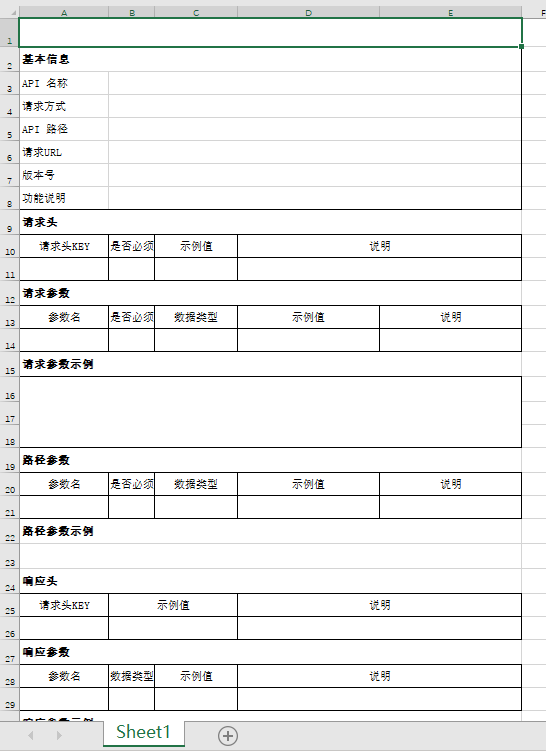
首先是excel模板样式预览
PDF预览
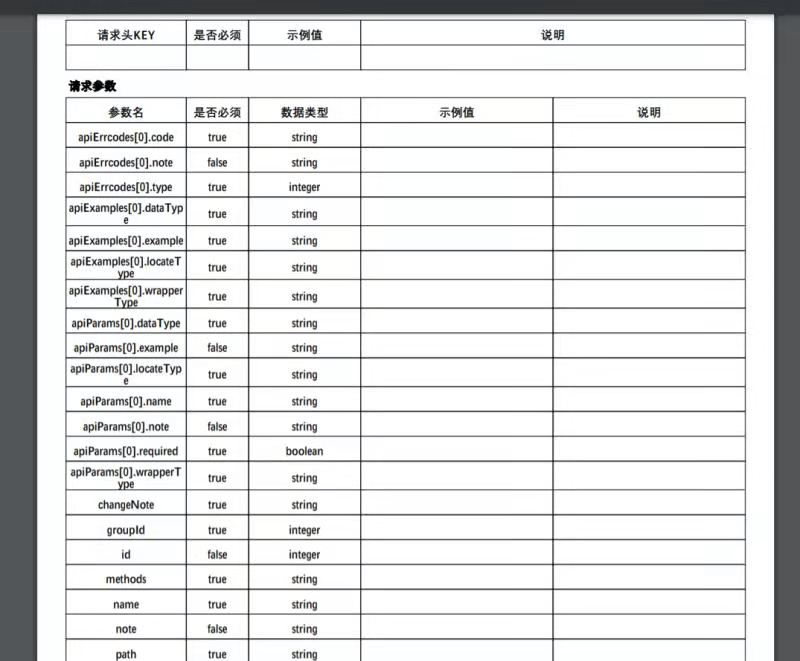
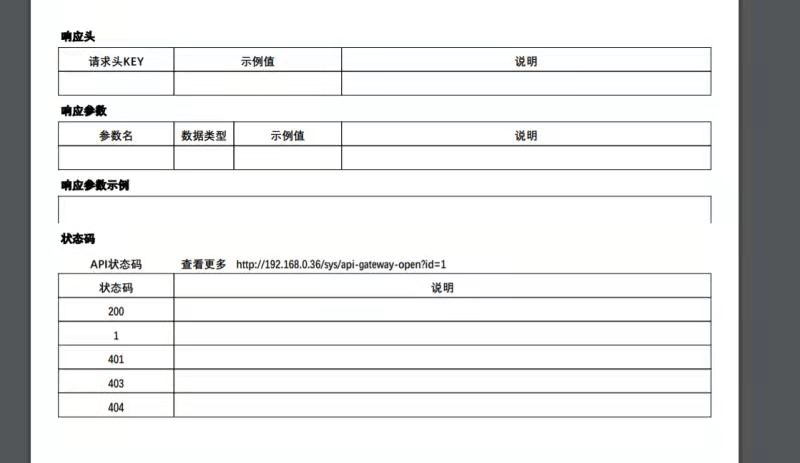
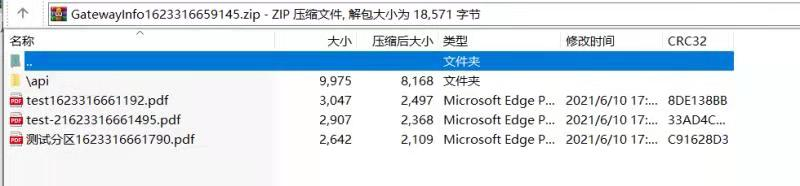
下载预览

首先引入依赖
        <!-- https://mvnrepository.com/artifact/com.itextpdf/itextpdf -->
        <dependency>
            <groupId>com.itextpdf</groupId>
            <artifactId>itextpdf</artifactId>
            <version>5.5.13.2</version>
        </dependency>
        <!-- https://mvnrepository.com/artifact/com.itextpdf/itext-asian -->
        <dependency>
            <groupId>com.itextpdf</groupId>
            <artifactId>itext-asian</artifactId>
            <version>5.2.0</version>
        </dependency>
        <!-- https://mvnrepository.com/artifact/org.apache.poi/poi -->
        <dependency>
            <groupId>org.apache.poi</groupId>
            <artifactId>poi</artifactId>
            <version>5.0.0</version>
        </dependency>
        <!-- https://mvnrepository.com/artifact/org.apache.poi/poi-ooxml -->
        <dependency>
            <groupId>org.apache.poi</groupId>
            <artifactId>poi-ooxml</artifactId>
            <version>5.0.0</version>
        </dependency>
服务层代码
    /**
     * PDF导出
     *
     * @param form     表单
     * @param response 响应
     * @throws DocumentException 异常
     * @throws IOException       异常
     */
    public void pdfExport(BaseForm form, HttpServletResponse response) throws DocumentException, IOException {
        //将zip以流的形式输出到前台
        response.setContentType("application/octet-stream");

        String keyword = form.getKeyword();
        ApiRegisterVo vo = null;
        if (StringUtils.isNotBlank(keyword)) {
            vo = JSON.parseObject(keyword, ApiRegisterVo.class);
        }
        // 数据列表
        List<ApiRegisterVo> vos = findList(vo);
        if (ObjectUtils.isNotEmpty(vos)) { // 不为空才导出
            if (vos.size() == 1) { // 单文件导出
                ApiRegisterVo temp = vos.get(0);
                ApiRegisterDetailVo detailVo = detail(temp.getId(), vo.getGatewayAddress());
                response.setHeader("Content-Disposition", "attachment;filename="
                        + URLEncoder.encode(detailVo.getName() + System.currentTimeMillis(), "UTF-8") + ".pdf");
                Workbook workbook = excelService.openGatewayApiWorkbook(detailVo);
                byte[] bytes = ExcelToPdfUtil.excelToPdf(workbook, false, 0.8f);
                response.getOutputStream().write(bytes);
            } else { // 批量压缩导出
                // pdf数据包列表
                List<Map<String, byte[]>> dataPackage = new ArrayList<>();
                // 单个数据,key为文件名
                Map<String, byte[]> map;
                // 文件设置,附件形式打开
                response.setHeader("content-disposition", "attachment; filename="
                        + URLEncoder.code("GatewayInfo" + System.currentTimeMillis(), "UTF-8") + ".zip");
                for (ApiRegisterVo registerVo : vos) {
                    ApiRegisterDetailVo detailVo = detail(registerVo.getId(), vo.getGatewayAddress());
                    Workbook workbook = excelService.openGatewayApiWorkbook(detailVo);
                    byte[] bytes = ExcelToPdfUtil.excelToPdf(workbook, false, 0.8f);
                    map = new HashMap<>();
                    map.put(detailVo.getName() + System.currentTimeMillis() + ".pdf", bytes);
                    dataPackage.add(map);
                }
                byte[] zipByte = ZipUtil.batchZipByte(dataPackage);
                response.getOutputStream().write(zipByte);
            }
            response.flushBuffer();
        }
    }
excel导出方法
    /**
     * 根据模板导出excel
     *
     * @param vo 数据列表
     * @return 工作簿
     */
    public Workbook openGatewayApiWorkbook(ApiRegisterDetailVo vo) throws IOException {

        String templatePath = "template/openGatewayApi.xlsx";
        Workbook workbook = ExcelUtils.getWorkBook(templatePath);
        // 字体信息
        assert workbook != null;
        Font font = workbook.createFont();
        font.setFontName("宋体");
        font.setBold(true);
        font.setFontHeightInPoints((short) 12);
        CellStyle workbookCellStyle = workbook.createCellStyle();
        workbookCellStyle.setWrapText(true);
        workbookCellStyle.setFont(font);
        workbookCellStyle.setVerticalAlignment(VerticalAlignment.CENTER);
        // 写入第一页sheet中
        Sheet sheet0 = workbook.getSheetAt(0);
        // 名称
        setMergedCellValue(sheet0, 0, 0, vo.getName());
        // 基本信息,固定行信息优先填写好
        setMergedCellValue(sheet0, 2, 1, vo.getName());
        setMergedCellValue(sheet0, 3, 1, vo.getMethods());
        setMergedCellValue(sheet0, 4, 1, vo.getPath());
        setMergedCellValue(sheet0, 5, 1, vo.getRequestUrl() == null ? "" : vo.getRequestUrl());
        setMergedCellValue(sheet0, 6, 1, vo.getVersion() == null ? "" : vo.getVersion());
        setMergedCellValue(sheet0, 7, 1, vo.getNote() == null ? "" : vo.getNote());
        setMergedCellValue(sheet0, 15, 0, vo.getRequestParamsExample() == null ? ""
                : vo.getRequestParamsExample().getExample() == null ? "" : vo.getRequestParamsExample().getExample());
        setMergedCellValue(sheet0, 22, 0, vo.getPathParamsExample() == null ? ""
                : vo.getPathParamsExample().getExample() == null ? "" : vo.getPathParamsExample().getExample());
        setMergedCellValue(sheet0, 30, 0, vo.getResponseParamsExample() == null ? ""
                : vo.getResponseParamsExample().getExample() == null ? "" : vo.getResponseParamsExample().getExample());
        setMergedCellValue(sheet0, 34, 2, vo.getMoreStateCodeUrl() == null ? "" : vo.getMoreStateCodeUrl());

        // 请求头
        List<ApiParams> requestHeaderParams = vo.getRequestHeaderParams();
        // 记录请求头动态添加的行数
        int requestHeaderParamsAddRow = 0;
        // 请求参数
        List<ApiParams> requestParams = vo.getRequestParams();
        // 记录请求参数动态添加的行数
        int requestParamsAddRow = 0;
        // 路径参数
        List<ApiParams> pathParams = vo.getPathParams();
        // 记录路径参数动态添加的行数
        int pathParamsAddRow = 0;
        // 响应头
        List<ApiParams> responseHeaderParams = vo.getResponseHeaderParams();
        // 记录响应头动态添加的行数
        int responseHeaderParamsAddRow = 0;
        // 响应参数
        List<ApiParams> responseParams = vo.getResponseParams();
        // 记录响应参数动态添加的行数
        int responseParamsAddRow = 0;
        // 状态码
        List<ApiErrcode> apiErrcodes = vo.getApiErrcodes();
        // 记录状态码动态添加的行数
        int apiErrcodesAddRow = 0;

        // 表格数据填充
        if (ObjectUtils.isNotEmpty(requestHeaderParams)) { // 请求头
            // 计算起始行和获取样式行
            int startRow = 11;
            // 样式行
            requestHeaderParamsAddRow = getParamsAddRow(sheet0, requestHeaderParams, requestHeaderParamsAddRow, startRow);
        }
        if (ObjectUtils.isNotEmpty(requestParams)) { // 请求参数
            // 计算起始行,原14+请求头添加行
            int startRow = 14 + (Math.max(requestHeaderParamsAddRow - 1, 0));
            // 样式行
            Row styleRow = sheet0.getRow(startRow - 1);
            if (requestParams.size() > 1) { // 动态插入行
                sheet0.shiftRows(startRow, sheet0.getLastRowNum(), requestParams.size() - 1, true, false);
            }
            requestParamsAddRow = getParamsAddRow(sheet0, requestParams, requestParamsAddRow, startRow, styleRow);
        }
        if (ObjectUtils.isNotEmpty(pathParams)) { // 路径参数
            // 计算起始行,原21+请求头添加行+请求参数添加行
            int startRow = 21 + (Math.max(requestHeaderParamsAddRow - 1, 0)) + (Math.max(requestParamsAddRow - 1, 0));
            // 样式行
            Row styleRow = sheet0.getRow(startRow - 1);
            pathParamsAddRow = getParamsAddRow(sheet0, pathParams, pathParamsAddRow, startRow, styleRow);
        }
        if (ObjectUtils.isNotEmpty(responseHeaderParams)) { // 响应头
            // 计算起始行,原26+请求头添加行+请求参数添加行+路径参数添加行
            int startRow = 26 + (Math.max(requestHeaderParamsAddRow - 1, 0)) + (Math.max(requestParamsAddRow - 1, 0))
                    + (Math.max(pathParamsAddRow - 1, 0));
            // 样式行
            Row styleRow = sheet0.getRow(startRow - 1);
            if (responseHeaderParams.size() > 1) { // 动态插入行
                sheet0.shiftRows(startRow, sheet0.getLastRowNum(), pathParams.size() - 1, true, false);
            }
            for (ApiParams apiParams : responseHeaderParams) {
                // 插入的行号
                int rowNum = responseHeaderParamsAddRow + (startRow - 1);
                Row newRow = sheet0.getRow(rowNum) == null ? sheet0.createRow(rowNum) : sheet0.getRow(rowNum);
                newRow.setRowStyle(styleRow.getRowStyle());
                newRow.setHeight(styleRow.getHeight());

                Cell cell0 = getCell(newRow, 0);
                cell0.setCellStyle(getCell(styleRow, 0).getCellStyle());
                cell0.setCellValue(apiParams.getName());
                Cell cell1 = getCell(newRow, 1);
                cell1.setCellStyle(getCell(styleRow, 1).getCellStyle());
                cell1.setCellValue(apiParams.getExample() == null ? "" : apiParams.getExample());
                Cell cell2 = getCell(newRow, 2);
                cell2.setCellStyle(getCell(styleRow, 2).getCellStyle());
                Cell cell3 = getCell(newRow, 3);
                cell3.setCellStyle(getCell(styleRow, 3).getCellStyle());
                cell3.setCellValue(apiParams.getNote() == null ? "" : apiParams.getNote());
                Cell cell4 = getCell(newRow, 4);
                cell4.setCellStyle(getCell(styleRow, 4).getCellStyle());
                if (!ExcelUtils.isMergedRegion(sheet0, newRow.getRowNum(), cell1.getColumnIndex())) {
                    // 合并单元格
                    CellRangeAddress cellAddresses1 = new CellRangeAddress(newRow.getRowNum(), newRow.getRowNum(), cell1.getColumnIndex(), cell2.getColumnIndex());
                    sheet0.addMergedRegion(cellAddresses1);
                }
                if (!ExcelUtils.isMergedRegion(sheet0, newRow.getRowNum(), cell3.getColumnIndex())) {
                    // 合并单元格
                    CellRangeAddress cellAddresses2 = new CellRangeAddress(newRow.getRowNum(), newRow.getRowNum(), cell3.getColumnIndex(), cell4.getColumnIndex());
                    sheet0.addMergedRegion(cellAddresses2);
                }
                responseHeaderParamsAddRow++;
            }
        }
        if (ObjectUtils.isNotEmpty(responseParams)) { // 响应参数
            // 计算起始行,原29+请求头添加行+请求参数添加行+路径参数添加行+响应头参数添加行
            int startRow = 29 + (Math.max(requestHeaderParamsAddRow - 1, 0)) + (Math.max(requestParamsAddRow - 1, 0))
                    + (Math.max(pathParamsAddRow - 1, 0)) + (Math.max(responseHeaderParamsAddRow - 1, 0));
            // 样式行
            responseParamsAddRow = getParamsAddRow(sheet0, responseParams, responseParamsAddRow, startRow);
        }
        if (ObjectUtils.isNotEmpty(apiErrcodes)) { // API状态码
            // 计算起始行,原37+请求头添加行+请求参数添加行+路径参数添加行+响应头参数添加行+响应参数添加行
            int startRow = 37 + (Math.max(requestHeaderParamsAddRow - 1, 0)) + (Math.max(requestParamsAddRow - 1, 0))
                    + (Math.max(pathParamsAddRow - 1, 0)) + (Math.max(responseHeaderParamsAddRow - 1, 0))
                    + (Math.max(responseParamsAddRow - 1, 0));
            Row styleRow = sheet0.getRow(startRow - 1);
            if (apiErrcodes.size() > 1) { // 动态插入行,此表格最后行为空行,会无法识别到,所以从上一行开始下移插入
                sheet0.shiftRows(startRow - 1, sheet0.getLastRowNum(), apiErrcodes.size() - 1, true, false);
            }
            for (ApiErrcode errcode : apiErrcodes) {
                // 插入的行号
                int rowNum = apiErrcodesAddRow + (startRow - 1);
                Row newRow = sheet0.getRow(rowNum) == null ? sheet0.createRow(rowNum) : sheet0.getRow(rowNum);
                newRow.setRowStyle(styleRow.getRowStyle());
                newRow.setHeight(styleRow.getHeight());

                Cell cell0 = getCell(newRow, 0);
                cell0.setCellStyle(getCell(styleRow, 0).getCellStyle());
                cell0.setCellValue(errcode.getCode());
                Cell cell1 = getCell(newRow, 1);
                cell1.setCellStyle(getCell(styleRow, 1).getCellStyle());
                cell1.setCellValue(errcode.getNote() == null ? "" : errcode.getNote());
                Cell cell2 = getCell(newRow, 2);
                cell2.setCellStyle(getCell(styleRow, 2).getCellStyle());
                Cell cell3 = getCell(newRow, 3);
                cell3.setCellStyle(getCell(styleRow, 3).getCellStyle());
                apiErrcodesAddRow = getCodeAddRow(sheet0, apiErrcodesAddRow, styleRow, newRow, cell1);
            }
        }
        workbook.close();
        return workbook;
    }

    /**
     * 合并单元格
     *
     * @param sheet0   工作簿
     * @param addRow   添加行
     * @param styleRow 样式行
     * @param newRow   插入行
     * @param cell1    单元格
     * @return 添加行
     */
    private int getCodeAddRow(Sheet sheet0, int addRow, Row styleRow, Row newRow, Cell cell1) {
        Cell cell4 = getCell(newRow, 4);
        cell4.setCellStyle(getCell(styleRow, 4).getCellStyle());
        if (!ExcelUtils.isMergedRegion(sheet0, newRow.getRowNum(), cell1.getColumnIndex())) {
            // 合并单元格
            CellRangeAddress cellAddresses = new CellRangeAddress(newRow.getRowNum(), newRow.getRowNum(), cell1.getColumnIndex(), cell4.getColumnIndex());
            sheet0.addMergedRegion(cellAddresses);
        }
        addRow++;
        return addRow;
    }

    /**
     * 提取重复项
     *
     * @param sheet0     工作簿
     * @param paramsList 参数列表
     * @param addRow     添加行
     * @param startRow   样式行
     * @param styleRow   样式行
     * @return 参数添加行
     */
    private int getParamsAddRow(Sheet sheet0, List<ApiParams> paramsList, int addRow, int startRow, Row styleRow) {
        for (ApiParams apiParams : paramsList) {
            // 插入的行号
            int rowNum = addRow + (startRow - 1);
            Row newRow = sheet0.getRow(rowNum) == null ? sheet0.createRow(rowNum) : sheet0.getRow(rowNum);
            newRow.setRowStyle(styleRow.getRowStyle());
            newRow.setHeight(styleRow.getHeight());
            // 插入数据
            Cell cell0 = getCell(newRow, 0);
            cell0.setCellStyle(getCell(styleRow, 0).getCellStyle());
            cell0.setCellValue(apiParams.getName());
            Cell cell1 = getCell(newRow, 1);
            cell1.setCellStyle(getCell(styleRow, 1).getCellStyle());
            cell1.setCellValue(apiParams.getRequired());
            Cell cell2 = getCell(newRow, 2);
            cell2.setCellStyle(getCell(styleRow, 2).getCellStyle());
            cell2.setCellValue(apiParams.getDataType());
            Cell cell3 = getCell(newRow, 3);
            cell3.setCellStyle(getCell(styleRow, 3).getCellStyle());
            cell3.setCellValue(apiParams.getExample() == null ? "" : apiParams.getExample());
            Cell cell4 = getCell(newRow, 4);
            cell4.setCellStyle(getCell(styleRow, 4).getCellStyle());
            cell4.setCellValue(apiParams.getNote() == null ? "" : apiParams.getNote());
            addRow++;
        }
        return addRow;
    }

    /**
     * 提取重复项
     *
     * @param sheet0     工作簿
     * @param paramsList 参数列表
     * @param addRow     添加行
     * @param startRow   开始行
     * @return 参数添加行
     */
    private int getParamsAddRow(Sheet sheet0, List<ApiParams> paramsList, int addRow, int startRow) {
        Row styleRow = sheet0.getRow(startRow - 1);
        if (paramsList.size() > 1) { // 动态插入行
            sheet0.shiftRows(startRow, sheet0.getLastRowNum(), paramsList.size() - 1, true, false);
        }
        for (ApiParams apiParams : paramsList) {
            // 插入的行号
            int rowNum = addRow + (startRow - 1);
            Row newRow = sheet0.getRow(rowNum) == null ? sheet0.createRow(rowNum) : sheet0.getRow(rowNum);
            newRow.setRowStyle(styleRow.getRowStyle());
            newRow.setHeight(styleRow.getHeight());

            Cell cell0 = getCell(newRow, 0);
            cell0.setCellStyle(getCell(styleRow, 0).getCellStyle());
            cell0.setCellValue(apiParams.getName());
            Cell cell1 = getCell(newRow, 1);
            cell1.setCellStyle(getCell(styleRow, 1).getCellStyle());
            cell1.setCellValue(apiParams.getRequired());
            Cell cell2 = getCell(newRow, 2);
            cell2.setCellStyle(getCell(styleRow, 2).getCellStyle());
            cell2.setCellValue(apiParams.getExample() == null ? "" : apiParams.getExample());
            Cell cell3 = getCell(newRow, 3);
            cell3.setCellStyle(getCell(styleRow, 3).getCellStyle());
            cell3.setCellValue(apiParams.getNote() == null ? "" : apiParams.getNote());
            addRow = getCodeAddRow(sheet0, addRow, styleRow, newRow, cell3);
        }
        return addRow;
    }

    /**
     * 设置合并单元格值
     *
     * @param sheet  工作表
     * @param row    行
     * @param column 列
     * @param value  值
     */
    private void setMergedCellValue(Sheet sheet, int row, int column, Object value) {
        Cell cell = ExcelUtils.getMergedRegion(sheet, row, column);
        if (cell != null && value != null) {
            cell.setCellValue(ExcelUtils.getCellValue(cell) + value);
        }
    }
excel工具类
package com.edp.gateway.open.utils;

import org.apache.commons.lang3.StringUtils;
import org.apache.poi.hssf.usermodel.HSSFClientAnchor;
import org.apache.poi.hssf.usermodel.HSSFPicture;
import org.apache.poi.hssf.usermodel.HSSFShape;
import org.apache.poi.hssf.usermodel.HSSFSheet;
import org.apache.poi.hssf.usermodel.HSSFWorkbook;
import org.apache.poi.ooxml.POIXMLDocumentPart;
import org.apache.poi.ss.usermodel.Cell;
import org.apache.poi.ss.usermodel.CellType;
import org.apache.poi.ss.usermodel.PictureData;
import org.apache.poi.ss.usermodel.Row;
import org.apache.poi.ss.usermodel.Sheet;
import org.apache.poi.ss.usermodel.Workbook;
import org.apache.poi.ss.util.CellRangeAddress;
import org.apache.poi.xssf.usermodel.XSSFClientAnchor;
import org.apache.poi.xssf.usermodel.XSSFDrawing;
import org.apache.poi.xssf.usermodel.XSSFPicture;
import org.apache.poi.xssf.usermodel.XSSFShape;
import org.apache.poi.xssf.usermodel.XSSFSheet;
import org.apache.poi.xssf.usermodel.XSSFWorkbook;
import org.openxmlformats.schemas.drawingml.x2006.spreadsheetDrawing.CTMarker;
import org.springframework.core.io.ClassPathResource;

import java.io.IOException;
import java.io.InputStream;
import java.util.HashMap;
import java.util.List;
import java.util.Map;

public class ExcelUtils {

    /**
     * 获取excel
     *
     * @param filePath 文件路径
     * @return Workbook
     */
    public static Workbook getWorkBook(String filePath) {
        if (StringUtils.isBlank(filePath)) {
            return null;
        }
        Workbook workbook = null;
        try {
            ClassPathResource cpr = new ClassPathResource(filePath);
            try (InputStream is = cpr.getInputStream()) {
                if (filePath.endsWith("xls")) {
                    // 2003
                    workbook = new HSSFWorkbook(is);
                } else if (filePath.endsWith("xlsx")) {
                    // 2007
                    workbook = new XSSFWorkbook(is);
                }
            }
        } catch (IOException e) {
            e.printStackTrace();
        }
        return workbook;
    }

    /**
     * 读取excel中的图片和位置
     *
     * @param workbook excel
     * @param sheet    工作表
     * @return Map<String, PictureData>
     */
    public static Map<String, PictureData> getPictures(Workbook workbook, Sheet sheet) {
        Map<String, PictureData> map = new HashMap<>();
        if (workbook instanceof HSSFWorkbook) {
            map = getPictures2003((HSSFSheet) sheet);
        } else if (workbook instanceof XSSFWorkbook) {
            map = getPictures2007((XSSFSheet) sheet);
        }

        return map;
    }

    /**
     * 读取excel中的图片和位置(xls)
     *
     * @param sheet 工作表
     * @return Map<String, PictureData>
     */
    public static Map<String, PictureData> getPictures2003(HSSFSheet sheet) {
        Map<String, PictureData> map = new HashMap<>();
        List<HSSFShape> list = sheet.getDrawingPatriarch().getChildren();
        for (HSSFShape shape : list) {
            if (shape instanceof HSSFPicture) {
                HSSFPicture picture = (HSSFPicture) shape;
                HSSFClientAnchor cAnchor = (HSSFClientAnchor) picture.getAnchor();
                // 行号-列号
                String key = cAnchor.getRow1() + "-" + cAnchor.getCol1();
                map.put(key, picture.getPictureData());
            }
        }
        return map;
    }

    /**
     * 读取excel中的图片和位置(xlsx)
     *
     * @param sheet 工作表
     * @return Map<String, PictureData>
     */
    public static Map<String, PictureData> getPictures2007(XSSFSheet sheet) {
        Map<String, PictureData> map = new HashMap<>();
        List<POIXMLDocumentPart> list = sheet.getRelations();
        for (POIXMLDocumentPart part : list) {
            if (part instanceof XSSFDrawing) {
                XSSFDrawing drawing = (XSSFDrawing) part;
                List<XSSFShape> shapes = drawing.getShapes();
                for (XSSFShape shape : shapes) {
                    if (shape instanceof XSSFPicture) {
                        XSSFPicture picture = (XSSFPicture) shape;
                        XSSFClientAnchor anchor = picture.getPreferredSize();
                        CTMarker marker = anchor.getFrom();
                        String key = marker.getRow() + "-" + marker.getCol();
                        map.put(key, picture.getPictureData());
                    }
                }
            }
        }
        return map;
    }

    /**
     * 获取excel中每列宽度的占比
     *
     * @param sheet 工作表
     * @return float[]
     */
    public static float[] getColWidth(Sheet sheet) {
        int rowNum = getMaxColRowNum(sheet);
        Row row = sheet.getRow(rowNum);
        int cellCount = row.getPhysicalNumberOfCells();
        int[] colWidths = new int[cellCount];
        int sum = 0;

        for (int i = row.getFirstCellNum(); i < cellCount; i++) {
            Cell cell = row.getCell(i);
            if (cell != null) {
                colWidths[i] = sheet.getColumnWidth(i);
                sum += sheet.getColumnWidth(i);
            }
        }

        float[] colWidthPer = new float[cellCount];
        for (int i = row.getFirstCellNum(); i < cellCount; i++) {
            //对数字进行操作前先校验是否为0
            if (sum != 0) {
                colWidthPer[i] = (float) colWidths[i] / sum * 100;
            }
        }
        return colWidthPer;
    }

    /**
     * 获取合并单元格
     *
     * @param sheet  工作表
     * @param row    行
     * @param column 列
     * @return Cell
     */
    public static Cell getMergedRegion(Sheet sheet, int row, int column) {
        int sheetMergeCount = sheet.getNumMergedRegions();

        for (int i = 0; i < sheetMergeCount; i++) {
            CellRangeAddress ca = sheet.getMergedRegion(i);
            int firstColumn = ca.getFirstColumn();
            int lastColumn = ca.getLastColumn();
            int firstRow = ca.getFirstRow();
            int lastRow = ca.getLastRow();

            if (row >= firstRow && row <= lastRow) {

                if (column >= firstColumn && column <= lastColumn) {
                    Row fRow = sheet.getRow(firstRow);
                    return fRow.getCell(firstColumn);
                }
            }
        }
        return null;
    }

    /**
     * 获取单元格的值
     *
     * @param cell 单元格
     * @return String
     */
    public static String getCellValue(Cell cell) {

        if (cell == null) {
            return "";
        }
        if (cell.getCellType() == CellType.STRING) {
            return cell.getStringCellValue();
        } else if (cell.getCellType() == CellType.BOOLEAN) {
            return String.valueOf(cell.getBooleanCellValue());
        } else if (cell.getCellType() == CellType.FORMULA) {
            return cell.getCellFormula();
        } else if (cell.getCellType() == CellType.NUMERIC) {
            double value = cell.getNumericCellValue();
            return String.valueOf((long) value);
        }
        return "";
    }

    /**
     * 判断指定的单元格是否是合并单元格
     *
     * @param sheet  工作表
     * @param row    行下标
     * @param column 列下标
     * @return boolean
     */
    public static boolean isMergedRegion(Sheet sheet, int row, int column) {
        int sheetMergeCount = sheet.getNumMergedRegions();
        for (int i = 0; i < sheetMergeCount; i++) {
            CellRangeAddress range = sheet.getMergedRegion(i);
            int firstColumn = range.getFirstColumn();
            int lastColumn = range.getLastColumn();
            int firstRow = range.getFirstRow();
            int lastRow = range.getLastRow();
            if (row >= firstRow && row <= lastRow) {
                if (column >= firstColumn && column <= lastColumn) {
                    return true;
                }
            }
        }
        return false;
    }

    /**
     * 获取合并单元格宽高
     *
     * @param sheet  工作表
     * @param row    行
     * @param column 列
     * @return int[]
     */
    public static float[] getMergedRegionSize(Sheet sheet, int row, int column) {
        int[] matrix = getMergedRegionMatrix(sheet, row, column);
        float[] size = new float[2];
        // 合并单元格高
        float height = 0;
        // 合并单元格宽
        float width = 0;
        for (int y = matrix[0]; y <= matrix[2]; y++) {
            Row rowY = sheet.getRow(y);
            if (rowY != null) {
                height += sheet.getRow(y).getHeightInPoints();
            }
        }
        for (int x = matrix[1]; x <= matrix[3]; x++) {
            width += sheet.getColumnWidthInPixels(x);
        }
        size[0] = height;
        size[1] = width;

        return size;
    }

    /**
     * 获取合并单元格矩阵
     *
     * @param sheet  工作表
     * @param row    行
     * @param column 列
     * @return int[]
     */
    public static int[] getMergedRegionMatrix(Sheet sheet, int row, int column) {
        int sheetMergeCount = sheet.getNumMergedRegions();
        int[] matrix = new int[4];
        for (int i = 0; i < sheetMergeCount; i++) {
            CellRangeAddress ca = sheet.getMergedRegion(i);
            int firstColumn = ca.getFirstColumn();
            int lastColumn = ca.getLastColumn();
            int firstRow = ca.getFirstRow();
            int lastRow = ca.getLastRow();

            if (row >= firstRow && row <= lastRow) {
                if (column >= firstColumn && column <= lastColumn) {
                    matrix[0] = firstRow;
                    matrix[1] = firstColumn;
                    matrix[2] = lastRow;
                    matrix[3] = lastColumn;
                    break;
                }
            }
        }
        return matrix;
    }

    /**
     * 计算合并单元格合并的跨行跨列数
     *
     * @param sheet  工作表
     * @param row    行
     * @param column 列
     * @return int[]
     */
    public static int[] getMergedSpan(Sheet sheet, int row, int column) {
        int sheetMergeCount = sheet.getNumMergedRegions();
        int[] span = {1, 1};
        for (int i = 0; i < sheetMergeCount; i++) {
            CellRangeAddress range = sheet.getMergedRegion(i);
            int firstColumn = range.getFirstColumn();
            int lastColumn = range.getLastColumn();
            int firstRow = range.getFirstRow();
            int lastRow = range.getLastRow();
            if (firstColumn == column && firstRow == row) {
                span[0] = lastRow - firstRow + 1;
                span[1] = lastColumn - firstColumn + 1;
                break;
            }
        }
        return span;
    }

    /**
     * 获取excel中列数最多的行号
     *
     * @param sheet 工作表
     * @return int
     */
    private static int getMaxColRowNum(Sheet sheet) {
        int rowNum = 0;
        int maxCol = 0;
        for (int r = sheet.getFirstRowNum(); r < sheet.getPhysicalNumberOfRows(); r++) {
            Row row = sheet.getRow(r);
            if (row != null && maxCol < row.getPhysicalNumberOfCells()) {
                maxCol = row.getPhysicalNumberOfCells();
                rowNum = r;
            }
        }
        return rowNum;
    }

}
excel转pdf工具类
package com.edp.gateway.open.utils;

import com.itextpdf.text.BaseColor;
import com.itextpdf.text.Document;
import com.itextpdf.text.DocumentException;
import com.itextpdf.text.Element;
import com.itextpdf.text.Font;
import com.itextpdf.text.Image;
import com.itextpdf.text.PageSize;
import com.itextpdf.text.Phrase;
import com.itextpdf.text.Rectangle;
import com.itextpdf.text.pdf.BaseFont;
import com.itextpdf.text.pdf.PdfPCell;
import com.itextpdf.text.pdf.PdfPTable;
import com.itextpdf.text.pdf.PdfWriter;
import org.apache.poi.ss.usermodel.BorderStyle;
import org.apache.poi.ss.usermodel.Cell;
import org.apache.poi.ss.usermodel.CellStyle;
import org.apache.poi.ss.usermodel.PictureData;
import org.apache.poi.ss.usermodel.Row;
import org.apache.poi.ss.usermodel.Sheet;
import org.apache.poi.ss.usermodel.Workbook;

import java.io.ByteArrayOutputStream;
import java.io.IOException;
import java.util.Map;

public class ExcelToPdfUtil {

    /**
     * 用excel生成PDF
     *
     * @param workbook excel工作表
     * @param isRotate 横向或纵向显示
     * @param zoom     缩放比例
     * @return byte[]
     */
    public static byte[] excelToPdf(Workbook workbook, boolean isRotate, float zoom)
            throws DocumentException, IOException {

        Sheet sheet = workbook.getSheetAt(0);
        // 获取excel中的图片
        Map<String, PictureData> pictureDataMap = ExcelUtils.getPictures(workbook, sheet);

        ByteArrayOutputStream os = new ByteArrayOutputStream();
        // 创建PDF
        Document document = new Document();
        Rectangle pageSize;

        if (isRotate) {
            // 横向显示
            pageSize = new Rectangle(PageSize.A4.getHeight(), PageSize.A4.getWidth());
        } else {
            // 纵向显示
            pageSize = new Rectangle(PageSize.A4.getWidth(), PageSize.A4.getHeight());
        }
        document.setPageSize(pageSize);

        PdfWriter.getInstance(document, os);
        //设置页边距
        document.setMargins(0, 0, 15, 15);

        document.open();
        // Table获取每列所占百分比
        float[] widths = ExcelUtils.getColWidth(sheet);
        int colCount = widths.length;
        // 创建Table
        PdfPTable pTable = new PdfPTable(widths);
        // 设置Table占页面的百分比
        pTable.setWidthPercentage(92);
        // 设置基本字体
        BaseFont baseFont = BaseFont.createFont("STSong-Light", "UniGB-UCS2-H", BaseFont.NOT_EMBEDDED);
        // 遍历Excel的行和列读取数据
        for (int r = sheet.getFirstRowNum(); r < sheet.getPhysicalNumberOfRows(); r++) {
            Row row = sheet.getRow(r);
            // 为空时创建默认单元格
            if (row == null) {
                PdfPCell pCell = new PdfPCell(new Phrase(""));
                pCell.setBorder(0);
                pCell.setMinimumHeight(13);
                pTable.addCell(pCell);
            } else {
                for (int c = row.getFirstCellNum(); (c < row.getLastCellNum() || c < colCount); c++) {
                    if (c > row.getPhysicalNumberOfCells()) {
                        PdfPCell pCell = new PdfPCell(new Phrase(""));
                        pCell.setBorder(0);
                        pTable.addCell(pCell);
                        continue;
                    }
                    Cell cell = row.getCell(c);
                    if (cell == null) {
                        continue;
                    }
                    // 获取单元格的值
                    String value = ExcelUtils.getCellValue(cell);
                    // 获取Excel单元格的样式
                    CellStyle cellStyle = cell.getCellStyle();
                    // 获取Excel单元格的字体
                    org.apache.poi.ss.usermodel.Font excelFont = workbook.getFontAt(cellStyle.getFontIndex());
                    // 设置PDF单元格字体
                    Font pFont = new Font(baseFont, excelFont.getFontHeightInPoints() * zoom,
                            excelFont.getBold() ? Font.BOLD : Font.NORMAL, BaseColor.BLACK);

                    // 处理图片
                    // 拼接图片的key
                    String pictureKey = r + "-" + c;
                    PdfPCell pCell;
                    if (pictureDataMap.containsKey(pictureKey)) {
                        // 如果是图片则给PDF单元格设置图片
                        PictureData pictureData = pictureDataMap.get(pictureKey);
                        Image image = Image.getInstance(pictureData.getData());
                        float percent = 0.8f;
                        if (ExcelUtils.isMergedRegion(sheet, r, c)) {
                            float[] size = ExcelUtils.getMergedRegionSize(sheet, r, c);
                            image.scaleToFit(size[0] * percent, size[1] * percent);
                        } else {
                            image.scaleToFit(row.getHeightInPoints() * percent,
                                    sheet.getColumnWidthInPixels(cell.getColumnIndex()) * percent);
                        }
                        pCell = new PdfPCell(image, true);
                    } else {
                        pCell = new PdfPCell(new Phrase(value, pFont));
                    }

                    // 设置对齐方式
                    pCell.setHorizontalAlignment(getHorAlignment(cellStyle.getAlignment().getCode()));
                    pCell.setVerticalAlignment(getVerAlignment(cellStyle.getVerticalAlignment().getCode()));

                    // 设置最小高度
                    pCell.setMinimumHeight(row.getHeightInPoints() * zoom);

                    // 判断是否合并单元格
                    if (ExcelUtils.isMergedRegion(sheet, r, c)) {
                        int[] span = ExcelUtils.getMergedSpan(sheet, r, c);
                        // 忽略合并过的单元格
                        if (span[0] == 1 && span[1] == 1) {
                            continue;
                        }
                        pCell.setRowspan(span[0]);
                        pCell.setColspan(span[1]);
                        // 跳过合并过的单元格
                        c = c + span[1] - 1;
                    }

                    // 设置边框
                    setBorder(pCell, sheet, r, c);

                    pTable.addCell(pCell);
                }
            }
        }
        document.add(pTable);
        document.close();

        byte[] pdfByte = os.toByteArray();
        os.close();

        return pdfByte;
    }

    /**
     * 设置PDF边框
     *
     * @param pCell  pdf单元格
     * @param sheet  工作表
     * @param row    行
     * @param column 列
     */
    private static void setBorder(PdfPCell pCell, Sheet sheet, int row, int column) {
        Cell cell;
        boolean isMergedRegion = ExcelUtils.isMergedRegion(sheet, row, column);
        if (isMergedRegion) {
            cell = ExcelUtils.getMergedRegion(sheet, row, column);
        } else {
            cell = sheet.getRow(row).getCell(column);
        }
        assert cell != null;
        CellStyle cellStyle = cell.getCellStyle();
        if (BorderStyle.NONE.equals(cellStyle.getBorderTop())) {
            // 隐藏上边框
            pCell.disableBorderSide(1);
        }
        if (BorderStyle.NONE.equals(cellStyle.getBorderBottom())) {
            // 隐藏下边框
            pCell.disableBorderSide(2);
        }
        if (BorderStyle.NONE.equals(cellStyle.getBorderLeft())) {
            // 隐藏左边框
            pCell.disableBorderSide(4);
        }

        if (isMergedRegion) {
            // 如果是合并单元格获取最后一个单元格的右边框样式
            int[] matrix = ExcelUtils.getMergedRegionMatrix(sheet, row, column);
            Cell endCell = sheet.getRow(matrix[0]).getCell(matrix[3]);
            if (BorderStyle.NONE.equals(endCell.getCellStyle().getBorderRight())) {
                // 隐藏右边框
                pCell.disableBorderSide(8);
            }
        } else {
            if (BorderStyle.NONE.equals(cellStyle.getBorderRight())) {
                // 隐藏右边框
                pCell.disableBorderSide(8);
            }
        }

    }


    /**
     * excel垂直对齐方式映射到pdf对齐方式
     *
     * @param alignment 对齐方式
     * @return int
     */
    private static int getVerAlignment(int alignment) {
        switch (alignment) {
            case 2:
                return Element.ALIGN_BOTTOM;
            case 3:
                return Element.ALIGN_TOP;
            case 1:
            default:
                return Element.ALIGN_MIDDLE;
        }
    }

    /**
     * excel水平对齐方式映射到pdf水平对齐方式
     *
     * @param alignment 对齐方式
     * @return int
     */
    private static int getHorAlignment(int alignment) {
        switch (alignment) {
            case 2:
                return Element.ALIGN_CENTER;
            case 3:
                return Element.ALIGN_RIGHT;
            case 1:
            default:
                return Element.ALIGN_LEFT;
        }
    }

}
zip打包工具类
package com.edp.gateway.open.utils;

import java.io.ByteArrayInputStream;
import java.io.ByteArrayOutputStream;
import java.io.IOException;
import java.util.Base64;
import java.util.List;
import java.util.Map;
import java.util.zip.ZipEntry;
import java.util.zip.ZipOutputStream;

public class ZipUtil {
    /**
     * 文件流压缩
     *
     * @param basisByte 需要压缩的字节输出流(ByteArrayOutputStream)的字节数组
     * @param fileName  需要压缩的文件名
     * @return 压缩后字节数组输出流转为的字符串
     * @throws IOException 异常
     */
    public static String zipByteToString(byte[] basisByte, String fileName) throws IOException {
        // 将需要压缩的字节输出流,转为字节数组输入流,
        ByteArrayOutputStream byteArrayOutputStream;
        // 创建压缩输出流
        ZipOutputStream zipOutputStream;
        try (ByteArrayInputStream byteArrayInputStream = new ByteArrayInputStream(basisByte)) {
            // 创建字节数组输出流,用于返回压缩后的输出流字节数组
            byteArrayOutputStream = new ByteArrayOutputStream();
            zipOutputStream = new ZipOutputStream(byteArrayOutputStream);
//         zipOutputStream.setMethod(ZipOutputStream.DEFLATED);// 进行压缩存储
//         zipOutputStream.setLevel(Deflater.BEST_COMPRESSION);// 压缩级别值为0-9共10个级别(值越大,表示压缩越利害)
            // 设置ZipEntry对象,并对需要压缩的文件命名
            zipOutputStream.putNextEntry(new ZipEntry(fileName));
            // 读取要压缩的字节输出流,进行压缩
            int temp;
            while ((temp = byteArrayInputStream.read()) != -1) {
                zipOutputStream.write(temp);    // 压缩输出
            }
        }
        zipOutputStream.close();
        byteArrayOutputStream.close();// 关闭流
        return Base64.getEncoder().encodeToString(byteArrayOutputStream.toByteArray());
    }

    /**
     * 文件流压缩
     *
     * @param basisByte 需要压缩的字节输出流(ByteArrayOutputStream)的字节数组
     * @param fileName  需要压缩的文件名
     * @return 压缩后字节数组
     * @throws IOException 异常
     */
    public static byte[] zipByte(byte[] basisByte, String fileName) throws IOException {
        // 将需要压缩的字节输出流,转为字节数组输入流,
        ByteArrayOutputStream byteArrayOutputStream;
        // 创建压缩输出流
        ZipOutputStream zipOutputStream;
        try (ByteArrayInputStream byteArrayInputStream = new ByteArrayInputStream(basisByte)) {
            // 创建字节数组输出流,用于返回压缩后的输出流字节数组
            byteArrayOutputStream = new ByteArrayOutputStream();
            zipOutputStream = new ZipOutputStream(byteArrayOutputStream);
//         zipOutputStream.setMethod(ZipOutputStream.DEFLATED);// 进行压缩存储
//         zipOutputStream.setLevel(Deflater.BEST_COMPRESSION);// 压缩级别值为0-9共10个级别(值越大,表示压缩越利害)
            // 设置ZipEntry对象,并对需要压缩的文件命名
            zipOutputStream.putNextEntry(new ZipEntry(fileName));
            // 读取要压缩的字节输出流,进行压缩
            int temp;
            while ((temp = byteArrayInputStream.read()) != -1) {
                zipOutputStream.write(temp);    // 压缩输出
            }
        }
        zipOutputStream.close();
        byteArrayOutputStream.close();// 关闭流
        return byteArrayOutputStream.toByteArray();
    }


    /**
     * 批量文件流压缩
     *
     * @param basisByteList List<Map<被压缩压缩文件名, 被压缩的文件流>>
     * @return 压缩后字节数组输出流转为的字符串
     * @throws IOException 异常
     */
    public static String batchZipByteToString(List<Map<String, byte[]>> basisByteList) throws IOException {
        // 创建字节数组输出流,用于返回压缩后的输出流字节数组
        try (ByteArrayOutputStream byteArrayOutputStream = new ByteArrayOutputStream()) {
            // 创建压缩输出流
            try (ZipOutputStream zipOutputStream = new ZipOutputStream(byteArrayOutputStream)) {
                // 遍历要批量压缩的集合文件流
                compress(basisByteList, zipOutputStream);
            }
            // 关闭流
            byteArrayOutputStream.close();
            return Base64.getEncoder().encodeToString(byteArrayOutputStream.toByteArray());
        }
    }

    /**
     * 批量文件流压缩
     *
     * @param basisByteList List<Map<被压缩压缩文件名, 被压缩的文件流>>
     * @return 压缩后字节数组
     * @throws IOException 异常
     */
    public static byte[] batchZipByte(List<Map<String, byte[]>> basisByteList) throws IOException {
        // 创建字节数组输出流,用于返回压缩后的输出流字节数组
        try (ByteArrayOutputStream byteArrayOutputStream = new ByteArrayOutputStream()) {
            // 创建压缩输出流
            try (ZipOutputStream zipOutputStream = new ZipOutputStream(byteArrayOutputStream)) {
                // 遍历要批量压缩的集合文件流
                compress(basisByteList, zipOutputStream);
            }
            // 关闭流
            byteArrayOutputStream.close();
            return byteArrayOutputStream.toByteArray();
        }
    }

    /**
     * 提取重复项
     *
     * @param basisByteList   字节数组列表
     * @param zipOutputStream 输出流
     * @throws IOException 异常
     */
    private static void compress(List<Map<String, byte[]>> basisByteList, ZipOutputStream zipOutputStream) throws IOException {
        ByteArrayInputStream byteArrayInputStream;
        Map<String, byte[]> tempMap;
        String fileName;
        int temp;
        for (Map<String, byte[]> stringMap : basisByteList) {
            tempMap = stringMap;
            fileName = tempMap.keySet().iterator().next();
            // 将需要压缩的字节输出流,转为字节数组输入流,
            byteArrayInputStream = new ByteArrayInputStream(tempMap.get(fileName));
//             zipOut.setMethod(ZipOutputStream.DEFLATED);// 进行压缩存储
//             zipOut.setLevel(Deflater.BEST_COMPRESSION);// 压缩级别值为0-9共10个级别(值越大,表示压缩越利害)
            // 设置ZipEntry对象,并对需要压缩的文件命名
            zipOutputStream.putNextEntry(new ZipEntry(fileName));
            // 读取要压缩的字节输出流,进行压缩
            while ((temp = byteArrayInputStream.read()) != -1) {
                zipOutputStream.write(temp);    // 压缩输出
            }
            // 关闭流
            byteArrayInputStream.close();
        }
    }

}
到此基本问题解决,工具类有一些是网友提供的,但是我没找到连接,在此就不贴原文引用链接了,知道的朋友也可提醒我补上,代码中还有不少地方可以优化,若对大家有帮助,可自行根据需求调整。
PS:
1.excel的动态插入行在转pdf的时候,空值单元格需要用空串占位,否则在转pdf时会发生数据错位现象。
2.因为全程都是字节数组和流式处理,对内存要求比较高,数据量大的注意控制内存,不要溢出。
3.字节数组文件直接压缩可能会导致,各个文件位置不统一,如效果图所示,自行定义文件位置后再打包。
4.打包中文乱码需要更改编码格式。

 浙公网安备 33010602011771号