

控制反转( Ioc)快速入门
1.1 什么是控制反转(IOC:Inverse of Control)
IOC反转控制,实际上就是将对象的创建权交给了Spring,程序员无需自己手动实例化对象。
紧密耦合
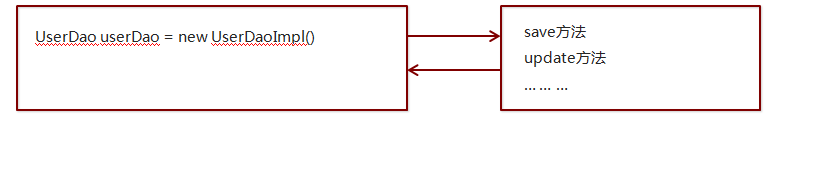
工厂--将对象的创建权交给了Spring,程序员无需自己手动实例化对象。
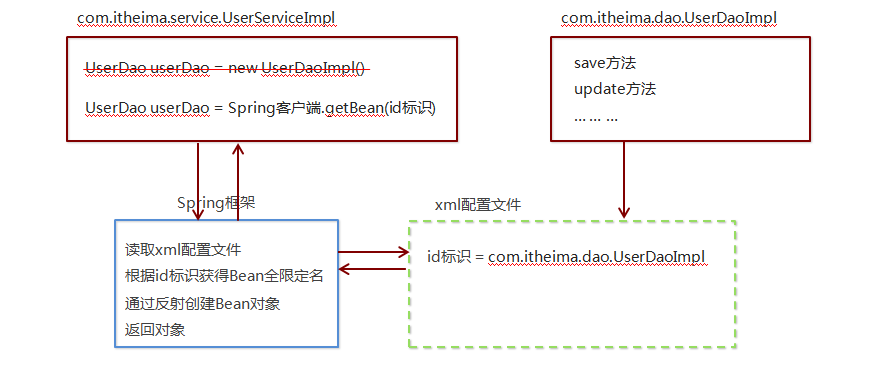
1.2 Spring程序开发步骤
①pom.xml : 导入 Spring 开发的基本包坐标(基于Maven)
  <dependencies>
        <!-- Spring核心包 -->
        <dependency>
            <groupId>org.springframework</groupId>
            <artifactId>spring-context</artifactId>
            <version>5.0.5.RELEASE</version>
        </dependency>
        <!-- Junit测试 -->
        <dependency>
            <groupId>junit</groupId>
            <artifactId>junit</artifactId>
            <version>4.12</version>
            <scope>test</scope>
        </dependency>
    </dependencies>
②编写 Dao 接口和实现类
接口:
public interface HelloService {
    public void sayHello();
}
实现类:
public class HelloServiceImpl implements HelloService {
    public void sayHello(){
        System.out.println("hello,spring");
    }
}
③创建 Spring 核心配置文件(在resource目录下创建applicationContext.xml)并配置 UserDaoImpl
<?xml version="1.0" encoding="UTF-8"?>
<beans xmlns="http://www.springframework.org/schema/beans"
xmlns:xsi="http://www.w3.org/2001/XMLSchema-instance"
xsi:schemaLocation="http://www.springframework.org/schema/beans http://www.springframework.org/schema/beans/spring-beans.xsd">
<!-- 配置实用哪个实现类对Service接口进行实例化 -->
<!-- 配置实现类HelloServiceImpl,定义名称helloService -->
<bean
id="helloService"
class="com.tianshouzhi.spring.HelloServiceImpl">
</bean>
</beans>
④使用 Spring 的 API 获得 Bean 实例
public class HelloServiceTest {
    //传统写法(紧密耦合)
    @Test
    public void traditionalTest(){
        HelloService service = new HelloServiceImpl();
        service.sayHello();
    }

    //使用Spring
    @Test
    public void springTest(){
        // 工厂+反射+配置文件,实例化Service对象
        ApplicationContext context = new ClassPathXmlApplicationContext(
                "applicationContext.xml");
        //通过工厂根据配置的实例名称获取实例对象
        HelloService service2=(HelloService) context.getBean("helloService");
        service2.sayHello();
    }
}

 浙公网安备 33010602011771号