
js写的点击跟随显示区域层
写个会常用到的js,点击显示跟随的区域层。获取跟随的是你鼠标所点击的位置
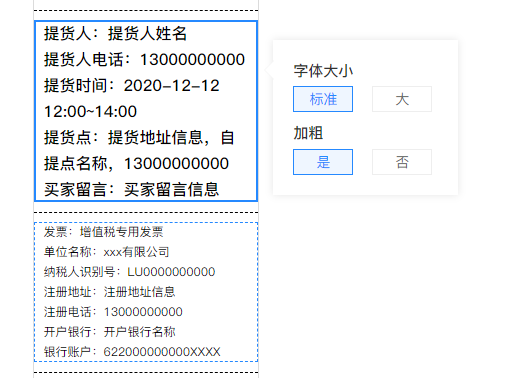
html代码如下:
<!-- 表单最外层-->
<div class="print-panel">
	<div class="name_title">
	不跟随区域
	</div>
	<!-- 点击跟随区域-->
	<div class="border-region">
	可点击跟随区域
	</div>
	<div class="border-region">
	可点击跟随区域
	</div>
	<div class="line">
	不跟随区域
	</div>
</div>
<div class="design-sidebar">
	不跟随区域
</div>

<!-- 跟随层-->
<div class="right-text-operate">
                <div class="operate-nr">
					<div class="item">
						<div class="title">字体大小</div>
						<div class="info">
							<a class="active">标准</a>
							<a>大</a>
						</div>
					</div>
					<div class="item">
						<div class="title">加粗</div>
						<div class="info">
							<a class="active">是</a>
							<a>否</a>
						</div>
					</div>
                </div>
</div>
css代码如下:
.border-region{position: relative; z-index: 1; padding: 0 10px; cursor: default;}
.border-region:hover::after,.border-region.current::after{  content: ''; position: absolute; left: 0; right: 0; top: 0; bottom: 0; border: 1px dashed #2589FF; z-index:2;}
.border-region.current::after { border: 2px solid #2589FF; left: 0px; right:0px; top: 0px; bottom: 0px;}

.right-text-operate{ width:185px; opacity: 0; position: absolute; top:0px; right:-200px; transition: .2s ease; float: right; top: 0px; z-index: 0; background:#ffffff; box-shadow: 0 0 8px 0 rgb(0 0 0 / 10%); padding: 10px 20px; box-sizing: border-box;}
.right-text-operate::after{ position: absolute; z-index: 2; content: ''; left: -18px; top: 20px; border: 10px solid #fff; border-color: transparent #fff transparent transparent; }
.right-text-operate::before{position: absolute; z-index: 1; content: ''; left: -19px; top: 20px; border: 10px solid #f5f5f5; border-color: transparent #f5f5f5 transparent transparent;}
.right-text-operate.show{ top:auto; opacity: 1; z-index: 20; transition: .2s ease;}
.right-text-operate .operate-nr .item{display: block; margin: 10px 0;}
.right-text-operate .operate-nr .item .title{ display: block; font-weight: bold; font-size: 15px;}
.right-text-operate .operate-nr .item .info{ display: block;}
.right-text-operate .operate-nr .item .info a{ display: inline-block; font-size: 14px; border: 1px solid #eee; margin: 5px 15px 0 0; min-width: 60px; text-align: center;  cursor: pointer; line-height: 24px;cursor: pointer; border: 1px solid #eee;}
.right-text-operate .operate-nr .item .info a:last-child{ margin-right: 0;}
.right-text-operate .operate-nr .item .info a.active{ border-color: #2589FF; color:#2589FF ; background: #EFF6FF;}
js代码如下:
// 每个选择器
	var li_wrapper_selector = '.border-region';
	var o_doc = $(li_wrapper_selector);
	// 中间区域 表单最外层
	var center_form_selector = '.print-panel';
	var o_center_form = $(center_form_selector);
	// 跟随层
	var tips_selector = '.right-text-operate';
	var o_tips = $(tips_selector);
	// 与上间距
	var space = 0;
	space = o_doc.offset().top;

	o_center_form.on('click', li_wrapper_selector, function (e) {
	    var self = $(this);
	    // 添加高亮效果
	    // 由于模板标题和顶部内容没有在一个区域内
	    removeAllFocus();
	    self.addClass('current');

	    // ************** 效果部分 ************** //
	    var pageY = e.pageY; // 获取鼠标点击位置
	    var height = pageY - space; // 需定位内容的位置调整
	    var top = height + 20;
	    if (top < 0) {
	        o_tips.css("top", 0 + 'px');
	    } else {
	        o_tips.css("top", (height) + 20 + 'px');
	    }

	    o_tips.addClass("show");
	});
	//清除所有选中
	function removeAllFocus() {
		$('.current').each(function() {
			$(this).removeClass('current');
		});
	}
	// 点击去掉跟随层
	$("body").on('click','.line,.name_title,.design-sidebar',function(){
		o_tips.removeClass("show");
	})
蓦然、回首,那人就在灯火阑珊处

 浙公网安备 33010602011771号