

【spring security】JWT理解
session认证流程
1、用户提交认证信息到认证服务,认证通过后服务器创建session,返回sessionID
2、浏览器保存sessionID到cookie中
3、请求资源时携带cookie,服务器根据sessionID判断是否完成认证
缺点:
- 占用服务器内存
- 在分布式系统中,每台服务器都有自己独立的session,session资源无法共享
- cookie安全问题等
token认证流程
1、客户端请求认证服务
2、服务器接收请求进行认证
3、认证成功后签发token给客户端
4、客户端保存token
5、客户端请求其他资源服务时携带token
6、服务器对token进行校验,校验成功之后可以访问资源
特点:
- Token完全由应用管理,所以它可以避开同源策略
- Token可以避免CSRF攻击
- Token可以是无状态的,可以在多个服务间共享
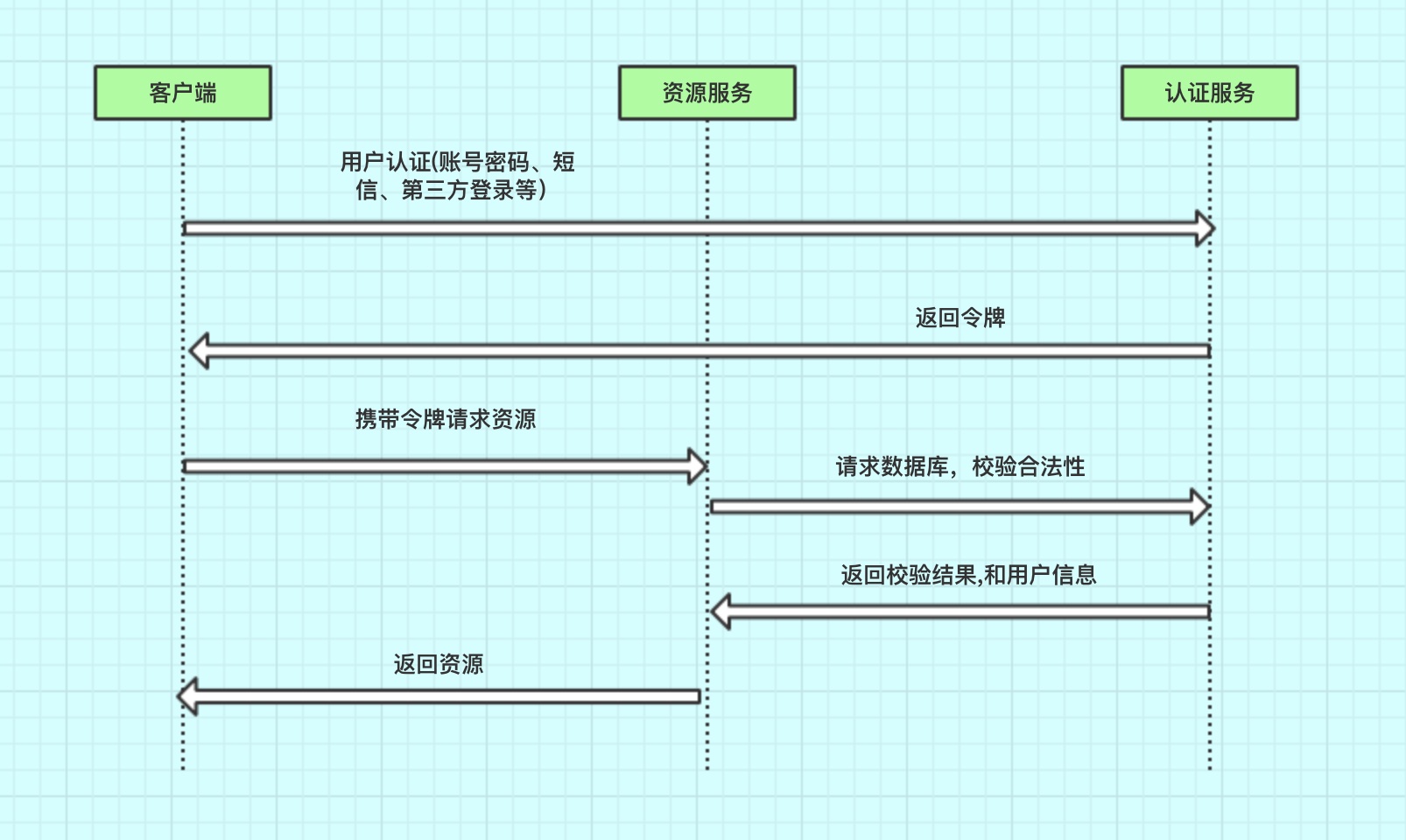
详细介绍---------> https://www.cnblogs.com/qdhxhz/p/13337919.html
JWT
JWT,全称JSON Web Token。可以生成token,也可以解析检验token。
JWT生成token的结构
JWT生成的token有三部分组成,header(头信息)、Payload(载荷)、Signature(签名),中间使用“.”链接。
qqq.wwwwwwww.eeeeeeee- 头信息:主要设置一些规范信息,签名部分的编码格式以及令牌类型。
{
  "alg": "HS256",
  "typ": "JWT"
}- 载荷:token中存放有效信息的部分,比如用户名,用户角色,过期时间等,此部分可以随意读取所以不能放入敏感信息
{
  "sub": "1234567890",
  "name": "John Doe",
  "admin": true
}- 签名:将头部与载荷分别采用base64编码后,用“.”相连,再加入盐,最后使用头部声明的编码类型进行编码,就得到了签名。
HMACSHA256(base64UrlEncode(header) + "." + base64UrlEncode(payload),secret);(加盐:使用一个字符串与原字符串组成一个新字符串,再对新字符串加密。就是秘钥)
非对称加密RSA
上面的token,对于头信息和载荷来说只是进行了base64编码相当于是透明的。能够保证安全性的只有签名部分加入的盐,如果生成token的盐和解析token的盐是一样,那token就可以随便伪造了,所以就需要对盐采用非对称加密的方式进行加密,以达到生成token与校验token方所用的盐不一致的安全效果!
- 基本原理:同时生成两把密钥:私钥和公钥,私钥隐秘保存,公钥可以下发给信任客户端
- 私钥加密,持有私钥或公钥才可以解密
- 公钥加密,持有私钥才可解密
- 优点:安全,难以破解,载荷中可以有用户信息减少查库,json形式跨语言
- 缺点:算法比较耗时
JWT认证授权实现
public class JwtTokenUtils {

    private static final String JWT_PAYLOAD_USER_KEY = "user";

    /**
     * 私钥加密token
     *
     * @param userInfo   载荷中的数据
     * @param privateKey 私钥
     * @param expire     过期时间,单位分钟
     * @return JWT
     */
    public static String generateTokenExpireInMinutes(Object userInfo, PrivateKey privateKey,
                                                      int expire) {
        return Jwts.builder()
                .claim(JWT_PAYLOAD_USER_KEY, JSON.toJSONString(userInfo))
                .setId(createJTI())
                .setExpiration(DateUtils.asDate(LocalDateTime.now().plusMinutes(expire)))
                .signWith(privateKey, SignatureAlgorithm.RS256)
                .compact();

    }

    /**
     * 私钥加密token
     *
     * @param userInfo   载荷中的数据
     * @param privateKey 私钥
     * @param expire     过期时间,单位秒
     * @return JWT
     */
    public static String generateTokenExpireInSeconds(Object userInfo, PrivateKey privateKey,
                                                      int expire) {
        return Jwts.builder()
                .claim(JWT_PAYLOAD_USER_KEY, JSON.toJSONString(userInfo))
                .setId(createJTI())
                .setExpiration(DateUtils.asDate(LocalDateTime.now().plusSeconds(expire)))
                .signWith(privateKey, SignatureAlgorithm.RS256)
                .compact();
    }

    /**
     * 公钥解析token
     *
     * @param token     用户请求中的token
     * @param publicKey 公钥
     * @return Jws<Claims>
     */
    private static Jws<Claims> parserToken(String token, PublicKey publicKey) {
        return Jwts.parser().setSigningKey(publicKey).parseClaimsJws(token);
    }

    private static String createJTI() {
        return new String(Base64.getEncoder().encode(UUID.randomUUID().toString().getBytes()));
    }

    /**
     * 获取token中的用户信息
     *
     * @param token     用户请求中的令牌
     * @param publicKey 公钥
     * @return 用户信息
     */
    public static <T> Payload<T> getInfoFromToken(String token, PublicKey publicKey, Class<T>
            userType) {
        Jws<Claims> claimsJws = parserToken(token, publicKey);
        Claims body = claimsJws.getBody();
        Payload<T> claims = new Payload<>();
        claims.setId(body.getId());
        claims.setUserInfo(JSONObject.parseObject(body.get(JWT_PAYLOAD_USER_KEY).toString(), userType));
        claims.setExpiration(body.getExpiration());
        return claims;
    }

    /**
     * 获取token中的载荷信息
     *
     * @param token     用户请求中的令牌
     * @param publicKey 公钥
     * @return 用户信息
     */
    public static <T> Payload<T> getInfoFromToken(String token, PublicKey publicKey) {
        Jws<Claims> claimsJws = parserToken(token, publicKey);
        Claims body = claimsJws.getBody();
        Payload<T> claims = new Payload<>();
        claims.setId(body.getId());
        claims.setExpiration(body.getExpiration());
        return claims;
    }

}
public class RsaUtils {

    private static final int DEFAULT_KEY_SIZE = 2048;

    /**
     * 从文件中读取公钥
     *
     * @param filename 公钥保存路径,相对于classpath
     * @return 公钥对象
     * @throws Exception
     */
    public static PublicKey getPublicKey(String filename) throws Exception {
        byte[] bytes = readFile(filename);
        return getPublicKey(bytes);
    }

    /**
     * 从文件中读取密钥
     *
     * @param filename 私钥保存路径,相对于classpath
     * @return 私钥对象
     * @throws Exception
     */
    public static PrivateKey getPrivateKey(String filename) throws Exception {
        byte[] bytes = readFile(filename);
        return getPrivateKey(bytes);
    }

    /**
     * 获取公钥
     *
     * @param bytes 公钥的字节形式
     * @return
     * @throws Exception
     */
    private static PublicKey getPublicKey(byte[] bytes) throws Exception {
        bytes = Base64.getDecoder().decode(bytes);
        X509EncodedKeySpec spec = new X509EncodedKeySpec(bytes);
        KeyFactory factory = KeyFactory.getInstance("RSA");
        return factory.generatePublic(spec);
    }

    /**
     * 获取密钥
     *
     * @param bytes 私钥的字节形式
     * @return
     * @throws Exception
     */
    private static PrivateKey getPrivateKey(byte[] bytes) throws NoSuchAlgorithmException,
            InvalidKeySpecException {
        bytes = Base64.getDecoder().decode(bytes);
        PKCS8EncodedKeySpec spec = new PKCS8EncodedKeySpec(bytes);
        KeyFactory factory = KeyFactory.getInstance("RSA");
        return factory.generatePrivate(spec);
    }

    /**
     * 根据密文,生存rsa公钥和私钥,并写入指定文件
     *
     * @param publicKeyFilename  公钥文件路径
     * @param privateKeyFilename 私钥文件路径
     * @param secret             生成密钥的密文
     */
    public static void generateKey(String publicKeyFilename, String privateKeyFilename, String
            secret, int keySize) throws Exception {
        KeyPairGenerator keyPairGenerator = KeyPairGenerator.getInstance("RSA");
        SecureRandom secureRandom = new SecureRandom(secret.getBytes());
        keyPairGenerator.initialize(Math.max(keySize, DEFAULT_KEY_SIZE), secureRandom);
        KeyPair keyPair = keyPairGenerator.genKeyPair();
        // 获取公钥并写出
        byte[] publicKeyBytes = keyPair.getPublic().getEncoded();
        publicKeyBytes = Base64.getEncoder().encode(publicKeyBytes);
        writeFile(publicKeyFilename, publicKeyBytes);
        // 获取私钥并写出
        byte[] privateKeyBytes = keyPair.getPrivate().getEncoded();
        privateKeyBytes = Base64.getEncoder().encode(privateKeyBytes);
        writeFile(privateKeyFilename, privateKeyBytes);
    }

    private static byte[] readFile(String fileName) throws Exception {
        return Files.readAllBytes(new File(fileName).toPath());
    }

    private static void writeFile(String destPath, byte[] bytes) throws IOException {
        File dest = new File(destPath);
        if (!dest.exists()) {
            dest.createNewFile();
        }
        Files.write(dest.toPath(), bytes);
    }

}
认证服务
在前面的代码里有写一个自定义的登录成功的处理器,我直接在这个处理器里生成token返回
/**
 * 用户 登录 成功---处理器
 */
@Slf4j
@Component
public class CustomSuccessHandler extends SavedRequestAwareAuthenticationSuccessHandler {

    @SneakyThrows
    @Override
    public void onAuthenticationSuccess(HttpServletRequest request, HttpServletResponse response, Authentication authentication) throws IOException, ServletException {
        log.info("登陆成功,用户名 = {},信息 = {}", authentication.getName(), JSONObject.toJSONString(authentication));
        UserDTO principal = (UserDTO)authentication.getPrincipal();

        Map<String, Object> userMap = new HashMap<>();
        userMap.put("username", authentication.getName());
        userMap.put("roleList", principal.getRoleList());

        String token = JwtTokenUtils.generateTokenExpireInMinutes(userMap, RsaUtils.getPrivateKey("E:\\key\\auth_key\\rsa_key"), 24 * 60);

        response.setContentType("application/json;charset=utf-8");
        PrintWriter out = response.getWriter();
        out.write(token);
        out.flush();
        out.close();
    }

}
可以在配置里禁用session
    @Override
    protected void configure(HttpSecurity http) throws Exception {
        ......
         // 禁用session
        http
                							.sessionManagement().sessionCreationPolicy(SessionCreationPolicy.STATELESS);
        .....
    }
资源服务
public class TokenVerifyFilter extends BasicAuthenticationFilter {

    public TokenVerifyFilter(AuthenticationManager authenticationManager) {
        super(authenticationManager);
    }

    /**
     * 过滤请求
     */
    @Override
    protected void doFilterInternal(HttpServletRequest request, HttpServletResponse response,
                                    FilterChain chain) {
        try {
            //请求体的头中是否包含Authorization
            String header = request.getHeader("Authorization");
            //Authorization中是否包含Bearer,不包含直接返回
            if (header == null || !header.startsWith("Bearer ")) {
                chain.doFilter(request, response);
                toResponse(response);
                return;
            }
            //获取权限失败,会抛出异常,这里直接用了UsernamePasswordAuthenticationToken,可以自己再实现一个token来用
            UsernamePasswordAuthenticationToken authentication = getAuthentication(request);
            //获取后,将Authentication写入SecurityContextHolder中供后序使用
            SecurityContextHolder.getContext().setAuthentication(authentication);
            chain.doFilter(request, response);
        } catch (Exception e) {
            toResponse(response);
            e.printStackTrace();
        }
    }

    /**
     * 未登录提示
     *
     * @param response
     */
    private void toResponse(HttpServletResponse response) {
        try {
            //未登录提示
            response.setContentType("application/json;charset=utf-8");
            response.setStatus(HttpServletResponse.SC_FORBIDDEN);
            PrintWriter out = response.getWriter();
            Map<String, Object> map = new HashMap<String, Object>();
            map.put("code", HttpServletResponse.SC_FORBIDDEN);
            map.put("message", "请登录!");
            out.write(new ObjectMapper().writeValueAsString(map));
            out.flush();
            out.close();
        } catch (Exception e1) {
            e1.printStackTrace();
        }
    }

    /**
     * 通过token,获取用户信息
     *
     * @param request
     * @return
     */
    private UsernamePasswordAuthenticationToken getAuthentication(HttpServletRequest request) throws Exception {
        String token = request.getHeader("Authorization");
        if (token != null) {
            //通过token解析出载荷信息
            Payload<UserDTO> payload = JwtUtils.getInfoFromToken(token.replace("Bearer ", ""), RsaUtils.getPublicKey("E:\\key\\auth_key\\rsa_key.pub"), UserDTO.class);
            UserDTO user = payload.getUserInfo();
            //不为null,返回
            if (user != null) {
                return new UsernamePasswordAuthenticationToken(user, null, user.getAuthorities());
            }
            return null;
        }
        return null;
    }
}
配置
@Configuration
public class SecurityConfig extends WebSecurityConfigurerAdapter {

    @Autowired
    private CustomAccessDeniedHandler accessDeniedHandler;

    /**
     * 配置静态资源
     */
    @Override
    public void configure(WebSecurity web) throws Exception {
        super.configure(web);
    }

    /**
     * 配置安全策略
     */
    @Override
    protected void configure(HttpSecurity http) throws Exception {

        TokenVerifyFilter tokenVerifyFilter = new TokenVerifyFilter(authenticationManagerBean());
        // 过滤器配置
        http
                .addFilter(tokenVerifyFilter);
        // 禁用session
        http
                .sessionManagement().sessionCreationPolicy(SessionCreationPolicy.STATELESS);

        // 禁用csrf
        http.csrf().disable()
                // 请求配置
                .authorizeRequests()
                // 配置请求权限 hasRole  hasAuthority 两种方式差一个 ROLE_ 前缀
                .antMatchers("/sys/**").hasAuthority("ROLE_SYS")
                .antMatchers("/user/**").hasAuthority("ROLE_USER")
                .antMatchers("/car/**").hasAuthority("ROLE_CAR")
                // 其他接口都需要进行认证
                .anyRequest().authenticated()
                .and().exceptionHandling()
                // 认证失败的处理器
                .accessDeniedHandler(accessDeniedHandler);
    }

}

 浙公网安备 33010602011771号