
java 获取视频中间帧缩略图 工具类
1、引入maven依赖:
      <dependency>
            <groupId>org.bytedeco</groupId>
            <artifactId>javacv</artifactId>
            <version>1.3.1</version>
      </dependency>
2、代码如下:
 1 public class VideoImageUntil {
 2
 3     private static final String IMAGEMAT = "png";
 4     private static final String ROTATE = "rotate";
 5     public static final int MOD = 2;//默认截取视频的中间帧为封面
 6
 7     public static void main(String[] args) throws Exception {
 8         System.out.println(randomGrabberFFmpegImage("D:/1.mp4", 2));
 9     }
10
11     /**
12      * 获取视频缩略图
13      * @param filePath:视频路径
14      * @param mod:视频长度/mod获取第几帧
15      * @throws Exception
16      */
17     public static String randomGrabberFFmpegImage(String filePath, int mod) throws FrameGrabber.Exception {
18         String targetFilePath = "";
19         try (FFmpegFrameGrabber ff = FFmpegFrameGrabber.createDefault(filePath)) {
20             ff.start();
21             String rotate = ff.getVideoMetadata(ROTATE);
22             int ffLength = ff.getLengthInFrames();
23             Frame f;
24             int i = 0;
25             int index = ffLength / mod;
26             while (i < ffLength) {
27                 f = ff.grabImage();
28                 if (i == index) {
29                     if (null != rotate && rotate.length() > 1) {
30                         OpenCVFrameConverter.ToIplImage converter = new OpenCVFrameConverter.ToIplImage();
31                         opencv_core.IplImage src = converter.convert(f);
32                         f = converter.convert(rotate(src, Integer.valueOf(rotate)));
33                     }
34                     targetFilePath = getImagePath(filePath, i);
35                     doExecuteFrame(f, targetFilePath);
36                     break;
37                 }
38                 i++;
39             }
40             ff.stop();
41         }
42         return targetFilePath;
43     }
44
45     /**
46      * 根据视频路径生成缩略图存放路径
47      * @param filePath:视频路径
48      * @param index:第几帧
49      * @return:缩略图的存放路径
50      */
51     private static String getImagePath(String filePath, int index){
52         if(filePath.contains(".") && filePath.lastIndexOf(".") < filePath.length() - 1){
53             filePath = filePath.substring(0, filePath.lastIndexOf(".")).concat("_").concat(String.valueOf(index)).concat(".").concat(IMAGEMAT);
54         }
55         return filePath;
56     }
57
58     /**
59      * 旋转图片
60      * @param src
61      * @param angle
62      * @return
63      */
64     public static opencv_core.IplImage rotate(opencv_core.IplImage src, int angle) {
65         opencv_core.IplImage img = opencv_core.IplImage.create(src.height(), src.width(), src.depth(), src.nChannels());
66         opencv_core.cvTranspose(src, img);
67         opencv_core.cvFlip(img, img, angle);
68         return img;
69     }
70     /**
71      * 截取缩略图
72      * @param f
73      * @param targerFilePath:封面图片
74      */
75     public static void doExecuteFrame(Frame f, String targerFilePath) {
76         if (null == f || null == f.image) {
77             return;
78         }
79         Java2DFrameConverter converter = new Java2DFrameConverter();
80         BufferedImage bi = converter.getBufferedImage(f);
81         File output = new File(targerFilePath);
82         try {
83             ImageIO.write(bi, IMAGEMAT, output);
84             //需要进行压缩图片处理
85         } catch (IOException e) {
86             e.printStackTrace();
87         }
88     }
89
90
91 }
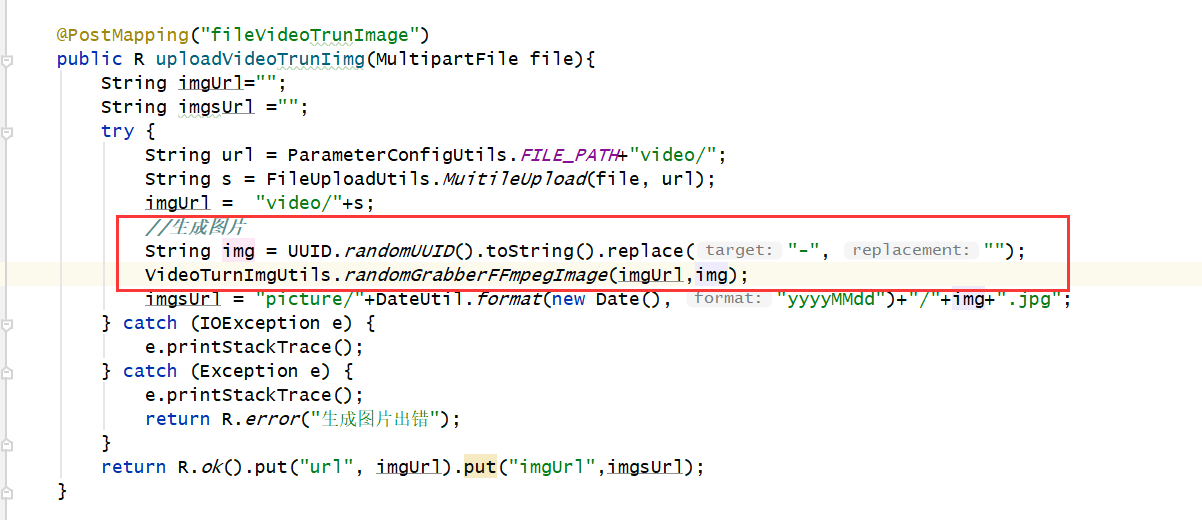
3、项目应用:通过添加视频,自动生成视频封面图
4、参考链接:https://blog.csdn.net/javadream007/article/details/97372211

 浙公网安备 33010602011771号