
docker:compose实战
1、用docker-compose拉起三个容器:nginx->ghost博客平台->mysql,拉起后可以直接访问ghost博客平台
2、目录结构:
ghost:
  data
  docker-compose.yml
  nginx:
    config.js
    Dockerfile
  ghost:
    nginx.conf
    Dockerfile
3、文件内容:
(1)docker-compose.yml
version: '2'
networks:
  ghost:
services:
  ghost-app:
    build: ghost
    networks:
      - ghost
    depends_on:
      - db
    ports:
      - "2368:2368"
  nginx:
    build: nginx
    networks:
      - ghost
    depends_on:
      - ghost-app
    ports:
      - "80:80"
  db:
    image: "mysql:5.7.15"
    networks:
      - ghost
    environment:
      MYSQL_ROOT_PASSWORD: mysqlroot
      MYSQL_USER: ghost
      MYSQL_PASSWORD: ghost
    volumes:
      - $PWD/data:/var/lib/mysql
    ports:
      - "3306:3306"
(2)ghost->config.js
var path = require('path'),
config;

config = {
    production: {
        url: 'http://mytestblog.com',
        mail: {},
        database: {
            client: 'mysql',
            connection: {
                host     : 'db',
                user     : 'ghost',
                password : 'ghost',
                database : 'ghost',
                port: '3306',
                charset  : 'utf-8'
            },
            debug: false
        },
        path: {
                contentPath: path.join(process.env.GHOST_CONTENT,'/')
        },
        server: {
            host: '0.0.0.0',
            port: '2368'
        }
    }
};
module.exports = config;
(3)ghost->Dockerfile
FROM ghost
COPY ./config.js /var/lib/ghost/content/config.js
EXPOSE 2368
CMD ["npm","start","--production"]
(4)nginx->nginx.conf
worker_processes 4;   #工作进程数,数字越大,能同时处理的连接越多
events {worker_connections 1024;}
http {
        server {
                listen 80;  #代理本地80端口
                location / {
                        proxy_pass http://ghost-app:2368;
                }
        }
}
(5)nginx->Dockerfile
FROM nginx
COPY ./nginx.conf /etc/nginx/nginx.conf
EXPOSE 80

4、启动前准备:安装python、pip
yum install python36 --安装Python3.6
tar -zxvf pip-21.0.1.tar.gz    #安装pip3,到https://pypi.org/project/pip/#files下载并上传pip包到服务器并解压pip-21.0.1.tar.gz包;pip是通用的 Python 包管理工具,提供了对 Python 包的查找、下载、安装、卸载的功能,功能类似于RedHat里面的yum
cd pip-21.0.1  #解压后进入pip目录
python3 setup.py install    #用python3安装自己下载的python包
pip -V  #查看是否安装成功,即查看pip版本号
5、用docker-compose拉取多个应用,在docker-compose.yml所在目录:
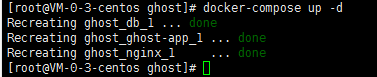
docker-compose up -d --此时会拉起服务,并创建3个容器nginx+ghost+mysql,up表示拉起,-d表示以后台的形式运行这3个容器(我已经创建过容器,所以显示recreating),此时浏览器输入http://服务器ip ,就可以看到自己的ghost博客首页
docker-compose stop --停止服务
docker-compose ps --查看被拉起的所有容器
docker-compose rm --删除服务中的所有容器

6、docker-compose.yml中常用命令:
build  -本地创建镜像
command  --覆盖缺省命令
depends_on  --连接容器
ports  --暴露端口
volumes  --卷
images  --pull镜像
up  --拉启服务
stop  --停止服务
rm  --删除服务中的各个容器
logs  --观察各个容器的日志
ps  --查看服务中的所有容器

 浙公网安备 33010602011771号