
04 RDD编程练习
一、filter,map,flatmap练习:
1.读文本文件生成RDD lines
2.将一行一行的文本分割成单词 words
3.全部转换为小写
4.去掉长度小于3的单词
5.去掉停用词
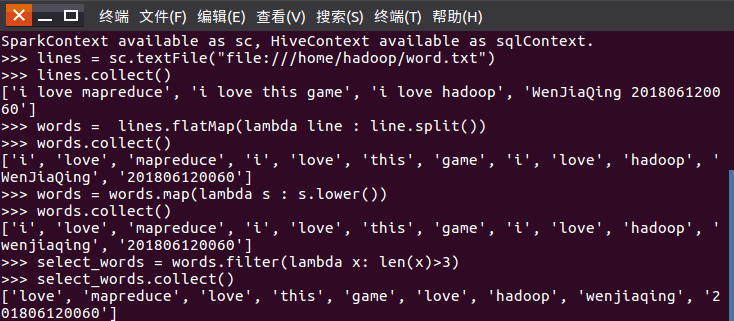


代码如下:
lines = sc.textFile("file:///home/hadoop/word.txt")
lines.collect()
words = lines.flatMap(lambda line : line.split())
words.collect()
words = words.map(lambda s : s.lower())
words.collect()
select_words = words.filter(lambda x: len(x)>3)
select_words.collect()
with open("/home/hadoop/stopwords.txt") as f:
file = f.read()
select_words = select_words.filter(lambda x: x not in file)
select_words.collect()
select_words_map = select_words.map(lambda s:(s,1))
select_words_map.collect()
最终结果如下:
[('love', 1), ('mapreduce', 1), ('love', 1), ('game', 1), ('love', 1), ('hadoop', 1), ('wenjiaqing', 1), ('201806120060', 1)]
二、groupByKey练习
6.练习一的生成单词键值对
7.对单词进行分组
8.查看分组结果

代码:
select_words_map = select_words.map(lambda s:(s,1))
select_words_map.collect()
select_words_map2 = select_words_map.groupByKey()
select_words_map2.foreach(print)
结果如下:
('wenjiaqing', <pyspark.resultiterable.ResultIterable object at 0x7f1648a78dd8>)
('mapreduce', <pyspark.resultiterable.ResultIterable object at 0x7f1648af9d30>)
('love', <pyspark.resultiterable.ResultIterable object at 0x7f1648a78dd8>)
('hadoop', <pyspark.resultiterable.ResultIterable object at 0x7f1648af9f60>)
('201806120060', <pyspark.resultiterable.ResultIterable object at 0x7f1648a78dd8>)
('game', <pyspark.resultiterable.ResultIterable object at 0x7f1648af9f60>)
* 相关文件与代码保留下来,后面还要用到。

 浙公网安备 33010602011771号