
使用HttpWebRequest头中的Range下载文件片段
HTTP请求包头信息中有一个Range属性可以指定索取部分HTTP请求的文件。在.NET中则通过HttpWebRequest.AddRange方法来定义数据的范围。
当添加了Range属性的HTTP请求发送后,如果服务器支持该请求,也就是说支持部分数据提取(也是我们常说到的支持断点续传的下载,所谓断点续 传的下载就是用一个Range属性来指定没有下载到的范围),那么服务器会返回Partial Content状态值。否则会返回OK状态值(200代码)。注意如果服务器支持Range但是HTTP Range请求的范围超出了文件范围,则服务器会返回RequestedRangeNotSatisfiable状态值(416代码)。
代码:
//+ using System.Net;
//+ using System.IO;
staticvoid Main(string[] args)
{
//创建HTTP请求
var request = (HttpWebRequest)WebRequest.Create("https://files.cnblogs.com/mgen/mgen_amalon.zip");
//从第3个到第12个字节,共10个字节。(0是第一个字节)
request.AddRange(2, 11);
try
{
//获取HTTP回应,注意HttpWebResponse继承自IDisposable
using (var response = (HttpWebResponse)request.GetResponse())
{
if(response.StatusCode ==HttpStatusCode.OK)
thrownewException("文件不支持Range部分下载");
//设置接收信息的缓冲器
var bytes =newbyte[5000];
Console.WriteLine("服务器回应:{0}", response.StatusCode);
Console.WriteLine("文件大小:{0}", humanReadableByteCount(response.ContentLength, false));
//获取回应的Stream(字节流)
using (var stream = response.GetResponseStream())
using (var outStream =newMemoryStream())
{
long recv =0;
int count;
//读取时注意实际接收数据大小
while ((count = stream.Read(bytes, 0, 5000)) !=0)
{
Console.WriteLine("已经下载:{0}", humanReadableByteCount(recv += count, false));
//将接收数据写入
outStream.Write(bytes, 0, count);
}
//输出下载的内容
Console.WriteLine(BitConverter.ToString(outStream.ToArray()));
}
}
}
catch (Exception ex)
{
Console.WriteLine("错误信息:{0}", ex.Message);
}
}
//规格化输出大小的方法
//代码来自 / Original source
//http://stackoverflow.com/questions/3758606/how-to-convert-byte-size-into-human-readable-format-in-java
publicstaticString humanReadableByteCount(long bytes, bool si)
{
int unit = si ?1000 : 1024;
if (bytes < unit) return bytes +" B";
int exp = (int)(Math.Log(bytes) /Math.Log(unit));
String pre = (si ?"kMGTPE" : "KMGTPE")[exp -1] + (si ?"" : "i");
returnString.Format("{0:F1} {1}B", bytes /Math.Pow(unit, exp), pre);
}
中间的十个数据会被下载:
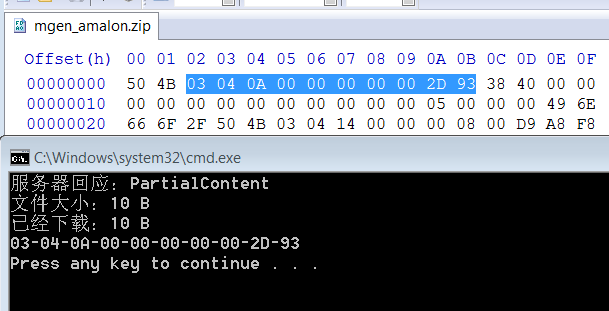
如果尝试不支持Range部分下载的文件,比如普通HTTP的GET请求指定网址的网页。程序则会输出“文件不支持Range部分下载”。
转自:http://www.cnblogs.com/mgen/archive/2012/01/30/2331675.html

 浙公网安备 33010602011771号