
GDI+区域(Region)排除与路径(GraphicsPath)叠加透明
1、区域(Region)排除
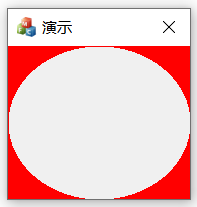
1 CRect rt;
2 GetClientRect(&rt);
3
4 GraphicsPath pa;
5 pa.AddEllipse(0, 0, rt.Width(), rt.Height());
6 Region rg(Rect(0, 0, rt.Width(), rt.Height()));
7 rg.Exclude(&pa);
8 graphics.FillRegion(&SolidBrush(Color(255, 0, 0)), &rg);
2、路径叠加透明

1 GraphicsPath pa;
2 pa.AddRectangle(Rect(0, 0, rt.Width(), rt.Height()));
3 pa.AddEllipse(Rect(0, 0, rt.Width(), rt.Height()));
4 graphics.FillPath(&SolidBrush(Color(255, 0, 0)), &pa);
注:绘图质量在设置后,区域排除条件下,绘图质量没有效果,待指点
记性太差,需要这么记下来

 浙公网安备 33010602011771号