Today I installed Clean Windows Web Server 2008 R2 64-bit with IIS 7.5. To my surprise opening .NET 4.0 application I received the following error:
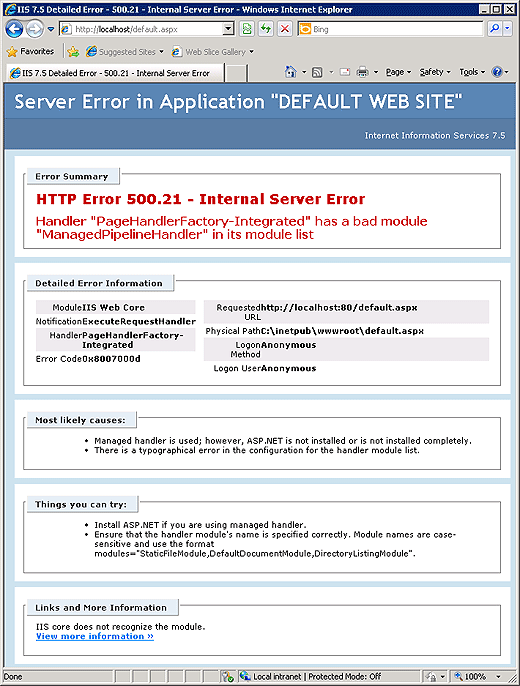
IIS 7.5 Detailed Error - 500.21 - Internal Server
Error


Server Error in Application "DEFAULT WEB
SITE"
Internet Information Services 7.5


[Error Summary]
HTTP
Error 500.21 - Internal Server Error
Handler "PageHandlerFactory-Integrated"
has a bad module "ManagedPipelineHandler" in its module
list


[Detailed Error Information]
Module IIS Web
Core
Notification ExecuteRequestHandler
Handler
PageHandlerFactory-Integrated
Error Code
0x8007000d
Requested URL
http://localhost:80/default.aspx
Physical Path
C:\inetpub\wwwroot\default.aspx
Logon Method Anonymous
Logon
User Anonymous


[Most likely causes:]
•Managed handler is
used; however, ASP.NET is not installed or is not installed
completely.
•There is a typographical error in the configuration for the
handler module list.


[Things you can try:]
•Install ASP.NET if you
are using managed handler.
•Ensure that the handler module's name is
specified correctly. Module names are case-sensitive and use the format
modules="StaticFileModule, DefaultDocumentModule,
DirectoryListingModule".


[Links and More Information]
IIS core
does not recognize the module.
View more information »
As it turns out, some glitch caused this problem, and somehow .NET was not registered with IIS.
Running the following commands solved this issue:
%windir%\Microsoft.NET\Framework\v4.0.30319\aspnet_regiis.exe
-i
%windir%\Microsoft.NET\Framework64\v4.0.30319\aspnet_regiis.exe
-i


 浙公网安备 33010602011771号
75 Responses to IIS 7.5 error: Handler “PageHandlerFactory-Integrated” has a bad module “ManagedPipelineHandler” in its module list