
实现百度搜索功能
百度搜索框
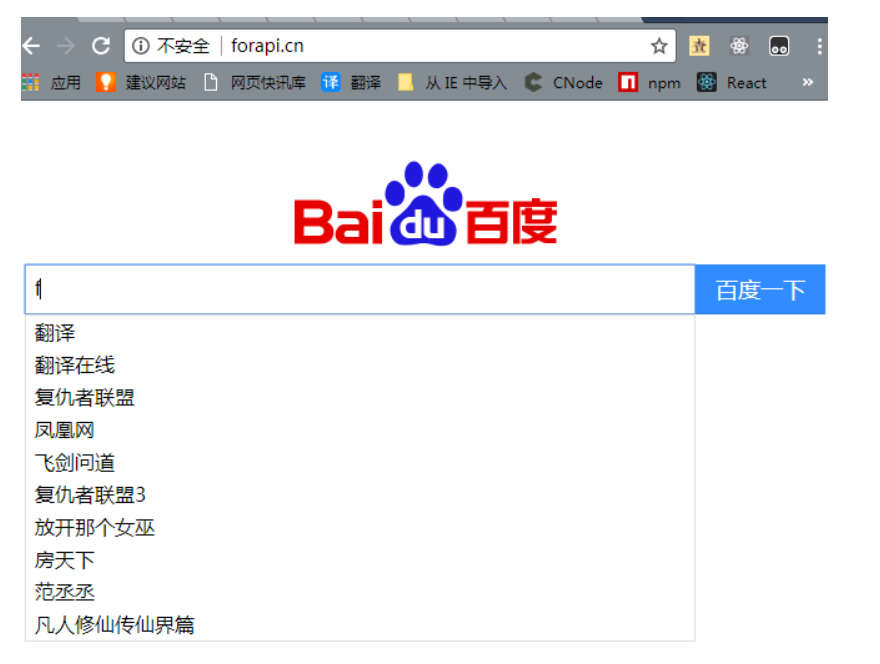
搜索功能教程
目录
01 基本页面制作
02 下拉提示框制作
03 下拉框的显示和隐藏
04 配置本地服务环境
05 实现百度搜索智能提示功能
06 点击提示关键字,跳转到搜索页面
07 点击百度一下,跳转到搜索页面
01基本页面制作
一 、html:
二 、css:
search-box {
width: 641px;
margin: 0 auto;
}
#search-form {
font-size: 0px;
}
#logo {
width: 270px;
height: 129px;
background-image: url('./bd_logo1.png');
background-size: cover;
margin: 0 auto;
}
#search-input {
width: 521px;
height: 20px;
line-height: 20px;
font-size: 16px;
padding: 9px 7px;
border: 1px solid #b8b8b8;
}
#search-botton {
width: 104px;
height: 40px;
border: 1px solid #38f;
border-bottom: 1px solid #2e7ae5;
background-color: #38f;
color: #fff;
font-size: 18px;
position: relative;
top: 2px;
cursor: pointer;
}
search-botton:hover {
background-color: #377ad8;
}
三 、百度logo图片: 点击查看
02下拉提示框制作
一 、在#search-box中添加下拉框的html代码
...
- suggestion1
- suggestion2
二 、 #search-box做相对定位
search-box {
width: 641px;
margin: 0 auto;
position: relative;
}
三 、#suggestion的样式
suggestions {
width: 535px;
border: 1px solid #d8d8d8;
position: absolute;
}
suggestions ul {
list-style: none;
padding: 0;
margin: 0;
}
suggestions li {
font-size: 16px;
height: 20px;
line-height: 20px;
padding: 3px 7px;
cursor: pointer;
background-color: #fff;
}
suggestions li:hover {
background-color: #f8f8f8;
}
03下拉框的显示和隐藏
一 、 去除body的默认margin,设置#suggestion样式为display: none
body {
margin: 0;
}
suggestions {
width: 535px;
border: 1px solid #d8d8d8;
position: absolute;
display: none;
}
二 、引入jQuery1.10.2,并编写下拉框提示框的显示也隐藏代码:
var searchInput = $('#search-input') //搜索输入框
var suggestions = $('#suggestions') //下拉提示框
var searchForm = $('#search-form') //搜索表单
// 输入搜索内容,显示下拉框
searchInput.on('keyup', function() {
// 下拉框的精准定位
suggestions.show().css({
top: searchForm.offset().top + searchForm.height(),
left: 0
})
})
// 点击其他区域 下拉框隐藏
$(document).click(function() {
suggestions.hide()
})
04配置本地服务环境
说明:使用ajax,需要服务器环境,下面我们先来配置一下本地的服务环境
一、打开host, 配置本地虚拟域名
-
以
window7为例,host目录为:C:\Windows\System32\drivers\etc -
配置虚拟域名
127.0.0.1 forapi.cn
二、 配置本地服务环境, 可以是WAMP、 phpStudy等,这里以phpStudy为例
-
下载
phpStudy, 点击进入下载页面, 下载后安装,可以一路下一步 -
以我电脑的安装路径为例:目录为
C:\phpStudy\PHPTutorial\Apache\conf, 打开,httpd.conf文件,去掉LoadModule vhost_alias_module modules/mod_vhost_alias.so前边的#
-
配置
apache域名映射,目录:C:\phpStudy\PHPTutorial\Apache\conf\extra,打开httpd-vhosts.conf,添加以下内容:<VirtualHost *:80>
DocumentRoot "C:\Users\Administrator\Desktop\LearnFree\baiduSearch" //虚拟域名映射的本地路径
ServerName forapi.cn //虚拟域名
<Directory "C:\Users\Administrator\Desktop\LearnFree\baiduSearch"> //同上
Options Indexes FollowSymLinks Includes ExecCGI
AllowOverride All
Order allow,deny
Allow from all
-
开启
phpStudy本地服务环境, 然后访问网址forapi.cn,就可以通过域名来访问我们的静态页面了

05实现百度搜索智能提示功能
一、获取提示jsonp数据的地址为:
https://sp0.baidu.com/5a1Fazu8AA54nxGko9WTAnF6hhy/su?wd=?&json=1&p=3&sid=20144_1467_19033_20515_18240_17949_20388_20456_18133_17001_15202_11615&req=2&csor=2&pwd=s&cb=jQuery110207612423721154653_1467355506619&_=1467355506623
其中参数wd为我们输入的关键字,此时为?; 参数cb为json数据的回到函数,此时为jQuery110207612423721154653_1467355506619
二、 根据上面的地址,我们就可以使用ajax获取jsonp数据,并进行渲染了
var searchInput = $('#search-input') //搜索输入框
var suggestions = $('#suggestions') //下拉提示框
var searchForm = $('#search-form') //搜索表单
var suggestionWrap = $('#suggestion-wrap') //提示信息的容器
// 输入搜索内容,显示智能提示下拉框
searchInput.on('keyup', function () {
// 输入的内容
var text = $(this).val()
// 智能提示数据jsonp的请求地址
var url = 'https://sp0.baidu.com/5a1Fazu8AA54nxGko9WTAnF6hhy/su?wd=' + text + '&json=1&p=3&sid=20144_1467_19033_20515_18240_17949_20388_20456_18133_17001_15202_11615&req=2&csor=2&pwd=s&cb=jQuery110207612423721154653_1467355506619&=1467355506623'
// ajax根据输入的内容,获取jsonp数据,并渲染到提示下拉框
$.ajax({
url: _url,
type: 'GET',
dataType: 'jsonp', //指定服务器返回的数据类型
jsonpCallback: 'jQuery110207612423721154653_1467355506619',
success: function (data) {
var data = data.s
var lis = data.reduce(function (result, item) {
return result += '
}, '')
suggestionWrap.html(lis)
// 下拉提示框精准定位
suggestions.show().css({
top: searchForm.offset().top + searchForm.height(),
left: 0
})
}
})
})
三、实现后的效果(输入关键字,显示关键字相关的下拉列表信息)

06点击提示关键字,跳转到搜索页面
一、搜索页面网址格式:
https://www.baidu.com/s?wd=?
二、代码实现:
//为suggestionWrap,绑定事件委托,点击suggestionWrap下的li,进行搜索页面跳转
suggestionWrap.on('click', 'li', function() {
var text = $(this).html()
window.location.href = 'https://www.baidu.com/s?wd=' + text
})
07点击百度一下,跳转到搜索页面
// 点击百度一下,跳转到搜索页面
var searchBotton = $('#search-botton')
searchBotton.click(function() {
var text = $.trim(searchInput.val())
if(text) {
window.location.href = 'https://www.baidu.com/s?wd=' + text
}
})

 浙公网安备 33010602011771号