
OpenCVSharp:使用CaffeModel
前言
今天这个例子用来学习一下在OpenCVSharp中如何使用caffemodel。
首先需要了解一下Caffe是什么?
Caffe是一个快速的开源深度学习框架。
GitHub地址:https://github.com/BVLC/caffe

Caffe 是一个以表达性、速度和模块化为核心设计的深度学习框架。它由伯克利人工智能研究(BAIR)/伯克利视觉与学习中心(BVLC)及社区贡献者共同开发。
caffemodel在这里指的就是使用这个框架训练的模型。
先来看下这个Demo的效果:
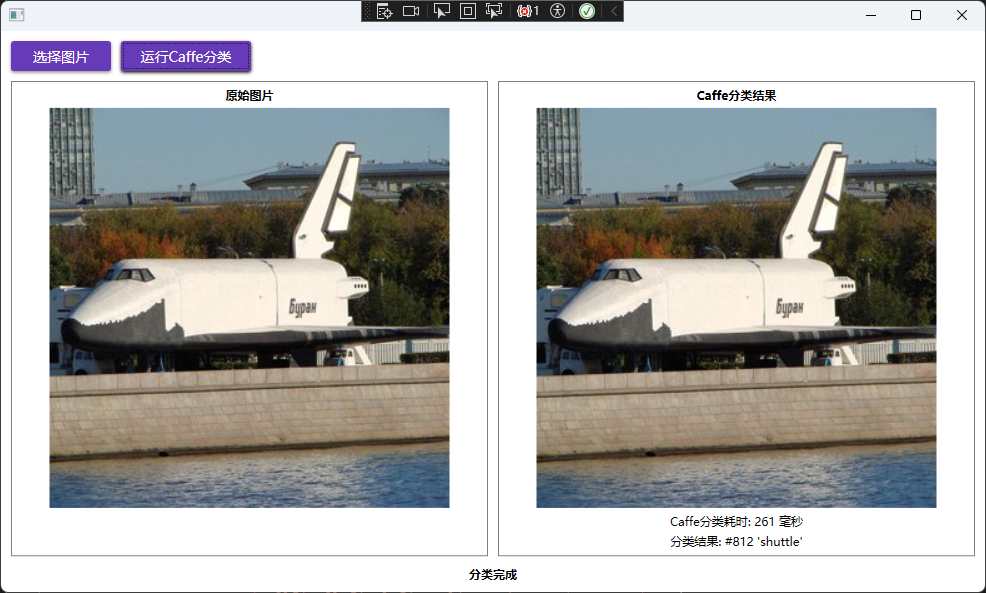
实践
在使用这个模型之前需要先了解这三个东西:

一个.prototxt文件、一个caffemodel文件与一个txt文件。
caffmodl下载地址:http://dl.caffe.berkeleyvision.org/bvlc_googlenet.caffemodel
另外两个文件在OpencvSharp仓库中有了,地址:https://github.com/shimat/opencvsharp_samples/tree/master/SampleBase/Data/Text
来看看.prototxt文件是什么?
打开之后是这样的:

.prototxt文件是一种文本格式的模型配置文件,主要用于Caffe深度学习框架。它用于定义神经网络结构与定义训练配置。
synset_words.txt打开是这样的:

synset_words.txt 是一个 标签文件。它包含了ImageNet数据集中所有 1000 个类别的人类可读的名称。
在OpenCVSharp加载CaffeModel就一行代码:
using var net = CvDnn.ReadNetFromCaffe(ProtoTxt, CaffeModel);
OpenCVSharp封装了一个CvDnn静态类,现在看看这个函数签名:
  public static Net? ReadNetFromCaffe(string prototxt, string? caffeModel = null)
  {
      return Net.ReadNetFromCaffe(prototxt, caffeModel);
  }

  public static Net? ReadNetFromCaffe(string prototxt, string? caffeModel = null)
  {
      if (prototxt is null)
          throw new ArgumentNullException(nameof(prototxt));

      NativeMethods.HandleException(
          NativeMethods.dnn_readNetFromCaffe(prototxt, caffeModel, out var p));
      return (p == IntPtr.Zero) ? null : new Net(p);
  }
OpenCVSharp中创建了一个Net类用于创建和操作复杂的人工神经网络。
在C#中这样写就会调用OpenCV对应的C++接口,要注意OpenCVSharp并不是OpenCV的C#实现,而是充当了C#与C++代码之间的一层桥接。

现在就是看怎么使用了。
首先需要将图片处理成神经网络需要的形式:
using var img = new Mat(ImagePath);
using var inputBlob = CvDnn.BlobFromImage(img, 1, new Size(224, 224), new Scalar(104, 117, 123));

public static Mat BlobFromImage(
    Mat image, double scaleFactor = 1.0, Size size = default,
    Scalar mean = default, bool swapRB = true, bool crop = true)
{
    if (image is null)
        throw new ArgumentNullException(nameof(image));

    NativeMethods.HandleException(
        NativeMethods.dnn_blobFromImage(
            image.CvPtr, scaleFactor, size, mean, swapRB ? 1 : 0, crop ? 1 : 0, out var ret));
    return new Mat(ret);
}
BlobFromImage是OpenCV中用于深度学习图像预处理的关键方法,它将输入图像转换为神经网络可处理的 4 维张量(blob)。主要功能包括:图像尺寸调整、中心裁剪、通道交换(BGR↔RGB)、均值减法和像素值缩放。输出为 NCHW 维度顺序的 4D Mat 对象,适用于 CNN 等深度学习模型的输入预处理。
net.SetInput(inputBlob, "data");
using var prob = net.Forward("prob");

// 找到最佳类别
GetMaxClass(prob, out int classId, out double classProb);

private void GetMaxClass(Mat probBlob, out int classId, out double classProb)
{
    // 将blob重塑为1x1000矩阵
    using var probMat = probBlob.Reshape(1, 1);
    Cv2.MinMaxLoc(probMat, out _, out classProb, out _, out var classNumber);
    classId = classNumber.X;
}
SetInput将预处理后的Blob数据设置为网络的输入层,"data"是网络配置文件中定义的输入层名称。
Forward执行完整的前向传播过程,"prob"是输出层名称,通常对应softmax概率输出,返回一个包含1000个类别概率值的Mat对象,输出形状为[1, 1000],表示ImageNet的1000个类别。
查看MinMaxLoc方法的定义:
/// <summary>
/// finds global minimum and maximum array elements and returns their values and their locations
/// </summary>
/// <param name="src">The source single-channel array</param>
/// <param name="minVal">Pointer to returned minimum value</param>
/// <param name="maxVal">Pointer to returned maximum value</param>
/// <param name="minLoc">Pointer to returned minimum location</param>
/// <param name="maxLoc">Pointer to returned maximum location</param>
/// <param name="mask">The optional mask used to select a sub-array</param>
public static void MinMaxLoc(InputArray src, out double minVal, out double maxVal,
    out Point minLoc, out Point maxLoc, InputArray? mask = null)
{
    if (src is null)
        throw new ArgumentNullException(nameof(src));
    src.ThrowIfDisposed();

    NativeMethods.HandleException(
        NativeMethods.core_minMaxLoc2(
            src.CvPtr, out minVal, out maxVal, out minLoc, out maxLoc, ToPtr(mask)));

    GC.KeepAlive(src);
    GC.KeepAlive(mask);
}
通过这个方法我们可以找到最大值如下所示:

与最大值的位置,如下所示:

然后这个X坐标值812就是对应类别的ID,可以根据这个ID找到对应的类别名称。

 浙公网安备 33010602011771号