
【Python】Word文档操作
依赖库下载:
pip install python-docx -i https://pypi.tuna.tsinghua.edu.cn/simple/
pip install docx2pdf -i https://pypi.tuna.tsinghua.edu.cn/simple/
一、全文替换
不是创建word文档写入内容,而是基于现有的Word文档进行替换处理
使用run.text直接赋值修改发现样式会丢失,而网上大部分办法都是这么写的...
直到我看到这篇文章的评论:
https://blog.csdn.net/qq_40222956/article/details/106098464

除了段落替换后,Word文档还插入了表格,后来反应过来表格的单元格也是有段落属性
同样需要通过段落对象拿到run进行替换
直接上代码:
# 全文替换操作,且不丢失文档样式
def replace_text_in_doc(doc: Document):
    # 段落内容替换
    for para in doc.paragraphs:
        for idx, run in enumerate(para.runs):
            para_text = run.text.strip()
            if not para_text:
                continue
            modified_text = mustache_clear(para_text)
            para.runs[idx].text = modified_text

    # 单元格内容替换
    for table in doc.tables:
        for row in table.rows:
            for cell in row.cells:
                for cell_para in cell.paragraphs:
                    for idx, cp_run in enumerate(cell_para.runs):
                        cpr_text = cp_run.text.strip()
                        if not cpr_text:
                            continue
                        modified_text = mustache_clear(cpr_text)
                        cell_para.runs[idx].text = modified_text

    doc.save(new_doc_path)
    return
二、读取文档标题:
发现文档标题有好几种style名称
# 标准标题style类型名
headerTags = [
    'Heading 1',
    'Heading 2',
    'Heading 3',
    'Heading 4',
    'Heading 5',
    'Heading 6',
]

# 目录style类型名
tocTypes = [
    'toc 1',
    'toc 2',
    'toc 3',
    'toc 4',
    'toc 5'
    'toc 6'
]

# 附录自定义style类型名
customHeaders = [
    '附录一级标题',
    '附录二级标题',
    '附录三级标题',
    '附录四级标题',
    '附录五级标题',
]
但是toc类型的是最多最全的,这里就用toc来找标题了
代码实现:
通过toc读取的段落,除了文本本身还会附带标题下标
所以这里还做了下标拆分和保留的逻辑
# 目录style类型名
tocTypes = [
    'toc 1',
    'toc 2',
    'toc 3',
    'toc 4',
    'toc 5'
    'toc 6'
]

# 读取所有目录信息
def get_all_toc_title_text(doc: Document):
    print('- - - - - - 读取所有目录信息 - - - - - - ')
    toc_list = []
    for para in doc.paragraphs:
        if para.style.name in tocTypes:
            rough_collect = para.text.split()
            # 标题信息
            title = ' '.join(rough_collect[: -1])
            # 标题下标
            title_idx = rough_collect[-1]
            toc_list.append(title)
            print(f"{title} | {title_idx}")
    return toc_list
三、读取文档表格:
表格读取没有过多要声明的
# 读取所有表格
def get_all_tables(doc: Document):
    print('- - - - - - 读取所有表格 - - - - - - ')
    for table in doc.tables:
        print('- - - - - - table - - - - - - ')
        for row in table.rows:
            for cell in row.cells:
                print(f"{cell.text} | ", end='')
            print()

    return
但是读取指定部分的表格就有点费劲了
表格的话这里只有下标可以访问第几个表格,所以只能从表格内容为特征入手
例如附录D的表格头的列信息固定是这几个文本:
appendix_d_spec = {'安全控制点', '测评指标', '结果记录', '符合程度'}
docx读取的时候,顺序会不一致,所以用集合装填元素,只要取出的集合和特征集合元素一样即可
逻辑代码:
# 读取所有附录D的表格数据
def get_appendix_d_tables(doc: Document):
    print('- - - - - - 读取所有附录D的表格数据 - - - - - - ')
    for table in doc.tables:
        first_row = table.rows[0].cells
        col_len = len(first_row)
        cell_name_list = {cell.text for cell in first_row}
        print(cell_name_list)
        if len(cell_name_list) != 4:
            continue

        cell_name = ' | '.join(cell_name_list)
        print(f"cell_name -> {cell_name}, col_len -> {col_len} ")
        if appendix_d_spec != cell_name_list:
            continue

        print('- - - - - - 附录D表格开始 - - - - - - ')
        for row in table.rows:
            each_row = " | ".join({cell.text for cell in row.cells})
            print(each_row)
        print('- - - - - - 附录D表格结束 - - - - - - ')
    return
三、转换成PDF
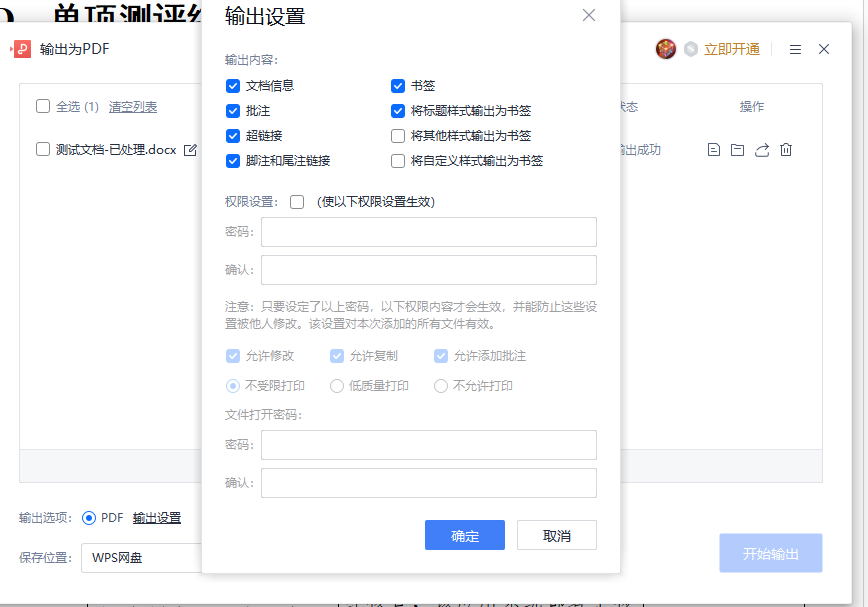
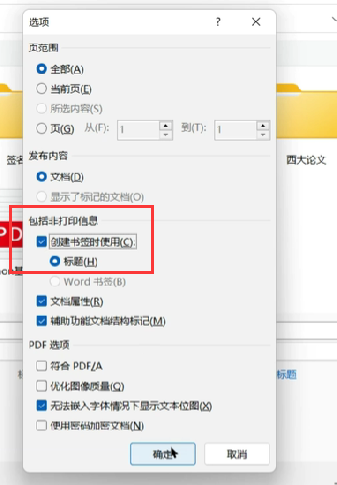
word导出为pdf时,可以勾选导出目录信息:
在浏览器可预览:
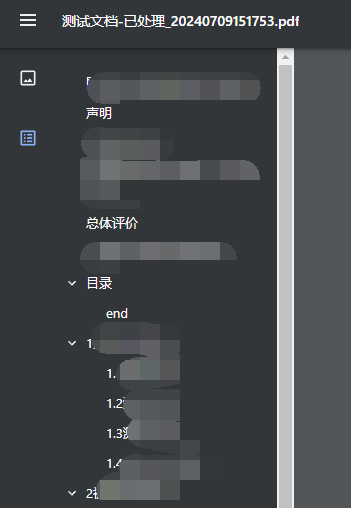
生成结果会附带目录信息:
from docx2pdf import convert

# 文件路径
docPath = r'C:\Users\Administrator\Desktop\pdf-test\测试文档-已处理.docx'
pdfPath = r'C:\Users\Administrator\Desktop\pdf-test\测试文档.pdf'


def docx2pdf_demo():
    # docx2pdf 将 Word 文档转换为 PDF
    convert(docPath, pdfPath)
    return


if __name__ == '__main__':
    docx2pdf_demo()

 浙公网安备 33010602011771号