
【Java】 Springboot+Vue 大文件断点续传
同事在重构老系统的项目时用到了这种大文件上传
第一篇文章是简书的这个:
https://www.jianshu.com/p/b59d7dee15a6
是夏大佬写的vue-uploader组件:
https://www.cnblogs.com/xiahj/p/15950975.html
然后晚上看完才发现,没有后台接口...
然后我找了下网上的资料也不多,然后参考的是这位来实现:
https://github.com/LuoLiangDSGA/spring-learning/tree/bc60e349b4c573fb624230d068f7bb66a9e64736/boot-uploader
我的Springboot接口实现:
1、Chuck分块对象实体:
package cn.cloud9.server.struct.file.dto;

import com.alibaba.fastjson.annotation.JSONField;
import com.baomidou.mybatisplus.annotation.TableField;
import com.baomidou.mybatisplus.annotation.TableName;
import lombok.Data;
import lombok.EqualsAndHashCode;
import org.springframework.data.annotation.Transient;
import org.springframework.web.multipart.MultipartFile;

import java.io.Serializable;

/**
 * @author OnCloud9
 * @description
 * @project tt-server
 * @date 2022年11月18日 下午 11:02
 */

@Data
@EqualsAndHashCode(callSuper = true)
@TableName("chuck")
public class Chuck extends ChuckFile implements Serializable {

    /**
     * 当前文件块,从1开始
     */
    @TableField("CHUNK_NUMBER")
    private Integer chunkNumber;
    /**
     * 分块大小
     */
    @TableField("CHUNK_SIZE")
    private Long chunkSize;
    /**
     * 当前分块大小
     */
    @TableField("CURRENT_CHUNK_SIZE")
    private Long currentChunkSize;

    /**
     * 相对路径
     */
    @TableField("RELATIVE_PATH")
    private String relativePath;
    /**
     * 总块数
     */
    @TableField("TOTAL_CHUNKS")
    private Integer totalChunks;

    /**
     * form表单的file对象,为了不让Fastjson序列化,注解设置false
     */
    @Transient
    @JSONField(serialize = false)
    @TableField(exist = false)
    private MultipartFile file;
}
2、分块文件实体:
package cn.cloud9.server.struct.file.dto;

import com.baomidou.mybatisplus.annotation.IdType;
import com.baomidou.mybatisplus.annotation.TableField;
import com.baomidou.mybatisplus.annotation.TableId;
import com.baomidou.mybatisplus.annotation.TableName;
import lombok.Data;
import org.springframework.data.annotation.Id;

import java.io.Serializable;

/**
 * @author OnCloud9
 * @description
 * @project tt-server
 * @date 2022年11月18日 下午 11:00
 */
@Data
@TableName("chuck_file")
public class ChuckFile implements Serializable {
    @TableId(value = "ID", type = IdType.AUTO)
    protected Long id;

    @TableField("FILENAME")
    protected String filename;

    @TableField("IDENTIFIER")
    protected String identifier;

    @TableField("TOTAL_SIZE")
    protected Long totalSize;

    @TableField("TYPE")
    protected String type;

    @TableField("LOCATION")
    protected String location;
}
3、保存分块信息,判断分块是否上传了
package cn.cloud9.server.struct.file.service.impl;

import cn.cloud9.server.struct.file.dto.Chuck;
import cn.cloud9.server.struct.file.mapper.ChuckMapper;
import com.baomidou.mybatisplus.extension.service.impl.ServiceImpl;
import lombok.extern.slf4j.Slf4j;
import org.apache.commons.collections.CollectionUtils;
import org.springframework.stereotype.Service;
import org.springframework.transaction.annotation.Propagation;
import org.springframework.transaction.annotation.Transactional;

import java.util.List;

/**
 * @author OnCloud9
 * @description
 * @project tt-server
 * @date 2022年11月18日 下午 11:08
 */
@Slf4j
@Service
public class ChuckService extends ServiceImpl<ChuckMapper, Chuck> {

    /**
     * 保存分块信息
     * @param chuck
     */
    @Transactional(propagation = Propagation.REQUIRED, rollbackFor = Exception.class)
    public Chuck saveChuck(Chuck chuck) {
        final int insert = baseMapper.insert(chuck);
        return 1 == insert ? chuck : null;
    }

    /**
     * 判断该分块是否上传过
     * @param chuck
     * @return
     */
    public boolean checkHasChucked(Chuck chuck) {
        final List<Chuck> chucks = lambdaQuery()
                .eq(Chuck::getIdentifier, chuck.getIdentifier())
                .eq(Chuck::getChunkNumber, chuck.getChunkNumber())
                .list();
        return CollectionUtils.isNotEmpty(chucks);
    }
}
4、分块文件服务Bean就两个作用:合并分块,写入合并后的文件信息:
这里原封不动照抄作者的逻辑,就是排序作者写错了用倒序,害我检查半天哪没写对,文件一直合成是坏的
package cn.cloud9.server.struct.file.service.impl;

import cn.cloud9.server.struct.file.dto.ChuckFile;
import cn.cloud9.server.struct.file.mapper.ChuckFileMapper;
import com.baomidou.mybatisplus.extension.service.impl.ServiceImpl;
import lombok.extern.slf4j.Slf4j;
import org.springframework.stereotype.Service;

import java.io.File;
import java.io.IOException;
import java.nio.file.Files;
import java.nio.file.Paths;
import java.nio.file.StandardOpenOption;

/**
 * @author OnCloud9
 * @description
 * @project tt-server
 * @date 2022年11月18日 下午 11:08
 */
@Slf4j
@Service
public class ChuckFileService extends ServiceImpl<ChuckFileMapper, ChuckFile> {

    public void mergeChuckFile(String storagePath, ChuckFile chuckFile) {
        try {
            final String finalFile = storagePath + File.separator + chuckFile.getFilename();

            Files.createFile(Paths.get(finalFile));
            Files.list(Paths.get(storagePath))
                    /* 1、过滤非合并文件 */
                    .filter(path -> path.getFileName().toString().contains("-"))
                    /* 2、升序排序 0 - 1 - 2 。。。 */
                    .sorted((o1, o2) -> {
                        String p1 = o1.getFileName().toString();
                        String p2 = o2.getFileName().toString();
                        int i1 = p1.lastIndexOf("-") + 1;
                        int i2 = p2.lastIndexOf("-") + 1;
                        return Integer.valueOf(p1.substring(i1)).compareTo(Integer.valueOf(p2.substring(i2)));
                    })
                    /* 3、合并文件 */
                    .forEach(path -> {
                        try {
                            /* 以追加的形式写入文件 */
                            Files.write(Paths.get(finalFile), Files.readAllBytes(path), StandardOpenOption.APPEND);
                            /* 合并后删除该块 */
                            Files.delete(path);
                        } catch (IOException e) {
                            e.printStackTrace();
                        }
                    });
        } catch (Exception e) {
            log.error("{}合并写入异常:{}", chuckFile.getFilename(), e.getMessage());
        }
    }


    public void addChuckFile(ChuckFile chuckFile) {
        baseMapper.insert(chuckFile);
    }
}
5、Controller的三个接口
这里Chuck接口的逻辑就没封装到服务了
package cn.cloud9.server.struct.file.controller;

import cn.cloud9.server.struct.controller.BaseController;
import cn.cloud9.server.struct.file.FileProperty;
import cn.cloud9.server.struct.file.FileUtil;
import cn.cloud9.server.struct.file.dto.Chuck;
import cn.cloud9.server.struct.file.dto.ChuckFile;
import cn.cloud9.server.struct.file.service.impl.ChuckFileService;
import cn.cloud9.server.struct.file.service.impl.ChuckService;
import lombok.extern.slf4j.Slf4j;
import org.springframework.http.MediaType;
import org.springframework.web.bind.annotation.*;
import org.springframework.web.multipart.MultipartFile;

import javax.annotation.Resource;
import javax.servlet.http.HttpServletResponse;
import java.io.File;

/**
 * @author OnCloud9
 * @description 大型文件上传
 * @project tt-server
 * @date 2022年11月18日 下午 10:58
 */
@Slf4j
@RestController
@RequestMapping("/chuck-file")
public class ChuckFileController extends BaseController {

    private static final String CHUCK_DIR = "chuck";

    @Resource
    private FileProperty fileProperty;

    @Resource
    private ChuckFileService chuckFileService;

    @Resource
    private ChuckService chuckService;

    /**
     * 上传分块文件
     * @param chuck 分块文件
     * @return 响应结果
     */
    @PostMapping(value = "/chuck", consumes = MediaType.MULTIPART_FORM_DATA_VALUE)
    public Object uploadFileChuck(@ModelAttribute Chuck chuck) {
        final MultipartFile mf = chuck.getFile();
        log.info("收到文件块 文件块名:{} 块编号:{}", mf.getOriginalFilename(), chuck.getChunkNumber());
        try {

            /* 1、准备存储位置  根目录 + 分块目录 + 无类型文件名的目录  */
            final String pureName = FileUtil.getFileNameWithoutTypeSuffix(mf.getOriginalFilename());
            String storagePath = fileProperty.getBaseDirectory() + File.separator + CHUCK_DIR + File.separator + pureName;
            final File storePath = new File(storagePath);
            if (!storePath.exists()) storePath.mkdirs();

            /* 2、准备分块文件的规范名称 [无类型文件名 -分块号] */
            String chuckFilename = pureName + "-" + chuck.getChunkNumber();

            /* 3、向存储位置写入文件 */
            final File targetFile = new File(storePath, chuckFilename);
            mf.transferTo(targetFile);
            log.debug("文件 {} 写入成功, uuid:{}", chuck.getFilename(), chuck.getIdentifier());

            chuck = chuckService.saveChuck(chuck);
        } catch (Exception e) {
            log.error("文件上传异常:{}, {}", chuck.getFilename(), e.getMessage());
            return e.getMessage();
        }
        return chuck;
    }

    /**
     * 检查该分块文件是否上传了
     * @param chuck 分块文件
     * @return 304 | 分块文件 has-chucked
     */
    @GetMapping("/chuck")
    public Object checkHasChucked(@ModelAttribute Chuck chuck) {
        final boolean hasChucked = chuckService.checkHasChucked(chuck);
        if (hasChucked) response.setStatus(HttpServletResponse.SC_NOT_MODIFIED);
        return chuck;
    }

    /**
     * 文件合并
     * @param chuckFile 分块文件合并信息
     */
    @PostMapping("/merge")
    public void mergeChuckFile(@ModelAttribute ChuckFile chuckFile) {
        /* 获取存储位置 */
        final String pureName = FileUtil.getFileNameWithoutTypeSuffix(chuckFile.getFilename());
        String storagePath = fileProperty.getBaseDirectory() + File.separator + CHUCK_DIR + File.separator + pureName;
        chuckFileService.mergeChuckFile(storagePath, chuckFile);

        chuckFile.setLocation(storagePath);
        chuckFileService.addChuckFile(chuckFile);
    }
}
6、根目录的配置bean:
package cn.cloud9.server.struct.file;

import lombok.Data;
import org.springframework.boot.autoconfigure.ImportAutoConfiguration;
import org.springframework.boot.context.properties.ConfigurationProperties;
import org.springframework.context.annotation.Configuration;

/**
 * @author OnCloud9
 * @description
 * @project tt-server
 * @date 2022年11月15日 下午 11:34
 */
@Data
@Configuration
@ConfigurationProperties(prefix = "file")
public class FileProperty {

    /* 文件基础目录位置 */
    private String baseDirectory;
}
配置文件写法:
file:
  base-directory: F:\\tt-file
文件工具类代码:
package cn.cloud9.server.struct.file;

import lombok.SneakyThrows;
import lombok.extern.slf4j.Slf4j;
import org.apache.commons.lang3.StringUtils;
import org.apache.tika.Tika;
import sun.misc.BASE64Encoder;

import javax.servlet.http.HttpServletResponse;
import java.io.File;
import java.net.URLEncoder;
import java.nio.charset.StandardCharsets;
import java.time.LocalDateTime;
import java.time.Month;

/**
 * @author OnCloud9
 * @description
 * @project tt-server
 * @date 2022年11月15日 下午 11:27
 */
@Slf4j
public class FileUtil {

    /**
     * 根据当前年月创建目录
     * @return yyyy_mm
     */
    public static String createDirPathByYearMonth() {
        final LocalDateTime now = LocalDateTime.now();
        final int year = now.getYear();
        final Month month = now.getMonth();
        final int monthValue = month.getValue();
        return year + "_" + monthValue;
    }

    /**
     * 获取文件类型后缀
     * @param filename 文件名称
     * @return 文件类型
     */
    public static String getFileTypeSuffix(String filename) {
        final int pointIndex = filename.lastIndexOf(".");
        final String suffix = filename.substring(pointIndex + 1);
        return StringUtils.isBlank(suffix) ? "" : suffix;
    }

    /**
     * 获取不带类型后缀的文件名
     * @param filename 文件名称
     * @return 不带类型后缀的文件名
     */
    public static String getFileNameWithoutTypeSuffix(String filename) {
        final int pointIndex = filename.lastIndexOf(".");
        final String pureName = filename.substring(0, pointIndex);
        return StringUtils.isBlank(pureName) ? "" : pureName;
    }

    /**
     * 设置文件下载的响应信息
     * @param response 响应对象
     * @param file 文件
     * @param originFilename 源文件名
     */
    public static void setDownloadResponseInfo(HttpServletResponse response, File file, String originFilename) {
        try {
            response.setCharacterEncoding("UTF-8");
            /* 文件名 */
            final String fileName = StringUtils.isBlank(originFilename) ? file.getName() : originFilename;

            /* 获取要下载的文件类型, 设置文件类型声明 */
            String mimeType = new Tika().detect(file);
            response.setContentType(mimeType);

            /* 设置响应头,告诉该文件用于下载而非展示  attachment;filename 类型:附件,文件名称 */
            final String header = response.getHeader("User-Agent");
            if (StringUtils.isNotBlank(header) && header.contains("Firefox")){
                /* 对火狐浏览器单独设置 */
                response.setHeader("Content-Disposition","attachment;filename==?UTF-8?B?"+ new BASE64Encoder().encode(fileName.getBytes(StandardCharsets.UTF_8))+"?=");
            }
            else response.setHeader("Content-Disposition","attachment;filename="+ URLEncoder.encode(fileName,"UTF-8"));
        } catch (Exception e) {
            log.info("设置响应信息异常:{}", e.getMessage());
        }
    }

}
获取MimeType类型需要这个Tika组件支持:
        <!-- https://mvnrepository.com/artifact/org.apache.tika/tika-core -->
        <dependency>
            <groupId>org.apache.tika</groupId>
            <artifactId>tika-core</artifactId>
            <version>2.6.0</version>
        </dependency>
Web接口组件:
直接克隆作者的项目
1、把接口改成你写的接口地址 一个chuck 一个merge (chuck会被组件用Post和Get区分请求好像,post就传分块,get检查分块上传了没有)
<template>
  <uploader :options="options" :file-status-text="statusText" class="uploader-example" ref="uploader" @file-complete="fileComplete" @complete="complete"></uploader>
</template>

<script>
import axios from 'axios'
import qs from 'qs'
export default {
  data () {
    return {
      options: {
        target: 'http://localhost:8080/chuck-file/chuck', // '//jsonplaceholder.typicode.com/posts/',
        testChunks: false
      },
      attrs: {
        accept: 'image/*'
      },
      statusText: {
        success: '成功了',
        error: '出错了',
        uploading: '上传中',
        paused: '暂停中',
        waiting: '等待中'
      }
    }
  },
  methods: {
    complete () {
      console.log('complete', arguments)
    },
    fileComplete () {
      console.log('file complete', arguments)
      const file = arguments[0].file
      axios.post('http://localhost:8080/chuck-file/merge', qs.stringify({
        filename: file.name,
        identifier: arguments[0].uniqueIdentifier,
        totalSize: file.size,
        type: file.type
      })).then(function (response) {
        console.log(response)
      }).catch(function (error) {
        console.log(error)
      })
    }
  },
  mounted () {
    this.$nextTick(() => {
      window.uploader = this.$refs.uploader.uploader
    })
  }
}
</script>

<style>
  .uploader-example {
    width: 880px;
    padding: 15px;
    margin: 40px auto 0;
    font-size: 12px;
    box-shadow: 0 0 10px rgba(0, 0, 0, .4);
  }
  .uploader-example .uploader-btn {
    margin-right: 4px;
  }
  .uploader-example .uploader-list {
    max-height: 440px;
    overflow: auto;
    overflow-x: hidden;
    overflow-y: auto;
  }
</style>
2、区分后台的端口:
在config / index.js 里面重新配置web的端口:
8080 改成 8081
// see http://vuejs-templates.github.io/webpack for documentation.
var path = require('path')

module.exports = {
  build: {
    env: require('./prod.env'),
    index: path.resolve(__dirname, '../dist/index.html'),
    assetsRoot: path.resolve(__dirname, '../dist'),
    assetsSubDirectory: '',
    assetsPublicPath: './',
    productionSourceMap: true,
    // Gzip off by default as many popular static hosts such as
    // Surge or Netlify already gzip all static assets for you.
    // Before setting to `true`, make sure to:
    // npm install --save-dev compression-webpack-plugin
    productionGzip: false,
    productionGzipExtensions: ['js', 'css'],
    // Run the build command with an extra argument to
    // View the bundle analyzer report after build finishes:
    // `npm run build --report`
    // Set to `true` or `false` to always turn it on or off
    bundleAnalyzerReport: process.env.npm_config_report
  },
  dev: {
    env: require('./dev.env'),
    port: 8081,
    autoOpenBrowser: true,
    assetsSubDirectory: '',
    assetsPublicPath: '/',
    proxyTable: {},
    // CSS Sourcemaps off by default because relative paths are "buggy"
    // with this option, according to the CSS-Loader README
    // (https://github.com/webpack/css-loader#sourcemaps)
    // In our experience, they generally work as expected,
    // just be aware of this issue when enabling this option.
    cssSourceMap: false
  }
}
这里可以看到就两个依赖:
  "dependencies": {
    "axios": "^1.1.3",
    "simple-uploader.js": "^0.5.6"
  },
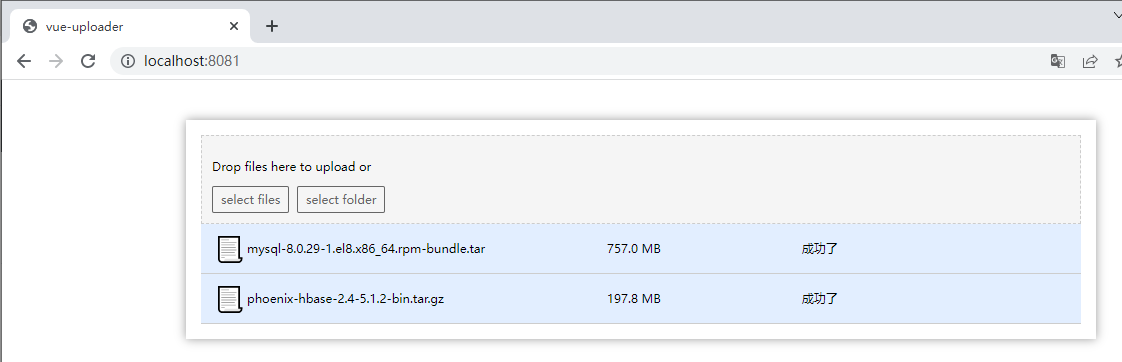
分块文件表记录:
mysql> SELECT * FROM chuck_file;
+----+------------------------------------------+----------------------------------------------+------------+--------------------+--------------------------------------------------------+
| ID | FILENAME                                 | IDENTIFIER                                   | TOTAL_SIZE | TYPE               | LOCATION                                               |
+----+------------------------------------------+----------------------------------------------+------------+--------------------+--------------------------------------------------------+
|  1 | charles中文破解版.rar                    | 135963354-charlesrar                         |  135963354 |                    | F:\\tt-file\chuck\charles中文破解版                    |
|  2 | charles中文破解版.rar                    | 135963354-charlesrar                         |  135963354 |                    | F:\\tt-file\chuck\charles中文破解版                    |
|  3 | charles中文破解版.rar                    | 135963354-charlesrar                         |  135963354 |                    | F:\\tt-file\chuck\charles中文破解版                    |
|  4 | charles中文破解版.rar                    | 135963354-charlesrar                         |  135963354 |                    | F:\\tt-file\chuck\charles中文破解版                    |
|  5 | charles中文破解版.rar                    | 135963354-charlesrar                         |  135963354 |                    | F:\\tt-file\chuck\charles中文破解版                    |
|  6 | charles中文破解版.rar                    | 135963354-charlesrar                         |  135963354 |                    | F:\\tt-file\chuck\charles中文破解版                    |
|  7 | mysql-8.0.29-1.el8.x86_64.rpm-bundle.tar | 793722880-mysql-8029-1el8x86_64rpm-bundletar |  793722880 | application/x-tar  | F:\\tt-file\chuck\mysql-8.0.29-1.el8.x86_64.rpm-bundle |
|  8 | phoenix-hbase-2.4-5.1.2-bin.tar.gz       | 207440936-phoenix-hbase-24-512-bintargz      |  207440936 | application/x-gzip | F:\\tt-file\chuck\phoenix-hbase-2.4-5.1.2-bin.tar      |
+----+------------------------------------------+----------------------------------------------+------------+--------------------+--------------------------------------------------------+
8 rows in set (0.02 sec)
表结构:
CREATE TABLE `chuck_file` (
  `ID` int NOT NULL AUTO_INCREMENT,
  `FILENAME` varchar(128) COLLATE utf8mb4_general_ci DEFAULT NULL,
  `IDENTIFIER` varchar(128) COLLATE utf8mb4_general_ci DEFAULT NULL,
  `TOTAL_SIZE` bigint DEFAULT NULL,
  `TYPE` varchar(24) COLLATE utf8mb4_general_ci DEFAULT NULL,
  `LOCATION` varchar(128) COLLATE utf8mb4_general_ci DEFAULT NULL,
  PRIMARY KEY (`ID`)
) ENGINE=InnoDB AUTO_INCREMENT=9 DEFAULT CHARSET=utf8mb4 COLLATE=utf8mb4_general_ci;
CREATE TABLE `chuck` (
  `ID` int NOT NULL AUTO_INCREMENT,
  `FILENAME` varchar(128) CHARACTER SET utf8mb4 COLLATE utf8mb4_general_ci DEFAULT NULL,
  `IDENTIFIER` varchar(128) CHARACTER SET utf8mb4 COLLATE utf8mb4_general_ci DEFAULT NULL,
  `TOTAL_SIZE` bigint DEFAULT NULL,
  `TYPE` varchar(24) CHARACTER SET utf8mb4 COLLATE utf8mb4_general_ci DEFAULT NULL,
  `LOCATION` varchar(128) CHARACTER SET utf8mb4 COLLATE utf8mb4_general_ci DEFAULT NULL,
  `CHUNK_NUMBER` int DEFAULT NULL,
  `CHUNK_SIZE` int DEFAULT NULL,
  `CURRENT_CHUNK_SIZE` int DEFAULT NULL,
  `RELATIVE_PATH` varchar(128) COLLATE utf8mb4_general_ci DEFAULT NULL,
  `TOTAL_CHUNKS` int DEFAULT NULL,
  PRIMARY KEY (`ID`)
) ENGINE=InnoDB AUTO_INCREMENT=1734 DEFAULT CHARSET=utf8mb4 COLLATE=utf8mb4_general_ci;
最后几点事项:
1、分块文件的命名规则最好是严谨点,影响合并操作,一般中文无特殊符号文件名不会有影响
2、不建议立即删除分块,可以先对合并后的文件进行校验,如果不存在或者大小不一致,可以继续拿分块重新合并

 浙公网安备 33010602011771号