
【WSDL】02 四种客户端调用方式
WSDL概念和一些语法内容:
https://www.w3school.com.cn/wsdl/index.asp
SOAP概念:
https://www.runoob.com/soap/soap-tutorial.html
UDDI概念:
https://www.runoob.com/wsdl/wsdl-uddi.html
四种客户端调用方式
公开提供的Web服务列表
http://www.webxml.com.cn/zh_cn/web_services.aspx
一、WSIMPORT自动生成
wsimport.exe 是JDK提供的一个客户端代码生成工具,根据WSDL地址生成
-s 参数 生成Java文件
-d 参数 生成Class文件 (默认生成)
-p 参数 指定包名,声明参数则默认使用命名空间的倒序
局限问题:
wsimport.exe 支持SOAP1.1客户端代码生成
除了入门案例自定义的WSDL,黑马这里还使用了一个WebXml网站的一个WSDL服务
地址:
http://ws.webxml.com.cn/WebServices/MobileCodeWS.asmx?wsdl
使用wsimport生成客户端代码:
C:\Users\Administrator\Desktop\temp wsdk>wsimport -s . http://ws.webxml.com.cn/WebServices/MobileCodeWS.asmx?wsdl
正在解析 WSDL...


[WARNING] 忽略 SOAP 端口 "MobileCodeWSSoap12": 它使用非标准 SOAP 1.2 绑定。
必须指定 "-extension" 选项以使用此绑定。
  http://ws.webxml.com.cn/WebServices/MobileCodeWS.asmx?wsdl的第 199 行

[WARNING] 忽略端口 "MobileCodeWSHttpGet": 未指定 SOAP 地址。请尝试运行带 -extension 开关的 wsimport。
  http://ws.webxml.com.cn/WebServices/MobileCodeWS.asmx?wsdl的第 202 行

[WARNING] 忽略端口 "MobileCodeWSHttpPost": 未指定 SOAP 地址。请尝试运行带 -extension 开关的 wsimport。
  http://ws.webxml.com.cn/WebServices/MobileCodeWS.asmx?wsdl的第 205 行


正在生成代码...


正在编译代码...


C:\Users\Administrator\Desktop\temp wsdk>
可以看到SOAP1.2版本协议是wsimport不支持的,所以直接忽略了
删除里面的Class文件和Package-Info文件,放到客户端项目里面
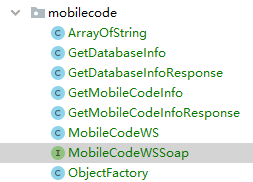
编写客户端启动类:
package cn.cloud9.jax_ws.client;

import cn.cloud9.jax_ws.client.intf.mobilecode.MobileCodeWS;
import cn.cloud9.jax_ws.client.intf.mobilecode.MobileCodeWSSoap;

/**
 * @author OnCloud9
 * @description
 * @project JAX-WS-Client
 * @date 2022年04月23日 14:41
 */
public class MobileClient {
    public static void main(String[] args) {
        // 服务视图
        final MobileCodeWS mobileCodeWS = new MobileCodeWS();

        // 获取服务实现类
        final MobileCodeWSSoap port = mobileCodeWS.getPort(MobileCodeWSSoap.class);

        // 调用
        final String mobileCodeInfo = port.getMobileCodeInfo("13755645841", null);
        System.out.println(mobileCodeInfo);
    }
}
启动客户端:
13755645841:江西 南昌 江西移动全球通卡
特点
该种方式使用简单,但一些关键的元素在代码生成时写死到生成代码中,
不方便维护,所以仅用于测试。
二、Service编程
package cn.cloud9.jax_ws.client;

import cn.cloud9.jax_ws.client.intf.mobilecode.MobileCodeWSSoap;

import javax.xml.namespace.QName;
import javax.xml.ws.Service;
import java.net.MalformedURLException;
import java.net.URL;

/**
 * @author OnCloud9
 * @description
 * @project JAX-WS-Client
 * @date 2022年04月23日 14:41
 */
public class MobileClient {
    public static void main(String[] args) throws MalformedURLException {
        // WSDL地址
        final URL WSDL_LOCATION = new URL("http://ws.webxml.com.cn/WebServices/MobileCodeWS.asmx?wsdl");

        /**
         * 创建服务名称
         * nameSpaceUri 命名空间地址
         * localPart 服务视图名
         */
        final QName SERVICE_NAME = new QName("http://WebXml.com.cn/", "MobileCodeWS");

        // 服务视图
        final Service service = Service.create(WSDL_LOCATION, SERVICE_NAME);

        // 获取服务实现类, 注意这里,还是需要一个MobileCodeWSSoap.class 接口类
        final MobileCodeWSSoap port = service.getPort(MobileCodeWSSoap.class);

        // 调用
        final String mobileCodeInfo = port.getMobileCodeInfo("13184565091", null);
        System.out.println(mobileCodeInfo);
    }
}
执行结果:
13184565091:江西 南昌 江西联通如意通卡
特点。
该种方式可以自定义关键元素,方便以后维护,是-种标准的开发方式,
三、HttpUrlConnection
开发步骤:。
第一步:创建服务地址。
第二步:打开一个通向服务地址的连接。
第三步:设置参数。
第四步:组织SOAP数据,发送请求+
第五步:接收服务端响应,打印
package cn.cloud9.jax_ws.client;

import java.io.BufferedReader;
import java.io.InputStream;
import java.io.InputStreamReader;
import java.io.OutputStream;
import java.net.HttpURLConnection;
import java.net.URL;
import java.net.URLConnection;
import java.nio.charset.StandardCharsets;
import java.util.Arrays;

/**
 * @author OnCloud9
 * @description
 * @project JAX-WS-Client
 * @date 2022年04月23日 15:03
 */
public class HttpUrlConnectionClient {
    public static void main(String[] args) throws Exception {
        // 请求服务地址 不需要添加?WSDL参数
        URL url = new URL("http://ws.webxml.com.cn/WebServices/MobileCodeWS.asmx");
        // 建立链接
        final URLConnection urlConnection = url.openConnection();
        HttpURLConnection connection = (HttpURLConnection) urlConnection;
        // 设置POST请求
        connection.setRequestMethod("POST");
        // 设置数据格式
        connection.setRequestProperty("content-Type", "text/xml;charset=utf-8");
        // 设置输入输出权限,connection默认没有
        connection.setDoInput(true);
        connection.setDoOutput(true);

        // 设置请求的数据
        String payload = getXml("13879105549");

        final OutputStream outputStream = connection.getOutputStream();
        outputStream.write(payload.getBytes(StandardCharsets.UTF_8));

        // 执行发送,获取响应数据
        final int responseCode = connection.getResponseCode();
        if (responseCode != 200) throw new Exception("请求异常: 响应代码:" + responseCode);

        final InputStream inputStream = connection.getInputStream();
        final InputStreamReader reader = new InputStreamReader(inputStream);
        final BufferedReader bufferedReader = new BufferedReader(reader);

        StringBuilder sb = new StringBuilder();
        String temp = null;
        while (null != (temp = bufferedReader.readLine())) sb.append(temp);
        System.out.println(sb);

        bufferedReader.close();
        reader.close();
        inputStream.close();
    }

    private static String getXml(String phoneNo) {
        String[] templates = {
            "<?xml version=\"1.0\" encoding=\"utf-8\"?>\n",
            "<soap:Envelope xmlns:xsi=\"http://www.w3.org/2001/XMLSchema-instance\" xmlns:xsd=\"http://www.w3.org/2001/XMLSchema\" xmlns:soap=\"http://schemas.xmlsoap.org/soap/envelope/\">\n",
            "  <soap:Body>\n",
            "    <getMobileCodeInfo xmlns=\"http://WebXml.com.cn/\">\n",
            "      <mobileCode>", phoneNo, "</mobileCode>\n",
            "      <userID></userID>\n",
            "    </getMobileCodeInfo>\n",
            "  </soap:Body>\n",
            "</soap:Envelope>\n"
        };
        final StringBuffer buffer = new StringBuffer();
        Arrays.asList(templates).forEach(buffer::append);
        return buffer.toString();
    }
}
服务说明和测试见此地址:
http://ws.webxml.com.cn/WebServices/MobileCodeWS.asmx?op=getMobileCodeInfo
如果请求成功,则会响应SOAP信息
<?xml version="1.0" encoding="utf-8"?>
<soap:Envelope xmlns:xsi="http://www.w3.org/2001/XMLSchema-instance" xmlns:xsd="http://www.w3.org/2001/XMLSchema" xmlns:soap="http://schemas.xmlsoap.org/soap/envelope/">
  <soap:Body>
    <getMobileCodeInfoResponse xmlns="http://WebXml.com.cn/">
      <getMobileCodeInfoResult>13879105549:江西 南昌 江西移动动感地带卡</getMobileCodeInfoResult>
    </getMobileCodeInfoResponse>
  </soap:Body>
</soap:Envelope>
四、AJAX调用方式
视频演示代码
<!DOCTYPE html>
<html lang="en">
<head>
    <meta charset="UTF-8">
    <meta http-equiv="X-UA-Compatible" content="IE=edge">
    <meta name="viewport" content="width=device-width, initial-scale=1.0">
    <title>Document</title>
    <script>
        function queryMobileInfo() {
            // 创建请求
            const xhr = new XMLHttpRequest()
            xhr.open('post', 'http://ws.webxml.com.cn/WebServices/MobileCodeWS.asmx', true)
            xhr.setRequestHeader('content-Type', 'text/xml;charset=utf-8')
            xhr.onreadystatechange = function() {
                debugger
                if (this.readyState !== 4 && this.status !== 200) return
                alert(this.responseText)
            }

            // 获取输入的手机号
            const phoneNoInput = document.querySelector('#phoneNo')
            const phoneNo = phoneNoInput.value

            let requestSOAP = [
                "<?xml version=\"1.0\" encoding=\"utf-8\"?>\n",
                "<soap:Envelope xmlns:xsi=\"http://www.w3.org/2001/XMLSchema-instance\" xmlns:xsd=\"http://www.w3.org/2001/XMLSchema\" xmlns:soap=\"http://schemas.xmlsoap.org/soap/envelope/\">\n",
                "  <soap:Body>\n",
                "    <getMobileCodeInfo xmlns=\"http://WebXml.com.cn/\">\n",
                "      <mobileCode>", phoneNo, "</mobileCode>\n",
                "      <userID></userID>\n",
                "    </getMobileCodeInfo>\n",
                "  </soap:Body>\n",
                "</soap:Envelope>\n"
            ]
            requestSOAP = requestSOAP.join('')
            alert(requestSOAP)
            xhr.send(requestSOAP)
        }
    </script>
</head>
<body>
    <p>手机号查询<input type="text" id="phoneNo"></p>
    <button onclick="javascript:queryMobileInfo()" >点击查询</button>

</body>
</html>
但是发现视频用的地址是这个:
http://webservice.webxml.com.cn/WebServices/MobileCodeWS.asmx
我换了直接请求不到了,解析不出来这个地址
然后我看了服务说明:
直接写参数名就够了
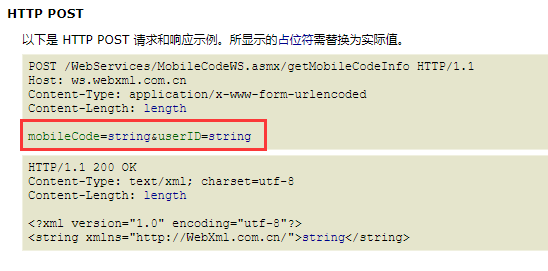
但是又给我报错,服务端不给跨域,那就这样了


 浙公网安备 33010602011771号