
【微信小程序】03 配置项
全局配置项:
https://developers.weixin.qq.com/miniprogram/dev/reference/configuration/app.html
| 属性 | 类型 | 必填 | 描述 | 最低版本 |
|---|---|---|---|---|
| entryPagePath | string | 否 | 小程序默认启动首页 | |
| pages | string[] | 是 | 页面路径列表 | |
| window | Object | 否 | 全局的默认窗口表现 | |
| tabBar | Object | 否 | 底部 tab 栏的表现 |
|
| networkTimeout | Object | 否 | 网络超时时间 | |
| debug | boolean | 否 | 是否开启 debug 模式,默认关闭 | |
| functionalPages | boolean | 否 | 是否启用插件功能页,默认关闭 | 2.1.0 |
| subpackages | Object[] | 否 | 分包结构配置 | 1.7.3 |
| workers | string | 否 | Worker 代码放置的目录 |
1.9.90 |
| requiredBackgroundModes | string[] | 否 | 需要在后台使用的能力,如「音乐播放」 | |
| plugins | Object | 否 | 使用到的插件 | 1.9.6 |
| preloadRule | Object | 否 | 分包预下载规则 | 2.3.0 |
| resizable | boolean | 否 | PC 小程序是否支持用户任意改变窗口大小(包括最大化窗口);iPad 小程序是否支持屏幕旋转。默认关闭 | 2.3.0 |
| usingComponents | Object | 否 | 全局自定义组件配置 | 开发者工具 1.02.1810190 |
| permission | Object | 否 | 小程序接口权限相关设置 | 微信客户端 7.0.0 |
| sitemapLocation | string | 是 | 指明 sitemap.json 的位置 | |
| style | string | 否 | 指定使用升级后的weui样式 | 2.8.0 |
| useExtendedLib | Object | 否 | 指定需要引用的扩展库 | 2.2.1 |
| entranceDeclare | Object | 否 | 微信消息用小程序打开 | 微信客户端7.0.9 |
| darkmode | boolean | 否 | 小程序支持 DarkMode | 2.11.0 |
| themeLocation | string | 否 | 指明 theme.json 的位置,darkmode为true为必填 | 开发者工具 1.03.2004271 |
| lazyCodeLoading | string | 否 | 配置自定义组件代码按需注入 | 2.11.1 |
| singlePage | Object | 否 | 单页模式相关配置 | 2.12.0 |
设置入口页面:
entryPagePath
指定小程序的默认启动路径(首页),常见情景是从微信聊天列表页下拉启动、小程序列表启动等。如果不填,将默认为 pages 列表的第一项。不支持带页面路径参数。
{
  "entryPagePath": "pages/index/index"
}
设置新增页面和路径
pages
用于指定小程序由哪些页面组成,每一项都对应一个页面的 路径(含文件名) 信息。文件名不需要写文件后缀,框架会自动去寻找对应位置的 .json, .js, .wxml, .wxss 四个文件进行处理。
未指定 entryPagePath 时,数组的第一项代表小程序的初始页面(首页)。
小程序中新增/减少页面,都需要对 pages 数组进行修改。
如开发目录为:
├── app.js
├── app.json
├── app.wxss
├── pages
│   │── index
│   │   ├── index.wxml
│   │   ├── index.js
│   │   ├── index.json
│   │   └── index.wxss
│   └── logs
│       ├── logs.wxml
│       └── logs.js
└── utils
则需要在 app.json 中写
{
  "pages": ["pages/index/index", "pages/logs/logs"]
}
设置Windows页面窗体属性
https://developers.weixin.qq.com/miniprogram/dev/reference/configuration/page.html
window
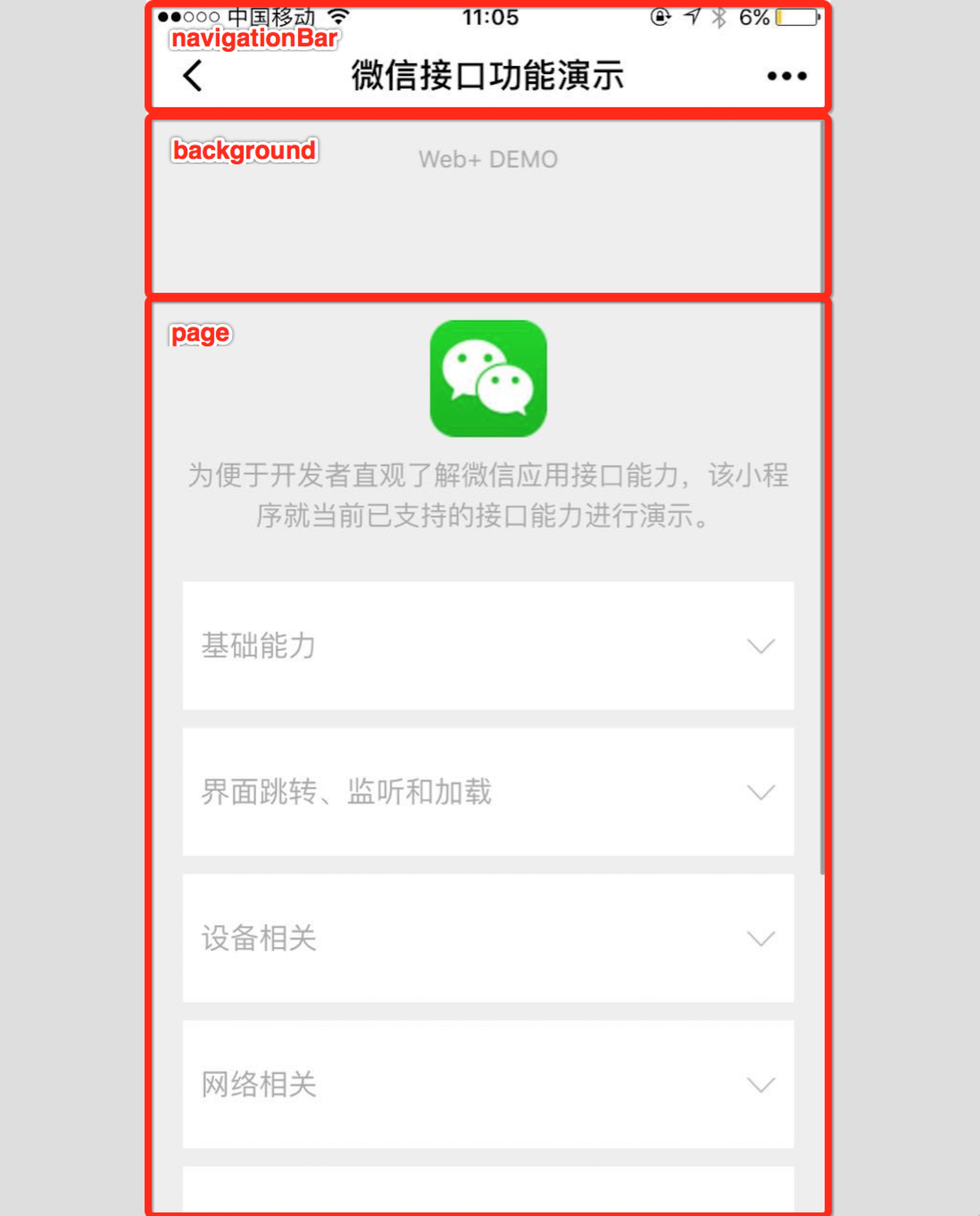
用于设置小程序的状态栏、导航条、标题、窗口背景色。
| 属性 | 类型 | 默认值 | 描述 | 最低版本 |
|---|---|---|---|---|
| navigationBarBackgroundColor | HexColor | #000000 | 导航栏背景颜色,如 #000000 |
|
| navigationBarTextStyle | string | white | 导航栏标题颜色,仅支持 black / white |
|
| navigationBarTitleText | string | 导航栏标题文字内容 | ||
| navigationStyle | string | default | 导航栏样式,仅支持以下值:default 默认样式custom 自定义导航栏,只保留右上角胶囊按钮。参见注 2。 |
iOS/Android 微信客户端 6.6.0,Windows 微信客户端不支持 |
| backgroundColor | HexColor | #ffffff | 窗口的背景色 | |
| backgroundTextStyle | string | dark | 下拉 loading 的样式,仅支持 dark / light |
|
| backgroundColorTop | string | #ffffff | 顶部窗口的背景色,仅 iOS 支持 | 微信客户端 6.5.16 |
| backgroundColorBottom | string | #ffffff | 底部窗口的背景色,仅 iOS 支持 | 微信客户端 6.5.16 |
| enablePullDownRefresh | boolean | false | 是否开启全局的下拉刷新。 详见 Page.onPullDownRefresh |
|
| onReachBottomDistance | number | 50 | 页面上拉触底事件触发时距页面底部距离,单位为 px。 详见 Page.onReachBottom |
|
| pageOrientation | string | portrait | 屏幕旋转设置,支持 auto / portrait / landscape详见 响应显示区域变化 |
2.4.0 (auto) / 2.5.0 (landscape) |
- 注 1:HexColor(十六进制颜色值),如"#ff00ff"
- 注 2:关于
navigationStyle- iOS/Android 客户端 7.0.0 以下版本,
navigationStyle只在app.json中生效。 - iOS/Android 客户端 6.7.2 版本开始,
navigationStyle: custom对 web-view 组件无效 - 开启 custom 后,低版本客户端需要做好兼容。开发者工具基础库版本切到 1.7.0(不代表最低版本,只供调试用)可方便切到旧视觉
- Windows 客户端 3.0 及以上版本,为了给用户提供更符合桌面软件的使用体验,统一了小程序窗口的导航栏,
navigationStyle: custom不再生效
- iOS/Android 客户端 7.0.0 以下版本,
如:
{
  "window": {
    "navigationBarBackgroundColor": "#ffffff",
    "navigationBarTextStyle": "black",
    "navigationBarTitleText": "微信接口功能演示",
    "backgroundColor": "#eeeeee",
    "backgroundTextStyle": "light"
  }
}
设置底部栏 TabBar:
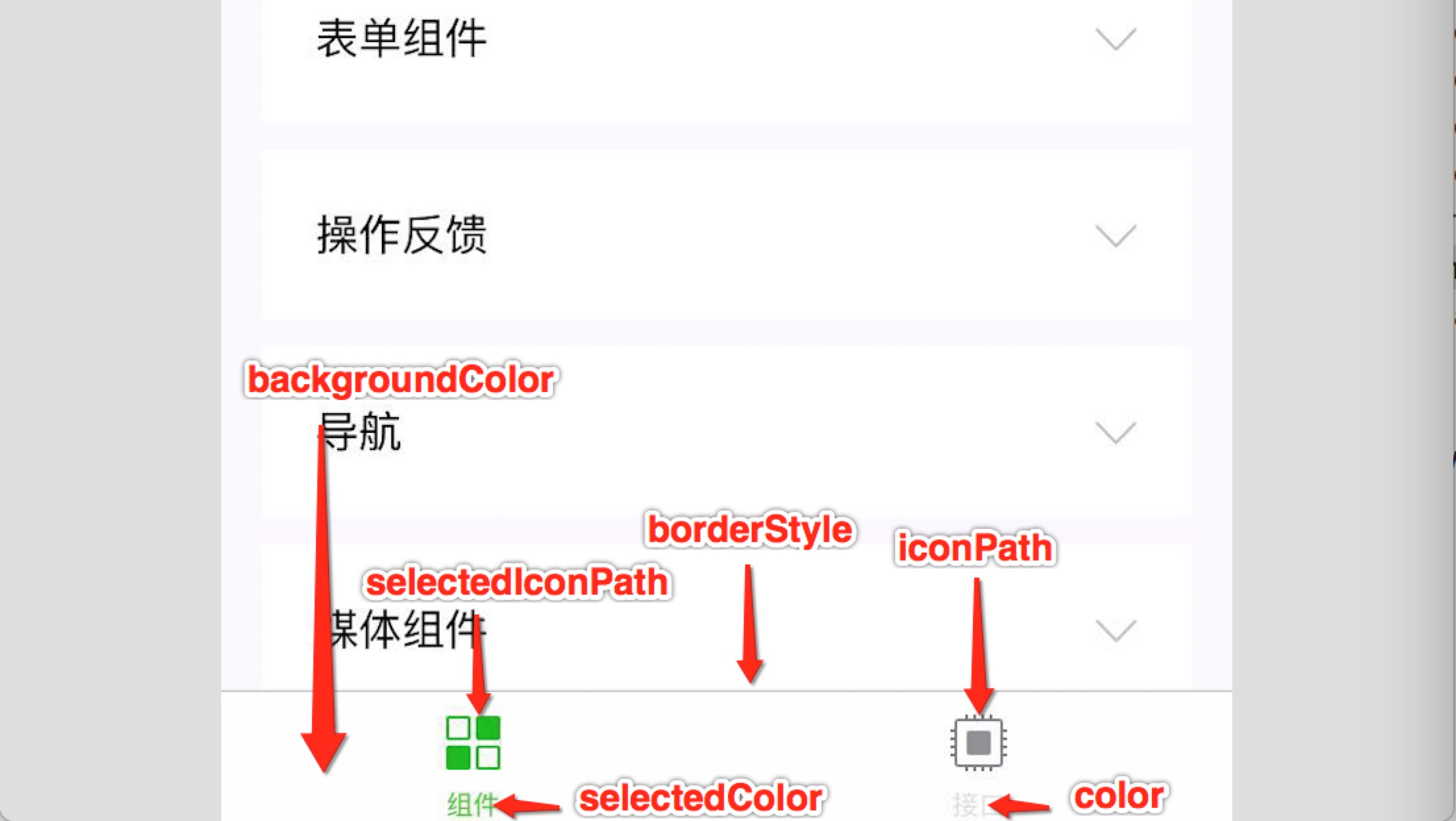
如果小程序是一个多 tab 应用(客户端窗口的底部或顶部有 tab 栏可以切换页面),可以通过 tabBar 配置项指定 tab 栏的表现,以及 tab 切换时显示的对应页面。
| 属性 | 类型 | 必填 | 默认值 | 描述 | 最低版本 |
|---|---|---|---|---|---|
| color | HexColor | 是 | tab 上的文字默认颜色,仅支持十六进制颜色 | ||
| selectedColor | HexColor | 是 | tab 上的文字选中时的颜色,仅支持十六进制颜色 | ||
| backgroundColor | HexColor | 是 | tab 的背景色,仅支持十六进制颜色 | ||
| borderStyle | string | 否 | black | tabbar 上边框的颜色, 仅支持 black / white |
|
| list | Array | 是 | tab 的列表,详见 list 属性说明,最少 2 个、最多 5 个 tab |
||
| position | string | 否 | bottom | tabBar 的位置,仅支持 bottom / top |
|
| custom | boolean | 否 | false | 自定义 tabBar,见详情 | 2.5.0 |
其中 list 接受一个数组,只能配置最少 2 个、最多 5 个 tab。tab 按数组的顺序排序,每个项都是一个对象,其属性值如下:
| 属性 | 类型 | 必填 | 说明 |
|---|---|---|---|
| pagePath | string | 是 | 页面路径,必须在 pages 中先定义 |
| text | string | 是 | tab 上按钮文字 |
| iconPath | string | 否 | 图片路径,icon 大小限制为 40kb,建议尺寸为 81px * 81px,不支持网络图片。 当 position 为 top 时,不显示 icon。 |
| selectedIconPath | string | 否 | 选中时的图片路径,icon 大小限制为 40kb,建议尺寸为 81px * 81px,不支持网络图片。 当 position 为 top 时,不显示 icon。 |
设置请求延时:
networkTimeout
各类网络请求的超时时间,单位均为毫秒。
| 属性 | 类型 | 必填 | 默认值 | 说明 |
|---|---|---|---|---|
| request | number | 否 | 60000 | wx.request 的超时时间,单位:毫秒。 |
| connectSocket | number | 否 | 60000 | wx.connectSocket 的超时时间,单位:毫秒。 |
| uploadFile | number | 否 | 60000 | wx.uploadFile 的超时时间,单位:毫秒。 |
| downloadFile | number | 否 | 60000 | wx.downloadFile 的超时时间,单位:毫秒。 |

 浙公网安备 33010602011771号