
【FreeMarker】05 页面静态化
Servlet:
package cn.zeal4j.servlet.freemarker;

import freemarker.template.Configuration;
import freemarker.template.Template;
import freemarker.template.TemplateException;

import javax.servlet.ServletContext;
import javax.servlet.ServletException;
import javax.servlet.annotation.WebServlet;
import javax.servlet.http.HttpServlet;
import javax.servlet.http.HttpServletRequest;
import javax.servlet.http.HttpServletResponse;
import java.io.File;
import java.io.FileWriter;
import java.io.IOException;
import java.util.HashMap;
import java.util.Map;

/**
 * @author Administrator
 * @file IntelliJ IDEA FreeMarker
 * @create 2020 09 21 22:06
 */
@WebServlet("/news")
public class NewsTemplateServlet extends HttpServlet {
    private static final long serialVersionUID = -3976053164099827626L;

    @Override
    protected void service(HttpServletRequest req, HttpServletResponse resp) throws ServletException, IOException {
        Configuration configuration = new Configuration();

        ServletContext servletContext = this.getServletContext();
        //设置模板目录
        final String path = "/freemarker-templates";
        // 模板配置对象
        configuration.setServletContextForTemplateLoading(servletContext, path);
        configuration.setDefaultEncoding("UTF-8");
        //得到模板文件对象
        Template template = configuration.getTemplate("news-template.ftl");

        // 数据获取,用来打印在模板文件中
        Map<String, Object> map = new HashMap<>();
        map.put("title", "这是标题,模拟数据库查询的结果");
        map.put("source", "这是发布源,模拟数据库查询的结果");
        map.put("time", "这是时间,模拟数据库查询的结果");
        map.put("content", "这是内容,模拟数据库查询的结果");

        // 生成的html位置
        String realPath = req.getServletContext().getRealPath("/");
        File file = new File(realPath + "/html");
        if (!file.exists()) file.mkdir();
        // 指定输出的HTML文件
        final String htmlName = System.currentTimeMillis() + ".html";
        File htmlFile = new File(file, htmlName);

        FileWriter fileWriter = new FileWriter(htmlFile);
        try {
            // 写入模板信息
            template.process(map, fileWriter);
        } catch (TemplateException e) {
            e.printStackTrace();
        } finally {
            fileWriter.flush();
            fileWriter.close();
        }
    }
}
模板代码:
<!DOCTYPE html>
<html>
    <head>
        <meta charset="UTF-8">
        <meta http-equiv="content-type" content="text/html;charset=utf-8">
    </head>
    <body>
        <h2>${title}</h2>
        <p align="center">来源 ${source}</p>
        <p align="center">发布时间 ${time}</p>
        <p align="center">${content} </p>
    </body>
</html>
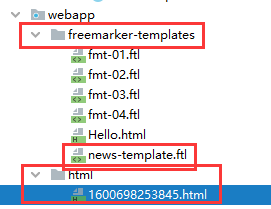
先访问News生成HTML文件,然后再开始访问HTML
http://localhots:8090/news

http://localhots:8090/html/文件名称

 浙公网安备 33010602011771号