

7 CSS背景属性
常用背景相关属性:
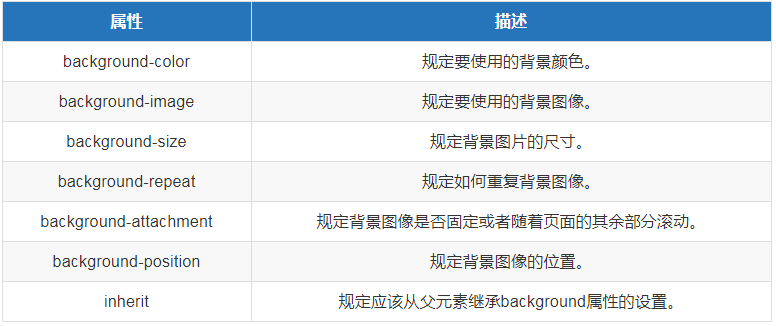
background-image: url('images/11.jpg');
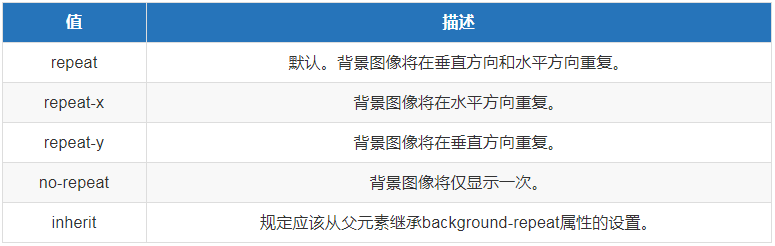
默认有图片平铺效果(宽高30px的图片,会在宽高300px的盒子中平铺)

背景图像如果不想设置平铺,就设置以下:
background-repeat: no-repeat;  值默认为repeat平铺
那么就会显示一张图片在盒子中
background-repeat: repeat-x;  横向平铺
background-repeat: repeat-y;  纵向平铺

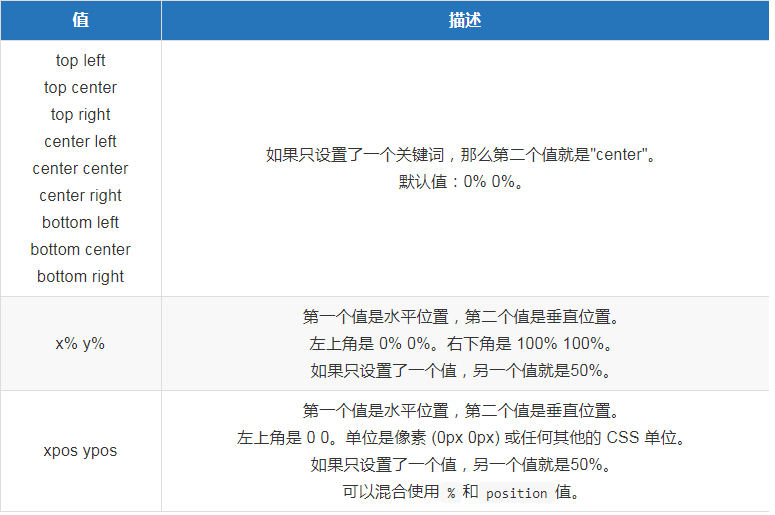
background-position: 0 0;  背景图片位置的默认值
background-position: 50px 100px;  背景图片 x y 的位置
图片位置还可以单独设置
background-position-x: 50px;
background-position-y: 100px;
关键字描述
background-position: top left;  在左上方显示
background-position: top center;  在上方居中显示
background-position: top right;  在右上方显示
background-position: center left;  在中部左侧显示
background-position: center cente;  在中间的中间显示
background-position: center right;  在中部右侧显示
background-position: bottom left;  在下方左侧显示
background-position: bottom cente;  在下方的中间显示
background-position: bottom right;  在下方右侧显示
百分比(0%~100% 分别对应x,y)
水平百分比的值 = 容器宽带的百分比 - 背景图片宽度百分比
列:background-position: 0% 50%
列:div宽度为1200高度1300,图片的宽高300px,图片x轴显示百分比为30%,y为60%
	x轴:1200*30%-300=270px
	y轴:1300*60%-300=600px
background-position: 270px 600px
background-repeat取值范围:
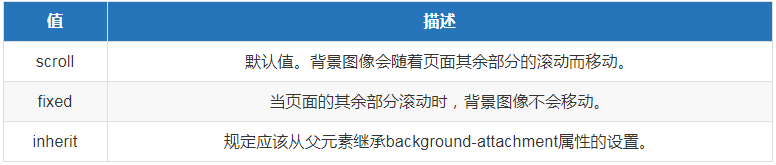
background-attachment取值范围:
background-position取值范围:
示例:
body {
  background-color: red;
  backgraound-image: url(xx.png);
  background-size: 300px 300px;
  background-repeat: no-repeat;
  background-position: center
}
简写:
body {
  background: red url(xx.png) no-repeat fixed center/300px 300px;
}

 浙公网安备 33010602011771号