20242221 实验四《Python程序设计》实验报告
课程:《Python程序设计》
班级: 2422
姓名: 周侯妤
学号:20242221
实验教师:王志强
实验日期:2025年5月14日
必修/选修: 公选课
1.实验内容
本实验设计了一个反应测试游戏,玩家需要根据屏幕上出现的节拍(beats)在正确的时间按下相应的方向键(上、下、左、右)。游戏的目标是尽可能多地击中节拍,以获得高分和连击(combo),然后对过往成绩进行排名。
2. 实验过程及结果
(1)初始代码设计
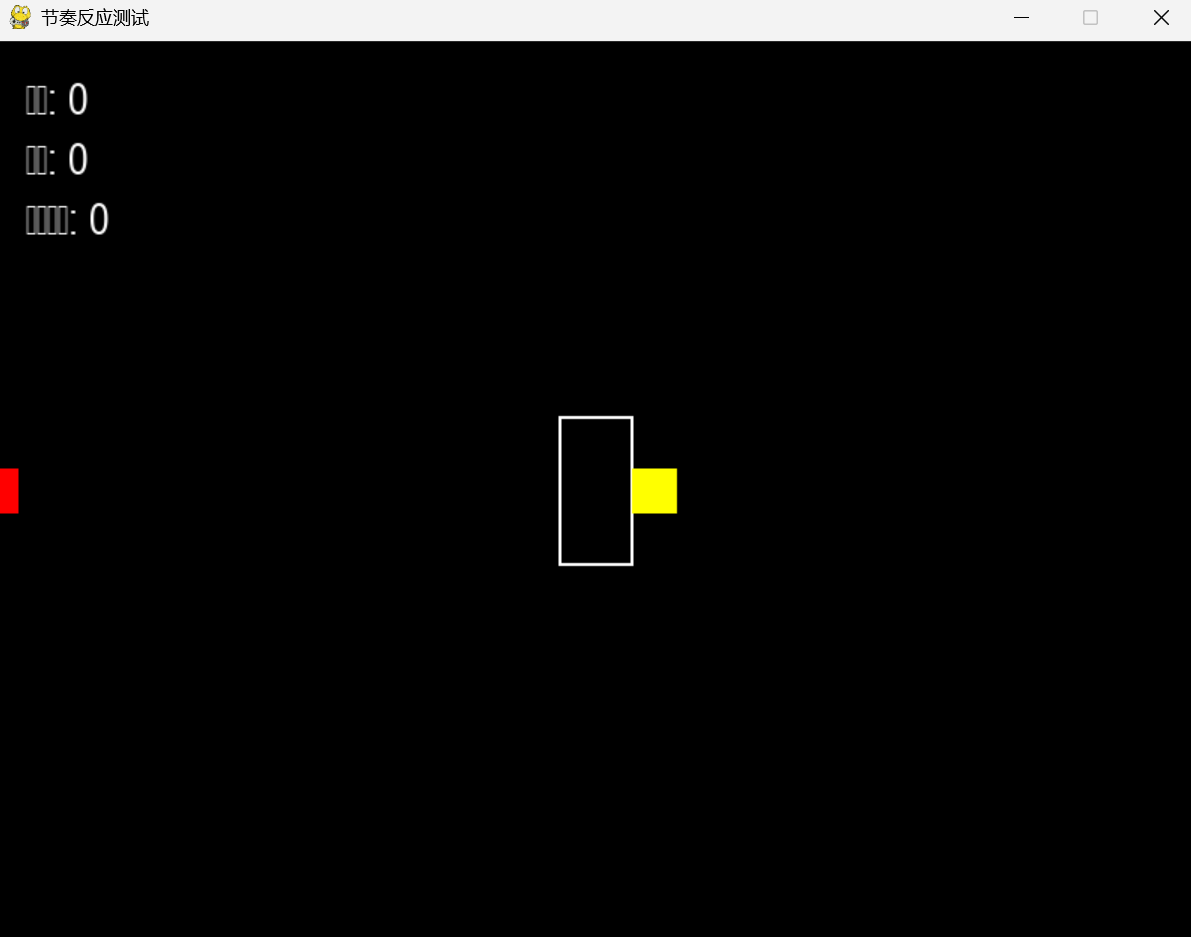
这段代码是一个简单版的节奏反应测试游戏。它包含了游戏的基本逻辑和功能,包括初始化和屏幕设置,颜色定义,游戏参数及游戏的基本逻辑,非常的简洁。
import pygame
import sys
import random
import time

pygame.init()
WIDTH, HEIGHT = 800, 600
screen = pygame.display.set_mode((WIDTH, HEIGHT))
pygame.display.set_caption("节奏反应测试")
WHITE = (255, 255, 255)
BLACK = (0, 0, 0)
RED = (255, 0, 0)
GREEN = (0, 255, 0)
BLUE = (0, 0, 255)
YELLOW = (255, 255, 0)
clock = pygame.time.Clock()
FPS = 60
font = pygame.font.SysFont('Arial', 30)
class RhythmGame:
    def __init__(self):
        self.beats = []
        self.target_pos = WIDTH // 2
        self.score = 0
        self.combo = 0
        self.max_combo = 0
        self.last_beat_time = 0
        self.beat_interval = 1.0
        self.beat_speed = 200
        self.generate_beats()

    def generate_beats(self):
        """生成一系列节拍"""
        self.beats = []
        current_time = 0
        for _ in range(20):
            current_time += self.beat_interval
            start_x = random.choice([0, WIDTH])
            self.beats.append({
                'time': current_time,
                'x': start_x,
                'width': 30,
                'height': 30,
                'hit': False,
                'accuracy': 0
            })

    def update(self, current_time):
        """更新游戏状态"""
        for beat in self.beats:
            if not beat['hit']:
                if beat['x'] == 0:  # 从左侧进入
                    beat['x'] += self.beat_speed / FPS
                else:  # 从右侧进入
                    beat['x'] -= self.beat_speed / FPS

                if abs(beat['x'] - self.target_pos) < 15:
                    beat['hit'] = True
                    beat['accuracy'] = -2
    def handle_key_press(self, current_time):
        """处理按键事件"""
        for beat in self.beats:
            if not beat['hit']:
                distance = abs(beat['x'] - self.target_pos)
                if distance < 50:
                    beat['hit'] = True

                    accuracy = 100 - (distance / 50 * 100)
                    beat['accuracy'] = max(0, accuracy)
                    self.score += accuracy
                    self.combo += 1
                    self.max_combo = max(self.max_combo, self.combo)
                    return


        self.combo = 0

    def draw(self, screen):
        """绘制游戏元素"""

        screen.fill(BLACK)


        pygame.draw.rect(screen, WHITE, (self.target_pos - 25, HEIGHT // 2 - 50, 50, 100), 2)


        for beat in self.beats:
            if not beat['hit']:
                color = YELLOW if abs(beat['x'] - self.target_pos) < 50 else RED
                pygame.draw.rect(screen, color, (beat['x'] - beat['width']//2, HEIGHT // 2 - beat['height']//2, beat['width'], beat['height']))


        score_text = font.render(f"分数: {int(self.score)}", True, WHITE)
        combo_text = font.render(f"连击: {self.combo}", True, WHITE)
        max_combo_text = font.render(f"最大连击: {self.max_combo}", True, WHITE)

        screen.blit(score_text, (20, 20))
        screen.blit(combo_text, (20, 60))
        screen.blit(max_combo_text, (20, 100))
def main():
    game = RhythmGame()
    running = True
    start_time = time.time()

    while running:
        current_time = time.time() - start_time

        for event in pygame.event.get():
            if event.type == pygame.QUIT:
                running = False
            elif event.type == pygame.KEYDOWN:
                if event.key == pygame.K_SPACE:
                    game.handle_key_press(current_time)

        game.update(current_time)
        game.draw(screen)

        pygame.display.flip()
        clock.tick(FPS)

    pygame.quit()
    sys.exit()
if __name__ == "__main__":
    main()
初始代码运行图片:
(2)代码的持续优化
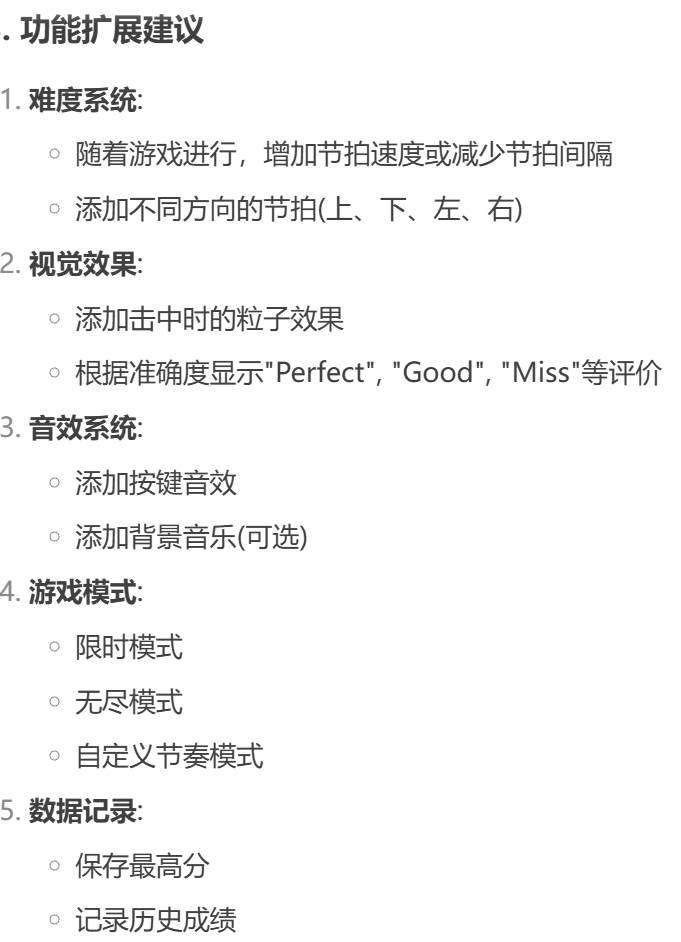
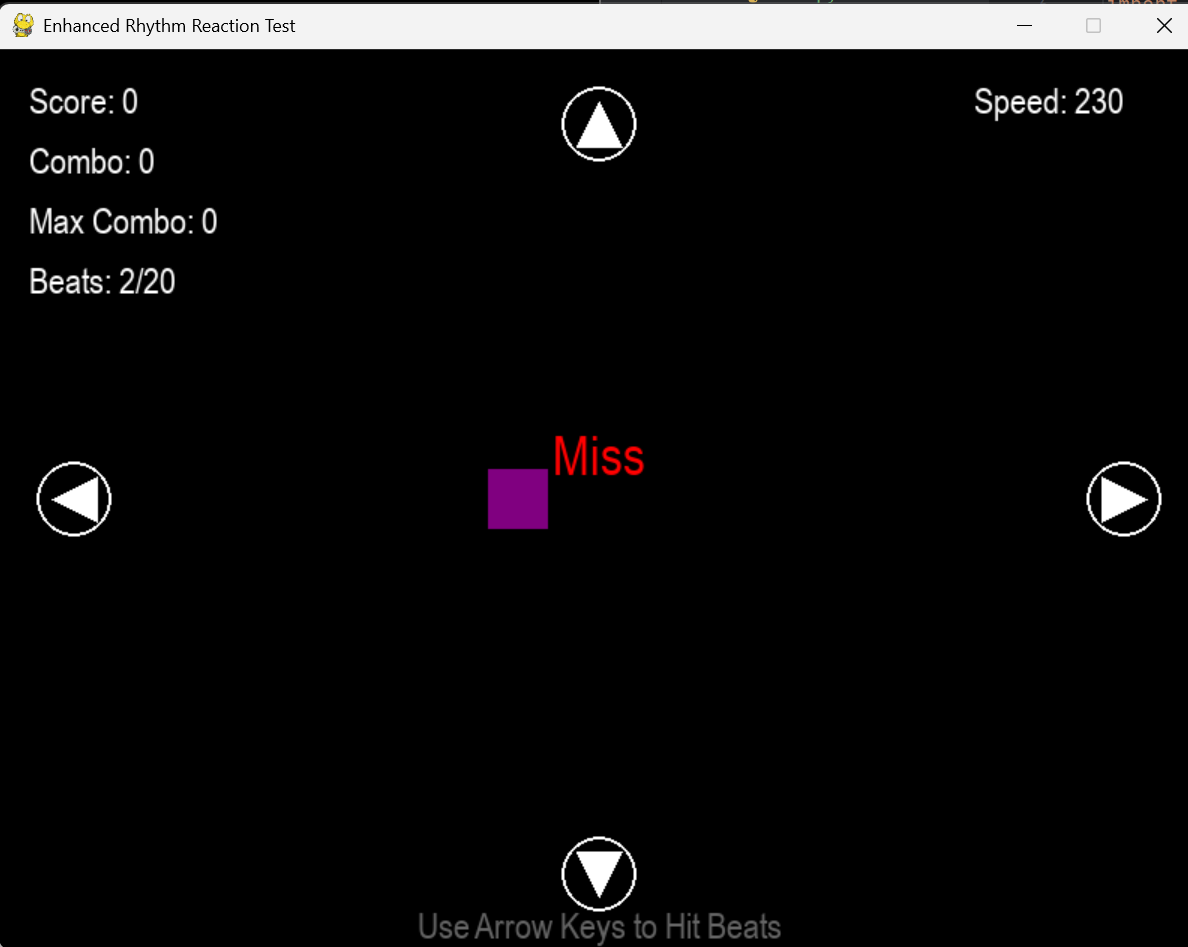
在原有的程序基础上,在多个方面进行了改进和增强,提供了更复杂的节拍生成逻辑、更丰富的按键处理、击打成功后粒子效果、游戏结束和重启机制、高分记录功能、倒计时和背景颜色渐变、更详细的统计信息、更复杂的节拍移动逻辑、更丰富的视觉以及更复杂的用户界面。
其中使用了多种 Python 语法和 Pygame 相关的函数,包括变量赋值、条件语句、循环语句、字典操作、函数定义、类的定义和实例化、异常处理、列表推导式、Pygame 初始化、窗口创建、事件处理、文本和图形绘制、屏幕更新、帧率控制、随机数生成、数学计算、文件操作等。根据AI提供的修改意见,查阅相关资料,增加相关代码段,完善优化原有代码。
优化意见:
相关资料学习:
《python Pygame库介绍和使用,基本游戏开发》https://blog.csdn.net/weixin_45568391/article/details/111562741
《Python 字典》https://www.runoob.com/python/python-dictionary.html
《【python基础】类与类的实例化对象、类方法与类的属性、类实例化的方法与属性、初始化函数、类的继承与重写、@property、私有属性与方法》https://blog.csdn.net/sodaloveer/article/details/134056037
《python 控制帧率》 https://blog.51cto.com/u_16175524/9341283#:~:text=%E5%9C%A8Python%E4%B8%AD%EF%BC%8C%E6%88%91%E4%BB%AC%E5%8F%AF%E4%BB%A5%E4%BD%BF%E7%94%A8%20time%20%E6%A8%A1%E5%9D%97%E6%9D%A5%E6%8E%A7%E5%88%B6%E5%B8%A7%E7%8E%87%E3%80%82%20time ,%E6%A8%A1%E5%9D%97%E6%8F%90%E4%BE%9B%E4%BA%86%E4%B8%80%E4%BA%9B%E5%87%BD%E6%95%B0%EF%BC%8C%E5%8F%AF%E4%BB%A5%E5%B8%AE%E5%8A%A9%E6%88%91%E4%BB%AC%E8%AE%A1%E7%AE%97%E7%A8%8B%E5%BA%8F%E8%BF%90%E8%A1%8C%E7%9A%84%E6%97%B6%E9%97%B4%EF%BC%8C%E4%BB%8E%E8%80%8C%E5%AE%9E%E7%8E%B0%E5%B8%A7%E7%8E%87%E6%8E%A7%E5%88%B6%E3%80%82%20%E9%A6%96%E5%85%88%EF%BC%8C%E6%88%91%E4%BB%AC%E9%9C%80%E8%A6%81%E7%A1%AE%E5%AE%9A%E6%AF%8F%E4%B8%80%E5%B8%A7%E5%BA%94%E8%AF%A5%E6%8C%81%E7%BB%AD%E7%9A%84%E6%97%B6%E9%97%B4%EF%BC%8C%E5%8D%B3%E6%AF%8F%E4%B8%80%E5%B8%A7%E7%9A%84%E6%97%B6%E9%97%B4%E9%97%B4%E9%9A%94%E3%80%82%20%E4%BE%8B%E5%A6%82%EF%BC%8C%E5%A6%82%E6%9E%9C%E6%88%91%E4%BB%AC%E5%B8%8C%E6%9C%9B%E6%AF%8F%E7%A7%92%E9%92%9F%E7%BB%98%E5%88%B630%E5%B8%A7%EF%BC%8C%E9%82%A3%E4%B9%88%E6%AF%8F%E4%B8%80%E5%B8%A7%E7%9A%84%E6%97%B6%E9%97%B4%E9%97%B4%E9%9A%94%E5%B0%B1%E5%BA%94%E8%AF%A5%E6%98%AF1%2F30%E7%A7%92%E3%80%82%20%E6%8E%A5%E4%B8%8B%E6%9D%A5%EF%BC%8C%E6%88%91%E4%BB%AC%E5%8F%AF%E4%BB%A5%E4%BD%BF%E7%94%A8%E4%B8%80%E4%B8%AA%E5%BE%AA%E7%8E%AF%E6%9D%A5%E6%8E%A7%E5%88%B6%E6%AF%8F%E4%B8%80%E5%B8%A7%E7%9A%84%E6%B8%B2%E6%9F%93%E3%80%82
《python如何绘制图形文字》https://docs.pingcode.com/baike/891593
《python 如何创建窗口》https://docs.pingcode.com/baike/722016
优化代码如下:
import pygame
import sys
import random
import time
import math
import json
from pygame import gfxdraw
pygame.init()
WIDTH, HEIGHT = 800, 600
screen = pygame.display.set_mode((WIDTH, HEIGHT))
pygame.display.set_caption("Enhanced Rhythm Reaction Test")
WHITE = (255, 255, 255)
BLACK = (0, 0, 0)
RED = (255, 0, 0)
GREEN = (0, 255, 0)
BLUE = (0, 0, 255)
YELLOW = (255, 255, 0)
GRAY = (100, 100, 100)
PURPLE = (128, 0, 128)
CYAN = (0, 255, 255)
clock = pygame.time.Clock()
FPS = 60
font_large = pygame.font.SysFont('Arial', 48)
font_medium = pygame.font.SysFont('Arial', 36)
font_small = pygame.font.SysFont('Arial', 24)
HIGH_SCORE_FILE = "rhythm_high_scores.json"
class Particle:
    def __init__(self, x, y, color):
        self.x = x
        self.y = y
        self.color = color
        self.size = random.randint(2, 5)
        self.life = random.randint(20, 40)
        self.angle = random.uniform(0, math.pi * 2)
        self.speed = random.uniform(1, 3)
        self.alpha = 255
    def update(self):
        self.x += math.cos(self.angle) * self.speed
        self.y += math.sin(self.angle) * self.speed
        self.life -= 1
        self.alpha = int(255 * (self.life / 40))
    def draw(self, surface):
        if self.life > 0:
            color_with_alpha = (*self.color[:3], self.alpha)
            pygame.gfxdraw.filled_circle(
                surface,
                int(self.x),
                int(self.y),
                self.size,
                color_with_alpha
            )
class RhythmGame:
    def __init__(self):
        self.high_scores = self.load_high_scores()
        self.reset_game()
    def load_high_scores(self):
        try:
            with open(HIGH_SCORE_FILE, 'r') as f:
                return json.load(f)
        except (FileNotFoundError, json.JSONDecodeError):
            return []
    def save_high_scores(self):
        with open(HIGH_SCORE_FILE, 'w') as f:
            json.dump(self.high_scores, f)
    def reset_game(self):
        """Reset game state"""
        self.beats = []
        self.target_pos = {
            'left': (50, HEIGHT // 2),
            'right': (WIDTH - 50, HEIGHT // 2),
            'up': (WIDTH // 2, 50),
            'down': (WIDTH // 2, HEIGHT - 50)
        }
        self.target_width = 50
        self.score = 0
        self.combo = 0
        self.max_combo = 0
        self.beat_count = 0
        self.total_beats = 20
        self.base_speed = 200
        self.speed_increase = 15
        self.current_speed = self.base_speed
        self.game_over = False
        self.start_time = time.time()
        self.particles = []
        self.judgement_text = ""
        self.judgement_time = 0
        self.judgement_color = WHITE
        self.background_color = BLACK
        self.title_alpha = 255
        self.game_started = False
        self.countdown = 3
        self.last_countdown_time = time.time()
        self.countdown_text = ""
        self.countdown_scale = 1.0
    def generate_next_beat(self):
        """Generate next beat from center moving outward"""
        if self.beat_count >= self.total_beats:
            return
        self.beat_count += 1
        direction = random.choice(['left', 'right', 'up', 'down'])
        start_x = WIDTH // 2
        start_y = HEIGHT // 2
        width, height = 40, 40
        self.beats.append({
            'x': start_x,
            'y': start_y,
            'width': width,
            'height': height,
            'direction': direction,
            'speed': self.current_speed,
            'hit': False,
            'missed': False,
            'accuracy': 0,
            'hit_time': 0,
            'color': random.choice([RED, GREEN, BLUE, YELLOW, PURPLE, CYAN])
        })
        self.current_speed += self.speed_increase

    def update(self, current_time):
        """Update game state"""
        for particle in self.particles[:]:
            particle.update()
            if particle.life <= 0:
                self.particles.remove(particle)
        if self.game_over:
            return
        if not self.game_started:
            if time.time() - self.last_countdown_time >= 1.0:
                self.countdown -= 1
                self.last_countdown_time = time.time()
                self.countdown_scale = 1.5
                if self.countdown > 0:
                    self.countdown_text = str(self.countdown)
                elif self.countdown == 0:
                    self.countdown_text = "GO!"
                else:
                    self.game_started = True
                    self.generate_next_beat()
            self.countdown_scale = max(1.0, self.countdown_scale * 0.9)
            return
        for beat in self.beats:
            if not beat['hit'] and not beat['missed']:
                if beat['direction'] == 'right':
                    beat['x'] += beat['speed'] / FPS
                    if beat['x'] >= self.target_pos['right'][0]:
                        beat['missed'] = True
                        self.combo = 0
                        self.show_judgement("Miss", RED)
                elif beat['direction'] == 'left':
                    beat['x'] -= beat['speed'] / FPS
                    if beat['x'] <= self.target_pos['left'][0]:
                        beat['missed'] = True
                        self.combo = 0
                        self.show_judgement("Miss", RED)
                elif beat['direction'] == 'down':
                    beat['y'] += beat['speed'] / FPS
                    if beat['y'] >= self.target_pos['down'][1]:
                        beat['missed'] = True
                        self.combo = 0
                        self.show_judgement("Miss", RED)
                elif beat['direction'] == 'up':
                    beat['y'] -= beat['speed'] / FPS
                    if beat['y'] <= self.target_pos['up'][1]:
                        beat['missed'] = True
                        self.combo = 0
                        self.show_judgement("Miss", RED)
        if len([b for b in self.beats if not b['hit'] and not b['missed']]) == 0 and self.beat_count < self.total_beats:
            self.generate_next_beat()
        if self.beat_count >= self.total_beats and all(b['hit'] or b['missed'] for b in self.beats):
            self.game_over = True
            if len(self.high_scores) < 5 or self.score > min(self.high_scores, key=lambda x: x['score'])['score']:
                self.high_scores.append({
                    'score': int(self.score),
                    'time': time.strftime("%Y-%m-%d %H:%M:%S")
                })
                self.high_scores.sort(key=lambda x: x['score'], reverse=True)
                self.high_scores = self.high_scores[:5]
                self.save_high_scores()
    def show_judgement(self, text, color):
        """Show judgement text (Perfect, Good, Miss, etc.)"""
        self.judgement_text = text
        self.judgement_color = color
        self.judgement_time = time.time()
    def handle_key_press(self, current_time, key):
        """Handle key press based on direction"""
        if self.game_over or not self.game_started:
            return
        key_directions = {
            pygame.K_LEFT: 'left',
            pygame.K_RIGHT: 'right',
            pygame.K_UP: 'up',
            pygame.K_DOWN: 'down'
        }
        if key not in key_directions:
            return
        direction = key_directions[key]
        for beat in self.beats:
            if not beat['hit'] and not beat['missed'] and beat['direction'] == direction:
                target_x, target_y = self.target_pos[direction]
                distance = math.sqrt((beat['x'] - target_x) ** 2 + (beat['y'] - target_y) ** 2)
                if distance < self.target_width:
                    beat['hit'] = True
                    beat['hit_time'] = current_time
                    accuracy = 100 - (distance / self.target_width * 100)
                    beat['accuracy'] = max(0, accuracy)
                    self.score += accuracy
                    self.combo += 1
                    self.max_combo = max(self.max_combo, self.combo)
                    for _ in range(20):
                        self.particles.append(Particle(beat['x'], beat['y'], beat['color']))
                    if accuracy > 90:
                        self.show_judgement("Perfect!", YELLOW)
                    elif accuracy > 70:
                        self.show_judgement("Good!", GREEN)
                    else:
                        self.show_judgement("OK", BLUE)
                    if len([b for b in self.beats if not b['hit'] and not b['missed']]) == 0 and self.beat_count < self.total_beats:
                        self.generate_next_beat()
                    return
        self.combo = 0
        self.show_judgement("Miss", RED)
    def draw(self, screen):
        """Draw game elements"""
               screen.fill(BLACK)
                if not self.game_started and not self.game_over:
            if self.countdown_text:
                countdown = font_large.render(self.countdown_text, True, WHITE)
                scaled_countdown = pygame.transform.scale(
                    countdown,
                    (int(countdown.get_width() * self.countdown_scale),
                     int(countdown.get_height() * self.countdown_scale))
                )
                screen.blit(scaled_countdown,
                            (WIDTH // 2 - scaled_countdown.get_width() // 2,
                             HEIGHT // 2 - scaled_countdown.get_height() // 2))

            title = font_large.render("Enhanced Rhythm Reaction Test", True, WHITE)
            subtitle = font_medium.render("Hit the beats in rhythm!", True, GRAY)
            screen.blit(title, (WIDTH // 2 - title.get_width() // 2, HEIGHT // 4 - title.get_height() // 2))
            screen.blit(subtitle, (WIDTH // 2 - subtitle.get_width() // 2, HEIGHT // 4 + title.get_height()))
            return
        for direction, (x, y) in self.target_pos.items():
            pygame.draw.circle(screen, WHITE, (x, y), self.target_width // 2, 2)
            if direction == 'left':
                pygame.draw.polygon(screen, WHITE, [(x - 15, y), (x + 15, y - 15), (x + 15, y + 15)])
            elif direction == 'right':
                pygame.draw.polygon(screen, WHITE, [(x + 15, y), (x - 15, y - 15), (x - 15, y + 15)])
            elif direction == 'up':
                pygame.draw.polygon(screen, WHITE, [(x, y - 15), (x - 15, y + 15), (x + 15, y + 15)])
            elif direction == 'down':
                pygame.draw.polygon(screen, WHITE, [(x, y + 15), (x - 15, y - 15), (x + 15, y - 15)])
        for particle in self.particles:
            particle.draw(screen)
        for beat in self.beats:
            if not beat['hit'] and not beat['missed']:
                target_x, target_y = self.target_pos[beat['direction']]
                distance = math.sqrt((beat['x'] - target_x) ** 2 + (beat['y'] - target_y) ** 2)
                color = beat['color']
                pygame.draw.rect(screen, color,
                                 (beat['x'] - beat['width'] // 2,
                                  beat['y'] - beat['height'] // 2,
                                  beat['width'],
                                  beat['height']))
        score_text = font_small.render(f"Score: {int(self.score)}", True, WHITE)
        combo_text = font_small.render(f"Combo: {self.combo}", True, WHITE)
        max_combo_text = font_small.render(f"Max Combo: {self.max_combo}", True, WHITE)
        beats_text = font_small.render(f"Beats: {self.beat_count}/{self.total_beats}", True, WHITE)
        screen.blit(score_text, (20, 20))
        screen.blit(combo_text, (20, 60))
        screen.blit(max_combo_text, (20, 100))
        screen.blit(beats_text, (20, 140))
        speed_text = font_small.render(f"Speed: {int(self.current_speed)}", True, WHITE)
        screen.blit(speed_text, (WIDTH - 150, 20))
        if time.time() - self.judgement_time < 0.5:
            judgement = font_medium.render(self.judgement_text, True, self.judgement_color)
            screen.blit(judgement, (WIDTH // 2 - judgement.get_width() // 2, HEIGHT // 2 - 50))
        keys_text = font_small.render("Use Arrow Keys to Hit Beats", True, GRAY)
        screen.blit(keys_text, (WIDTH // 2 - keys_text.get_width() // 2, HEIGHT - 30))
        if self.game_over:
            overlay = pygame.Surface((WIDTH, HEIGHT), pygame.SRCALPHA)
            overlay.fill((0, 0, 0, 180))
            screen.blit(overlay, (0, 0))
            hit_beats = [b for b in self.beats if b['hit']]
            hit_rate = len(hit_beats) / self.total_beats * 100
            avg_accuracy = sum(b['accuracy'] for b in hit_beats) / len(hit_beats) if hit_beats else 0
            title = font_large.render("Game Over!", True, WHITE)
            final_score = font_medium.render(f"Final Score: {int(self.score)}", True, YELLOW)
            hit_rate_text = font_small.render(f"Hit Rate: {hit_rate:.1f}%", True, WHITE)
            avg_acc_text = font_small.render(f"Avg Accuracy: {avg_accuracy:.1f}%", True, WHITE)
            max_combo_final = font_small.render(f"Max Combo: {self.max_combo}", True, WHITE)
            restart_text = font_small.render("Press R to restart, ESC to quit", True, GRAY)
            screen.blit(title, (WIDTH // 2 - title.get_width() // 2, HEIGHT // 2 - 150))
            screen.blit(final_score, (WIDTH // 2 - final_score.get_width() // 2, HEIGHT // 2 - 80))
            screen.blit(hit_rate_text, (WIDTH // 2 - hit_rate_text.get_width() // 2, HEIGHT // 2 - 40))
            screen.blit(avg_acc_text, (WIDTH // 2 - avg_acc_text.get_width() // 2, HEIGHT // 2))
            screen.blit(max_combo_final, (WIDTH // 2 - max_combo_final.get_width() // 2, HEIGHT // 2 + 40))
            high_score_title = font_small.render("High Scores:", True, YELLOW)
            screen.blit(high_score_title, (WIDTH // 2 - high_score_title.get_width() // 2, HEIGHT // 2 + 80))
            for i, score in enumerate(self.high_scores[:5]):
                score_text = font_small.render(
                    f"{i + 1}. {score['score']} - {score['time']}",
                    True,
                    WHITE
                )
                screen.blit(score_text, (WIDTH // 2 - score_text.get_width() // 2, HEIGHT // 2 + 120 + i * 30))
            screen.blit(restart_text, (WIDTH // 2 - restart_text.get_width() // 2, HEIGHT - 60))
def main():
    game = RhythmGame()
    running = True
    while running:
        current_time = time.time() - game.start_time
        for event in pygame.event.get():
            if event.type == pygame.QUIT:
                running = False
            elif event.type == pygame.KEYDOWN:
                if event.key in [pygame.K_LEFT, pygame.K_RIGHT, pygame.K_UP, pygame.K_DOWN]:
                    game.handle_key_press(current_time, event.key)
                elif event.key == pygame.K_r and game.game_over:
                    game.reset_game()
                elif event.key == pygame.K_ESCAPE:
                    running = False
        game.update(current_time)
        game.draw(screen)
        pygame.display.flip()
        clock.tick(FPS)
    pygame.quit()
    sys.exit()
if __name__ == "__main__":
    main()
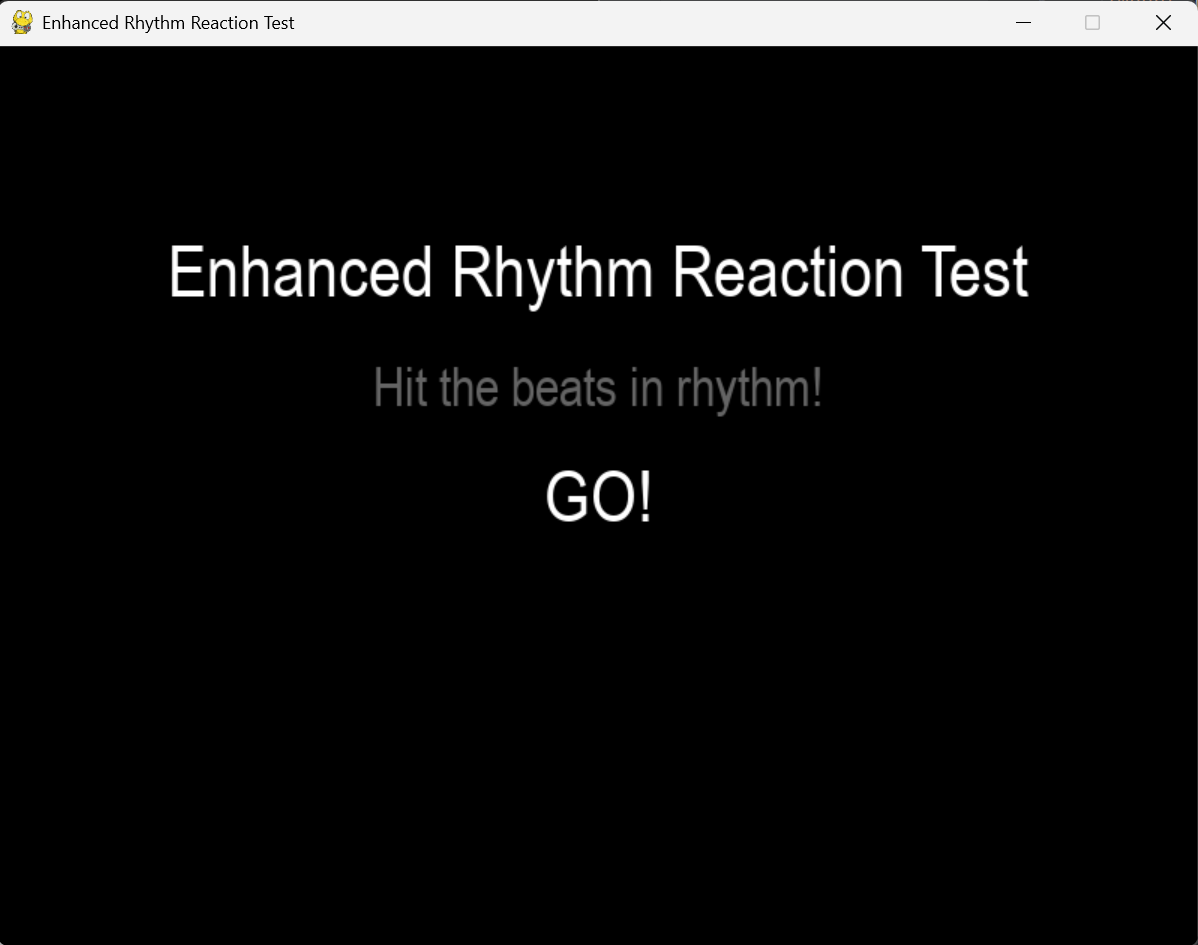
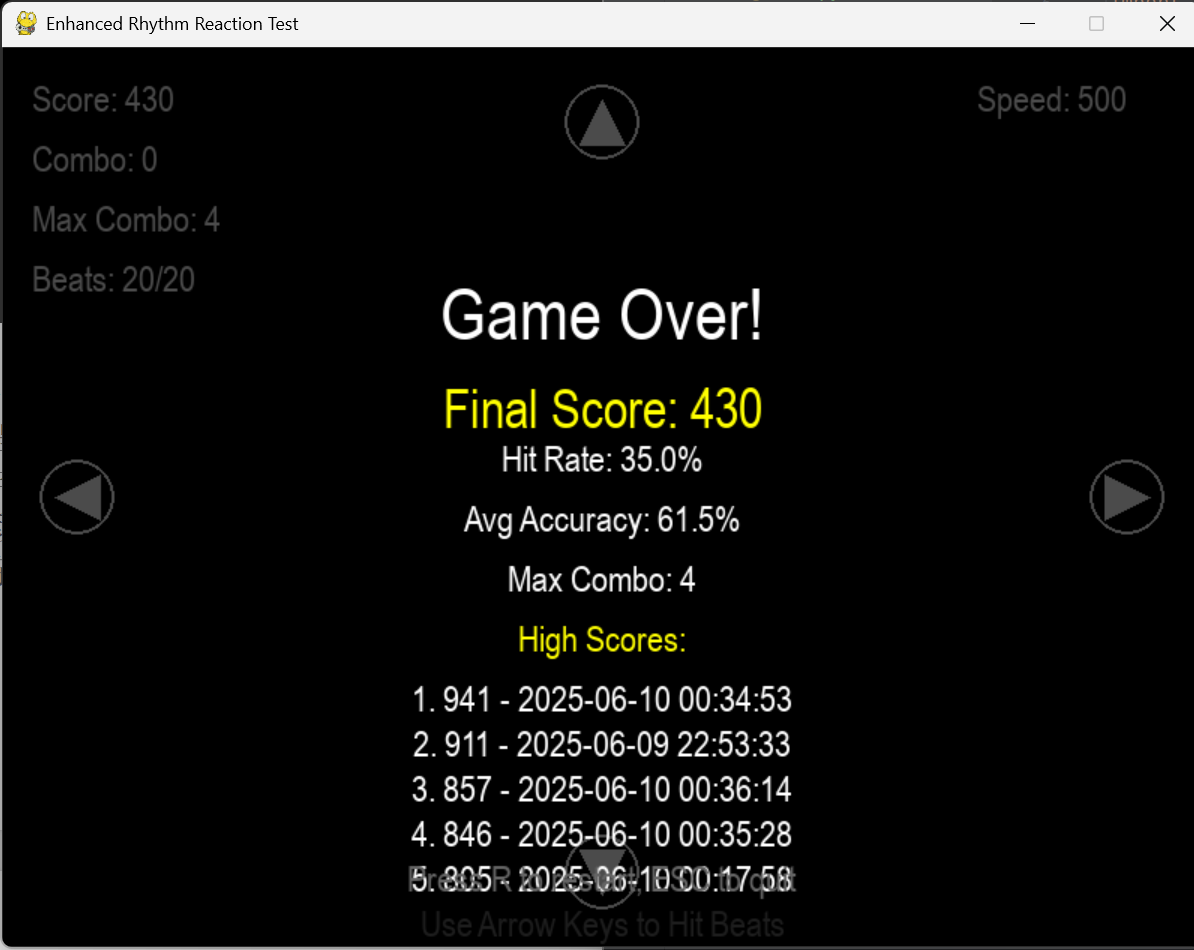
运行结果:
3.实验过程中遇到的问题和解决过程
问题1:游戏中图形页面创建复杂。
问题1解决方案:下载pygame,一个用于开发游戏和多媒体应用程序的 Python 库。它提供了丰富的功能,用于处理图形、音频、事件处理和游戏循环等。大大减小了代码复杂度。
问题2:不同尺寸数据的传递导致程序出现错误。
问题2解决方案:在调用下一个函数之前进行取整操作。
问题3:游戏精度过高导致可操作性不强。
问题3解决办法:调整节拍大小,目标区域,或者速度大小。
4.其他
游戏的核心是玩家的体验。如果游戏难度设计不合理,或者玩家在游戏过程中感到困惑、挫败或无聊,那么游戏的趣味性和教育意义都会大打折扣,。从用户角度出发逐步改进,才能使游戏更有温度。从一个相对基础的创意构建起基础代码,在其基础上,不断生发新的想法,再上网搜索如何进行代码实践,不断在原有代码中增加代码段获得新的功能,进行完善和优化。
通过本学期的Python程序设计课程学习,我掌握了Python编程的基础知识和应用技能。课程从最基础的变量、数据类型讲起,逐步深入到函数、文件操作等等。在实践环节中,我熟练运用了基本语法、判定语句、循环语句、逻辑运算及创建服务端和客户端等。这些实践不仅巩固了理论知识,也提升了解决实际问题的能力。特别是在调试程序的过程中,我学会了如何分析错误信息,逐步排查问题。我认识到Python语言的简洁性和强大功能,这为我后续的专业学习打下了基础。虽然课程即将结束,但我将继续深入学习Python在其他方面的更多应用。
5.参考资料
《Python程序设计与数据结构教程(第二版)》
《Python程序设计与数据结构教程(第二版)》学习指导
《python Pygame库介绍和使用,基本游戏开发》
《Python 字典》
《【python基础】类与类的实例化对象、类方法与类的属性、类实例化的方法与属性、初始化函数、类的继承与重写、@property、私有属性与方法》
《python 控制帧率》
《python如何绘制图形文字》
《python 如何创建窗口》等

 浙公网安备 33010602011771号