
参考:【小黑盒】强迫症狂喜!用AI把乱成狗的浏览器书签整理得像艺术品(附工具)
Qwen3修订代码
01 使用方法
1.1 导出当前书签
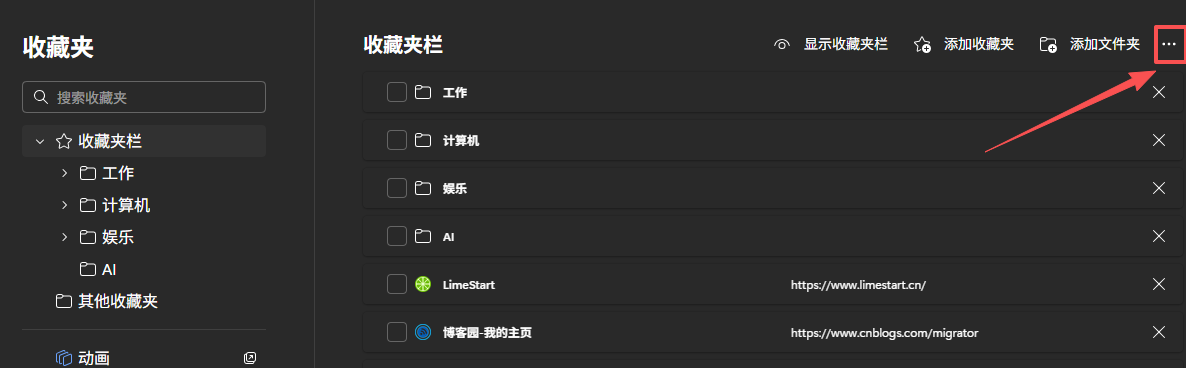
打开edge,在url栏输入
edge://favorites/
进入收藏夹界面,右上角点击"···",选择“导出收藏夹”,生成html
1.2 删除图片缩减token大小
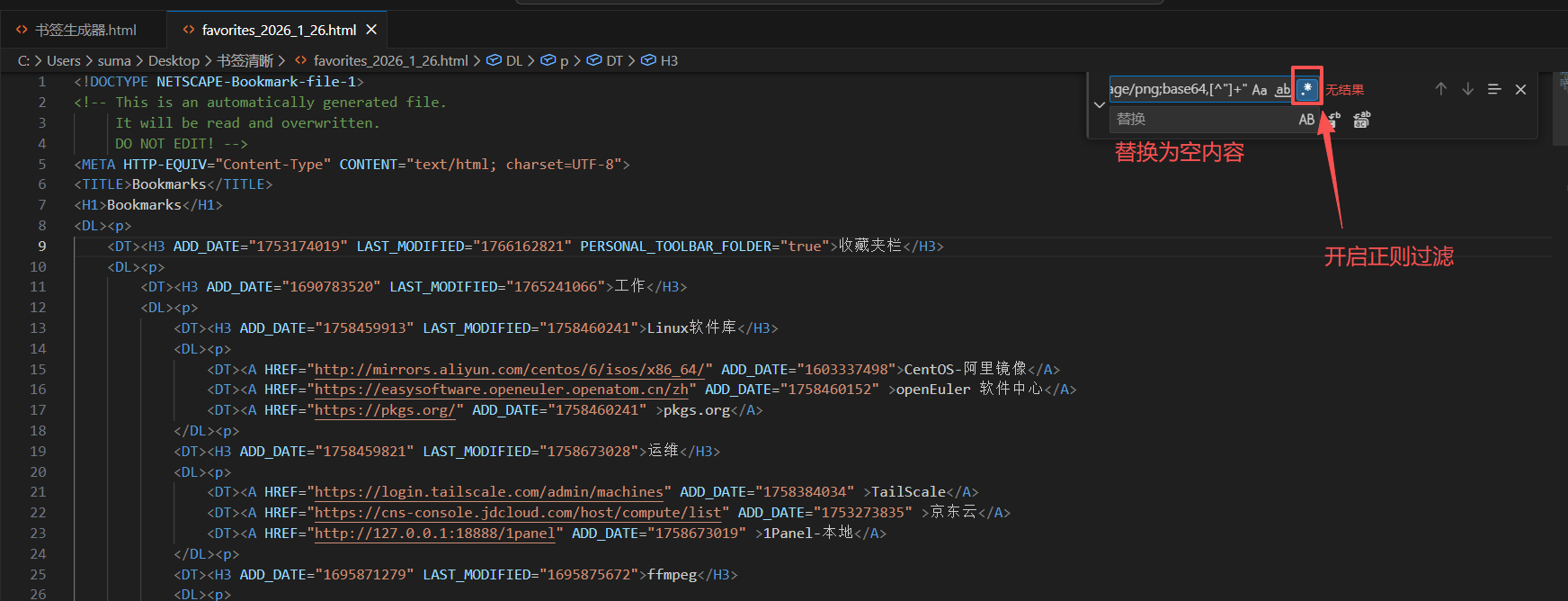
将html用vscode打开(或者其他支持正则的编辑器),使用Ctrl+H替换。
vscode开启正则替换(Alt+R),使用以下规则
ICON="data:image/png;base64,[^"]+"
将内容替换为空,删除图片内容,避免数据过大
1.3 AI重新整理内容
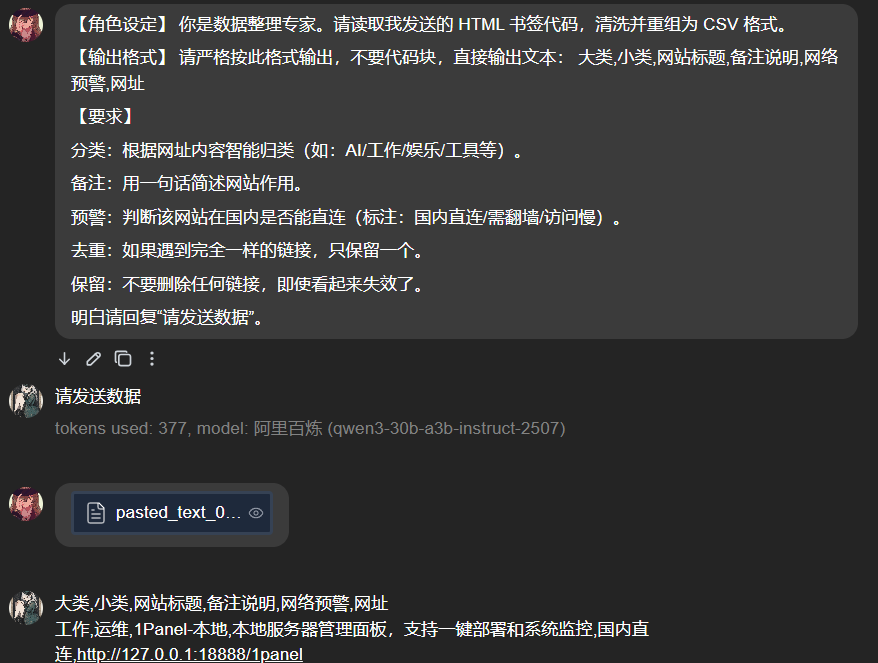
向AI输入提示词:
【角色设定】 你是数据整理专家。请读取我发送的 HTML 书签代码,清洗并重组为 CSV 格式。

【输出格式】 请严格按此格式输出,不要代码块,直接输出文本: 大类,小类,网站标题,备注说明,网络预警,网址

【要求】

分类:根据网址内容智能归类(如:AI/工作/娱乐/工具等)。

备注:用一句话简述网站作用。

预警:判断该网站在国内是否能直连(标注:国内直连/需FQ/访问慢)。

去重:如果遇到完全一样的链接,只保留一个。

保留:不要删除任何链接,即使看起来失效了。

明白请回复“请发送数据”。
然后发送自己清洗后的数据,复制AI返回的内容
1.4 使用书签生成器重新生成
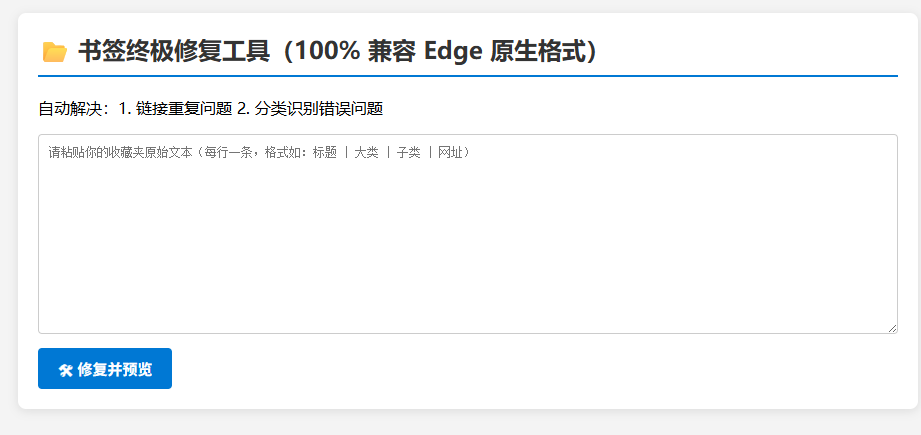
创建一个新文件“edge书签生成器.html”,使用编辑器打开,将2.0的代码[点击跳转到书签生成器](# 02 书签生成器) 的代码内容复制进去,保存。
然后使用edge或者其他浏览器打开这个html网页
1.5 导入新的书签
edge进入导入收藏栏url
edge://settings/profiles/importBrowsingData
选择“其他导入位置” ,导入位置选择 “收藏夹或书签HTML文件”,然后“选择文件”选择刚才保存的html。
即可获得新的收藏栏。
02 书签生成器
<!DOCTYPE html>
<html lang="zh">
<head>
<meta charset="UTF-8" />
<meta name="viewport" content="width=device-width, initial-scale=1.0"/>
<title>书签终极修复工具(100% 兼容 Edge 原生格式)</title>
<style>
body {
font-family: "Microsoft YaHei", sans-serif;
max-width: 900px;
margin: 20px auto;
padding: 0 20px;
background-color: #f4f4f4;
}
.container {
background: white;
padding: 20px;
border-radius: 8px;
box-shadow: 0 2px 10px rgba(0,0,0,0.1);
}
h2 {
color: #333;
border-bottom: 2px solid #0078d4;
padding-bottom: 10px;
margin-top: 0;
}
textarea {
width: 100%;
height: 200px;
padding: 10px;
border: 1px solid #ccc;
border-radius: 4px;
font-family: monospace;
font-size: 12px;
margin-bottom: 10px;
box-sizing: border-box;
}
.btn {
background-color: #0078d4;
color: white;
padding: 10px 20px;
border: none;
border-radius: 4px;
cursor: pointer;
font-size: 15px;
font-weight: bold;
margin-right: 10px;
}
.btn:hover {
background-color: #0063b1;
}
.btn-green {
background-color: #107c10;
}
.stats {
background: #e6f4ff;
border-left: 5px solid #0078d4;
padding: 10px;
margin: 15px 0;
font-size: 14px;
display: none;
}
.preview-box {
border: 1px solid #eee;
height: 300px;
overflow-y: auto;
background: #fff;
padding: 10px;
}
.folder {
font-weight: bold;
color: #d83b01;
margin-top: 5px;
background: #fff4ce;
padding: 2px 5px;
display: inline-block;
border-radius: 3px;
}
.sub-folder {
font-weight: bold;
color: #0078d4;
margin-left: 20px;
margin-top: 2px;
}
.bookmark {
margin-left: 40px;
color: #333;
font-size: 13px;
border-bottom: 1px dashed #eee;
padding: 3px 0;
}
.bookmark b {
color: #000;
}
</style>
</head>
<body>
<div class="container">
<h2>📂 书签终极修复工具(100% 兼容 Edge 原生格式)</h2>
<p>自动解决:1. 链接重复问题 2. 分类识别错误问题</p>
<!-- 输入框 -->
<textarea id="inputData" placeholder="请粘贴你的收藏夹原始文本(每行一条,格式如:标题 | 大类 | 子类 | 网址)"></textarea>
<!-- 按钮区域 -->
<div>
<button id="processBtn" class="btn">🛠 修复并预览</button>
<button id="dlBtn" class="btn btn-green" style="display:none;">💾 下载修复后的收藏夹</button>
</div>
<!-- 统计信息 -->
<div id="statsPanel" class="stats"></div>
<!-- 预览区域 -->
<div id="previewPanel" class="preview-box" style="display:none;"></div>
</div>
<script>
let finalHtml = "";
/**
* 安全转义 HTML 特殊字符
*/
function escapeHtml(text) {
if (!text) return "";
return text
.replace(/&/g, "&")
.replace(/</g, "<")
.replace(/>/g, ">")
.replace(/"/g, """);
}
/**
* 主处理函数:解析输入,去重、智能分词、分类,生成与原生一致的 Edge 格式
*/
function processData() {
const raw = document.getElementById('inputData').value;
const lines = raw.split('\n');
const urlSet = new Set();
const categoryMap = {};
let count = 0;
let dupCount = 0;
// 临时时间戳(模拟当前时间)
const nowTimestamp = Math.floor(Date.now() / 1000);
lines.forEach(line => {
line = line.trim();
if (!line || line.startsWith("大类,")) return;
const urlMatch = line.match(/(https?:\/\/[^\s\|,<>"']+)/);
if (!urlMatch) return;
const url = urlMatch[0];
if (urlSet.has(url)) {
dupCount++;
return;
}
urlSet.add(url);
let metaPart = line.replace(url, "").replace(/\|/g, " ").trim();
let parts = metaPart
.split(/,|,|\s+/)
.filter(s => s && !['国内直连', '需FQ', '访问慢'].includes(s));
let warning = "";
if (line.includes("需FQ")) warning = "需FQ";
else if (line.includes("访问慢")) warning = "访问慢";
else if (line.includes("国内直连")) warning = "国内直连";
let cat = "未分类", sub = "其他", title = "未知标题", note = "";
if (parts.length >= 3) {
cat = parts[0];
sub = parts[1];
title = parts[2];
if (parts.length > 3) note = parts.slice(3).join(" ");
} else if (parts.length === 2) {
cat = parts[0];
title = parts[1];
} else if (parts.length === 1) {
title = parts[0];
}
if (title === cat) title = "未命名";
let displayTitle = title;
if (warning) displayTitle += ` [${warning}]`;
if (note) displayTitle += ` - ${note}`;
if (displayTitle.length > 150) {
displayTitle = displayTitle.substring(0, 147) + "...";
}
if (!categoryMap[cat]) categoryMap[cat] = {};
if (!categoryMap[cat][sub]) categoryMap[cat][sub] = [];
categoryMap[cat][sub].push({ t: displayTitle, u: url });
count++;
});
// ✅ 生成 100% 兼容原生结构的 Edge 格式
let htmlContent = `<!DOCTYPE NETSCAPE-Bookmark-file-1>
<!-- This is an automatically generated file.
It will be read and overwritten.
DO NOT EDIT! -->
<META HTTP-EQUIV="Content-Type" CONTENT="text/html; charset=UTF-8">
<TITLE>Bookmarks</TITLE>
<H1>Bookmarks</H1>
<DL><p>
`;
// 递归构建树状结构(严格匹配原始格式)
function buildTree(catName, subs, parentDate = nowTimestamp) {
const catEscaped = escapeHtml(catName);
const addDate = Math.floor(Date.now() / 1000); // 每个节点独立时间戳
const lastModified = addDate;
// 大类 H3
htmlContent += ` <DT><H3 ADD_DATE="${addDate}" LAST_MODIFIED="${lastModified}">${catEscaped}</H3>\n`;
htmlContent += ` <DL><p>\n`;
for (const [subName, items] of Object.entries(subs)) {
const subEscaped = escapeHtml(subName);
const subAddDate = Math.floor(Date.now() / 1000);
const subLastModified = subAddDate;
htmlContent += ` <DT><H3 ADD_DATE="${subAddDate}" LAST_MODIFIED="${subLastModified}">${subEscaped}</H3>\n`;
htmlContent += ` <DL><p>\n`;
items.forEach(item => {
const titleEscaped = escapeHtml(item.t);
const urlEscaped = escapeHtml(item.u);
const itemAddDate = Math.floor(Date.now() / 1000);
const itemLastModified = itemAddDate;
htmlContent += ` <DT><A HREF="${urlEscaped}" ADD_DATE="${itemAddDate}" LAST_MODIFIED="${itemLastModified}">${titleEscaped}</A>\n`;
});
htmlContent += ` </DL><p>\n`;
}
htmlContent += ` </DL><p>\n`;
}
// 开始构建
for (const [cat, subs] of Object.entries(categoryMap)) {
buildTree(cat, subs);
}
htmlContent += `</DL><p>`;
finalHtml = htmlContent;
// 更新界面
const stats = document.getElementById('statsPanel');
stats.style.display = 'block';
stats.innerHTML = `✅ 处理完成!共提取有效链接:${count} 条,自动去除重复:${dupCount} 条。已生成与原生 Edge 完全兼容的书签文件。`;
const previewPanel = document.getElementById('previewPanel');
previewPanel.style.display = 'block';
let previewHtml = "";
for (const [cat, subs] of Object.entries(categoryMap)) {
previewHtml += `
📂 ${escapeHtml(cat)}
`;
for (const [sub, items] of Object.entries(subs)) {
previewHtml += `
└ 📂 ${escapeHtml(sub)}
`;
items.forEach(item => {
const titleText = item.t.split('[')[0];
const warningTag = item.t.substring(item.t.indexOf('['));
previewHtml += `
⭐ ${escapeHtml(titleText)} ${escapeHtml(warningTag)}
`;
});
}
}
previewPanel.innerHTML = previewHtml;
document.getElementById('dlBtn').style.display = 'inline-block';
}
/**
* 下载文件
*/
function downloadData() {
const blob = new Blob([finalHtml], { type: 'text/html' });
const link = document.createElement('a');
link.href = URL.createObjectURL(blob);
link.download = "生成收藏夹.html";
link.click();
}
// 事件绑定
document.addEventListener('DOMContentLoaded', () => {
document.getElementById('processBtn').addEventListener('click', processData);
document.getElementById('dlBtn').addEventListener('click', downloadData);
});
</script>
</body>
</html>

 浙公网安备 33010602011771号