
WPF Prism BindableBase(MVVM)
- View负责前端展示,与ViewModel进行数据和命令的交互。
- ViewModel,负责前端视图业务级别的逻辑结构组织,并将其反馈给前端。
- Model,主要负责数据实体的结构处理,与ViewModel进行交互。
命令创建方式
方式一:
public DelegateCommand GetTextCommnd { get; set; }
public MainWindowViewModel()
{
    this.GetTextCommnd = new DelegateCommand(new Action(ExecuteGetTextCommnd));
}
void ExecuteGetTextCommnd()
{
    System.Windows.MessageBox.Show(Obj.Text);
}
方式二:
public DelegateCommand<Button> LoginCommand
{
    get
    {
        return new DelegateCommand<Button>((p) =>
        {

        });
    }
}
方式三:
private DelegateCommand _getTextCommnd;
public DelegateCommand GetTextCommnd => _getTextCommnd ?? (_getTextCommnd = new DelegateCommand(ExecuteGetTextCommnd));

void ExecuteGetTextCommnd()
{
    System.Windows.MessageBox.Show(Obj.Text);
}
命令绑定方式
方式一:
<Button Height="100" Width="300" Content="赋值" FontSize="50" Command="{Binding SetTextCommnd}" Margin="10"/>
方式二:
<Button  Height="100" Width="300" Content="取值" FontSize="50">
    <i:Interaction.Triggers>
        <i:EventTrigger EventName="Click">
            <i:InvokeCommandAction Command="{Binding GetTextCommnd2}"/>
        </i:EventTrigger>
    </i:Interaction.Triggers>
</Button>
参数:
<!-- 无参方式 -->
<Button Content="Test Command" Command="{Binding TestCommand}" />
<!-- 将自己作为参数 -->
<Button Content="Test Command2" Command="{Binding TestCommand2}" CommandParameter="{Binding RelativeSource={x:Static RelativeSource.Self}}" >
<!-- 将父元素作为参数 -->
<Button Content="Test Command3" Command="{Binding TestCommand3}" CommandParameter="{Binding RelativeSource={x:Static RelativeSource.TemplatedParent}}" >
绑定元素
CommandParameter="Student"
CommandParameter="{Binding ElementName=lb, Path=SelectedIndex}"
绑定当前元素下的DataContext
CommandParameter="{Binding Path=.}"
绑定自身
CommandParameter="{Binding RelativeSource={x:Static RelativeSource.Self}}"
绑定Window
CommandParameter="{Binding RelativeSource={RelativeSource AncestorType={x:Type Window}}}"
绑定ListBoxItem
CommandParameter="{Binding Content, RelativeSource ={RelativeSource AncestorType={x:Type ListBoxItem}}}"
绑定TextBox ScrollViewer
CommandParameter="{Binding RelativeSource={x:Static RelativeSource.TemplatedParent}}"
绑定TreeView
CommandParameter="{Binding RelativeSource={RelativeSource AncestorType={x:Type TreeView}}, Path=SelectedValue}"
WPF ListBoxItem 使用Command命令
https://www.cnblogs.com/xcong/archive/2013/11/17/3428595.html
项目结构:
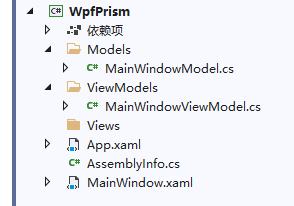
Model 类
using Prism.Mvvm;

namespace WpfPrism.Models
{
    public class MainWindowModel : BindableBase
    {
        private string _text;
        public string Text
        {
            get { return _text; }
            set { SetProperty(ref _text, value); }
        }
    }
}
ViewModel 类
using System;
using Prism.Commands;
using Prism.Mvvm;
using WpfPrism.Models;

namespace WpfPrism.ViewModels
{
    public class MainWindowViewModel : BindableBase
    {
        public MainWindowViewModel()
        {
            Obj = new MainWindowModel();
            Obj.Text = "默认值";
        }
        public MainWindowModel Obj { set; get; }

        private DelegateCommand _setTextCommnd;
        public DelegateCommand SetTextCommnd =>
            _setTextCommnd ?? (_setTextCommnd = new DelegateCommand(ExecuteSetTextCommnd));

        void ExecuteSetTextCommnd()
        {
            Obj.Text = "已赋新值";
        }

        private DelegateCommand _getTextCommnd;
        public DelegateCommand GetTextCommnd =>
            _getTextCommnd ?? (_getTextCommnd = new DelegateCommand(ExecuteGetTextCommnd));

        void ExecuteGetTextCommnd()
        {
            System.Windows.MessageBox.Show(Obj.Text);
        }
    }
}
前端 XAML
依赖项引用:System.Windows.Interactivity.WPF
<ResourceDictionary xmlns:i="http://schemas.microsoft.com/expression/2010/interactivity">
ListBox 绑定命令
<Button Content="邀请" Height="28">
    <i:Interaction.Triggers>
        <i:EventTrigger EventName="Click">
            <i:InvokeCommandAction Command="{Binding Path=DataContext.CommandSendPK,RelativeSource={RelativeSource Mode=FindAncestor,AncestorType=ListBox}}" CommandParameter="{}" />
        </i:EventTrigger>
    </i:Interaction.Triggers>
</Button>
Button绑定命令
<Grid>
    <StackPanel>
        <TextBox Text="{Binding Obj.Text}" Margin="10" Height="100" FontSize="50"/>
        <Button  Height="100" Width="300" Content="赋值" FontSize="50" Command="{Binding SetTextCommnd}" Margin="10"/>
        <Button  Height="100" Width="300" Content="取值" FontSize="50" Command="{Binding GetTextCommnd}"/>
    </StackPanel>
</Grid>
后台 CS
public MainWindow()
{
    InitializeComponent();
    DataContext = new MainWindowViewModel();
}
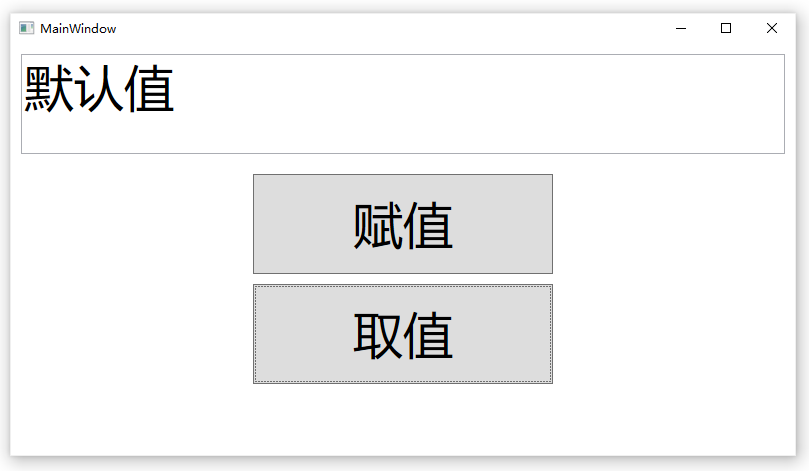
示例下载:WpfPrism

 浙公网安备 33010602011771号